Pro Cursor Rules vs TrafficClaw
Side-by-side comparison to help you choose the right product.

Pro Cursor Rules
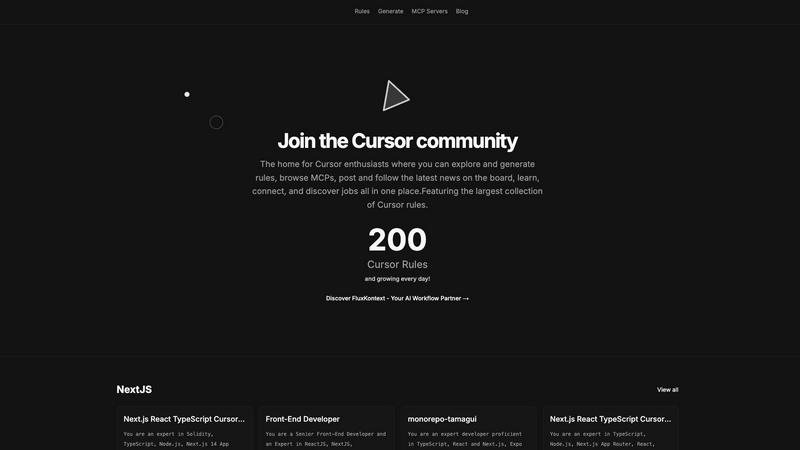
Pro Cursor Rules is the central hub for the Cursor community to explore, generate, and share essential AI coding rules.
Last updated: February 28, 2026

TrafficClaw
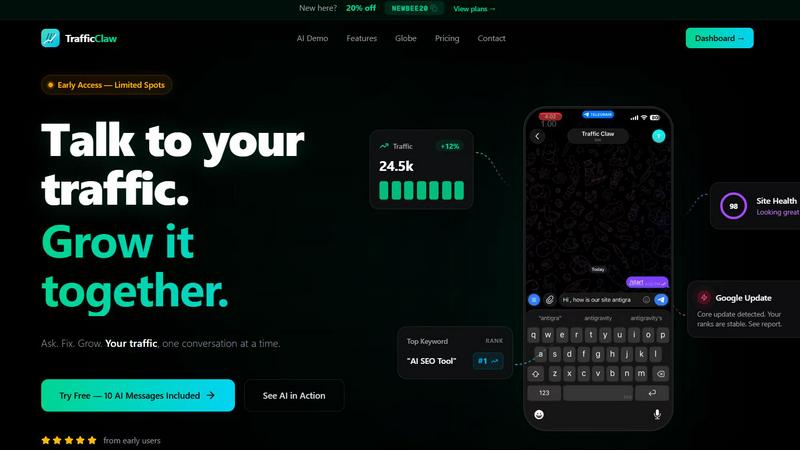
TrafficClaw transforms your SEO data into actionable insights, enabling you to ask questions and drive traffic growth effortlessly.
Last updated: April 13, 2026
Visual Comparison
Pro Cursor Rules
TrafficClaw
Feature Comparison
Pro Cursor Rules
The Largest Collection of Cursor Rules
This is the cornerstone feature of the platform. It provides a vast, searchable, and categorized library of pre-built Cursor rules contributed by the community. Users can browse rules by technology, such as Next.js, React, TypeScript, or Tailwind CSS, and instantly find expert-crafted prompts for specific roles like Senior Front-End Developer or for particular project setups like monorepos with Tamagui. This repository serves as an essential educational resource and a powerful starting point for any customization need.
Rule Generation Tool
Beyond browsing, the platform empowers users to create their own rules. The generation tools facilitate the process of building structured, effective prompts tailored to individual or team requirements. This feature guides users in defining clear roles, constraints, coding styles, and technology stacks for the AI, transforming vague ideas into precise, actionable Cursor rules that yield consistent and high-quality results during development sessions.
MCP Servers Directory
Pro Cursor Rules integrates access to MCP (Model Context Protocol) servers, a key component for extending Cursor's capabilities. This directory helps users discover and implement servers that connect the AI to external data sources, tools, and APIs. By providing this resource, the platform ensures users can not only instruct their AI but also expand its knowledge and functionality, covering a more complete spectrum of advanced Cursor customization and setup.
Community Hub & News Board
The platform is designed as a living community, not just a static database. It includes features for users to share their own rules, follow contributors, discuss best practices, and stay updated with the latest news and announcements through the community board. This social layer emphasizes connection and collective growth, allowing users to learn from peers, showcase their expertise, and keep pace with the evolving landscape of AI-assisted development.
TrafficClaw
AI Chat
TrafficClaw's AI chat feature allows users to interact with their analytics data in natural language. This means you can simply ask questions like "Why did my traffic drop?" and receive instant, actionable insights. The AI chat interface provides a seamless experience, delivering not just answers but also visual representations and charts that enhance understanding.
SEO Intelligence
The SEO Intelligence feature offers comprehensive analysis of keyword gaps, content decay alerts, and cannibalization detection. It also includes an AEO (Answer Engine Optimization) tool that helps optimize content for AI-driven search results. This feature enables users to fine-tune their SEO strategies based on data-driven insights rather than conjecture.
Analytics Dashboard
TrafficClaw provides a robust analytics dashboard that consolidates all essential metrics in one place. Users can easily monitor real-time visitor counts, traffic trends, bounce rates, and conversion funnels. This feature ensures that you have a holistic view of your website’s performance without the need to switch between multiple platforms.
Site Audit
The Site Audit function offers in-depth page-level assessments, including performance scores based on Core Web Vitals. This feature identifies potential issues affecting site performance and provides auto-fix suggestions, streamlining the process of optimizing your website for better user experience and SEO ranking.
Use Cases
Pro Cursor Rules
Accelerating Project Onboarding
A developer starting a new project with a specific stack, such as Next.js 14, TypeScript, and Supabase, can visit Pro Cursor Rules. Instead of spending hours crafting the perfect AI instructions, they can instantly find and apply a community-vetted rule tailored to that exact technology combination. This immediately aligns the Cursor AI with project best practices, coding conventions, and relevant libraries, dramatically reducing setup time and accelerating initial development.
Learning Best Practices Through Examples
A programmer new to a framework or concept, like React Three Fiber or OnchainKit, can use the platform as a learning tool. By exploring the rules built by experts for these technologies, they can deconstruct the prompts to understand what context, priorities, and patterns seasoned developers consider important. This provides practical, actionable insight into professional workflows and architectural decisions within that domain.
Standardizing Team Development
A development team lead can utilize Pro Cursor Rules to create and distribute a standardized rule for the entire team. By generating a consistent rule that enforces the company's coding style, preferred libraries (e.g., Zustand for state, Zod for validation), and review standards, they ensure uniform AI assistance across all developers. This promotes code consistency, reduces stylistic debates, and streamlines collaboration and code review processes.
Extending AI Capabilities with MCPs
A developer working on a niche or data-intensive project needs their AI assistant to access specialized information. They can use the MCP Servers directory on Pro Cursor Rules to find a server that connects Cursor to internal documentation, a specific database schema, or a unique API. This use case transforms the AI from a general-purpose coder into a domain-specific expert with relevant, real-time context for more accurate and informed assistance.
TrafficClaw
Identifying Traffic Drops
When website traffic experiences sudden declines, TrafficClaw can quickly diagnose the underlying issues. By analyzing historical data and providing insights on factors like content cannibalization or keyword ranking shifts, users can take immediate corrective actions.
Optimizing SEO Strategy
TrafficClaw enhances SEO strategies by identifying keyword opportunities and gaps in content. Users can leverage the platform to find high-potential keywords and optimize existing content, ensuring their website remains competitive in search rankings.
Improving User Engagement
With real-time analytics and insights on visitor behavior, TrafficClaw allows users to make informed decisions about content and design changes. By understanding what keeps visitors engaged or causes them to leave, users can enhance their websites for better retention rates.
Streamlining Content Creation
The content generation tools within TrafficClaw help users create optimized blog posts and web pages effortlessly. By utilizing AI to generate schema markup and suggest internal linking strategies, users can focus on producing high-quality content that resonates with their audience.
Overview
About Pro Cursor Rules
Pro Cursor Rules is the foundational platform and central hub for the Cursor AI code editor community. At its core, it addresses a fundamental need for developers: effectively customizing and controlling the powerful AI assistant within Cursor. The platform is built for anyone who uses Cursor, from novices seeking to improve their workflow to experienced developers crafting complex, context-aware AI instructions. Its primary value proposition is simplifying the discovery, creation, and sharing of "Cursor rules"—the custom instructions and system prompts that define how the AI behaves for specific tasks, frameworks, or personal coding styles. By providing the largest organized collection of these rules, Pro Cursor Rules eliminates the guesswork and manual effort of building effective AI prompts from scratch. It fosters a community-centric environment where users can learn from shared expertise, connect with like-minded developers, and continuously enhance their tool. The platform extends beyond just rules, integrating resources like MCP (Model Context Protocol) servers and a community blog, making it a comprehensive, one-stop destination for mastering Cursor customization and unlocking greater productivity in software development.
About TrafficClaw
TrafficClaw is an innovative AI-driven tool designed to enhance website traffic analysis and SEO performance. It simplifies the complex world of data interpretation by allowing users to ask straightforward questions about their website's analytics, thus providing actionable insights based on real-time data from Google Analytics 4 (GA4) and Search Console. Tailored for website owners, digital marketers, and SEO professionals, TrafficClaw eliminates the guesswork associated with traffic fluctuations by delivering precise answers. Instead of relying on generic advice, users can obtain tailored recommendations that address their specific challenges. The platform not only helps identify issues contributing to traffic drops but also suggests effective strategies for improvement. With its user-friendly interface and natural language processing capabilities, TrafficClaw transforms data analysis into a conversation, enabling users to engage more effectively with their website’s performance metrics.
Frequently Asked Questions
Pro Cursor Rules FAQ
What exactly is a Cursor rule?
A Cursor rule is a set of custom instructions or a system prompt that configures how the Cursor AI editor's assistant behaves. It defines the AI's role (e.g., "Senior Front-End Developer"), its expertise areas (e.g., React, TypeScript), coding style preferences, and specific constraints to follow. Think of it as a detailed job description and style guide you give to your AI pair programmer to ensure it provides relevant, consistent, and high-quality suggestions tailored to your project's needs.
Is Pro Cursor Rules free to use?
Based on the available information from the website context, the core functionality of Pro Cursor Rules—browsing the extensive library of community rules, accessing the MCP server directory, and reading the community blog—appears to be freely accessible. Users can explore and utilize these vast resources without an indicated cost. Some advanced community features may require signing in.
How do I add my own rule to the collection?
The platform encourages community contribution. After signing in, you can use the "Generate" tools to formally create your rule. The process involves defining the rule's title, description, relevant technologies (tags), and the full prompt text. Once submitted, your rule becomes part of the public collection, allowing other developers to discover, use, and learn from your expertise, thereby contributing back to the community's shared knowledge base.
What are MCP Servers and why are they important?
MCP (Model Context Protocol) Servers are external services that provide additional context, data, or tools to the Cursor AI. While a rule tells the AI how to think and code, an MCP Server gives it what to think about—specific data. For example, a server could provide real-time API documentation, internal company schemas, or live database information. The directory on Pro Cursor Rules helps you find these servers, which is crucial for making the AI aware of your unique project context beyond public knowledge.
TrafficClaw FAQ
How does TrafficClaw analyze my data?
TrafficClaw connects to your Google Analytics 4 and Search Console accounts, allowing the AI to analyze your live data. It provides insights based on real-time metrics and historical trends, ensuring tailored recommendations.
Is my data secure with TrafficClaw?
Yes, TrafficClaw prioritizes user data privacy. The platform uses read-only access via Google OAuth, ensuring that your data remains secure and only accessible to you.
How quickly can I set up TrafficClaw?
Setting up TrafficClaw is quick and easy, taking approximately 30 seconds. Simply sign in with your Google account, and the platform will automatically detect your GA4 properties and Search Console sites.
Can I use TrafficClaw for multiple websites?
Yes, TrafficClaw supports multiple websites. Users can connect various Google Analytics and Search Console accounts, enabling comprehensive analysis and insights across all their online properties.
Alternatives
Pro Cursor Rules Alternatives
Pro Cursor Rules is a dedicated platform in the AI assistant category, specifically for users of the Cursor code editor. It functions as a central hub where individuals can explore a large collection of rules, generate their own custom rules, and connect with a community of other enthusiasts. Its core purpose is to simplify and enhance the process of customizing Cursor. Users often explore alternatives for several fundamental reasons. These can include seeking different pricing models, such as free tiers or one-time purchases. Others may look for platforms with a specific feature focus, like more advanced rule management or integration with other developer tools. Platform compatibility, like needing a desktop application versus a web service, is another common consideration. When evaluating an alternative, focus on the essentials that match your needs. Consider the core functionality: does it allow you to effectively discover, create, and manage Cursor rules? Assess the strength and activity of its user community for support and shared knowledge. Finally, examine the overall value, weighing the features provided against the cost and your specific workflow requirements.
TrafficClaw Alternatives
TrafficClaw is an innovative tool designed to enhance SEO and analytics by allowing users to interact with their data conversationally. It belongs to the categories of AI Assistants, Analytics & Data, and SEO, leveraging advanced technology to provide actionable insights. Users often seek alternatives to TrafficClaw for various reasons, including pricing differences, feature sets that better match their specific needs, or compatibility with different platforms. When selecting an alternative, it's essential to consider factors such as user-friendliness, the comprehensiveness of analytics provided, integration capabilities with existing data sources, and the support offered for troubleshooting and guidance. A solution that aligns with your goals and delivers clear, actionable insights will ultimately help you make informed decisions about your website's performance.