Doodle Duel vs Pro Cursor Rules
Side-by-side comparison to help you choose the right product.

Doodle Duel
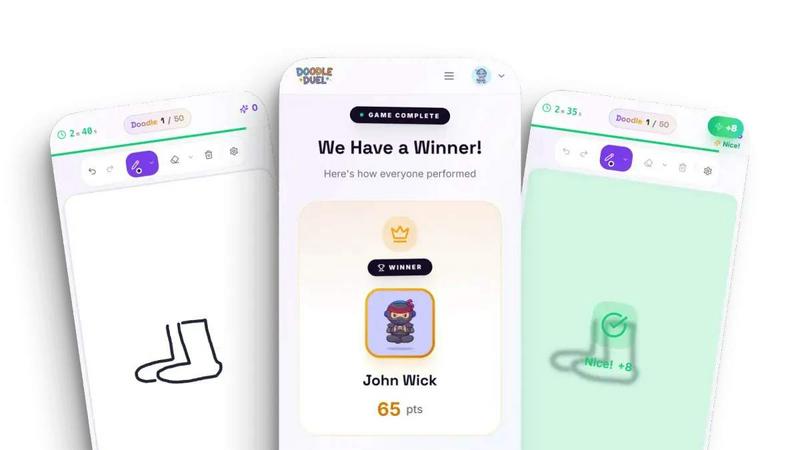
Doodle Duel is a free game where you draw against friends and an AI judges your sketches in real time.
Last updated: February 28, 2026

Pro Cursor Rules
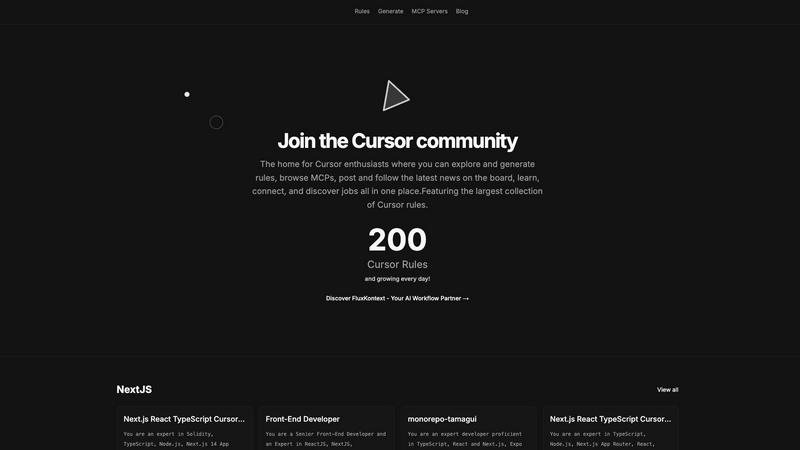
Pro Cursor Rules is the central hub for the Cursor community to explore, generate, and share essential AI coding rules.
Last updated: February 28, 2026
Visual Comparison
Doodle Duel
Pro Cursor Rules
Feature Comparison
Doodle Duel
Instant Play, No Friction
Doodle Duel is built for immediate engagement. There is no requirement to download software, create an account, or sign in with an email. You can begin playing within seconds by visiting the website. To start a game with friends, you simply create a room, receive a shareable code, and your friends can join by entering that code on their own devices. This eliminates all traditional barriers to starting a game, making spontaneous play sessions effortless and straightforward for everyone involved.
AI-Powered Judging System
The game's defining feature is its use of advanced AI models from Google Gemini or OpenAI to act as an impartial judge. After each drawing round, the AI analyzes every submission. It does not judge based on artistic perfection but evaluates specific, objective criteria: how accurately the drawing represents the given prompt, the creativity of the interpretation, and the style employed. This provides fair and consistent feedback for every player, ensuring the winner is determined by the AI's analysis rather than a subjective popularity vote among friends.
Flexible Game Modes
Doodle Duel offers two distinct ways to play, catering to different preferences. For social, chaotic fun, the Multiplayer Duel mode allows you to create rooms and compete with friends in real-time. For a personal challenge, the Solo Arcade mode presents 50 levels of increasing difficulty where you must beat score thresholds, manage a limited number of lives, and climb global leaderboards. This dual-structure ensures the game provides value whether you are alone or in a group.
Real-Time Synchronized Play
The multiplayer experience is designed for seamless, live interaction. When a round starts, all players in the room receive the same prompt simultaneously and work against the same 60-second timer. Everyone can see the countdown, creating a shared sense of urgency and excitement. Once time is up, all drawings are submitted and judged by the AI at once, with results displayed to the entire group in real time. This synchronization is fundamental to creating an engaging, party-game atmosphere where everyone participates together.
Pro Cursor Rules
The Largest Collection of Cursor Rules
This is the cornerstone feature of the platform. It provides a vast, searchable, and categorized library of pre-built Cursor rules contributed by the community. Users can browse rules by technology, such as Next.js, React, TypeScript, or Tailwind CSS, and instantly find expert-crafted prompts for specific roles like Senior Front-End Developer or for particular project setups like monorepos with Tamagui. This repository serves as an essential educational resource and a powerful starting point for any customization need.
Rule Generation Tool
Beyond browsing, the platform empowers users to create their own rules. The generation tools facilitate the process of building structured, effective prompts tailored to individual or team requirements. This feature guides users in defining clear roles, constraints, coding styles, and technology stacks for the AI, transforming vague ideas into precise, actionable Cursor rules that yield consistent and high-quality results during development sessions.
MCP Servers Directory
Pro Cursor Rules integrates access to MCP (Model Context Protocol) servers, a key component for extending Cursor's capabilities. This directory helps users discover and implement servers that connect the AI to external data sources, tools, and APIs. By providing this resource, the platform ensures users can not only instruct their AI but also expand its knowledge and functionality, covering a more complete spectrum of advanced Cursor customization and setup.
Community Hub & News Board
The platform is designed as a living community, not just a static database. It includes features for users to share their own rules, follow contributors, discuss best practices, and stay updated with the latest news and announcements through the community board. This social layer emphasizes connection and collective growth, allowing users to learn from peers, showcase their expertise, and keep pace with the evolving landscape of AI-assisted development.
Use Cases
Doodle Duel
Virtual Social Gatherings and Parties
Doodle Duel is an excellent activity for online parties or casual hangouts with friends and family who are geographically separated. By creating a room and sharing the code, you can quickly bring a group together for a session of lighthearted competition and shared laughter. The game's simplicity and the humor often found in the AI's feedback serve as a fantastic icebreaker and a source of collective entertainment, making virtual gatherings more interactive and memorable.
Classroom Engagement and Icebreakers
Educators can use Doodle Duel as a creative tool for classroom engagement, team-building, or as a fun break. The game encourages quick thinking, interpretation, and visual communication skills. A teacher can create a room, share the code with students, and use prompts related to lesson topics or general themes. It provides a non-intimidating way for students to participate, as artistic skill is not the primary focus, and the AI's objective judging removes social pressure.
Solo Creativity and Skill Practice
For individuals looking to practice drawing, spark creativity, or simply pass time in an entertaining way, the Solo Arcade mode is ideal. It provides a structured, challenging environment with specific prompts and score goals. Players can work through levels at their own pace, trying to improve their scores and climb the leaderboards. This use case turns Doodle Duel into a personal creativity gym, helping users hone their ability to conceptualize and sketch ideas quickly.
Corporate Team Building Events
Companies can utilize Doodle Duel during remote or in-person team-building sessions. The game promotes creative thinking, friendly competition, and collaboration in a low-stakes, fun environment. It requires no special skills from participants, ensuring everyone can join on an equal footing. The shared experience of drawing and reacting to the AI's often humorous critiques can help break down barriers, improve team morale, and foster a more connected and relaxed workplace culture.
Pro Cursor Rules
Accelerating Project Onboarding
A developer starting a new project with a specific stack, such as Next.js 14, TypeScript, and Supabase, can visit Pro Cursor Rules. Instead of spending hours crafting the perfect AI instructions, they can instantly find and apply a community-vetted rule tailored to that exact technology combination. This immediately aligns the Cursor AI with project best practices, coding conventions, and relevant libraries, dramatically reducing setup time and accelerating initial development.
Learning Best Practices Through Examples
A programmer new to a framework or concept, like React Three Fiber or OnchainKit, can use the platform as a learning tool. By exploring the rules built by experts for these technologies, they can deconstruct the prompts to understand what context, priorities, and patterns seasoned developers consider important. This provides practical, actionable insight into professional workflows and architectural decisions within that domain.
Standardizing Team Development
A development team lead can utilize Pro Cursor Rules to create and distribute a standardized rule for the entire team. By generating a consistent rule that enforces the company's coding style, preferred libraries (e.g., Zustand for state, Zod for validation), and review standards, they ensure uniform AI assistance across all developers. This promotes code consistency, reduces stylistic debates, and streamlines collaboration and code review processes.
Extending AI Capabilities with MCPs
A developer working on a niche or data-intensive project needs their AI assistant to access specialized information. They can use the MCP Servers directory on Pro Cursor Rules to find a server that connects Cursor to internal documentation, a specific database schema, or a unique API. This use case transforms the AI from a general-purpose coder into a domain-specific expert with relevant, real-time context for more accurate and informed assistance.
Overview
About Doodle Duel
Doodle Duel is a real-time online drawing game that combines creativity with friendly competition. At its core, the game is about translating ideas into sketches under time pressure and having those drawings evaluated by an impartial artificial intelligence judge. The process is straightforward: players receive a common prompt, have 60 seconds to draw their interpretation, and then an AI system powered by Google Gemini or OpenAI analyzes each submission. It scores the doodles based on objective criteria like accuracy to the prompt, creativity, and artistic style to declare a winner for each round. This fundamental gameplay loop removes the barrier of artistic skill, making the experience accessible and fun for both seasoned sketchers and complete beginners.
The game is designed for social play and instant accessibility. It requires no user accounts, downloads, or installations. To start, one player simply creates a virtual room, generating a unique code to share with friends. Up to four players can join for free, with a Pro upgrade allowing rooms of up to 30 participants. This makes Doodle Duel an ideal digital activity for parties, family gatherings, online hangouts, or classroom icebreakers. Beyond multiplayer, a Solo Arcade mode offers a single-player challenge with levels and leaderboards. The primary value proposition is clear: immediate, frictionless fun that sparks laughter and creativity through a unique blend of human imagination and AI-powered judgment, all directly in your web browser.
About Pro Cursor Rules
Pro Cursor Rules is the foundational platform and central hub for the Cursor AI code editor community. At its core, it addresses a fundamental need for developers: effectively customizing and controlling the powerful AI assistant within Cursor. The platform is built for anyone who uses Cursor, from novices seeking to improve their workflow to experienced developers crafting complex, context-aware AI instructions. Its primary value proposition is simplifying the discovery, creation, and sharing of "Cursor rules"—the custom instructions and system prompts that define how the AI behaves for specific tasks, frameworks, or personal coding styles. By providing the largest organized collection of these rules, Pro Cursor Rules eliminates the guesswork and manual effort of building effective AI prompts from scratch. It fosters a community-centric environment where users can learn from shared expertise, connect with like-minded developers, and continuously enhance their tool. The platform extends beyond just rules, integrating resources like MCP (Model Context Protocol) servers and a community blog, making it a comprehensive, one-stop destination for mastering Cursor customization and unlocking greater productivity in software development.
Frequently Asked Questions
Doodle Duel FAQ
Is Doodle Duel really free to play?
Yes, Doodle Duel is completely free to play in its basic form. You can enjoy the Solo Arcade mode and create multiplayer rooms for up to 4 players without any cost, account, or download. The game offers a "Pro" upgrade, which is an optional purchase that unlocks additional features like the ability to host rooms with up to 30 players and access to all difficulty levels, but the core game experience is freely available to everyone.
How does the AI judge the drawings?
The AI judge uses advanced models from providers like Google Gemini or OpenAI to analyze each drawing. It evaluates submissions based on several pre-defined criteria. The main factors are accuracy (how well the drawing matches the text prompt), creativity (the originality and uniqueness of the interpretation), and style (the artistic approach used). The AI combines these scores to determine a winner for each round, providing objective and consistent feedback.
What do I need to play Doodle Duel?
You need very little to play. First, you need a device with a modern web browser (like Chrome, Safari, or Edge) and an internet connection. Second, you need a way to draw; this can be a mouse, a touchpad, or a touchscreen/stylus if you are on a tablet or smartphone. No special software, apps, or accounts are required. Just visit the Doodle Duel website and you can start playing immediately.
Can I play Doodle Duel by myself?
Absolutely. Doodle Duel features a dedicated Solo Arcade mode designed for single-player enjoyment. In this mode, you progress through 50 levels of increasing difficulty, where you must meet or exceed score targets set by the AI judge. You have a limited number of lives to manage, and your performance is tracked on global leaderboards, providing a challenging and rewarding experience for solo players.
Pro Cursor Rules FAQ
What exactly is a Cursor rule?
A Cursor rule is a set of custom instructions or a system prompt that configures how the Cursor AI editor's assistant behaves. It defines the AI's role (e.g., "Senior Front-End Developer"), its expertise areas (e.g., React, TypeScript), coding style preferences, and specific constraints to follow. Think of it as a detailed job description and style guide you give to your AI pair programmer to ensure it provides relevant, consistent, and high-quality suggestions tailored to your project's needs.
Is Pro Cursor Rules free to use?
Based on the available information from the website context, the core functionality of Pro Cursor Rules—browsing the extensive library of community rules, accessing the MCP server directory, and reading the community blog—appears to be freely accessible. Users can explore and utilize these vast resources without an indicated cost. Some advanced community features may require signing in.
How do I add my own rule to the collection?
The platform encourages community contribution. After signing in, you can use the "Generate" tools to formally create your rule. The process involves defining the rule's title, description, relevant technologies (tags), and the full prompt text. Once submitted, your rule becomes part of the public collection, allowing other developers to discover, use, and learn from your expertise, thereby contributing back to the community's shared knowledge base.
What are MCP Servers and why are they important?
MCP (Model Context Protocol) Servers are external services that provide additional context, data, or tools to the Cursor AI. While a rule tells the AI how to think and code, an MCP Server gives it what to think about—specific data. For example, a server could provide real-time API documentation, internal company schemas, or live database information. The directory on Pro Cursor Rules helps you find these servers, which is crucial for making the AI aware of your unique project context beyond public knowledge.
Alternatives
Doodle Duel Alternatives
Doodle Duel is a real-time multiplayer drawing game that uses artificial intelligence to judge player creativity. It falls into the category of AI-assisted entertainment and social gaming, where technology enhances a traditional creative activity. This combination of art, competition, and AI analysis defines its unique position in the market. Users often explore alternatives for several practical reasons. They may seek different pricing models, such as a one-time purchase versus a subscription. Others might need compatibility with specific devices or operating systems not supported by their current choice. Feature preferences also drive the search, whether it's a desire for more drawing tools, different game modes, or alternative social sharing options. When evaluating an alternative, consider your primary needs. Focus on the core experience: the quality of the drawing tools, the fairness and engagement of the judging or scoring system, and the ease of playing with friends. Also assess the technical requirements, such as whether you need to download software or if it runs directly in a web browser. The ideal choice balances these functional aspects with your personal or group's entertainment goals.
Pro Cursor Rules Alternatives
Pro Cursor Rules is a dedicated platform in the AI assistant category, specifically for users of the Cursor code editor. It functions as a central hub where individuals can explore a large collection of rules, generate their own custom rules, and connect with a community of other enthusiasts. Its core purpose is to simplify and enhance the process of customizing Cursor. Users often explore alternatives for several fundamental reasons. These can include seeking different pricing models, such as free tiers or one-time purchases. Others may look for platforms with a specific feature focus, like more advanced rule management or integration with other developer tools. Platform compatibility, like needing a desktop application versus a web service, is another common consideration. When evaluating an alternative, focus on the essentials that match your needs. Consider the core functionality: does it allow you to effectively discover, create, and manage Cursor rules? Assess the strength and activity of its user community for support and shared knowledge. Finally, examine the overall value, weighing the features provided against the cost and your specific workflow requirements.