Print Chat vs Zignt
Side-by-side comparison to help you choose the right product.

Print Chat
Convert WhatsApp chats to professional PDFs offline, ensuring privacy and preserving essential details for any purpose.
Last updated: February 26, 2026

Zignt is a contract management tool that helps teams create, send, and sign legally binding agreements quickly.
Last updated: March 1, 2026
Visual Comparison
Print Chat
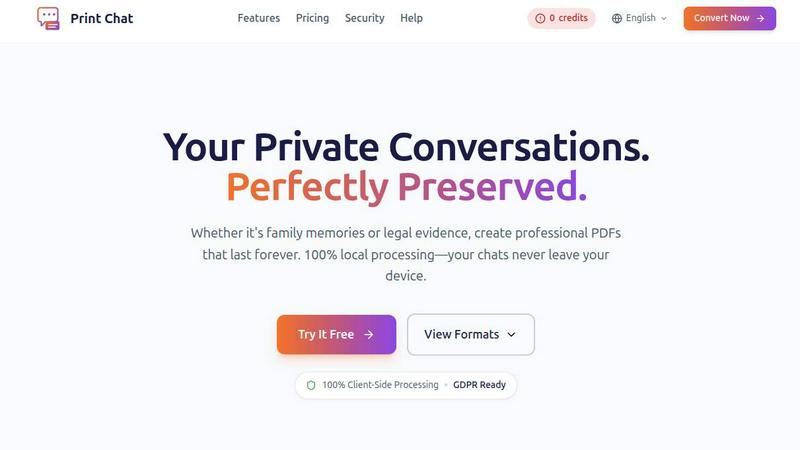
Zignt

Feature Comparison
Print Chat
100% Client-Side Processing
Print Chat operates entirely on your device, ensuring that no data is uploaded to external servers. This client-side processing offers unparalleled privacy and security for your sensitive conversations, making it a trustworthy choice for legal professionals.
Unlimited File Size
Whether you are processing a small chat history or a massive archive of messages, Print Chat can handle files up to 50GB without freezing or crashing. This feature allows users to compile extensive chat histories without worrying about technical limitations.
Legal & Evidence Ready
The tool preserves exact timestamps and sender information, formatting the output PDF to meet legal standards for admissibility in court. This feature is critical for attorneys and professionals who must submit accurate and reliable documentation for legal proceedings.
Voice & Video Embeds
Print Chat allows users to embed clickable voice messages and videos directly into the PDF. This feature ensures that the context of conversations is preserved, enabling users to access multimedia content seamlessly from the final document.
Zignt
Reusable Contract Templates
Create a contract template once and use it an unlimited number of times. You can drag and drop fields like signature blocks, dates, and text boxes onto your PDF to configure it perfectly. This foundational feature eliminates the need to rebuild the same document repeatedly, saving hours of work on every subsequent contract you send, ensuring consistency and reducing errors.
AI-Powered Renewal Management
Zignt's AI automatically scans your contracts to identify key dates like renewal and expiration milestones. It then provides smart reminders and a clear renewal dashboard, so you never miss a deadline. This proactive feature removes the burden of manual tracking, helping you stay organized and ahead of important contractual obligations without constant oversight.
Secure, Multi-Option Signing
Send contracts for signature via email with automated reminders or share a simple, secure link. Signers have multiple options, including typed or drawn signatures, and you can optionally require ID verification before signing. Once complete, all parties instantly receive the executed PDF with a full, automatic audit trail for legal protection.
Team Collaboration & Permissions
Invite unlimited team members to help prepare, send, and manage contracts. You can set specific permissions for each member, controlling who can view, edit, or send documents. This provides clear structure for growing teams, enhances accountability through activity tracking, and streamlines collaborative workflows securely.
Use Cases
Print Chat
Legal Documentation
Attorneys can use Print Chat to convert WhatsApp messages and other chat histories into formatted PDFs that are ready for court submissions. The tool's legal compliance features facilitate the preservation of critical case evidence.
Personal Archiving
Families can document cherished conversations and memories by converting chat histories into beautifully formatted PDFs. Print Chat allows users to keep their memories alive while ensuring privacy and security.
Workplace Investigations
HR professionals can utilize Print Chat to compile chat transcripts for workplace investigations. The clean formatting and pagination make it easy to reference specific messages during the resolution process.
Academic Research
Researchers can convert chat data into standardized PDFs for analysis or presentation. Print Chat supports diverse languages and formats, making it a versatile tool for academic professionals working with various communication mediums.
Zignt
Streamlining Sales Agreements
Sales teams can use pre-built templates for proposals, NDAs, and service agreements. They can send contracts directly from their workflow via a link or email, get them signed in minutes, and automatically file the executed copy. This accelerates deal cycles, improves the client experience, and keeps all records organized in one secure place.
Managing Vendor and Supplier Contracts
Operations and procurement departments can efficiently manage contracts with multiple vendors. They can track renewal dates automatically, collaborate internally on terms, and securely obtain signatures from external parties. This use case ensures timely renewals, reduces risk, and maintains a clear, centralized repository for all supplier agreements.
Onboarding New Employees and Freelancers
Human resources teams can automate the onboarding process by sending offer letters, confidentiality agreements, and policy documents digitally. New hires can sign from any device, and completed documents are instantly stored. This eliminates printing, mailing, and manual filing, creating a faster, more professional onboarding experience.
Handling Client Service Agreements
Service-based businesses, such as agencies or consultants, can quickly generate and send standardized project contracts or statements of work. The ability to reuse templates and track signing status in real-time ensures projects start faster with clear terms, reducing administrative delays and improving client communication.
Overview
About Print Chat
Print Chat is a revolutionary tool designed for professionals who need to convert chat conversations into legally compliant PDFs while ensuring utmost privacy. Built specifically for lawyers and professionals, it addresses a critical concern: the legality of uploading sensitive client conversations to third-party servers. With Print Chat, every conversion is processed locally in your browser using WebAssembly technology, meaning your data never leaves your device. This guarantees that your conversations remain private and secure, adhering to strict attorney-client privilege regulations. The main value proposition lies in its ability to create high-quality, court-ready documents that preserve the integrity of your conversations, making it ideal for legal work, personal archives, or any situation where confidentiality is paramount.
About Zignt
Zignt is a contract management platform designed to simplify the entire lifecycle of a contract, from creation to signing and renewal. It serves as a foundational tool for businesses of all sizes, particularly those seeking to replace slow, manual, and insecure paper-based processes with a streamlined digital solution. At its core, Zignt helps organizations create legally binding agreements quickly and manage them efficiently, saving significant time and reducing administrative overhead. The platform is built for teams, allowing for secure collaboration internally and with external clients. Its primary value proposition is delivering enterprise-grade security and legal compliance within an intuitive, fast interface, all without charging per-signature fees. This makes professional contract management accessible and predictable, enabling businesses to focus on their work rather than paperwork.
Frequently Asked Questions
Print Chat FAQ
Is Print Chat secure for processing sensitive conversations?
Yes, Print Chat processes everything locally on your device, ensuring that your conversations never leave your browser. This guarantees your data’s privacy and security.
Can I process large files with Print Chat?
Absolutely! Print Chat can handle files of any size, from small conversations to extensive chat histories of up to 50GB, without any freezing or crashes.
What types of formats can I export with Print Chat?
You can export your chats in two beautiful layouts: a clean, professional legal format with Bates stamping or an original chat bubble format that retains the look and feel of your messaging app.
Does Print Chat support multiple languages?
Yes, Print Chat is designed to support a wide range of languages and scripts, including emojis and RTL (right-to-left) languages, ensuring that everyone can use the tool effectively.
Zignt FAQ
Is a signature made with Zignt legally binding?
Yes, signatures obtained through Zignt are legally binding and court-admissible. The platform is compliant with major international laws including the E-SIGN Act in the US, UETA, and the eIDAS regulation in the EU. Every signed document includes a detailed audit trail with timestamps, IP addresses, and signer details to support its legal validity.
How does Zignt handle security and privacy?
Zignt employs bank-grade security measures. All documents are protected with 256-bit SSL/TLS encryption both in transit and at rest. The platform is GDPR compliant, adhering to strict data protection and privacy controls. It also follows international standards like SOC 2 and ISO 27001, ensuring enterprise-level security for all your contracts.
Are there any per-signature fees?
No, Zignt does not charge per-signature fees. Its pricing model is based on templates and features, not on the number of documents you send or signatures you collect. This allows for predictable budgeting and unlimited use, making it cost-effective for businesses that handle a high volume of contracts.
Can I use Zignt to collaborate with my team?
Absolutely. Zignt includes full team management features. You can invite unlimited team members, assign them specific roles and permissions, and track their activity. This allows for secure collaboration where multiple people can prepare, review, and send contracts while maintaining control over the process.
Alternatives
Print Chat Alternatives
Print Chat is an innovative tool designed to convert WhatsApp chats to PDF format instantly, catering specifically to the legal industry. By processing files entirely offline, it ensures that sensitive client conversations remain private and secure, a crucial consideration for legal professionals. Users often seek alternatives for a variety of reasons including pricing concerns, feature sets that may cater to specific needs, or compatibility with various platforms they may be using. When exploring alternatives, it is essential to assess the security measures in place, especially for sensitive data, as well as the features offered, such as Bates stamping and redaction tools. Additionally, consider the ease of use and whether the tool aligns with your professional requirements, ensuring it effectively meets your needs without compromising data integrity.
Zignt Alternatives
Zignt is a contract management tool that falls under the business intelligence category. It helps teams create, send, and sign contracts efficiently by using automated templates and real-time collaboration features. This type of software is essential for businesses that handle numerous agreements and need to maintain organization and security. Users often explore alternatives to a tool like Zignt for several common reasons. These can include budget constraints, the need for specific integrations with other platforms, or a requirement for different feature sets that better match their unique workflow. It is a normal part of the software selection process to compare options. When evaluating an alternative, focus on a few key areas. Consider the core features for template creation and electronic signing, the level of security offered, and the overall ease of use for your team. It is also wise to assess the pricing structure and customer support to ensure the tool is a sustainable long-term fit for your business needs.