AI Photo Generator vs poseup
Side-by-side comparison to help you choose the right product.

AI Photo Generator
Create stunning, photorealistic images from text or your own photos with this free and fast AI generator.
Last updated: March 11, 2026

poseup
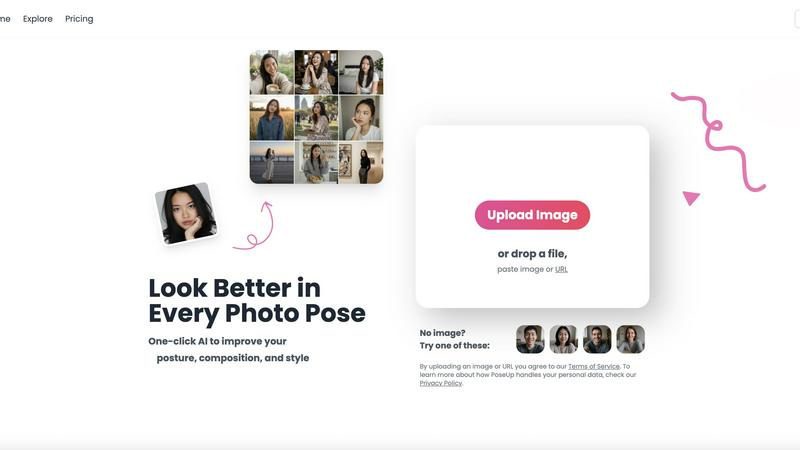
PoseUp uses AI to enhance your photos by improving posture and composition for effortlessly professional results.
Last updated: February 28, 2026
Visual Comparison
AI Photo Generator

poseup
Feature Comparison
AI Photo Generator
Text-to-Image Generation
This is the foundational feature where you create images from written descriptions. You provide a detailed text prompt about your desired subject, setting, lighting, and style. The platform's AI models are fine-tuned to interpret this natural language with high accuracy, turning your abstract ideas into concrete, detailed visuals. This process is ideal for generating completely original artwork, product mockups, or scene concepts directly from your imagination.
Image-to-Image Editing
This feature allows for the transformation of existing photos. You upload a reference image, which serves as a structural and stylistic baseline. Then, using text instructions, you direct the AI on what to change, such as altering the background, adjusting the color palette, changing the artistic style, or modifying specific elements. This workflow is essential for maintaining visual consistency, like updating a product shot or creating different versions of a portrait while keeping the subject recognizable.
Extensive Model and Style Library
The platform provides access to a diverse library of specialized AI models, each optimized for different outcomes. You can choose models tailored for hyper-realistic photography, vibrant anime, classic oil paintings, 3D renders, and more. This selection allows you to match the AI's output precisely to your project's needs, whether you require a professional headshot or a fantastical illustration, ensuring the final image aligns with your desired aesthetic.
Fast, Optimized Processing
Speed is a core technical feature. The platform utilizes optimized cloud architecture to ensure rapid image generation. Instead of waiting for minutes, your images are typically processed and delivered in seconds. This efficiency supports fast iteration, enabling you to generate multiple variants, test different prompts, and refine your concepts quickly, which is crucial for meeting tight deadlines and maintaining creative momentum.
poseup
One-Click Pose Enhancement
PoseUp's one-click pose enhancement feature is designed to simplify the photo editing process. Users can upload their images, and within seconds, the AI analyzes the composition and suggests improvements, ensuring that results are professional and visually striking.
AI Posture Correction
The AI posture correction functionality is a standout feature that intelligently assesses the user's posture in photographs. It provides recommendations for better positioning, which can significantly enhance the overall appeal and professionalism of the photo, making it suitable for various contexts.
Versatile Use Cases
PoseUp is versatile in its application, catering to different types of photography such as casual selfies, family portraits, professional headshots, and even fitness photos. This flexibility makes it a go-to solution for anyone looking to elevate their photography across multiple scenarios.
User-Friendly Interface
The user-friendly interface of PoseUp allows for seamless navigation, making it accessible for users of all skill levels. Whether you are a beginner or a seasoned photographer, the intuitive design ensures that you can easily upload images and access the enhancement features without any technical hurdles.
Use Cases
AI Photo Generator
Social Media and Content Creation
Content creators, bloggers, and social media managers can use the tool to generate a constant stream of unique, copyright-free visuals. This includes creating eye-catching thumbnails for videos, designing engaging posts for Instagram or Facebook, and producing illustrations for blog articles. The ability to quickly generate assets that are tailored to specific topics or brand aesthetics helps maintain a consistent and professional online presence.
Marketing and Advertising Material
Marketers and small business owners can create high-quality visuals for campaigns without a large design budget. The tool is perfect for producing ad banners, website graphics, email newsletter images, and presentation slides. The text-to-image feature allows for the quick visualization of product concepts, while the image-editing function can help adapt stock photos or existing assets to fit new campaign themes.
Professional Portrait and Headshot Creation
Individuals and professionals can generate or enhance portraits for LinkedIn, company websites, or personal branding. Starting from a simple selfie, the AI can transform it into a professional headshot with improved lighting, background, and styling. This use case is valuable for anyone needing a polished profile picture without the cost and time of a professional photoshoot.
Concept Art and Design Ideation
Designers, writers, and product developers can use the generator as a brainstorming tool to visualize concepts early in the creative process. Whether sketching out a character for a story, visualizing a room's interior design, or creating mockups for a product prototype, the AI can provide quick visual references that help communicate ideas and inspire further development before final production.
poseup
Social Media Content Creation
For social media enthusiasts, PoseUp can transform ordinary selfies into eye-catching images. By applying AI enhancements, users can ensure their photos stand out, attracting more engagement and likes on platforms like Instagram and Facebook.
Family Photo Sessions
When it comes to family gatherings and special occasions, PoseUp can help create beautiful memories by enhancing group photos. The tool's ability to correct poses and improve composition ensures that family portraits are both flattering and memorable.
Professional Portfolios
Photographers looking to enhance their portfolios can benefit from PoseUp's advanced features. By improving poses and compositions in their images, they can present a more polished and professional body of work to potential clients.
Fitness and Wellness Photography
For fitness enthusiasts and trainers, capturing the perfect pose is crucial. PoseUp can optimize fitness photos by correcting posture and enhancing visual appeal, making them more motivating and inspiring for clients and followers.
Overview
About AI Photo Generator
AI Photo Generator is a foundational creative tool designed to transform written ideas and existing photographs into high-quality digital images. At its core, the platform uses advanced neural networks to make professional-grade visual creation accessible to everyone, regardless of their technical design skills or artistic background. The primary value proposition is simple: to provide a fast, reliable, and versatile way to generate and edit images for any purpose.
The product operates on two fundamental workflows. First, you can describe any scene, object, or concept in plain language using a text prompt, and the AI will generate a corresponding image. Second, you can upload a reference photo and instruct the AI to edit, restyle, or transform it while maintaining key elements. This dual-path approach caters to both starting from scratch and refining existing visuals. It is built for a wide audience, including content creators needing unique social media assets, marketers crafting campaign visuals, entrepreneurs building their brand identity on a budget, and anyone looking to explore visual storytelling. By offering a free starting point and a streamlined, browser-based experience, AI Photo Generator removes traditional barriers to visual content creation.
About poseup
PoseUp is an innovative AI-powered photo enhancement tool that revolutionizes the way users improve their photo poses, posture, and overall composition. With just a single click, this tool allows anyone to elevate the quality of their photographs, making it an ideal solution for both casual users and professional photographers. Whether you are taking selfies for social media, capturing precious family moments, or crafting a stunning portfolio, PoseUp leverages advanced artificial intelligence technology to analyze images and recommend optimal changes in positioning and composition. This ensures that users can achieve visually appealing results effortlessly, regardless of their prior photography experience. By utilizing PoseUp, you can easily rectify poor poses, correct posture issues, and enhance the aesthetic value of your images, making it an invaluable resource for social media enthusiasts, photographers, and anyone looking to enhance their photography skills without extensive training.
Frequently Asked Questions
AI Photo Generator FAQ
How does the AI Photo Generator work?
The AI Photo Generator uses a type of artificial intelligence called a neural network, specifically trained on vast datasets of images and text. When you provide a text prompt, the AI analyzes the words and constructs a new image that statistically matches the description. For image editing, it uses your uploaded photo as a reference point and follows your text instructions to alter specific aspects while preserving the overall structure, effectively blending the original content with your new creative direction.
Do I own the images I create?
Yes, you typically own the images you generate on the platform. The provided context states that outputs are for "commercial use," meaning you can use the created images in your projects, marketing materials, and even for commercial purposes without worrying about copyright claims from the AI. It is always recommended to review the platform's specific Terms of Service for the most current and detailed information on usage rights.
Is there a free plan?
Yes, AI Photo Generator offers a free plan to start. This allows users to test the core functionalities, experiment with different prompts and styles, and understand the workflow before committing to a paid subscription. The free plan is designed to provide a genuine hands-on experience, though it may have limitations on the number of generations or access to premium models compared to paid tiers.
What is the difference between Text-to-Image and Image-to-Image?
Text-to-Image is for creating entirely new images from a written description. You start with only words, and the AI builds the visual from scratch. Image-to-Image is for editing or transforming an existing photo. You start with an uploaded image and use text to guide specific changes, such as "make this a watercolor painting" or "change the background to a beach." The first path is for original creation; the second is for controlled modification and restyling.
poseup FAQ
How does PoseUp work?
PoseUp utilizes advanced artificial intelligence algorithms to analyze uploaded photos. It assesses factors such as pose and composition, then suggests improvements that users can apply with a single click.
What types of images can I upload?
PoseUp supports various image formats including JPG, PNG, WEBP, and HEIC, with a file size limit of up to 5MB per image. This allows users to upload a wide range of photographs for enhancement.
Is there a learning curve to using PoseUp?
No, PoseUp is designed to be user-friendly and intuitive. Users do not require any prior photography experience or editing skills to effectively utilize the tool and achieve professional-looking results.
Can I use PoseUp for commercial purposes?
Yes, PoseUp can be used for both personal and commercial photography projects. Whether you are a hobbyist or a professional, the enhancements provided can help improve the quality of your images across various use cases.
Alternatives
AI Photo Generator Alternatives
AI Photo Generator is a tool in the image and photo category that uses artificial intelligence to create digital art from text descriptions or existing images. It is designed to make professional visual creation accessible without requiring advanced technical skills. Users often look for alternatives for various reasons. Common factors include pricing models, such as subscription costs or pay-per-use credits. Others may seek different features, specific artistic styles, a particular user interface, or need the tool to work on a different platform like a mobile app. When choosing an alternative, consider your primary needs. Key aspects to evaluate are the quality and style of the generated images, the cost structure, the speed of processing, and the tool's ease of use. It's also wise to check what kind of support and updates the platform provides to ensure it meets your ongoing creative projects.
poseup Alternatives
PoseUp is an AI-powered photo enhancement tool that specializes in improving posture and composition for stunning photographic results. As a member of the image and photo category, it caters to a wide range of users, from casual selfie-takers to professional photographers seeking to elevate their portfolios. Users often look for alternatives to PoseUp due to factors such as pricing, specific feature sets, or compatibility with various platforms and devices. When searching for an alternative, it is essential to consider the tool's ease of use, the quality of enhancements provided, and the types of images it supports. Additionally, the availability of community resources and support can significantly contribute to a better user experience, ensuring that individuals can effectively achieve their desired photographic outcomes.