Nano Banana vs TinyFast
Side-by-side comparison to help you choose the right product.

Nano Banana
Create and edit stunning images effortlessly with Nano Banana's powerful AI, all through simple chat prompts.
Last updated: March 19, 2026

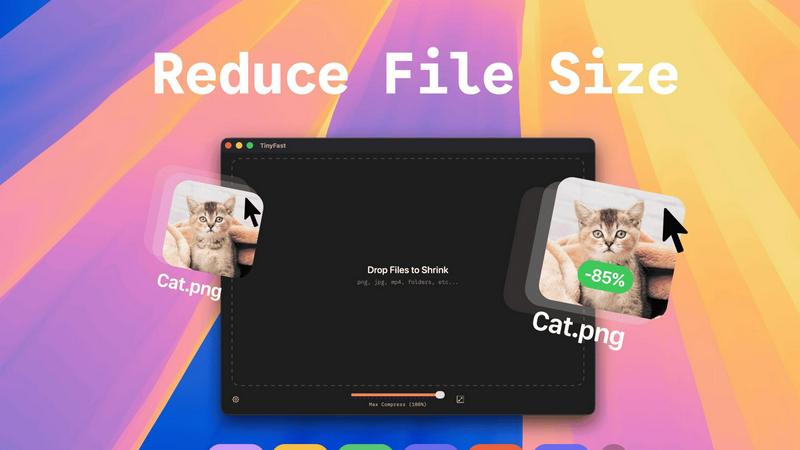
TinyFast compresses images, videos, and PDFs locally on your Mac for quick and secure file management.
Last updated: February 28, 2026
Visual Comparison
Nano Banana

TinyFast
Feature Comparison
Nano Banana
AI Image Generation
Nano Banana utilizes cutting-edge AI technology to generate high-quality images based on user-defined text prompts. This feature enables users to create visuals that align closely with their creative ideas without needing any prior design experience.
AI Image Upscaler
The AI Image Upscaler allows users to enhance the resolution of their images effortlessly. By employing advanced algorithms, this feature can significantly improve image clarity and detail, making it perfect for professional printing and presentations.
Background Remover
With the AI Background Remover, users can instantly eliminate backgrounds from images, improving focus on the subject. This tool simplifies the process of creating polished graphics for ads, social media, and other applications.
Nano Banana Pro Capabilities
The Pro version of Nano Banana offers superior features, including consistent character editing and scene preservation. Users can produce images with up to 4K resolution, ensuring high-quality outputs suitable for various professional uses.
TinyFast
Batch & Drag-Drop Shrink
With TinyFast, users can easily drop entire folders for batch processing, allowing them to receive optimized output in just seconds. This feature saves time and improves workflow efficiency, making it ideal for those who handle large volumes of files.
Blazing-Fast Compression
TinyFast employs optimized native engines that provide lightning-fast compression of large files. Users experience no waiting for uploads and downloads, making file reduction almost instantaneous and enhancing productivity.
Resize Resolution
TinyFast allows users to set automatic resizing for images and videos, enabling them to save space without compromising on quality. This feature is particularly useful for those who need specific resolutions for web use or other applications.
100% Local & Private
One of TinyFast's defining features is its commitment to privacy. Users can compress files without uploads, ensuring that sensitive information remains on their device. This design principle is crucial for professionals handling confidential documents and media.
Use Cases
Nano Banana
Marketing Materials Creation
Marketers can use Nano Banana to generate quick and visually appealing ad mockups. By inputting simple descriptions, they can produce graphics that resonate with their target audience, saving time and resources.
Content Creation for Blogs
Content creators can enhance their blog posts with unique visuals generated by Nano Banana. Instead of relying on stock images, they can create tailored graphics that complement their written content and engage readers.
Design Inspiration
Designers can leverage Nano Banana as a source of inspiration. By generating various visual concepts based on their prompts, they can explore different styles and ideas that inform their design projects.
Photo Enhancement and Editing
Individuals looking to improve their personal photos can utilize Nano Banana's editing capabilities. From adjusting lighting to replacing backgrounds, users can enhance their images effortlessly and achieve professional-looking results.
TinyFast
Graphic Designers
Graphic designers can utilize TinyFast to compress large image files quickly, ensuring their portfolios and project submissions remain efficient and easy to share. This functionality is vital when working with high-resolution graphics.
Video Editors
Video editors can benefit from TinyFast’s ability to compress video files without sacrificing quality. By streamlining file sizes, they can facilitate faster uploads and smoother collaboration with clients and team members.
Developers
Developers can use TinyFast to optimize code files and documentation. By reducing file sizes, they can enhance the performance of applications and websites, ensuring a better user experience overall.
Content Creators
Content creators, including bloggers and social media managers, can rely on TinyFast to compress images and videos for online platforms. This not only minimizes loading times but also improves SEO and user engagement by delivering faster content.
Overview
About Nano Banana
Nano Banana is an innovative, AI-driven platform designed to simplify the process of image creation and editing, making it accessible to users at all skill levels. By leveraging advanced machine learning technologies, Nano Banana allows you to generate and edit high-quality images using simple text prompts. This capability transforms the often complex and intimidating world of visual design into an intuitive experience. Whether you are a marketer in need of eye-catching ad mockups, a content creator searching for unique graphics, or a designer seeking fresh inspiration, Nano Banana caters to all. The platform prioritizes speed and simplicity, eliminating the need for extensive training on complicated software tools. Instead, you can express your creative vision in natural language, while the AI takes care of the technical intricacies—from altering backgrounds and adjusting lighting to creating entirely new scenes from scratch. With its advanced models like Nano Banana Pro, it offers enhanced features such as consistent character editing, 4K ultra-resolution output, and sharp text generation, making it a valuable asset for both casual projects and professional commercial work. In addition, specialized tools like the AI Image Upscaler and Background Remover complete this robust creative suite powered by artificial intelligence.
About TinyFast
TinyFast is a powerful software tool designed specifically for macOS users, focused on a single, essential task: file size reduction. This application provides local compression for a wide variety of file types, including images (PNG, JPEG), videos (MP4, MOV), documents (PDF), and even audio and code files. Users can simply drag their files into the TinyFast window and retrieve a smaller, optimized version in mere seconds. The entire process occurs locally on the user's Mac, ensuring that no data is uploaded to the internet. This approach not only addresses the needs for speed but also prioritizes user privacy. By avoiding the delays of uploads and downloads, compression is nearly instantaneous, while keeping all sensitive data on the local device guarantees complete confidentiality. TinyFast is tailored for developers, designers, and creators who frequently handle various media and documents, requiring a reliable solution that marries efficiency with security. This straightforward tool empowers users to take direct control of their digital assets without dependence on external web services.
Frequently Asked Questions
Nano Banana FAQ
What makes Nano Banana different from traditional design software?
Nano Banana stands out by allowing users to generate and edit images using natural language prompts, eliminating the need for complex design skills. This makes it accessible to everyone, regardless of experience level.
Can I use Nano Banana for commercial projects?
Yes, Nano Banana is designed to cater to both casual users and professionals. The high-quality output, including 4K resolution, makes it suitable for various commercial applications, such as marketing and advertising.
Is there a free trial available for Nano Banana?
Absolutely! Users can sign up to receive 20 free credits, allowing them to explore the platform's features without any financial commitment. This trial is a great way to experience its capabilities firsthand.
How does the AI Background Remover work?
The AI Background Remover uses advanced algorithms to detect and separate the subject of an image from its background. This feature allows users to create clean and focused visuals quickly, enhancing the overall quality of their graphics.
TinyFast FAQ
How does TinyFast ensure my files remain private?
TinyFast operates entirely on your Mac, meaning all file compression occurs locally. No data is uploaded to the internet, ensuring complete confidentiality and security for your sensitive assets.
Can I compress multiple files at once with TinyFast?
Yes, TinyFast supports batch processing. You can drag entire folders into the application, allowing you to compress multiple files simultaneously, saving you time and effort.
What file types are supported by TinyFast?
TinyFast supports a wide range of file types, including images (PNG, JPG, TIFF), videos (MP4, MOV), documents (PDF, DOCX), audio (MP3), and even code files (JS, CSS, JSON), making it versatile for various user needs.
Is there a trial version available for TinyFast?
Yes, TinyFast offers a free plan that allows you to compress up to 5 files per day. This provides users with an opportunity to explore all features without commitment before deciding on a paid plan.
Alternatives
Nano Banana Alternatives
Nano Banana is an AI-driven platform designed for creating and editing images with ease. It belongs to the image and photo category, empowering users to generate high-quality visuals through simple text prompts. This innovative tool simplifies the complex process of visual design, making it accessible to a wide range of users, from marketers to casual photo enhancers. Users often seek alternatives to Nano Banana for various reasons, including pricing, specific feature sets, or compatibility with different platforms. When choosing an alternative, it's essential to consider factors such as user-friendliness, the range of creative tools available, and the quality of output. A good alternative should not only meet your immediate needs but also enhance your overall creative workflow.
TinyFast Alternatives
TinyFast is a powerful software tool designed specifically for macOS that focuses on file compression, allowing users to reduce the size of images, videos, PDFs, and more directly on their devices. This application is particularly beneficial for developers, designers, and creators who need to manage large files efficiently while maintaining privacy. Users often seek alternatives to TinyFast for various reasons, including pricing differences, specific feature requirements, or compatibility with different operating systems. When searching for alternatives, it is important to consider factors such as local versus cloud processing, user interface simplicity, and support for a wide range of file formats. Additionally, assessing the speed of the compression process and the security measures in place will help ensure that the chosen tool aligns with your workflow needs and data privacy expectations.