
LuxSign vs Refbox
Side-by-side comparison to help you choose the right product.

LuxSign enables secure electronic signatures for documents, compliant with EU regulations, all hosted in Luxembourg.
Last updated: February 26, 2026

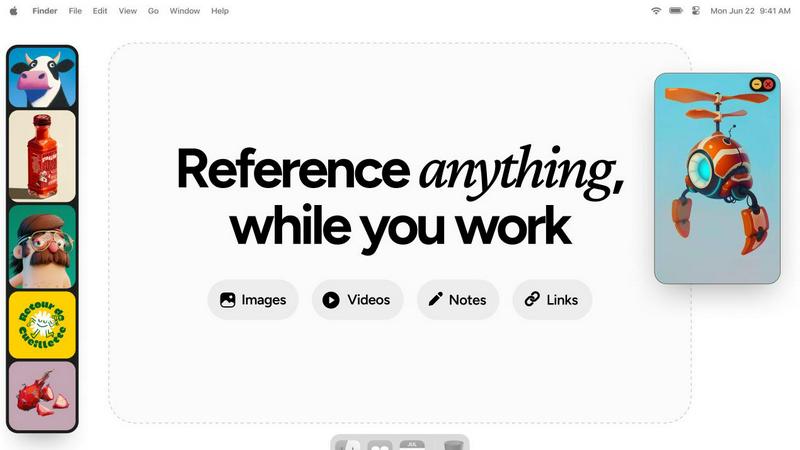
Refbox is a floating app that keeps your reference images and notes visible above any workspace.
Last updated: February 28, 2026
Visual Comparison
LuxSign

Refbox
Feature Comparison
LuxSign
Multiple Signature Methods
LuxSign provides versatile signing options, allowing users to draw their signature with a mouse, type their name, or upload an image of their signature. This flexibility accommodates various preferences and speeds up the signing process, making it convenient for every user.
Advanced Security
Security is paramount with LuxSign. The platform employs industry-standard encryption to protect documents during upload, storage, and transmission. Additionally, documents are stored on secure servers in Luxembourg, ensuring compliance with EU data protection regulations for peace of mind.
Collaboration Workspaces
LuxSign facilitates teamwork through collaboration workspaces where users can create shared environments for their teams. This feature allows users to organize documents in folders, manage member access, and collaborate seamlessly on signing workflows, enhancing productivity and efficiency.
Complete Audit Trail
Maintaining transparency and security, LuxSign provides a complete audit trail for every action taken on a document. Each log includes timestamps, IP addresses, and signer information, ensuring compliance and providing a reliable record for verification purposes.
Refbox
Always-on-Top Floating Frames
This is the foundational feature of Refbox. It allows you to pin any image, GIF, or video reference into a resizable frame that stays visible above all other application windows. This eliminates the need for disruptive window switching, keeping your reference material directly in your line of sight as you work in your primary creative software, preserving your focus and workflow continuity.
Centralized Reference Library (The Box)
All your media is gathered into a central, organized sidebar called the Box. You can import references by dragging files from your computer, pasting image links or screenshots from the web, or using the clipboard. This creates a single source of truth for your project's inspiration, moving you away from scattered folders and browser tabs to a streamlined, searchable collection.
Multiple Viewing Modes
Refbox provides flexible ways to interact with your references. View your entire collection in a dense Masonry grid within the Box, float individual items as separate windows, or use a full-screen gallery mode ideal for secondary monitors. You can also flip through items like a slideshow for quick comparison, ensuring you have the right visual context at any moment.
Integrated Notes and Tools
Beyond images, Refbox lets you create markdown-enabled notes with styling and checklists, turning it into a full reference hub. Practical tools are built-in, including a color picker to sample colors from any media, GIF frame-by-frame playback, pixel-perfect rendering for pixel art, and the ability to crop images or take website screenshots directly by pasting a URL.
Use Cases
LuxSign
Real Estate Transactions
In the real estate sector, LuxSign can be utilized to streamline the signing of contracts and agreements between buyers, sellers, and agents. The platform's secure and compliant nature ensures that all parties can sign documents electronically, expediting the entire process.
Employment Contracts
LuxSign is an excellent tool for HR departments to manage employment contracts. With the ability to send documents for signature and track their status in real-time, HR teams can ensure that all contracts are signed promptly and securely.
Financial Agreements
Financial institutions can leverage LuxSign for signing loan agreements and other financial documents. The platform's compliance with eIDAS standards guarantees that these documents are legally valid across the European Union, thus enhancing trust in the transaction.
Remote Team Collaboration
For companies with remote teams, LuxSign simplifies the document signing process. Employees can sign documents from anywhere, at any time, using their smartphones or tablets. This flexibility is essential for maintaining productivity in a distributed work environment.
Refbox
Digital Illustration and Concept Art
Illustrators and concept artists can keep mood boards, anatomical references, color palettes, and style guides pinned around their canvas. This allows for constant visual comparison and inspiration without breaking concentration to search through files, enabling a more fluid and accurate creative process from sketch to final piece.
UI/UX and Graphic Design
Designers can float brand guidelines, logo variations, typography samples, and competitor website screenshots directly over their design tools like Figma or Adobe XD. This ensures every design decision is made with immediate reference to critical assets and specifications, boosting both speed and consistency in the design workflow.
3D Modeling and Animation
3D artists and animators can pin orthographic reference images, texture maps, character turnarounds, and motion study videos next to their 3D viewport. Having these crucial references always visible allows for more accurate modeling, sculpting, and animation, as artists can match proportions, poses, and movements without guesswork.
Motion Graphics and Video Editing
Editors and motion designers can keep storyboards, style frames, asset lists, and video clips accessible in floating windows above their timeline software. This facilitates quick visual checks and ensures the final product aligns perfectly with the planned creative direction, all while maintaining an efficient editing flow.
Overview
About LuxSign
LuxSign is a secure, cloud-based electronic signature platform designed specifically for businesses that require high compliance standards. Originating from Luxembourg, LuxSign ensures that all documents are encrypted end-to-end and stored exclusively within the country, thereby guaranteeing full compliance with the General Data Protection Regulation (GDPR). The platform supports the European Union's eIDAS Simple Electronic Signature (SES) standards, ensuring that contracts signed through LuxSign hold legal validity across all member states. LuxSign is equipped with essential features such as parallel and sequential signing workflows, drag-and-drop signature field placement, and automated email notifications for signers. Its advanced tiers offer additional functionalities like document templates, comprehensive audit trails, bulk signing capabilities, collaboration workspaces, custom branding options, and a REST API for system integrations. This makes LuxSign an ideal solution for businesses aiming to streamline their document signing processes while ensuring security and compliance.
About Refbox
Refbox is a fundamental desktop application designed to solve a persistent problem in creative workflows: the disruptive act of window switching. At its core, Refbox is a floating reference manager that allows artists, designers, animators, and other visual professionals to keep their inspiration and resources visible at all times. It functions by letting users pin images, GIFs, videos, and notes into always-on-top frames that float above any other application. This foundational approach eliminates the need to constantly alt-tab between a creative software and a folder, browser, or note-taking app, thereby preserving a state of deep focus and flow.
The tool is built for professionals across disciplines like 3D art, animation, UI/UX design, illustration, concept art, motion graphics, photography, and pixel art. Its main value proposition is organized visual access without distraction. Users can gather media from the web, their computer, or clipboard into a central sidebar and then choose how to view it: in a Masonry grid, as individual floating windows on the desktop, or in a full-screen gallery for secondary monitors. By integrating markdown-enabled notes and clickable bookmarks directly into the reference ecosystem, Refbox consolidates the entire inspirational toolkit into one always-accessible space. It is the essential companion for any creative who needs their references at their fingertips, not buried in tabs and folders.
Frequently Asked Questions
LuxSign FAQ
What types of documents can I sign using LuxSign?
You can sign a variety of document formats using LuxSign, including PDF, DOC, and DOCX files. The platform supports automatic conversion for seamless processing.
Is LuxSign GDPR compliant?
Yes, LuxSign is fully compliant with GDPR and Luxembourg data protection laws. All documents are encrypted and stored securely in Luxembourg, ensuring your data privacy is protected.
How many signers can I add to a document?
LuxSign allows you to add up to four signers per document. You can choose to set up either parallel signing or sequential signing workflows to suit your needs.
What kind of support does LuxSign offer?
LuxSign provides email support for users, with premium plans offering priority support for faster response times. This ensures that users have access to assistance when needed for any signing-related inquiries.
Refbox FAQ
What types of files does Refbox support?
Refbox supports a wide range of media essential for creative work. You can import standard image files (JPG, PNG, WebP, SVG), animated GIFs, and various video formats. It also supports text-based notes and can generate image screenshots directly from website URLs you paste into the application.
How does Refbox help maintain focus?
Refbox is built on the principle of reducing friction. By allowing references to float in always-on-top windows, it completely eliminates the disruptive cycle of minimizing your work to find a file or browser tab. Your inspiration stays visually accessible, which helps you maintain a state of deep focus, or flow, for much longer periods.
Can I use Refbox with multiple monitors?
Yes, Refbox is excellent for multi-monitor setups. You can use the full-screen gallery mode to turn a secondary monitor into a dedicated reference display. Alternatively, you can spread individual floating frames across multiple screens, organizing your workspace to keep your primary screen clear for your main creative application.
Is there a way to organize different projects?
Yes, Refbox uses a system called Collections. You can create different Collections for each project, client, or theme. Switching between these Collections is instant with a single click, allowing you to keep your references neatly separated and quickly access the exact set of visuals you need for your current task.
Alternatives
LuxSign Alternatives
LuxSign is a sophisticated electronic signature platform designed to facilitate secure document signing for businesses. It operates within the productivity and management category, ensuring that all signatures comply with eIDAS SES standards, thus providing legal validity across the European Union. Businesses often seek alternatives to LuxSign for various reasons, including pricing considerations, specific feature requirements, or the need for different platform integrations that better fit their operational workflows. When looking for an alternative to LuxSign, it is important to evaluate the platform's compliance with legal standards, the security measures in place for data protection, and the range of features offered. Users should consider their unique needs, such as the ability to customize workflows, the level of customer support, and integration capabilities with existing systems. Assessing these factors will help ensure that the chosen platform aligns with the business's goals and requirements.
Refbox Alternatives
Refbox is a fundamental desktop application in the productivity and management category. It serves as a floating reference manager, designed to keep images, notes, and videos visible above other software to prevent disruptive window switching and maintain creative focus. Users may look for alternatives for foundational reasons like budget, specific feature needs, or compatibility with their operating system. Some may require a simpler tool, while others seek more advanced organizational capabilities not present in their current solution. When evaluating an alternative, consider the core need: persistent visual access to reference material. Key factors include the ability to keep content always on top, support for various file types, and organizational methods that fit your workflow without adding complexity or distraction.