Geekflare Connect vs Perkoon
Side-by-side comparison to help you choose the right product.

Geekflare Connect
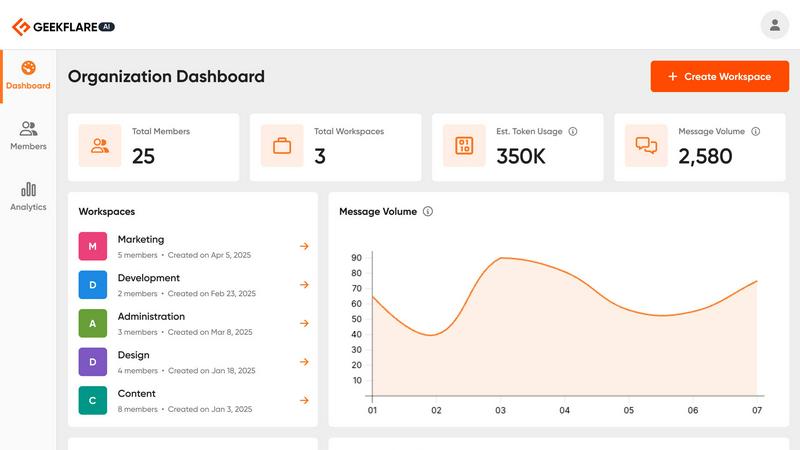
Geekflare Connect unifies your team's AI tools into one platform to cut costs and boost collaboration.
Last updated: March 1, 2026

Perkoon enables free unlimited peer-to-peer file transfers without signup, ensuring your files stay private and secure.
Last updated: March 4, 2026
Visual Comparison
Geekflare Connect
Perkoon

Feature Comparison
Geekflare Connect
Multi-Model Comparison
This fundamental feature allows you to instantly compare responses from leading AI models like GPT-4o, Claude 3.5 Sonnet, and Gemini 1.5 Pro side-by-side within a single interface. Instead of manually copying prompts between different tabs and applications, you can submit one query and view the outputs from multiple providers simultaneously. This enables you to objectively evaluate the quality, tone, and completeness of each model's response for your specific task, ensuring you always select the best possible output without guesswork or extra steps.
Collaborative Workspaces
Geekflare Connect moves beyond individual AI chats to provide structured, team-oriented workspaces. You can organize conversations and projects into dedicated spaces, add team members with appropriate permissions, and securely share chat histories. This foundational approach ensures that prompts, successful outputs, and institutional knowledge are not trapped in individual accounts but are centralized and accessible. It keeps everyone aligned, reduces duplicate work, and allows for seamless handoffs and collaborative brainstorming on AI-driven projects.
Live Web Access
To ground AI responses in real-time, factual information, Geekflare Connect integrates live web search capabilities. Powered by providers like Exa and Firecrawl, this feature allows the AI models to search the current internet and incorporate up-to-date data, news, and research into their answers. This solves the core limitation of static AI knowledge cutoffs, supercharging your research, market analysis, content creation, and competitive intelligence tasks with accurate, timely information pulled directly from the web.
Your Private AI Brain
This feature addresses the need for contextual, secure AI interactions using your own data. You can securely upload private documents—such as PDFs, Word files, and text documents—to create a personalized knowledge base. The AI models can then reference this uploaded content to provide answers that are specific to your company's processes, products, or research. It acts as a private, internal AI assistant that understands your unique context without the risk of exposing sensitive data to public models.
Perkoon
Peer-to-Peer (P2P) File Transfer
Perkoon's flagship feature allows users to send files directly between browsers without any size limitations or sign-ups. This P2P technology ensures that files are transmitted securely and privately, as they do not pass through any central servers. This direct connection makes file sharing efficient and stress-free.
Encrypted Cloud Storage
For instances when recipients are offline, Perkoon provides an encrypted cloud storage solution. This paid feature securely holds files until the recipient is available to download them. The encryption ensures that users' data remains private and protected during transit and storage.
Built-in Automation Tools
Perkoon is designed with the modern user in mind, incorporating built-in tools that allow for automation and integration with AI agents. These features streamline the file transfer process, enabling users to interact with the service directly without the need for cumbersome screen-scraping methods.
Referral and Rewards Program
Perkoon offers a unique referral program that rewards users for sharing the service with others. By sending a referral link, users can earn extra storage space when their friends sign up and transfer files. This incentivizes community growth while benefiting all participants.
Use Cases
Geekflare Connect
Content Creation and Strategy
Marketing teams, writers, and strategists can use the platform to generate and refine content. By using the multi-model comparison, they can prompt several AIs to create blog post drafts, social media copy, or email campaigns and instantly compare the results to select the most engaging version. The shared prompt library and workspaces allow the entire content team to build on successful templates and maintain a consistent brand voice across all materials, significantly speeding up the production cycle.
Technical Development and Code Review
Developers and engineering teams can leverage multiple AI models for coding assistance, debugging, and code explanation. They can ask different models to solve the same problem or review a code snippet, then use the side-by-side comparison to evaluate the efficiency and accuracy of each suggested solution. Collaborative workspaces allow team members to share complex technical prompts and solutions, building a valuable internal knowledge base for common development challenges.
Business Intelligence and Research
Analysts and product managers can conduct comprehensive market and competitive research efficiently. Using the live web access feature, they can task AIs with gathering the latest information on market trends, competitor announcements, or customer sentiment. Uploading internal reports to the private AI brain allows for deep analysis of company-specific data. Comparing insights from different models ensures a well-rounded, fact-based understanding to support strategic decisions.
Customer Support Optimization
Support teams can use Geekflare Connect to build and refine a library of response templates for common customer inquiries. By testing prompts with multiple AI models, they can identify the clearest, most helpful, and most empathetic responses. These optimized responses can be stored and shared in team workspaces, ensuring all support agents provide high-quality, consistent information. This reduces resolution time and improves the overall customer experience.
Perkoon
Personal File Sharing
Individuals can use Perkoon to share large files with friends and family without worrying about size limits or fees. Whether sending vacation photos or important documents, Perkoon makes personal file sharing simple and hassle-free.
Team Collaboration
For teams working remotely, Perkoon serves as an essential tool for sharing project files and documents. The ability to send large files without restrictions streamlines collaboration, ensuring that team members can access the resources they need promptly.
Secure Business Transactions
Businesses can rely on Perkoon for secure file transfers, especially when dealing with sensitive information. The P2P feature ensures that confidential documents remain private, and the encrypted cloud storage provides an additional layer of security.
AI Integration
Developers and tech enthusiasts can leverage Perkoon’s capabilities by integrating it with AI agents. This allows for automated file transfers and interactions, enhancing productivity and efficiency in various applications.
Overview
About Geekflare Connect
Geekflare Connect is a foundational platform designed to bring order and efficiency to how modern businesses use artificial intelligence. At its core, it solves the critical problem of AI tool fragmentation. Today, teams often juggle multiple individual subscriptions from providers like OpenAI, Google, and Anthropic. This scattered approach leads to redundant spending, operational silos, and a complete lack of centralized oversight. Geekflare Connect addresses this by being a BYOK (Bring Your Own Key) AI platform. It allows organizations to consolidate their use of multiple, best-in-class AI models into a single, unified workspace.
This platform is built for teams across all functions—from marketing, sales, and development to customer support and strategy—who need to leverage AI for diverse tasks. Its primary value proposition is twofold: significant cost reduction and enhanced team collaboration. By allowing companies to use their existing API keys, Geekflare Connect provides a centralized dashboard to monitor all AI usage, prevent budget waste, and optimize spending, with reported savings of up to 65%. Simultaneously, it creates a collaborative environment where team members can work together in shared projects, compare AI outputs side-by-side, and maintain a centralized history of all AI-powered work. In essence, Geekflare Connect transforms AI from a collection of disparate, expensive tools into a manageable, collaborative, and cost-effective utility for the entire organization.
About Perkoon
Perkoon is an innovative file transfer service designed to simplify the way individuals and teams share files. In a digital landscape cluttered with limitations and unnecessary complexity, Perkoon redefines file sharing by offering a straightforward solution that prioritizes user experience and privacy. It caters to anyone frustrated with traditional file transfer methods that impose artificial limits, require mandatory sign-ups, or treat user data as a commodity. Perkoon's core offering includes two efficient ways to send files: a free peer-to-peer (P2P) service that allows users to transfer files directly between browsers when both parties are online, and a secure cloud storage option for offline transfers, available through a paid plan. With its commitment to free usage, privacy, and user-friendly automation tools built for the age of AI, Perkoon stands out as a trusted and robust solution for file transfer needs.
Frequently Asked Questions
Geekflare Connect FAQ
What does BYOK (Bring Your Own Key) mean?
BYOK means you use your own existing API keys from AI providers like OpenAI, Anthropic, or Google AI Studio. You connect these keys to your Geekflare Connect workspace. The platform does not charge you for the AI model usage itself; you pay the providers directly based on their standard API pricing. Geekflare Connect provides the unified interface, collaboration tools, and analytics on top of your keys, helping you manage and optimize that usage.
How does Geekflare Connect help reduce AI costs by up to 65%?
The platform reduces costs primarily through consolidation and visibility. By bringing all AI usage into one dashboard, it eliminates wasteful duplicate subscriptions across a team. The usage and cost analytics feature gives you a real-time, consolidated view of token consumption and estimated spend across all connected models, allowing you to identify and curb inefficient usage patterns. Furthermore, the ability to compare models helps teams choose the most cost-effective model for each specific task, avoiding unnecessary use of expensive, premium models for simpler queries.
Is my data and conversation history private and secure?
Yes, data privacy and security are foundational to the platform. Your conversations and uploaded documents within your private workspace are not used to train public AI models. The platform operates on a BYOK model, meaning your API keys and the data sent through them are handled with strict security protocols. You maintain ownership and control over your data, and team collaboration features include permission controls to ensure information is shared only with intended members.
Can I use Geekflare Connect for free?
Yes, Geekflare Connect offers a free plan to get started. This plan allows you to connect your own API keys and access core features, including the multi-model chat interface and basic collaboration. This enables individuals and small teams to experience the benefits of a unified AI workspace without an initial subscription fee. You only incur costs based on your usage of the underlying AI models via your API keys. The platform may offer advanced features or higher usage limits through paid team plans.
Perkoon FAQ
Is Perkoon really free?
Yes, Perkoon offers a free P2P file transfer service that does not impose size limits or require user accounts. This service is free because it operates on a decentralized model that costs Perkoon nothing to run.
How does cloud storage work with Perkoon?
When files need to be stored for offline recipients, Perkoon offers encrypted cloud storage as a paid feature. This ensures that files are held securely until the recipient can access them.
Can I use Perkoon on any browser?
Perkoon is compatible with Chrome, Edge, and Brave browsers without any limits. However, users of Firefox and Safari may encounter certain restrictions due to browser-specific limitations.
How can I earn rewards through the referral program?
By sharing your unique referral link, you can invite others to use Perkoon. When they sign up and transfer files, both you and your friend can earn additional storage space, creating a mutually beneficial system.
Alternatives
Geekflare Connect Alternatives
Geekflare Connect is a productivity and management platform designed to help businesses consolidate their use of various AI models. It acts as a central hub, allowing teams to bring their own API keys from providers like OpenAI and Anthropic to manage costs and collaborate more effectively. Users often explore alternatives for several common reasons. These can include budget constraints, the need for different feature sets, or specific platform requirements like deeper integrations with existing company software. The search for the right tool is a normal part of finding the best operational fit. When evaluating other options, key considerations should include the platform's approach to cost management, its support for collaborative features among team members, and the range of AI models it can access. The goal is to find a solution that reduces tool fragmentation while fitting seamlessly into your company's workflow.
Perkoon Alternatives
Perkoon is a unique file transfer service that falls under the category of productivity and management tools. It offers users the ability to send files for free using peer-to-peer technology, which eliminates the need for sign-ups and size restrictions. This straightforward approach appeals to individuals seeking a hassle-free experience when transferring data, especially in an age where many services impose limitations or treat user data as a commodity. Users often look for alternatives to Perkoon for various reasons such as pricing, feature sets, or specific platform compatibility. When searching for a suitable alternative, it's essential to consider factors like the ease of use, privacy policies, file size limits, and any additional functionalities that may enhance your file transfer experience. A good alternative should prioritize user needs without compromising on security or convenience.