Editaimg vs SparkPix
Side-by-side comparison to help you choose the right product.

Editaimg
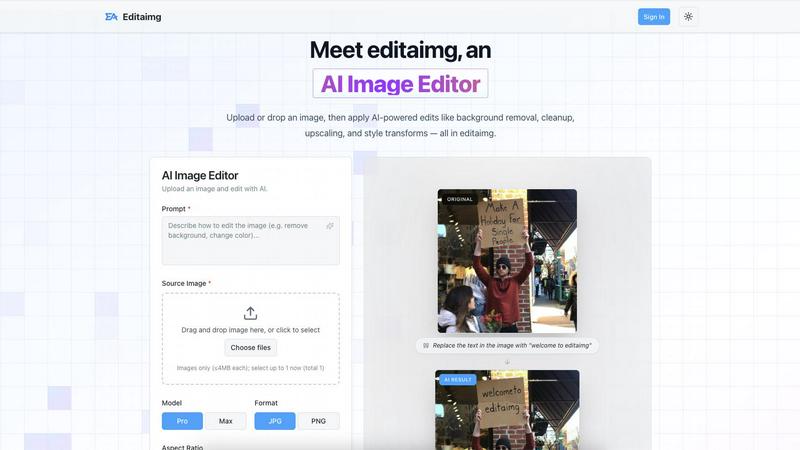
Editaimg is an AI image editor that simplifies photo enhancement, background removal, and creative transformations with.
Last updated: February 28, 2026

SparkPix
SparkPix is a fundamental AI photo editor that transforms your images simply by typing what you want to change.
Last updated: March 11, 2026
Visual Comparison
Editaimg
SparkPix

Feature Comparison
Editaimg
AI-Powered Editing
Editaimg harnesses artificial intelligence to simplify complex tasks such as background removal, image cleanup, and style transformations. Users can achieve professional results without needing advanced technical skills, making it ideal for anyone looking to enhance their images quickly.
Add Someone to Photo
With the Add Someone to Photo feature, users can seamlessly integrate another person into their images. This tool uses natural blending techniques to ensure that the added person looks like a natural part of the photo, enhancing personalization and creativity.
AI Snow
The AI Snow feature allows users to add realistic snowfall effects to their images, creating a seasonal atmosphere with adjustable intensity and lighting options. This feature is perfect for holiday promotions or creating visually appealing winter scenes.
Gemini Watermark Remover
Editaimg includes a Gemini Watermark Remover, which helps users export clean images without visible watermarks. This feature ensures that users can maintain a professional appearance in their projects, free from distracting overlays.
SparkPix
AI Photo Editor with Text Commands
This is the cornerstone feature of SparkPix. Instead of navigating complex toolbars, you simply type instructions like "remove the tourist in the background" or "make this photo look like an oil painting." The AI interprets your natural language request and applies the precise edits to your uploaded image, typically in under 30 seconds. This makes sophisticated editing accessible to users of all skill levels, turning a creative idea into a visual reality with just a few words.
Background Remover
SparkPix offers a highly efficient one-click background removal tool powered by AI. It is engineered to handle a wide variety of subjects with precision, including detailed portraits, product photos for e-commerce, and complex scenes with multiple elements. The AI intelligently distinguishes between the foreground subject and the background, creating a clean, transparent cutout instantly, which is essential for creating professional thumbnails, marketing materials, or composite images.
Photo Restoration
This feature is specifically designed to repair and revive old, damaged photographs. Using advanced AI models, SparkPix can automatically address common issues found in historical photos, such as fading, scratches, tears, dust spots, and general wear and tear. It analyzes the image to reconstruct missing details, reduce noise, and enhance contrast, making it an invaluable tool for anyone looking to digitally preserve and restore family memories or archival documents.
AI Object Remover
The AI Object Remover allows you to clean up images by seamlessly deleting unwanted elements. By using a simple text command to identify the object, person, or watermark you wish to remove, the AI intelligently fills in the resulting space. It analyzes the surrounding pixels and textures to generate a believable replacement background, making it appear as though the unwanted item was never there, perfect for fixing photobombs or cleaning up product shots.
Use Cases
Editaimg
E-Commerce Product Photography
E-commerce professionals can utilize Editaimg to create stunning product shots. By transforming simple white-background images into realistic settings, users can enhance their product presentations, making them more appealing to potential buyers.
Social Media Content Creation
Content creators can take advantage of Editaimg to quickly edit images for social media platforms. Whether removing unwanted objects or adding creative elements, the AI Image Editor allows for swift modifications that enhance engagement and aesthetic appeal.
Event Photography Enhancement
For photographers, Editaimg serves as a powerful tool to enhance event photos. Users can remove distractions such as unwanted guests or clutter, ensuring that the focus remains on the event's highlights and creating memorable keepsakes.
Seasonal Promotions
Businesses can use the AI Snow feature to create seasonal images for promotions. By adding snowfall effects to product images or marketing materials, companies can evoke a festive atmosphere that resonates with their audience, making their campaigns more effective.
SparkPix
E-commerce Product Photography
Online sellers can use SparkPix to create professional product images without a studio. They can easily remove distracting backgrounds, clean up minor imperfections, and even generate product mockups by describing scenes like "place this mug on a rustic wooden table." This helps create a consistent, high-quality visual catalog for platforms like Shopify or Amazon, directly boosting product appeal and potential sales.
Family Photo Archive Restoration
Individuals and genealogists can digitize and restore precious old family photographs. Using the photo restoration feature, they can repair physical damage like cracks and fading, and even colorize black and white photos with a simple prompt. This use case is about preserving heritage, allowing families to bring historical moments back to life and share them with future generations in a renewed state.
Social Media Content Creation
Content creators, influencers, and marketers can rapidly produce eye-catching graphics for platforms like Instagram, TikTok, and YouTube. They can change backgrounds to match a theme, apply artistic filters like "anime style," remove unwanted objects from a scene, and enhance image quality for a polished look. This streamlines the content creation workflow, enabling the production of more engaging visual posts in less time.
Professional Document Preparation
Individuals needing official photos for documents can use SparkPix as a passport photo maker and professional headshot generator. By uploading a portrait and using a prompt like "generate a professional photo with formal attire and a blue background," the AI can create a compliant ID, visa, or LinkedIn profile picture. This eliminates the need for a photo studio visit, providing a convenient and cost-effective solution.
Overview
About Editaimg
Editaimg is a revolutionary web-based AI Image Editor that transforms the image editing experience for users of all skill levels. By harnessing the power of a natural language interface, Editaimg enables users to make intricate graphical modifications simply by describing their desired changes in text. This user-friendly approach eliminates the steep learning curve associated with traditional pixel-based editors, making it accessible to everyone, from marketers and e-commerce professionals to content creators and casual hobbyists. The platform leverages advanced generative models to interpret user prompts and execute specific alterations directly on uploaded images, including tasks such as background removal, object replacement, and artistic style transformations while maintaining the original image's integrity. Editaimg represents a game-changing solution for anyone looking to enhance their images efficiently and effectively.
About SparkPix
SparkPix is a web-based AI photo editing platform designed to make professional-grade image manipulation accessible to everyone. Its foundational principle is simple: you edit photos by typing what you want. This approach removes the traditional barrier of needing complex software knowledge, like Photoshop, and replaces it with intuitive text commands. Whether you're a small business owner needing product photos, a social media enthusiast creating content, a genealogist restoring family archives, or a complete beginner, SparkPix provides the tools. The platform's core value proposition is delivering powerful AI-driven transformations—from background removal and photo restoration to style transfer and object removal—in under 30 seconds, directly from your web browser on any device. By offering a free starting tier with credits and a straightforward pricing model, SparkPix democratizes advanced photo editing, empowering users to enhance their visual content with speed, ease, and remarkable results.
Frequently Asked Questions
Editaimg FAQ
How does Editaimg work?
Editaimg works by allowing users to upload images and describe the modifications they want using natural language prompts. The AI then interprets these instructions and applies the desired changes to the image.
Is Editaimg suitable for beginners?
Yes, Editaimg is designed to be user-friendly and accessible to individuals of all skill levels. The natural language interface simplifies the editing process, making it easy for beginners to achieve professional-looking results.
What types of images can I edit with Editaimg?
Users can edit various image formats with Editaimg, making it versatile for different applications such as personal photos, e-commerce product images, and social media content.
Can I save my edits and revisit them later?
Yes, users can sign in to their Editaimg account to view their generation history and access previously edited images. This feature allows for easy management of projects and revisiting past edits.
SparkPix FAQ
How do I start using SparkPix?
Getting started is straightforward and requires no download. Simply visit the SparkPix website from any desktop or mobile browser. You can sign up for a free account which immediately grants you 5 credits to begin experimenting. From there, upload an image, type a text command describing the edit you want, and the AI will process your request.
What are credits and how many do I need?
Credits are the unit used to process edits on SparkPix. Each AI generation, such as removing a background or restoring a photo, typically costs a certain number of credits (e.g., 5 credits per task as indicated on the site). The free plan offers 5 initial credits plus 1 daily credit, allowing for regular use. Paid plans offer larger credit packs for users with higher volume needs.
Is there a watermark on images edited with the free plan?
No, a key benefit of SparkPix is that it does not apply watermarks to your exported images, even on the free plan. You retain full ownership and can use your edited photos for personal or commercial purposes without any branding from SparkPix obstructing your content.
What kind of text prompts work best?
For the best results, be as specific and descriptive as possible in your prompts. Instead of "make it better," try "enhance colors, sharpen details, and reduce grain." For creative changes, describe the desired outcome in detail, such as "change the background to a misty mountain landscape at sunset." The AI performs better with clear, instructional language.
Alternatives
Editaimg Alternatives
Editaimg is an innovative web-based AI image editor that simplifies the process of enhancing photos through a natural language interface. By allowing users to describe their editing needs in plain text, it caters to a wide range of users, including marketers, content creators, and hobbyists, who seek a more intuitive approach to image editing. Users often seek alternatives to Editaimg for various reasons, such as pricing, specific features, or compatibility with their preferred platforms. When exploring alternatives, it is essential to consider factors such as user-friendliness, the range of editing tools available, customer support, and the overall value offered in relation to the pricing structure.
SparkPix Alternatives
SparkPix is an AI-powered online photo editor that allows users to edit images by simply typing text commands. It falls into the category of web-based, automated image editing tools designed for accessibility and ease of use. People often seek out alternatives for various practical reasons, such as different pricing structures, the need for more advanced manual controls, or a preference for downloadable software over a web platform. When evaluating other options, it's wise to consider your primary needs. Key factors include the specific AI features you require, the cost relative to your usage volume, and whether the tool works on your preferred devices. Some users may prioritize high-resolution output or professional-grade retouching capabilities that go beyond automated edits. Ultimately, the best choice depends on balancing simplicity, power, and value. A tool that excels at quick, text-based edits might not suit someone needing intricate layer-based work, just as a free plan with limited credits may not support high-volume editing.