
Editaimg
Editaimg is an AI image editor that simplifies photo enhancement, background removal, and creative transformations with.
Visit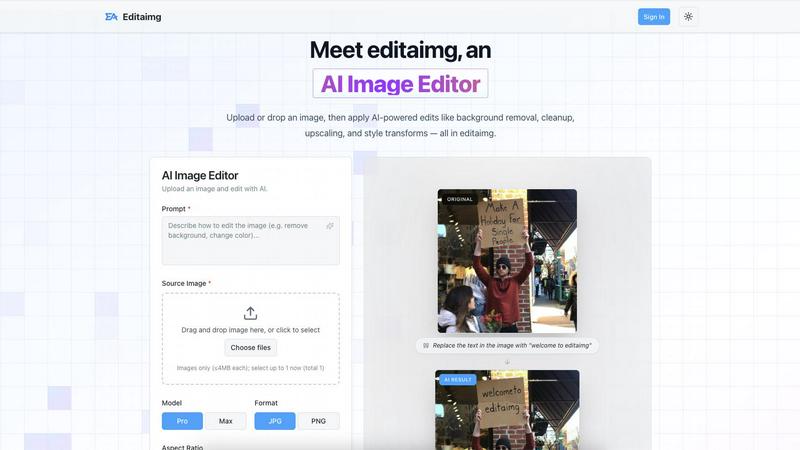
About Editaimg
Editaimg is a revolutionary web-based AI Image Editor that transforms the image editing experience for users of all skill levels. By harnessing the power of a natural language interface, Editaimg enables users to make intricate graphical modifications simply by describing their desired changes in text. This user-friendly approach eliminates the steep learning curve associated with traditional pixel-based editors, making it accessible to everyone, from marketers and e-commerce professionals to content creators and casual hobbyists. The platform leverages advanced generative models to interpret user prompts and execute specific alterations directly on uploaded images, including tasks such as background removal, object replacement, and artistic style transformations while maintaining the original image's integrity. Editaimg represents a game-changing solution for anyone looking to enhance their images efficiently and effectively.
Features of Editaimg
AI-Powered Editing
Editaimg harnesses artificial intelligence to simplify complex tasks such as background removal, image cleanup, and style transformations. Users can achieve professional results without needing advanced technical skills, making it ideal for anyone looking to enhance their images quickly.
Add Someone to Photo
With the Add Someone to Photo feature, users can seamlessly integrate another person into their images. This tool uses natural blending techniques to ensure that the added person looks like a natural part of the photo, enhancing personalization and creativity.
AI Snow
The AI Snow feature allows users to add realistic snowfall effects to their images, creating a seasonal atmosphere with adjustable intensity and lighting options. This feature is perfect for holiday promotions or creating visually appealing winter scenes.
Gemini Watermark Remover
Editaimg includes a Gemini Watermark Remover, which helps users export clean images without visible watermarks. This feature ensures that users can maintain a professional appearance in their projects, free from distracting overlays.
Use Cases of Editaimg
E-Commerce Product Photography
E-commerce professionals can utilize Editaimg to create stunning product shots. By transforming simple white-background images into realistic settings, users can enhance their product presentations, making them more appealing to potential buyers.
Social Media Content Creation
Content creators can take advantage of Editaimg to quickly edit images for social media platforms. Whether removing unwanted objects or adding creative elements, the AI Image Editor allows for swift modifications that enhance engagement and aesthetic appeal.
Event Photography Enhancement
For photographers, Editaimg serves as a powerful tool to enhance event photos. Users can remove distractions such as unwanted guests or clutter, ensuring that the focus remains on the event's highlights and creating memorable keepsakes.
Seasonal Promotions
Businesses can use the AI Snow feature to create seasonal images for promotions. By adding snowfall effects to product images or marketing materials, companies can evoke a festive atmosphere that resonates with their audience, making their campaigns more effective.
Frequently Asked Questions
How does Editaimg work?
Editaimg works by allowing users to upload images and describe the modifications they want using natural language prompts. The AI then interprets these instructions and applies the desired changes to the image.
Is Editaimg suitable for beginners?
Yes, Editaimg is designed to be user-friendly and accessible to individuals of all skill levels. The natural language interface simplifies the editing process, making it easy for beginners to achieve professional-looking results.
What types of images can I edit with Editaimg?
Users can edit various image formats with Editaimg, making it versatile for different applications such as personal photos, e-commerce product images, and social media content.
Can I save my edits and revisit them later?
Yes, users can sign in to their Editaimg account to view their generation history and access previously edited images. This feature allows for easy management of projects and revisiting past edits.
Explore more in this category:
Similar to Editaimg

Free AI attractiveness test and face analysis with private, on-device photo processing.

Generate and edit production-ready images with GPT Image 2 using prompts, reference images, clear text rendering, and a developer-friendly API.

Explore Flux LoRA workflows in a browser-based AI Studio, with a roadmap for models, generation, and guided training.

Turn any image into editable layers with AI

One AI enhancer for photos, images, videos, and creative effects.

Create text-perfect logos, posters, ads, packaging, and ecommerce visuals with Ideogram 4 workflows, references, and API tools.

Turn videos, images, and files into secure direct links for sharing, embedding, and automated workflows.

AI-native presentation and visual content platform that turns prompts, documents, images, videos, and data into polished, shareable decks.