Editaimg vs Remove Handwriting
Side-by-side comparison to help you choose the right product.

Editaimg
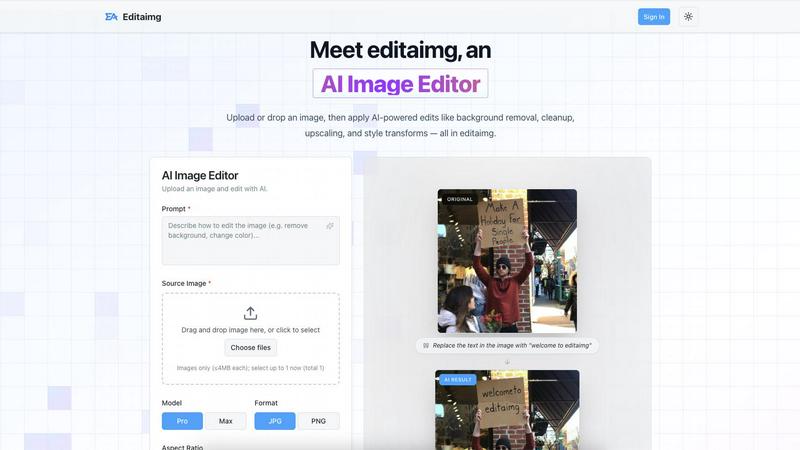
Editaimg is an AI image editor that simplifies photo enhancement, background removal, and creative transformations with.
Last updated: February 28, 2026

Remove Handwriting
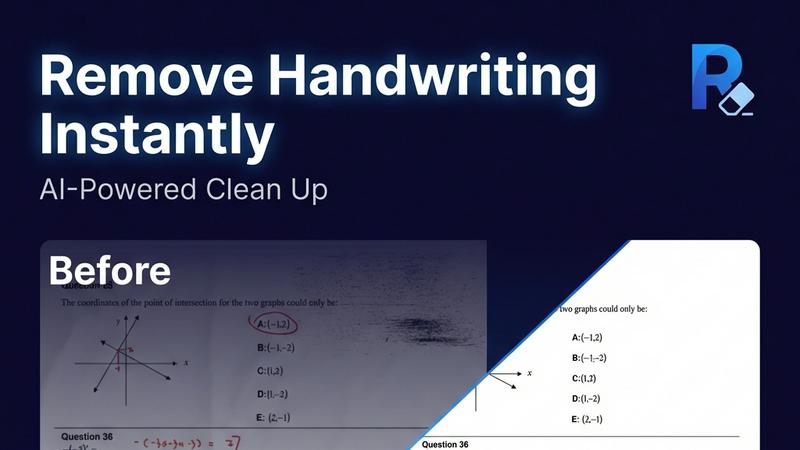
Effortlessly remove handwritten text from images and PDFs while preserving original content with our AI-powered handwriting removal tool.
Last updated: March 26, 2026
Visual Comparison
Editaimg
Remove Handwriting
Feature Comparison
Editaimg
AI-Powered Editing
Editaimg harnesses artificial intelligence to simplify complex tasks such as background removal, image cleanup, and style transformations. Users can achieve professional results without needing advanced technical skills, making it ideal for anyone looking to enhance their images quickly.
Add Someone to Photo
With the Add Someone to Photo feature, users can seamlessly integrate another person into their images. This tool uses natural blending techniques to ensure that the added person looks like a natural part of the photo, enhancing personalization and creativity.
AI Snow
The AI Snow feature allows users to add realistic snowfall effects to their images, creating a seasonal atmosphere with adjustable intensity and lighting options. This feature is perfect for holiday promotions or creating visually appealing winter scenes.
Gemini Watermark Remover
Editaimg includes a Gemini Watermark Remover, which helps users export clean images without visible watermarks. This feature ensures that users can maintain a professional appearance in their projects, free from distracting overlays.
Remove Handwriting
AI-Powered Handwriting Removal
This feature utilizes advanced artificial intelligence to intelligently detect and erase handwritten text, notes, and annotations from images and PDFs. It ensures that printed text and other important elements remain intact, providing a clean and professional final document.
Multi-Format Support
Remove Handwriting supports various file formats, including JPG, PNG, JPEG, and PDF. This versatility allows users to work with different types of documents seamlessly, whether they are single images or multi-page PDFs, making it suitable for diverse applications.
Batch Processing Capability
For users dealing with large volumes of documents, the batch processing feature allows for multiple files to be processed simultaneously. This saves time and enhances productivity, especially for businesses and educational institutions that require efficient document management.
Manual Processing Options
In addition to automated features, Remove Handwriting also offers manual processing for challenging cleanup tasks. Users can manually adjust settings to address complex issues such as damaged pages or intricate markings, ensuring a high-quality output even in difficult scenarios.
Use Cases
Editaimg
E-Commerce Product Photography
E-commerce professionals can utilize Editaimg to create stunning product shots. By transforming simple white-background images into realistic settings, users can enhance their product presentations, making them more appealing to potential buyers.
Social Media Content Creation
Content creators can take advantage of Editaimg to quickly edit images for social media platforms. Whether removing unwanted objects or adding creative elements, the AI Image Editor allows for swift modifications that enhance engagement and aesthetic appeal.
Event Photography Enhancement
For photographers, Editaimg serves as a powerful tool to enhance event photos. Users can remove distractions such as unwanted guests or clutter, ensuring that the focus remains on the event's highlights and creating memorable keepsakes.
Seasonal Promotions
Businesses can use the AI Snow feature to create seasonal images for promotions. By adding snowfall effects to product images or marketing materials, companies can evoke a festive atmosphere that resonates with their audience, making their campaigns more effective.
Remove Handwriting
Document Cleanup for Students
Students can use Remove Handwriting to erase handwritten answers, notes, or grading marks from their exam papers or worksheets, allowing them to create clean, shareable copies for study purposes or submission.
Archival Restoration
Archivists can benefit from this tool by restoring old documents that may have handwritten annotations, stains, or folds. By cleaning up these documents, they can preserve historical materials for future generations.
Business Documentation
Businesses can utilize Remove Handwriting to prepare contracts, reports, and marketing materials by removing handwritten notes and revisions. This creates a polished and professional appearance for important documents.
Enhancing Scanned Images
Individuals or organizations with low-quality scanned documents can employ Remove Handwriting to enhance clarity and remove unwanted marks. This ensures that all text is legible and visually appealing, improving overall document quality.
Overview
About Editaimg
Editaimg is a revolutionary web-based AI Image Editor that transforms the image editing experience for users of all skill levels. By harnessing the power of a natural language interface, Editaimg enables users to make intricate graphical modifications simply by describing their desired changes in text. This user-friendly approach eliminates the steep learning curve associated with traditional pixel-based editors, making it accessible to everyone, from marketers and e-commerce professionals to content creators and casual hobbyists. The platform leverages advanced generative models to interpret user prompts and execute specific alterations directly on uploaded images, including tasks such as background removal, object replacement, and artistic style transformations while maintaining the original image's integrity. Editaimg represents a game-changing solution for anyone looking to enhance their images efficiently and effectively.
About Remove Handwriting
Remove Handwriting is an innovative AI-powered tool designed to facilitate the removal of handwritten text from images, PDFs, and scanned documents. It caters to a wide range of users, including students, educators, businesses, and archivists who need to clean up documents for improved readability and presentation. This tool offers a seamless solution for erasing handwritten notes, annotations, and markings while preserving the integrity of printed content, tables, and diagrams. Whether you are dealing with exam papers, contracts, or archival materials, Remove Handwriting enables you to restore documents to a pristine state, enhancing their usability. With its user-friendly interface and availability on both web and mobile platforms, this tool allows users to perform document cleanup tasks quickly and efficiently. Best of all, you can try it for free with no credit card required, making it accessible for anyone looking to streamline their document management process.
Frequently Asked Questions
Editaimg FAQ
How does Editaimg work?
Editaimg works by allowing users to upload images and describe the modifications they want using natural language prompts. The AI then interprets these instructions and applies the desired changes to the image.
Is Editaimg suitable for beginners?
Yes, Editaimg is designed to be user-friendly and accessible to individuals of all skill levels. The natural language interface simplifies the editing process, making it easy for beginners to achieve professional-looking results.
What types of images can I edit with Editaimg?
Users can edit various image formats with Editaimg, making it versatile for different applications such as personal photos, e-commerce product images, and social media content.
Can I save my edits and revisit them later?
Yes, users can sign in to their Editaimg account to view their generation history and access previously edited images. This feature allows for easy management of projects and revisiting past edits.
Remove Handwriting FAQ
How does Remove Handwriting work?
Remove Handwriting uses advanced AI algorithms to analyze documents, automatically detecting and removing handwritten text while preserving the original printed content and layout.
What file formats are supported?
The tool supports multiple file formats, including JPG, PNG, JPEG, and PDF, allowing users to work with a variety of document types for their specific needs.
Is there a limit on the number of documents I can process?
The application supports batch processing, enabling users to upload and process multiple documents at once, thus streamlining workflows for users with larger quantities of files.
Can I use Remove Handwriting on mobile devices?
Yes, Remove Handwriting is available on both iOS and Android platforms, making it convenient for users to clean up documents on the go, whether they are using a smartphone or tablet.
Alternatives
Editaimg Alternatives
Editaimg is an innovative web-based AI image editor that simplifies the process of enhancing photos through a natural language interface. By allowing users to describe their editing needs in plain text, it caters to a wide range of users, including marketers, content creators, and hobbyists, who seek a more intuitive approach to image editing. Users often seek alternatives to Editaimg for various reasons, such as pricing, specific features, or compatibility with their preferred platforms. When exploring alternatives, it is essential to consider factors such as user-friendliness, the range of editing tools available, customer support, and the overall value offered in relation to the pricing structure.
Remove Handwriting Alternatives
Remove Handwriting is an AI-powered tool designed to erase handwritten text, notes, and annotations from images, PDFs, and scanned documents. This tool falls under the category of image and photo editing, specifically tailored for users needing to clean up documents while maintaining the integrity of printed text, tables, and diagrams. Users often seek alternatives to Remove Handwriting for various reasons, including pricing concerns, specific feature requirements, or compatibility with different platforms and devices. When choosing an alternative, it is essential to consider factors such as ease of use, supported file formats, batch processing capabilities, and whether the tool can effectively preserve the remaining content while removing unwanted handwriting.