
Editaimg vs Nano AI
Side-by-side comparison to help you choose the right product.

Editaimg
Editaimg is an AI image editor that simplifies photo enhancement, background removal, and creative transformations with.
Last updated: February 28, 2026

Nano AI
Nano AI is an all-in-one creative platform for fast AI image generation and editing.
Last updated: February 28, 2026
Visual Comparison
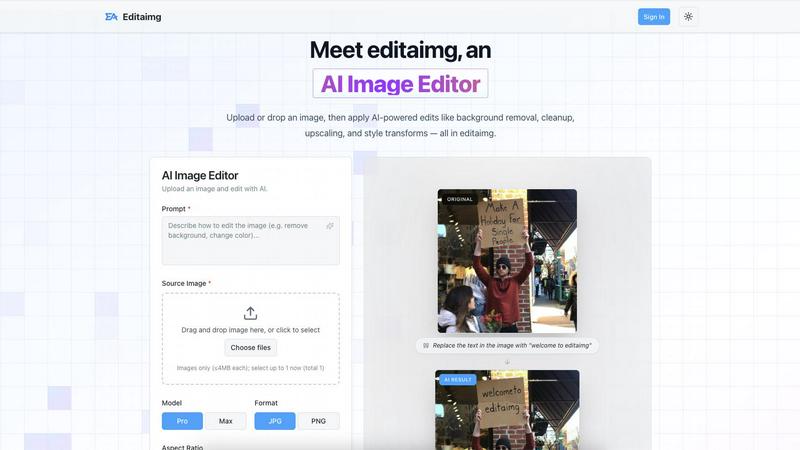
Editaimg
Nano AI

Feature Comparison
Editaimg
AI-Powered Editing
Editaimg harnesses artificial intelligence to simplify complex tasks such as background removal, image cleanup, and style transformations. Users can achieve professional results without needing advanced technical skills, making it ideal for anyone looking to enhance their images quickly.
Add Someone to Photo
With the Add Someone to Photo feature, users can seamlessly integrate another person into their images. This tool uses natural blending techniques to ensure that the added person looks like a natural part of the photo, enhancing personalization and creativity.
AI Snow
The AI Snow feature allows users to add realistic snowfall effects to their images, creating a seasonal atmosphere with adjustable intensity and lighting options. This feature is perfect for holiday promotions or creating visually appealing winter scenes.
Gemini Watermark Remover
Editaimg includes a Gemini Watermark Remover, which helps users export clean images without visible watermarks. This feature ensures that users can maintain a professional appearance in their projects, free from distracting overlays.
Nano AI
Flash-Speed AI Generation
Powered by the proprietary Nano Banana AI model, Nano AI delivers high-quality text-to-image and image-to-image generations in under ten seconds. This "flash-speed" inference keeps you in the creative flow, allowing for rapid experimentation and iteration without frustrating wait times. You can describe a scene or upload an image and see near-instant results, making it ideal for brainstorming and tight deadlines.
All-in-One Creative Workspace
Nano AI consolidates the entire creative pipeline into one platform. It combines AI image generation with a suite of practical editing tools like background removal, an image resizer, and an image converter. Soon-to-arrive Prompt Labs, Galleries, and Editors will further centralize every experiment, review, and export, ensuring you can explore, iterate, and share assets without losing momentum or switching apps.
Deep Style Tuning & Magic Edit
Move beyond generic presets with granular style control. Describe a specific vibe—like "Renaissance lighting on cyberpunk geometry"—and the Nano Banana model faithfully follows it for style generation or transfer. The Magic Edit tool allows for intuitive inpainting and outpainting using natural language; simply highlight an area and type what you want to change, add, or expand.
Upcoming 4K Neural Upscaling
This soon-to-launch feature is designed to turn draft generations into production-ready assets. It goes beyond simple sharpening by intelligently adding believable detail and texture density—such as pores to skin or grain to wood—allowing you to upscale small images to 4K resolution suitable for high-quality prints and large formats without losing fidelity.
Use Cases
Editaimg
E-Commerce Product Photography
E-commerce professionals can utilize Editaimg to create stunning product shots. By transforming simple white-background images into realistic settings, users can enhance their product presentations, making them more appealing to potential buyers.
Social Media Content Creation
Content creators can take advantage of Editaimg to quickly edit images for social media platforms. Whether removing unwanted objects or adding creative elements, the AI Image Editor allows for swift modifications that enhance engagement and aesthetic appeal.
Event Photography Enhancement
For photographers, Editaimg serves as a powerful tool to enhance event photos. Users can remove distractions such as unwanted guests or clutter, ensuring that the focus remains on the event's highlights and creating memorable keepsakes.
Seasonal Promotions
Businesses can use the AI Snow feature to create seasonal images for promotions. By adding snowfall effects to product images or marketing materials, companies can evoke a festive atmosphere that resonates with their audience, making their campaigns more effective.
Nano AI
Rapid Social Media Content Creation
Marketers and social media managers can use Nano AI to quickly generate and edit visual assets for campaigns. The flash-speed generation allows for creating multiple on-brand image variations in minutes, while built-in tools like background removal and style tuning enable quick polishing and adaptation for different platforms, all within a single workflow.
Concept Art and Mockup Design
Designers and product teams can leverage the platform to rapidly visualize concepts and build mockups. Starting with a text prompt, they can generate base imagery, then use image-to-image and the Magic Edit tool to refine details, change elements, and iterate on compositions without needing separate specialized software, accelerating the early design phase.
Personalized Art and Entertainment
Individual creators and hobbyists can explore artistic styles and create personalized artwork. Using effects like "Photo to Watercolor Painting" or "Manga Generator," users can transform their photos. The deep style tuning feature allows for easy experimentation with unique aesthetic mashups, making advanced creative techniques accessible without professional training.
Efficient E-commerce Asset Production
Online retailers can streamline the creation of product visuals. The platform can generate lifestyle or context images from product photos, remove or replace backgrounds instantly, and upscale product shots for high-resolution catalogs. This integrated approach significantly reduces the time and cost associated with producing large volumes of commercial imagery.
Overview
About Editaimg
Editaimg is a revolutionary web-based AI Image Editor that transforms the image editing experience for users of all skill levels. By harnessing the power of a natural language interface, Editaimg enables users to make intricate graphical modifications simply by describing their desired changes in text. This user-friendly approach eliminates the steep learning curve associated with traditional pixel-based editors, making it accessible to everyone, from marketers and e-commerce professionals to content creators and casual hobbyists. The platform leverages advanced generative models to interpret user prompts and execute specific alterations directly on uploaded images, including tasks such as background removal, object replacement, and artistic style transformations while maintaining the original image's integrity. Editaimg represents a game-changing solution for anyone looking to enhance their images efficiently and effectively.
About Nano AI
Nano AI is a comprehensive, all-in-one creative platform designed to streamline the entire process of visual asset creation. It serves as a unified workspace that eliminates the need to switch between multiple, disparate applications. At its heart is the proprietary Nano Banana AI model, engineered for exceptionally fast "flash-speed" orchestration. This allows users to generate high-quality text-to-image and image-to-image results in under ten seconds. The platform is built for a wide audience, from individual creators and marketers to professional design teams who need to produce visuals quickly and efficiently. Its core value proposition lies in combining powerful AI generation with practical editing and utility tools—such as background removal, inpainting/outpainting, and granular style control—all within a single, intuitive interface. This integration enables rapid iteration, allowing users to draft, refine, and export production-ready assets faster than traditional methods. With features like shared galleries, upcoming 4K neural upscaling, and API access, Nano AI provides a scalable solution for turning creative inspiration into tangible, commercially viable visual content, all without leaving one simple space.
Frequently Asked Questions
Editaimg FAQ
How does Editaimg work?
Editaimg works by allowing users to upload images and describe the modifications they want using natural language prompts. The AI then interprets these instructions and applies the desired changes to the image.
Is Editaimg suitable for beginners?
Yes, Editaimg is designed to be user-friendly and accessible to individuals of all skill levels. The natural language interface simplifies the editing process, making it easy for beginners to achieve professional-looking results.
What types of images can I edit with Editaimg?
Users can edit various image formats with Editaimg, making it versatile for different applications such as personal photos, e-commerce product images, and social media content.
Can I save my edits and revisit them later?
Yes, users can sign in to their Editaimg account to view their generation history and access previously edited images. This feature allows for easy management of projects and revisiting past edits.
Nano AI FAQ
What is the Nano Banana AI model?
The Nano Banana AI model is Nano AI's proprietary, core AI engine specifically engineered for speed and fidelity. It is responsible for the platform's "flash-speed" inference, generating images in under ten seconds. It is also designed to understand layered instructions and stylistic cues from natural language prompts, reducing the need for complex prompt engineering.
What kinds of tools are included in the Nano AI workspace?
The Nano AI workspace integrates AI generation with practical utility tools. This includes core AI features like Text-to-Image and Image-to-Image, alongside tools for Image to Prompt conversion, resizing, and format conversion. It also includes creative effects like style filters and essential editing functions such as background removal and the Magic Edit tool for inpainting.
Can I use Nano AI for commercial projects?
Yes, Nano AI is designed to help users create commercially viable visual content. The platform's features, including high-quality generation, editing tools, and the upcoming 4K upscaling, are built to support the production of assets for marketing, advertising, e-commerce, and other professional use cases where ready-to-ship visuals are required.
Is there a way to organize and share my creations?
Yes, Nano AI includes features for organization and collaboration. Users have a "My Creations" gallery to manage their work. The platform also supports shared galleries, making it easy to send work to team members or clients for review directly within the workspace, facilitating a smoother collaborative workflow without external file sharing.
Alternatives
Editaimg Alternatives
Editaimg is an innovative web-based AI image editor that simplifies the process of enhancing photos through a natural language interface. By allowing users to describe their editing needs in plain text, it caters to a wide range of users, including marketers, content creators, and hobbyists, who seek a more intuitive approach to image editing. Users often seek alternatives to Editaimg for various reasons, such as pricing, specific features, or compatibility with their preferred platforms. When exploring alternatives, it is essential to consider factors such as user-friendliness, the range of editing tools available, customer support, and the overall value offered in relation to the pricing structure.
Nano AI Alternatives
Nano AI is an all-in-one creative platform in the image generation and editing category. It combines ultra-fast AI image creation with practical editing tools in a single workspace, aiming to streamline the entire visual content creation process from concept to final asset. Users often explore alternatives for various practical reasons. These can include budget constraints, the need for different specific features not offered, or a requirement to integrate with other platforms in their existing workflow. The search for the right tool is a normal part of finding the best fit for one's unique creative process and project demands. When evaluating other options, consider a few core aspects. Focus on the balance between generation speed and output quality, the depth of editing and utility tools available, and the overall usability of the interface. The goal is to find a solution that effectively supports your specific creative workflow without unnecessary complexity.