DocuExtractor vs Receipt Generator
Side-by-side comparison to help you choose the right product.

DocuExtractor
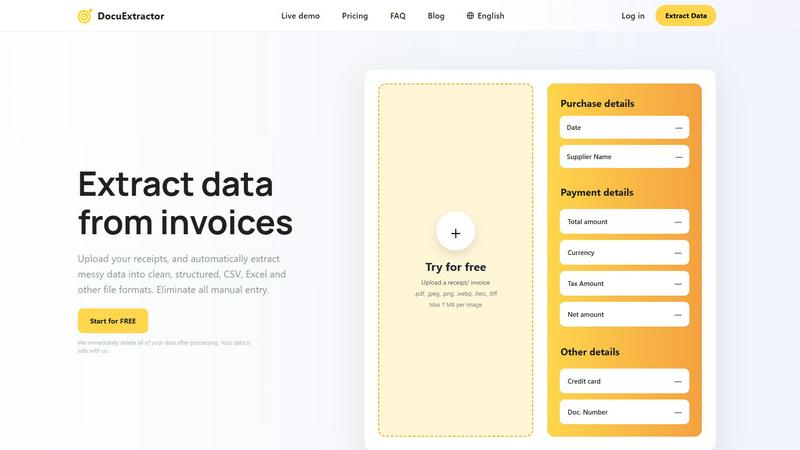
DocuExtractor automatically turns your receipts and invoices into clean, structured Excel or CSV files.
Last updated: February 28, 2026

Receipt Generator
Create realistic custom receipts instantly with free AI and over 400 store templates for legitimate use.
Last updated: April 4, 2026
Visual Comparison
DocuExtractor
Receipt Generator

Feature Comparison
DocuExtractor
Advanced AI-Powered Extraction
At its core, DocuExtractor employs a sophisticated blend of Optical Character Recognition (OCR), Deep Learning (DL), and Large Language Models (LLMs). This multi-layered AI approach allows the software to not just read text, but to understand the context and structure of financial documents. It can intelligently identify and extract key data fields such as dates, supplier names, total amounts, tax details, and document numbers from various layouts and formats with a reported 99.6% accuracy, ensuring the output is both precise and reliable.
Broad Format and Language Support
DocuExtractor is built to handle the diverse reality of business documentation. It supports a wide array of upload formats including PDF, JPG, PNG, WebP, HEIC, and TIFF files, making it compatible with scans, photos, and digital documents. Furthermore, it can process documents in over 45 languages with automatic language detection, which is crucial for businesses operating in global markets or dealing with international suppliers and clients.
Simple Three-Step Workflow
The platform is designed with a back-to-basics, user-friendly approach. The entire process is broken down into three straightforward steps: Upload, Extract, and Download. Users can drag and drop documents, either individually or in batches, select their desired output format (CSV or Excel), and receive their structured data instantly. This simplicity ensures a minimal learning curve, allowing teams to become productive in minutes without extensive training.
Enterprise-Grade Security and Scale
DocuExtractor is engineered for businesses with serious data security and volume needs. It operates on a principle of immediate data deletion post-processing, ensuring your financial information is not stored unnecessarily. The platform is enterprise-ready, capable of handling over 500,000 documents monthly with consistent performance. This combination of robust security, high-volume processing, and reliable uptime makes it a trustworthy solution for both small firms and large corporations.
Receipt Generator
Extensive Template Library
Receipt Generator provides a foundational starting point with a collection of over 400 store-specific receipt templates. These are not generic designs but are modeled after actual retailers and restaurants, such as Walmart, Best Buy, McDonald's, and Starbucks. Each template includes authentic layouts, correct fonts, and standard sections like headers, itemized lists, tax breakdowns, and payment details. This library eliminates the need to build a receipt from scratch, allowing users to select the closest match to their needs and begin customizing immediately, ensuring the final product looks genuine and credible.
Full Customization and Drag-and-Drop Editing
The tool offers complete control over the receipt's content and appearance through a user-friendly, drag-and-drop editor. Users can edit all text, prices, and dates. Beyond basic text, the platform uses different "blocks" for headers, line items, totals, barcodes, and dividers. These blocks can be visually rearranged, added, or removed to construct the exact receipt layout required. This feature ensures that every detail, from the subtotal to the payment method, can be tailored to create a perfectly accurate document for any specific scenario.
AI-Powered "Place in Scene" Feature
This advanced feature sets Receipt Generator apart by adding a layer of photorealistic context. Instead of just a flat digital file, the AI "Place in Scene" can generate an image of your customized receipt as if it were physically placed on any surface. Users can create visuals of a receipt on a wooden desk, a kitchen counter, inside a wallet, or even crumpled in a pocket. This eliminates the need for physical printing and staging, providing content creators and professionals with ready-to-use, realistic images for mockups, documentation, and visual storytelling.
Instant, High-Resolution Export
Speed and quality are fundamental to the tool's utility. Once a receipt is customized, it can be exported immediately without delays, watermarks (on Pro plans), or the need for an account on the free tier. Users can download their creation as a high-resolution PNG or PDF file with one click. This instant access to a pixel-perfect, professional-grade file ensures the receipt is ready for presentation, submission, or integration into other projects within seconds, streamlining workflows significantly.
Use Cases
DocuExtractor
Automating Accounts Payable Processing
For accounts payable teams, processing a high volume of invoices and receipts is a daily chore. DocuExtractor automates this by extracting key details like vendor name, invoice number, date, and total amount. The resulting CSV or Excel file can be directly imported into accounting software (like QuickBooks or Xero), eliminating manual entry, reducing errors, and accelerating the payment cycle, which can save professionals several hours per week.
Streamlining Expense Reporting and Reconciliation
Employees and managers can use DocuExtractor to quickly process personal or corporate credit card receipts. Instead of manually typing details from a pile of receipts, users upload them in batches. The software extracts the merchant, date, and amount, creating a clean, auditable digital record. This streamlines expense report submission, simplifies reconciliation for accountants, and ensures compliance with company spending policies.
Bank Statement Analysis and Bookkeeping
Bookkeepers and accountants often need to categorize transactions from bank and credit card statements. Manually copying this data is time-consuming. DocuExtractor can convert PDF bank statements into structured Excel files, isolating transaction dates, descriptions, and amounts. This formatted data is much easier to review, categorize, and integrate into general ledgers, making monthly closings faster and more accurate.
Data Migration and Historical Document Digitization
When businesses switch accounting systems or need to analyze historical financial data, they face the daunting task of digitizing paper archives or old PDFs. DocuExtractor provides an efficient solution by batch-processing these historical documents—invoices, receipts, statements—and converting them into structured digital data. This creates a searchable, analyzable database from previously unstructured information, unlocking valuable insights from past records.
Receipt Generator
Small Business Expense Documentation
Small business owners and freelancers often need to create records for expenses, reimbursements, or tax preparation. Receipt Generator allows them to produce professional, detailed receipts for services rendered or hypothetical purchases. This is invaluable for creating clean, consistent documentation for bookkeeping, client invoices, or for filling gaps in financial records with legitimate-looking proof of purchase, all formatted correctly with appropriate taxes and totals.
Content Creation and Social Media Proof
Content creators, influencers, and marketers frequently require visual proof of purchase for reviews, hauls, or sponsorship disclosures. Using Receipt Generator, they can create realistic receipts for products without needing to reveal personal shopping details. The AI "Place in Scene" feature is particularly useful here, enabling them to generate engaging photos of receipts alongside products for Instagram, YouTube thumbnails, or blog posts, enhancing authenticity and production value.
Resale and Inventory Management
Individuals who resell items online, such as on platforms like eBay or Poshmark, can use Receipt Generator to create proof of purchase for their inventory. This helps in establishing item authenticity and value for potential buyers. It provides a way to generate a clean, readable record of where an item was originally purchased and for what price, which can build buyer trust and facilitate smoother transactions.
Educational and Training Material Development
Trainers, educators, and software developers can use the tool to create realistic receipt examples for educational purposes. This includes training employees on point-of-sale systems, accounting software, or expense report procedures. Students learning about retail math, business operations, or graphic design can also use these customizable receipts as practical, hands-on project materials to understand transaction documentation.
Overview
About DocuExtractor
DocuExtractor is a fundamental software solution designed to solve a foundational problem in business operations: manual data entry. It is a cutting-edge document conversion tool that specializes in extracting and structuring data from financial documents. By utilizing advanced Optical Character Recognition (OCR) technology combined with deep learning and large language models (AI), it automatically transforms messy, unstructured information from documents like invoices, receipts, and bank statements into clean, organized data. This data is then output into universally usable formats such as CSV and Excel files. The primary value proposition of DocuExtractor is its ability to eliminate tedious, error-prone manual data input, thereby saving significant time and enhancing data reliability. It is built for accountants, bookkeepers, accounts payable specialists, and businesses of all sizes who seek to streamline their financial workflows. With a focus on accuracy, speed, and ease of use, DocuExtractor allows professionals to redirect their efforts from repetitive administrative tasks to more strategic, value-added activities, making it an essential tool for modern, efficient financial management.
About Receipt Generator
Receipt Generator is a foundational online tool designed for creating realistic, customized receipts. It serves a clear and essential purpose: to provide a digital solution for generating authentic-looking receipts without the need for physical printing or complex software. At its core, the tool offers access to over 400 professionally designed templates based on real-world stores and restaurants, including major retailers like Walmart, Target, CVS, and Starbucks. Users can start from these templates and customize every single detail, from store information and line items to prices, taxes, dates, and payment methods. The final receipt can be downloaded instantly as a high-resolution PNG file, ready for use. This product is built for a wide range of users, including small business owners needing proof of concept, freelancers documenting expenses, content creators requiring visual assets, and resellers managing inventory. Its primary value proposition lies in its simplicity, speed, and the unparalleled realism of its outputs, making digital receipt creation accessible and efficient for legitimate business, creative, and personal projects.
Frequently Asked Questions
DocuExtractor FAQ
What types of documents can DocuExtractor process?
DocuExtractor is specifically optimized for financial documents. This includes, but is not limited to, invoices, receipts, purchase orders, and bank or credit card statements. You can upload these documents in various formats such as PDF, JPG, PNG, WebP, HEIC, and TIFF. The software uses specialized algorithms for each document type to ensure the highest accuracy during data extraction.
How does DocuExtractor ensure the security of my data?
Data security is a foundational priority. DocuExtractor operates on a strict data privacy policy where all uploaded documents and the extracted data are immediately and permanently deleted from our servers once the processing is complete and you have downloaded your results. We do not store, share, or use your financial data for any other purpose, ensuring your sensitive information remains safe and confidential.
What is the accuracy rate of the data extraction?
DocuExtractor achieves a consistently high accuracy rate of 99.6% for standard, clear financial documents. This high precision is the result of combining advanced OCR technology with deep learning and large language model (AI) systems that are trained to understand the context and layout of financial data. For optimal results, ensure your uploaded documents are legible and of reasonable quality.
Can I process multiple documents at once?
Yes, batch processing is a core feature designed to save you time. DocuExtractor allows you to upload multiple documents simultaneously through a simple drag-and-drop interface. The system will process them in sequence, extracting data from each one. You can then download the consolidated, structured data from all documents in a single CSV or Excel file, ready for import into your accounting or analysis software.
Receipt Generator FAQ
Is Receipt Generator free to use?
Yes, Receipt Generator offers a free tier that allows anyone to start creating receipts immediately without requiring an account. This free access includes the use of the extensive template library and basic customization tools. However, receipts downloaded on the free plan will include a watermark. To remove the watermark and access advanced features like unlimited downloads and AI credits, users can upgrade to a Pro plan.
What is the "Place in Scene" AI feature?
The "Place in Scene" AI feature is a tool that generates a photorealistic image of your digital receipt placed onto a real-world background. You simply create your receipt, and then the AI can render it onto surfaces like a desk, countertop, or wallet. This creates a highly realistic photo without any physical printing or manual photography, saving time and resources for users who need visual content for mockups, social media, or documentation.
Can I use these receipts for official or fraudulent purposes?
No. Receipt Generator is strictly intended for legitimate business, creative, and personal use only as outlined in its Terms of Service. This includes expense mockups, content creation, inventory documentation, and educational projects. The receipts generated are not valid legal or financial documents and must not be used for fraud, deception, or to claim illegitimate refunds or expenses. Users are responsible for complying with all applicable laws.
What file formats can I download my receipt in?
Receipt Generator allows you to export your finished receipt in high-resolution PNG format, which is ideal for digital use, sharing online, or embedding in documents. The tool also supports PDF export, providing a vector-based format that is perfect for printing or professional archiving. The download process is instant, and file quality is maintained for clear, crisp text and details.
Alternatives
DocuExtractor Alternatives
DocuExtractor is a productivity and management tool designed to automate data extraction from financial documents like invoices and receipts. It uses OCR technology to convert unstructured document data into organized spreadsheets, eliminating manual entry. This category of software is essential for businesses aiming to improve efficiency and data accuracy in their financial workflows. Users often explore alternatives to find a solution that better fits their specific needs. Common reasons include budget constraints, as pricing models vary, or a need for different features like integration with specific accounting software. Some may require a tool that works on a particular operating system or offers a different user experience. When evaluating other options, consider the core functionality: accurate OCR, batch processing capabilities, and output format compatibility. It's also wise to assess the software's ease of use, security measures for handling sensitive documents, and the scalability of its pricing plans to match your business volume.
Receipt Generator Alternatives
Receipt Generator is a specialized online tool in the productivity and management category, designed to create custom, high-quality digital receipts. Users often explore alternatives for various reasons, such as specific budget constraints, the need for different feature sets like advanced reporting, or a preference for software that integrates with other business platforms they use. When evaluating other options, it's crucial to consider your core needs. Key factors include the realism and variety of receipt templates, the ease of customization, output quality, and the overall cost for the required features. The availability of unique tools, like AI-powered visual placement, can also be a significant differentiator for creative or documentation projects.