
Daily vs Never Drop
Side-by-side comparison to help you choose the right product.

Daily is a simple planner to clear your mind and focus on what truly matters.

Never Drop
NeverDrop captures contacts, enriches profiles, and drafts personalized follow-ups instantly to close deals faster.
Last updated: February 28, 2026
Visual Comparison
Daily
Never Drop

Feature Comparison
Daily
The Unstructured Capture Space
This is the foundational feature where everything begins. Daily provides a simple, open space to quickly jot down tasks, reminders, and thoughts the moment they enter your mind, without any requirement to categorize, prioritize, or organize them. This process of externalizing mental clutter is the first critical step to reducing cognitive load. It allows you to trust that nothing will be forgotten, freeing your mental energy for actual focus instead of constant recall. You can capture items throughout your day as they arise, creating a comprehensive but unorganized master list that serves as your brain's external hard drive.
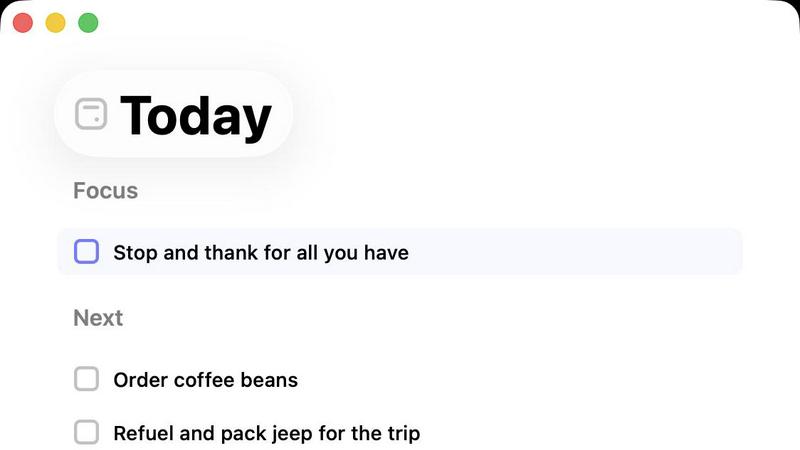
The Intentional "Today" View
After capturing your thoughts, the "Today" view is where intention meets action. This view is deliberately designed to show only the tasks you have consciously chosen for the current day. It acts as a focused lens, filtering out the noise of your master list to present a clean, manageable slate. This feature prevents the common pitfall of an endlessly daunting to-do list and helps combat decision fatigue by presenting a clear starting point. By limiting your view to today's commitments, Daily fosters a calm, grounded sense of focus on the present moment's work.
Gentle Task Carry-Forward
Not everything captured needs to be done today. Daily understands this and incorporates a gentle, non-punitive system for managing unfinished tasks. At the end of the day, items you did not complete are not marked as failures or left to disappear. Instead, they are simply carried forward to the next day's planning session. This feature removes the guilt and pressure associated with an incomplete list and reframes planning as a daily, forgiving practice. You are invited to re-evaluate each carried-forward item with fresh eyes, deciding anew if it deserves a spot on your next "Today" list or can be let go entirely.
Purposeful Simplicity in Design
The entire application is built on a philosophy of minimalism and restraint. This is not merely an aesthetic choice but a core feature that reduces friction and mental overhead. There are no complex tags, elaborate color-coding systems, or overwhelming integrations. The interface is clean, intuitive, and free of distractions. This intentional simplicity ensures that the tool itself never becomes a source of complexity or pressure, staying true to its goal of being a supportive, quiet place for thought management rather than another demanding app to manage.
Never Drop
AI-Powered Business Card Scanning
Never Drop allows users to scan any business card in seconds using their smartphone camera. The app's AI-powered OCR technology extracts essential contact details such as name, company, title, phone number, and email instantly. This eliminates the hassle of manual typing and reduces the risk of losing valuable cards.
Automatic Email Enrichment
Business cards often contain generic emails or lack email addresses entirely. Never Drop resolves this issue by automatically finding verified work emails based on the contact's name and company. This feature ensures that your contact profiles are enriched and ready for CRM integration without any manual effort.
Personalized AI-Generated Follow-Ups
After scanning a business card, users can dictate voice notes or add text context about their conversation. Never Drop leverages this information to generate a personalized follow-up email, tailored to the specifics of your interaction. Users can review and send the email with just one tap, all in under two minutes.
Team Collaboration and Management
Never Drop offers a collaborative workspace for sales teams, allowing them to organize scans by event, reassign leads between representatives, and track team activities through a comprehensive dashboard. This ensures that everyone on the team remains aligned, and nothing slips through the cracks.
Use Cases
Daily
For the Overwhelmed Professional
Professionals juggling multiple projects, meetings, and communications often have their thoughts scattered across emails, notes, and their own memory. Daily serves as a unified, calming dock for all work-related tasks. They can quickly capture a follow-up from a call, an idea for a presentation, or a reminder to send a report without breaking their flow. At the start of each workday, they review their captured list and intentionally select 3-5 priority items for their "Today" view, creating a clear and achievable plan that reduces anxiety and increases productive output.
For the Mindful Student
Students face a unique blend of academic deadlines, study sessions, and personal commitments. Daily helps them externalize all syllabus tasks, assignment ideas, and reading reminders into one trusted system. Instead of feeling crushed by the scope of a semester, they can focus on the actionable steps for today: perhaps just "read Chapter 4" and "outline essay introduction." This daily narrowing of focus makes large projects feel manageable, reduces procrastination, and helps maintain a healthier balance by clearly defining daily academic boundaries.
For the Busy Parent or Homemaker
Managing a household involves a constant, swirling list of errands, appointments, chores, and family needs that are easy to forget. Daily acts as a reliable second brain for all non-work responsibilities. A parent can instantly capture "order birthday cake," "call pediatrician," and "buy groceries" amid a busy day. During a quiet moment, they can then look at their list and realistically choose what can be accomplished in that day's limited windows of time, bringing order and calm to domestic management without the stress of a missed task.
For Anyone Seeking Mental Clarity
This use case applies to anyone experiencing general life overwhelm or mental clutter. Whether planning a personal project, managing personal goals, or simply trying to quiet a busy mind, Daily provides the structure for a helpful mental practice. The act of regularly downloading thoughts onto a trusted list is a form of mindfulness. The subsequent daily ritual of reviewing and intentionally selecting tasks fosters a sense of control and purposeful action, replacing feelings of being scattered with a grounded sense of direction and clarity.
Never Drop
Trade Shows and Expos
Sales teams attending trade shows can benefit significantly from Never Drop. The ability to scan business cards quickly and efficiently ensures that leads are captured before they leave the booth, allowing for immediate follow-up and maximizing conversion opportunities.
Networking Events
At networking events, professionals often meet numerous contacts in a short period. Never Drop enables users to capture these connections effortlessly, adding context about conversations to ensure that follow-ups are relevant and timely.
Conferences and Seminars
Conferences present a unique opportunity for businesses to connect with potential clients and partners. With Never Drop, users can easily manage contacts gathered during these events and send personalized follow-up emails that capitalize on the momentum gained during the conference.
Business Meetings and Dinners
In more intimate settings like business dinners, Never Drop helps users maintain a professional edge by allowing them to capture leads without the need for cumbersome note-taking. This ensures that conversations are remembered and followed up on promptly.
Overview
About Daily
Daily is a digital to-do list and daily planner built on a foundational principle: clarity over chaos. It is designed for individuals who feel mentally overwhelmed by the constant stream of tasks, ideas, and responsibilities that modern life demands. Instead of adding to the pressure with complex project management features or gamified productivity metrics, Daily provides a quiet, intentional space to unload your mind. Its core value proposition is to help you transition from a state of reactive overwhelm to proactive calm by separating the act of capturing everything from the act of deciding what truly matters. The tool is for anyone who has ever felt paralyzed by a long list or struggled to start their day because they didn't know where to begin. Daily offers just enough structure to create order without introducing complexity, acting as a gentle guide back to focused, meaningful work. By encouraging you to put things down as they come and then review them with fresh eyes, it facilitates a more mindful and deliberate approach to daily planning, ensuring you move forward with purpose rather than simply checking off boxes.
About Never Drop
Never Drop is an innovative lead-capture app meticulously designed for sales teams working in dynamic and fast-paced environments such as trade shows, conferences, and networking events. Its primary function is to streamline the process of collecting and managing leads effectively. Users can easily scan business cards using their smartphones, which significantly reduces the time and effort typically required for manual data entry. Once a card is scanned, users have the option to enrich the captured data with voice notes or text context about their conversations. This ensures that vital details about each lead are preserved. One of the standout features of Never Drop is its advanced AI technology, which drafts personalized follow-up emails in under two minutes. This capability helps eliminate the risk of losing leads by ensuring that timely follow-ups are sent. Additionally, Never Drop integrates seamlessly with popular CRMs like HubSpot, keeping your sales pipeline organized and efficient. By utilizing Never Drop, sales teams can bid farewell to lost leads and embrace a more streamlined approach to turning prospects into closed deals.
Frequently Asked Questions
Daily FAQ
How is Daily different from other to-do list apps?
Daily distinguishes itself through its philosophical commitment to reducing overwhelm, not increasing productivity pressure. Most to-do apps are built on a framework of efficiency, packing in features for sorting, scheduling, and optimizing every minute. Daily is built on a framework of clarity. It intentionally lacks complex features to force a simpler, two-step process: capture everything without judgment, then consciously choose only what matters for today. The focus is on mental calm and intentional action, not on doing more.
What happens to tasks I don't complete today?
Tasks that you do not complete are not deleted or highlighted as overdue. They are gently carried forward to the next day. When you next open Daily, these items will reappear in your master capture list, ready for your fresh review. You then have the opportunity to decide if each item is still relevant and deserves a place on your new "Today" list, or if it can be deleted. This system is designed to be forgiving and flexible, eliminating the guilt of an unfinished list.
Can I use Daily for long-term project planning?
Daily is purposefully designed for daily planning, not detailed project management. It is excellent for capturing the individual action items that stem from a larger project. You would capture "draft project proposal introduction" or "email client for feedback" as tasks. For visualizing timelines, dependencies, and major milestones, a dedicated project management tool would be more suitable. Daily excels at taking those large projects and breaking them down into calm, daily actionable steps.
Is my data stored securely, and can I access it on multiple devices?
Based on standard practices for modern applications, Daily would prioritize user data security, though specific technical details are not provided in the source material. Typically, data is stored securely in the cloud with encryption. For multi-device access, this would require an account-based system allowing you to sync your capture list and Today view across your phone, tablet, and computer, ensuring your plan is always with you. For definitive answers on security and sync, checking the official Daily website or app store listing is recommended.
Never Drop FAQ
What is Never Drop?
Never Drop is a lead-capture app designed for sales teams at events. It enables users to scan business cards, add contextual notes, and generates personalized follow-up emails in under two minutes. It also enriches contact data with verified emails and integrates with CRMs.
How does business card scanning work?
Users can take a photo of any business card through the Never Drop app. The app utilizes AI-powered OCR to extract relevant contact details, including the person's name, company, title, phone number, and email. Manual entry of contact details is also an option if preferred.
What types of events is Never Drop suitable for?
Never Drop is ideal for various events such as trade shows, conferences, networking events, meetups, and business dinners. It allows users to categorize scans by event, making it easy to track and manage leads from specific conferences.
Do I need the mobile app for Never Drop?
Yes, the mobile app is essential for scanning business cards, recording voice context, and triggering follow-ups on the go. The web dashboard complements the mobile app by allowing team management, review of scans, configuration of settings, and billing management. Both platforms work together seamlessly.