ConvertBankToExcel vs Vendor Space
Side-by-side comparison to help you choose the right product.

ConvertBankToExcel
ConvertBankToExcel instantly transforms PDF bank statements into Excel, CSV, and more with over 99% accuracy.
Last updated: February 26, 2026

Vendor Space
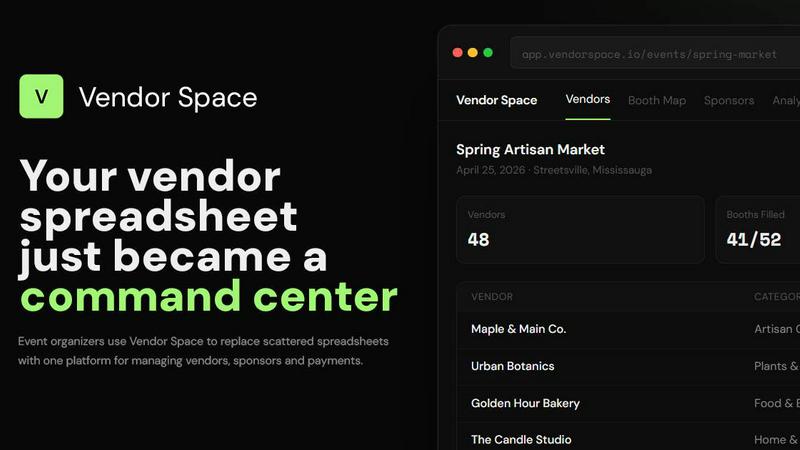
Vendor Space is a simple platform that replaces scattered spreadsheets to manage all your event vendors and payments in one place.
Last updated: April 13, 2026
Visual Comparison
ConvertBankToExcel

Vendor Space
Feature Comparison
ConvertBankToExcel
99%+ Accuracy Rate
ConvertBankToExcel guarantees an accuracy rate of over 99%, which has been verified by CPAs. This level of precision significantly reduces the likelihood of errors during data extraction, ensuring that financial records remain reliable and trustworthy.
Fast Processing Time
The platform efficiently processes bank statements in under 30 seconds on average. This rapid turnaround allows accounting professionals to focus on analyzing financial data rather than spending excessive time on manual entry and conversions.
Extensive Bank Support
ConvertBankToExcel supports over 20 major banks across the U.S. and Canada, including Chase, Wells Fargo, and TD. This extensive compatibility ensures that users can convert statements from a wide array of financial institutions without hassle.
Multiple Export Formats
Users can choose from nine different export formats, including QuickBooks (QBO/QFX/OFX/IIF), Excel, CSV, JSON, and XML. This flexibility allows accounting professionals to seamlessly integrate converted statements into their existing workflows and software applications.
Vendor Space
Centralized Vendor Management
This core feature replaces scattered spreadsheets and email chains with a unified dashboard. You can view all vendor applications, track their status (Confirmed, Pending, Waitlist), manage contact details, and see key metrics like total vendors and revenue at a glance. It provides a single source of truth for every participant in your event, eliminating the need to switch between multiple documents and inboxes to find information.
Visual Booth Mapping & Assignment
Organizers can create interactive floor plans to manage physical event space. This tool allows for drag-and-drop booth assignment, shows real-time availability, and helps prevent double-booking conflicts. Visualizing your layout simplifies the planning process and makes it easy to communicate placements to vendors, moving beyond manual, error-prone methods like coloring cells on a spreadsheet.
Integrated Payment Processing
Vendor Space includes built-in, Stripe-powered payment collection. This allows vendors to pay fees directly through a secure portal, with funds going to your account. The platform provides real-time tracking of collected revenue, automatic fee calculations, and simplifies the entire financial workflow. This removes the burden of manually creating and tracking invoices, sending payment links, and reconciling transactions.
Digital Contracts & E-Signatures
The platform streamlines the agreement process by enabling you to send, sign, and track vendor contracts digitally. Built-in e-signature functionality means vendors can review and sign important documents like vendor agreements, booth terms, and insurance waivers online. This feature creates a secure, organized, and searchable record of all signed contracts, replacing slow and unreliable paper-based or email attachment methods.
Use Cases
ConvertBankToExcel
Mortgage Applications
For individuals preparing mortgage applications, ConvertBankToExcel can organize and convert bank statements into a clear format that meets lender requirements. This simplifies the process and enhances the chances of approval.
Tax Preparation
During tax season, accountants can utilize ConvertBankToExcel to compile and organize financial statements efficiently. By converting bank statements into easily manageable formats, it streamlines the tax filing process and ensures compliance with IRS regulations.
Visa Applications
When applying for visas, applicants often need to submit financial documentation. ConvertBankToExcel assists in converting bank statements for visa applications, ensuring that all necessary information is presented in a clear and organized manner.
Financial Audits
During financial audits, having accurate and accessible bank statements is crucial. ConvertBankToExcel enables professionals to quickly convert and organize statements, making it easier to prepare for audits and present necessary documentation.
Vendor Space
Craft Fairs and Artisan Markets
For organizers of craft fairs, managing dozens or hundreds of unique artisans is a complex task. Vendor Space simplifies applications, categorizes vendors by craft type, manages booth fees, and organizes a diverse floor plan. The vendor portal allows artisans to apply and pay on their own, saving the organizer countless hours of administrative communication and data entry.
Food Festivals and Pop-Up Markets
Food festivals involve strict health regulations, varied vendor needs, and complex spatial planning. The platform helps manage specialized application forms, track necessary permits and certificates, and map out food truck locations or kitchen spaces efficiently. Integrated payments ensure quick collection of vendor fees, which is crucial for high-turnover pop-up events.
Trade Shows and Business Expos
Professional trade shows require robust sponsor management and detailed analytics. Vendor Space allows organizers to create tiered sponsorship packages (Gold, Silver, Bronze), track sponsor deliverables, and manage all exhibitors from one dashboard. The analytics module provides clear insights into revenue and participation, which is vital for reporting to stakeholders and planning future events.
Community Events and Farmers Markets
Local event organizers often work with limited resources and volunteer staff. Vendor Space's free-to-use model and simple setup are ideal for this. It provides a professional framework for managing local vendors and sponsors, collecting payments securely, and communicating event details, all without requiring a large budget or technical expertise.
Overview
About ConvertBankToExcel
ConvertBankToExcel is an innovative, AI-powered platform specifically designed for accounting professionals to streamline the bank statement conversion process. This tool allows users to effortlessly convert PDF bank statements into various formats, including Excel, CSV, and QuickBooks, thus eliminating the tedious task of manual data entry. With its advanced technology, ConvertBankToExcel automatically extracts transaction data from both digital and scanned PDF files, making it a versatile solution for accountants, bookkeepers, and CPAs. Trusted by over 50,000 financial professionals, this service boasts a 99% accuracy rate that has been verified by CPAs. Users can enjoy a free tier that allows for the conversion of up to seven pages daily without requiring a credit card. For those needing more extensive capabilities, professional plans start at just $15 per month, providing a cost-effective way to enhance efficiency and productivity.
About Vendor Space
Vendor Space is a foundational platform built to solve the core administrative challenges faced by event organizers. It is an all-in-one vendor management system designed to replace the chaotic, manual processes that plague event planning. If you are currently managing vendors through a patchwork of spreadsheets, disjointed email threads, and separate tools for payments and contracts, Vendor Space consolidates these essential tasks into a single, intuitive command center. The platform is built by an event organizer for event organizers, ensuring it addresses real-world needs. It manages the entire vendor lifecycle, from initial application and custom form creation to booth mapping, digital contract signing, and payment processing. It also integrates sponsor management, allowing you to handle paid partnerships within the same system you use for vendors. The value proposition is clear: professionalize your events, save significant administrative time, and provide a smoother experience for both organizers and vendors. Vendor Space operates on a transparent, pay-as-you-go model. It is completely free to use, with the platform only earning a fee when you successfully collect payment from a vendor, aligning its success directly with yours.
Frequently Asked Questions
ConvertBankToExcel FAQ
How does ConvertBankToExcel ensure data security?
ConvertBankToExcel employs bank-grade encryption to protect user data during the conversion process. Additionally, all files are automatically deleted after 24 hours to further ensure privacy and security.
Can I convert scanned bank statements?
Yes, the platform features advanced AI-powered OCR technology that can accurately convert both digital and scanned PDF bank statements. This ensures that all types of bank statements can be processed efficiently.
What is the free tier offering?
ConvertBankToExcel offers a free tier that allows users to convert up to seven pages daily without the need for a credit card. This provides an excellent opportunity for new users to explore the platform's capabilities.
What should I do if I encounter errors in the converted data?
The platform automatically detects and corrects OCR errors, enhancing the accuracy of data extraction. If you still notice discrepancies, you can easily contact customer support for further assistance.
Vendor Space FAQ
How quickly can I set up my first event?
Most organizers can have their first event live and ready to accept vendor applications within 15 minutes. The process involves creating your event, configuring basic details like booth options and pricing, and then immediately sharing your unique vendor registration page. The platform is designed for simplicity from the ground up.
What is the cost to use Vendor Space?
Vendor Space uses a straightforward, performance-based pricing model. The platform itself is completely free to use. There are no monthly subscriptions, no hidden setup fees, and no required contracts. Vendor Space only charges a flat 6% transaction fee when you successfully process and collect a payment from a vendor through the system.
How do vendors apply and pay for my event?
You share a custom, professional registration page generated by Vendor Space. Vendors visit this page to fill out your application form, select their preferred booth options, and submit payment securely via credit card. This creates a self-serve portal that automates the entire intake process, saving you from manually handling each application and invoice.
Can I manage sponsors alongside vendors?
Yes, sponsor management is a fully integrated module within Vendor Space. You can create custom sponsorship tiers with different benefits and pricing, track the status of each sponsor, and manage all communication and deliverables from the same dashboard you use for regular vendors. This keeps your entire participant ecosystem in one place.
Alternatives
ConvertBankToExcel Alternatives
ConvertBankToExcel is an AI-powered bank statement conversion platform designed for accounting professionals. It automates the process of extracting transaction data from PDF bank statements, converting them into various formats like Excel, CSV, and QuickBooks. This technology falls under the productivity and management category, streamlining financial tasks for accountants and bookkeepers. Users often seek alternatives to ConvertBankToExcel for various reasons, such as pricing structures, specific feature requirements, or compatibility with different platforms. When looking for an alternative, it's essential to consider factors like accuracy rates, processing speed, supported file formats, and user experience. Additionally, ensure that any option you consider aligns with your specific needs and the scale of your operations.
Vendor Space Alternatives
Vendor Space is a vendor and sponsor management platform within the business and finance software category. It is designed to help event organizers consolidate their operations, replacing scattered tools like spreadsheets and email with a single system for applications, contracts, payments, and communication. Users may explore alternatives for various reasons. Some may seek different pricing structures, such as a monthly subscription without transaction fees. Others might require specific integrations with existing event software or need a platform that handles broader event planning tasks beyond vendor management. The scale and frequency of one's events also play a key role in determining the right fit. When evaluating an alternative, focus on your core needs. Consider the total cost of ownership, including any subscription, transaction fees, or setup costs. Assess whether the platform's features align with your vendor and sponsor workflow from initial contact to post-event settlement. Finally, prioritize ease of use for both you and your vendors to ensure a smooth process.