AskFormulas vs Receipt Generator
Side-by-side comparison to help you choose the right product.

AskFormulas
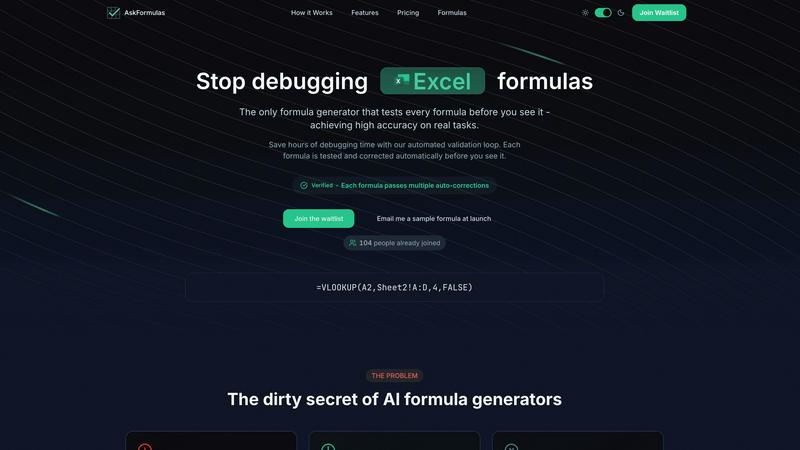
AskFormulas creates and tests your spreadsheet formulas for you, guaranteeing accuracy and saving time.
Last updated: February 28, 2026

Receipt Generator
Create realistic custom receipts instantly with free AI and over 400 store templates for legitimate use.
Last updated: April 4, 2026
Visual Comparison
AskFormulas
Receipt Generator

Feature Comparison
AskFormulas
Verified Formula Validation
Every formula generated by AskFormulas undergoes a strict, automated three-step validation process before you see it. First, your natural language request is parsed into precise formula intent. Second, the proposed formula is executed in a secure sandbox using template data to simulate real-world conditions. Third, any errors detected are automatically corrected through multiple iterations. This loop continues until the formula passes all tests, at which point it earns the "Verified" badge, ensuring high accuracy and reliability for your real tasks.
Natural Language to Formula Conversion
You do not need to know spreadsheet syntax to use AskFormulas. The platform features an intuitive input system where you simply describe your goal in plain English. For example, you can type "sum all values in column B where column A contains the word Sales" and the AI will handle the complex task of translating that intent into the correct formula syntax, such as =SUMIF(A:A,"*Sales*",B:B). This removes the barrier of memorizing function names and structures.
Cross-Platform Syntax Handling
AskFormulas seamlessly supports both Microsoft Excel and Google Sheets. A simple one-click toggle allows you to switch between the two platforms. The system automatically adjusts the formula syntax to match the conventions and specific functions of your chosen spreadsheet software, whether it's VLOOKUP for Excel or ARRAYFORMULA for Sheets. This ensures you get a formula that works correctly in your specific environment without manual adjustments.
Smart Error Detection and Correction
The tool proactively identifies and fixes common formula errors as part of its validation loop. When a generated formula results in an error like #REF! or #VALUE! during testing, the system doesn't just report it. It analyzes the cause and automatically creates a corrected version, retesting it until it works. This smart correction mechanism is what drives the high accuracy rate, saving you from the manual debugging process.
Receipt Generator
Extensive Template Library
Receipt Generator provides a foundational starting point with a collection of over 400 store-specific receipt templates. These are not generic designs but are modeled after actual retailers and restaurants, such as Walmart, Best Buy, McDonald's, and Starbucks. Each template includes authentic layouts, correct fonts, and standard sections like headers, itemized lists, tax breakdowns, and payment details. This library eliminates the need to build a receipt from scratch, allowing users to select the closest match to their needs and begin customizing immediately, ensuring the final product looks genuine and credible.
Full Customization and Drag-and-Drop Editing
The tool offers complete control over the receipt's content and appearance through a user-friendly, drag-and-drop editor. Users can edit all text, prices, and dates. Beyond basic text, the platform uses different "blocks" for headers, line items, totals, barcodes, and dividers. These blocks can be visually rearranged, added, or removed to construct the exact receipt layout required. This feature ensures that every detail, from the subtotal to the payment method, can be tailored to create a perfectly accurate document for any specific scenario.
AI-Powered "Place in Scene" Feature
This advanced feature sets Receipt Generator apart by adding a layer of photorealistic context. Instead of just a flat digital file, the AI "Place in Scene" can generate an image of your customized receipt as if it were physically placed on any surface. Users can create visuals of a receipt on a wooden desk, a kitchen counter, inside a wallet, or even crumpled in a pocket. This eliminates the need for physical printing and staging, providing content creators and professionals with ready-to-use, realistic images for mockups, documentation, and visual storytelling.
Instant, High-Resolution Export
Speed and quality are fundamental to the tool's utility. Once a receipt is customized, it can be exported immediately without delays, watermarks (on Pro plans), or the need for an account on the free tier. Users can download their creation as a high-resolution PNG or PDF file with one click. This instant access to a pixel-perfect, professional-grade file ensures the receipt is ready for presentation, submission, or integration into other projects within seconds, streamlining workflows significantly.
Use Cases
AskFormulas
Financial Modeling and Analysis
Financial analysts and accountants can use AskFormulas to quickly build accurate and complex models. Instead of manually constructing error-prone formulas for projections, valuations, or ratio analysis, they can describe the logic in plain language. The tool generates validated formulas for functions like XNPV, IRR, or sophisticated INDEX-MATCH combinations, ensuring data integrity and saving significant time in model development and auditing.
Business Reporting Automation
Managers and revenue operations teams often spend hours compiling weekly or monthly reports. AskFormulas streamlines this by automating formula creation for summarizing sales data, calculating growth percentages, or pulling specific records with VLOOKUP. By generating verified formulas to aggregate and analyze data from multiple sheets, it enables faster report generation with reduced risk of manual errors.
Data Cleaning and Organization
Marketing professionals, researchers, or administrators frequently need to clean and organize large datasets. AskFormulas can instantly create formulas for tasks like extracting text, converting date formats, removing duplicates, or categorizing data based on conditions. Describing the cleanup goal, such as "combine first name and last name from columns A and B," yields a ready-to-use, validated formula, speeding up data preparation.
Accessibility for Non-Experts
Small business owners, students, or professionals in non-technical roles who lack deep Excel or Sheets expertise can achieve advanced results. They can perform tasks like calculating inventory totals, creating simple budgets, or finding specific customer information without learning complex syntax. AskFormulas acts as an on-demand expert, translating their business needs into working formulas with guaranteed accuracy.
Receipt Generator
Small Business Expense Documentation
Small business owners and freelancers often need to create records for expenses, reimbursements, or tax preparation. Receipt Generator allows them to produce professional, detailed receipts for services rendered or hypothetical purchases. This is invaluable for creating clean, consistent documentation for bookkeeping, client invoices, or for filling gaps in financial records with legitimate-looking proof of purchase, all formatted correctly with appropriate taxes and totals.
Content Creation and Social Media Proof
Content creators, influencers, and marketers frequently require visual proof of purchase for reviews, hauls, or sponsorship disclosures. Using Receipt Generator, they can create realistic receipts for products without needing to reveal personal shopping details. The AI "Place in Scene" feature is particularly useful here, enabling them to generate engaging photos of receipts alongside products for Instagram, YouTube thumbnails, or blog posts, enhancing authenticity and production value.
Resale and Inventory Management
Individuals who resell items online, such as on platforms like eBay or Poshmark, can use Receipt Generator to create proof of purchase for their inventory. This helps in establishing item authenticity and value for potential buyers. It provides a way to generate a clean, readable record of where an item was originally purchased and for what price, which can build buyer trust and facilitate smoother transactions.
Educational and Training Material Development
Trainers, educators, and software developers can use the tool to create realistic receipt examples for educational purposes. This includes training employees on point-of-sale systems, accounting software, or expense report procedures. Students learning about retail math, business operations, or graphic design can also use these customizable receipts as practical, hands-on project materials to understand transaction documentation.
Pricing Comparison
AskFormulas
AskFormulas offers simple, transparent pricing with three main plans. All plans include access to the core validated formula generation, formula history, and priority queue access.
Starter Plan: Priced at $9 per month, this plan is for individual users. It includes 500 formulas per month, support for all formula types, and email support.
Pro Plan: Priced at $19 per month, this popular plan is designed for power users. It includes 2,000 formulas per month, priority support, and additional export features.
Team Plan: Priced at $39 per month, this plan is for small teams of up to 5 members. It includes 6,000 shared formulas per month, a team workspace, admin controls, SSO integration, audit logs, and dedicated support.
All plans can be billed monthly or yearly, and enterprise pricing is available for organizations with greater needs.
Receipt Generator
Receipt Generator offers simple, transparent pricing with a lifetime access option. The primary highlighted plan is a Lifetime Pro plan, often offered at a discount (e.g., 50% off from $47 to $23.50 for a one-time payment). This plan includes a set number of AI credits (e.g., 25 credits), removes all watermarks from downloads, provides unlimited receipt downloads, grants access to all 400+ templates, allows users to save their own custom templates, and offers unlimited customization options. This model provides a cost-effective, single-payment solution for users who require regular, watermark-free receipt creation without a recurring subscription.
Overview
About AskFormulas
AskFormulas is a fundamental tool designed to solve the most common and frustrating problem in spreadsheet work: broken formulas. It is an AI-powered formula generator that goes beyond simple text-to-code conversion. Its core innovation is a rigorous, automated validation process that tests and corrects every single formula before it is presented to you. This ensures the formulas you receive are not just syntactically correct, but functionally accurate and ready to use. Unlike other generators that can have error rates of 40-60%, AskFormulas delivers reliable results you can trust immediately.
The tool is built for anyone who uses Excel or Google Sheets, from complete beginners to seasoned professionals. If you are a financial analyst building complex models, a business manager automating reports, a marketer analyzing data, or a small business owner without deep technical expertise, AskFormulas simplifies your workflow. You describe what you need in plain English through a natural language input. The AI interprets your request, generates the appropriate formula, and then runs it through a secure sandbox environment with synthetic test data. If errors are found, the system auto-corrects them in an iterative loop until the formula is verified. The final output comes with a clear "Verified" badge, guaranteeing it has been tested and works. By eliminating the hours typically spent debugging #REF! and #VALUE! errors, AskFormulas returns the focus to your actual work, making spreadsheet management more efficient and less stressful.
About Receipt Generator
Receipt Generator is a foundational online tool designed for creating realistic, customized receipts. It serves a clear and essential purpose: to provide a digital solution for generating authentic-looking receipts without the need for physical printing or complex software. At its core, the tool offers access to over 400 professionally designed templates based on real-world stores and restaurants, including major retailers like Walmart, Target, CVS, and Starbucks. Users can start from these templates and customize every single detail, from store information and line items to prices, taxes, dates, and payment methods. The final receipt can be downloaded instantly as a high-resolution PNG file, ready for use. This product is built for a wide range of users, including small business owners needing proof of concept, freelancers documenting expenses, content creators requiring visual assets, and resellers managing inventory. Its primary value proposition lies in its simplicity, speed, and the unparalleled realism of its outputs, making digital receipt creation accessible and efficient for legitimate business, creative, and personal projects.
Frequently Asked Questions
AskFormulas FAQ
How accurate are the generated formulas?
AskFormulas is designed for exceptionally high accuracy. Unlike standard AI generators, every formula undergoes an automated validation and correction loop in a simulated spreadsheet environment. This process tests the formula with synthetic data and auto-corrects any errors multiple times until it works perfectly. The result is a "Verified" formula that has been proven functional before you ever see it, drastically reducing the 40-60% error rate common in other tools.
Does it work with both Excel and Google Sheets?
Yes, AskFormulas provides full support for both Microsoft Excel and Google Sheets. The interface includes a simple toggle to switch between the two platforms. When you select your preferred software, the system automatically generates the formula using the correct syntax and function names specific to that platform, ensuring seamless compatibility whether you use =VLOOKUP in Excel or =ARRAYFORMULA(VLOOKUP(...)) in Sheets.
How many formulas can I generate?
The number of formulas you can generate per month depends on your chosen subscription plan. The Starter plan includes 500 formulas per month, the Pro plan offers 2,000, and the Team plan provides 6,000 formulas to be shared among up to 5 team members. This tiered structure ensures there is a suitable plan for individual users, power users, and small teams with varying needs.
What happens if my formula has an error?
If a generated formula contains an error during AskFormulas's internal validation testing, you will never see the broken version. The system's smart error detection identifies issues like #REF! or #VALUE! and automatically initiates corrections. It iteratively adjusts the formula and retests it within the secure sandbox until a fully functional, error-free version is achieved. Only this validated, working formula is then presented to you with the "Verified" badge.
Receipt Generator FAQ
Is Receipt Generator free to use?
Yes, Receipt Generator offers a free tier that allows anyone to start creating receipts immediately without requiring an account. This free access includes the use of the extensive template library and basic customization tools. However, receipts downloaded on the free plan will include a watermark. To remove the watermark and access advanced features like unlimited downloads and AI credits, users can upgrade to a Pro plan.
What is the "Place in Scene" AI feature?
The "Place in Scene" AI feature is a tool that generates a photorealistic image of your digital receipt placed onto a real-world background. You simply create your receipt, and then the AI can render it onto surfaces like a desk, countertop, or wallet. This creates a highly realistic photo without any physical printing or manual photography, saving time and resources for users who need visual content for mockups, social media, or documentation.
Can I use these receipts for official or fraudulent purposes?
No. Receipt Generator is strictly intended for legitimate business, creative, and personal use only as outlined in its Terms of Service. This includes expense mockups, content creation, inventory documentation, and educational projects. The receipts generated are not valid legal or financial documents and must not be used for fraud, deception, or to claim illegitimate refunds or expenses. Users are responsible for complying with all applicable laws.
What file formats can I download my receipt in?
Receipt Generator allows you to export your finished receipt in high-resolution PNG format, which is ideal for digital use, sharing online, or embedding in documents. The tool also supports PDF export, providing a vector-based format that is perfect for printing or professional archiving. The download process is instant, and file quality is maintained for clear, crisp text and details.
Alternatives
AskFormulas Alternatives
AskFormulas is a productivity tool designed to create and verify formulas for Excel and Google Sheets. It belongs to the category of software that helps users automate and simplify spreadsheet tasks. People often seek alternatives to tools like this for various reasons, such as budget constraints, a need for different features, or specific platform requirements that may not be fully met. When evaluating other options, it's wise to consider a few core principles. First, assess the tool's accuracy and whether it validates its outputs, as unreliable formulas can create more work. Second, ensure it supports the spreadsheet platform you use daily. Finally, consider the overall value, balancing cost against the time and frustration the tool saves you in your workflow. The goal is to find a solution that integrates smoothly into your process. A good tool should reduce complexity, not add to it. By focusing on these foundational aspects—reliability, compatibility, and value—you can make a sound decision that enhances your productivity with spreadsheets.
Receipt Generator Alternatives
Receipt Generator is a specialized online tool in the productivity and management category, designed to create custom, high-quality digital receipts. Users often explore alternatives for various reasons, such as specific budget constraints, the need for different feature sets like advanced reporting, or a preference for software that integrates with other business platforms they use. When evaluating other options, it's crucial to consider your core needs. Key factors include the realism and variety of receipt templates, the ease of customization, output quality, and the overall cost for the required features. The availability of unique tools, like AI-powered visual placement, can also be a significant differentiator for creative or documentation projects.