AI Photo Generator vs TinyFast
Side-by-side comparison to help you choose the right product.

AI Photo Generator
Create stunning, photorealistic images from text or your own photos with this free and fast AI generator.
Last updated: March 11, 2026

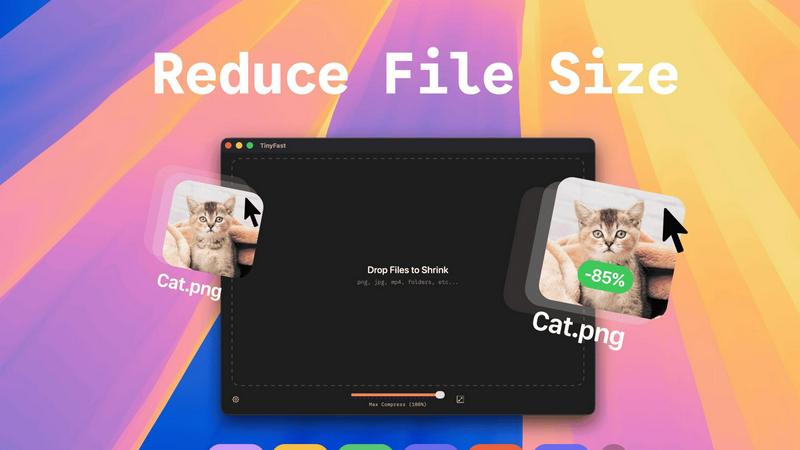
TinyFast compresses images, videos, and PDFs locally on your Mac for quick and secure file management.
Last updated: February 28, 2026
Visual Comparison
AI Photo Generator

TinyFast
Feature Comparison
AI Photo Generator
Text-to-Image Generation
This is the foundational feature where you create images from written descriptions. You provide a detailed text prompt about your desired subject, setting, lighting, and style. The platform's AI models are fine-tuned to interpret this natural language with high accuracy, turning your abstract ideas into concrete, detailed visuals. This process is ideal for generating completely original artwork, product mockups, or scene concepts directly from your imagination.
Image-to-Image Editing
This feature allows for the transformation of existing photos. You upload a reference image, which serves as a structural and stylistic baseline. Then, using text instructions, you direct the AI on what to change, such as altering the background, adjusting the color palette, changing the artistic style, or modifying specific elements. This workflow is essential for maintaining visual consistency, like updating a product shot or creating different versions of a portrait while keeping the subject recognizable.
Extensive Model and Style Library
The platform provides access to a diverse library of specialized AI models, each optimized for different outcomes. You can choose models tailored for hyper-realistic photography, vibrant anime, classic oil paintings, 3D renders, and more. This selection allows you to match the AI's output precisely to your project's needs, whether you require a professional headshot or a fantastical illustration, ensuring the final image aligns with your desired aesthetic.
Fast, Optimized Processing
Speed is a core technical feature. The platform utilizes optimized cloud architecture to ensure rapid image generation. Instead of waiting for minutes, your images are typically processed and delivered in seconds. This efficiency supports fast iteration, enabling you to generate multiple variants, test different prompts, and refine your concepts quickly, which is crucial for meeting tight deadlines and maintaining creative momentum.
TinyFast
Batch & Drag-Drop Shrink
With TinyFast, users can easily drop entire folders for batch processing, allowing them to receive optimized output in just seconds. This feature saves time and improves workflow efficiency, making it ideal for those who handle large volumes of files.
Blazing-Fast Compression
TinyFast employs optimized native engines that provide lightning-fast compression of large files. Users experience no waiting for uploads and downloads, making file reduction almost instantaneous and enhancing productivity.
Resize Resolution
TinyFast allows users to set automatic resizing for images and videos, enabling them to save space without compromising on quality. This feature is particularly useful for those who need specific resolutions for web use or other applications.
100% Local & Private
One of TinyFast's defining features is its commitment to privacy. Users can compress files without uploads, ensuring that sensitive information remains on their device. This design principle is crucial for professionals handling confidential documents and media.
Use Cases
AI Photo Generator
Social Media and Content Creation
Content creators, bloggers, and social media managers can use the tool to generate a constant stream of unique, copyright-free visuals. This includes creating eye-catching thumbnails for videos, designing engaging posts for Instagram or Facebook, and producing illustrations for blog articles. The ability to quickly generate assets that are tailored to specific topics or brand aesthetics helps maintain a consistent and professional online presence.
Marketing and Advertising Material
Marketers and small business owners can create high-quality visuals for campaigns without a large design budget. The tool is perfect for producing ad banners, website graphics, email newsletter images, and presentation slides. The text-to-image feature allows for the quick visualization of product concepts, while the image-editing function can help adapt stock photos or existing assets to fit new campaign themes.
Professional Portrait and Headshot Creation
Individuals and professionals can generate or enhance portraits for LinkedIn, company websites, or personal branding. Starting from a simple selfie, the AI can transform it into a professional headshot with improved lighting, background, and styling. This use case is valuable for anyone needing a polished profile picture without the cost and time of a professional photoshoot.
Concept Art and Design Ideation
Designers, writers, and product developers can use the generator as a brainstorming tool to visualize concepts early in the creative process. Whether sketching out a character for a story, visualizing a room's interior design, or creating mockups for a product prototype, the AI can provide quick visual references that help communicate ideas and inspire further development before final production.
TinyFast
Graphic Designers
Graphic designers can utilize TinyFast to compress large image files quickly, ensuring their portfolios and project submissions remain efficient and easy to share. This functionality is vital when working with high-resolution graphics.
Video Editors
Video editors can benefit from TinyFast’s ability to compress video files without sacrificing quality. By streamlining file sizes, they can facilitate faster uploads and smoother collaboration with clients and team members.
Developers
Developers can use TinyFast to optimize code files and documentation. By reducing file sizes, they can enhance the performance of applications and websites, ensuring a better user experience overall.
Content Creators
Content creators, including bloggers and social media managers, can rely on TinyFast to compress images and videos for online platforms. This not only minimizes loading times but also improves SEO and user engagement by delivering faster content.
Overview
About AI Photo Generator
AI Photo Generator is a foundational creative tool designed to transform written ideas and existing photographs into high-quality digital images. At its core, the platform uses advanced neural networks to make professional-grade visual creation accessible to everyone, regardless of their technical design skills or artistic background. The primary value proposition is simple: to provide a fast, reliable, and versatile way to generate and edit images for any purpose.
The product operates on two fundamental workflows. First, you can describe any scene, object, or concept in plain language using a text prompt, and the AI will generate a corresponding image. Second, you can upload a reference photo and instruct the AI to edit, restyle, or transform it while maintaining key elements. This dual-path approach caters to both starting from scratch and refining existing visuals. It is built for a wide audience, including content creators needing unique social media assets, marketers crafting campaign visuals, entrepreneurs building their brand identity on a budget, and anyone looking to explore visual storytelling. By offering a free starting point and a streamlined, browser-based experience, AI Photo Generator removes traditional barriers to visual content creation.
About TinyFast
TinyFast is a powerful software tool designed specifically for macOS users, focused on a single, essential task: file size reduction. This application provides local compression for a wide variety of file types, including images (PNG, JPEG), videos (MP4, MOV), documents (PDF), and even audio and code files. Users can simply drag their files into the TinyFast window and retrieve a smaller, optimized version in mere seconds. The entire process occurs locally on the user's Mac, ensuring that no data is uploaded to the internet. This approach not only addresses the needs for speed but also prioritizes user privacy. By avoiding the delays of uploads and downloads, compression is nearly instantaneous, while keeping all sensitive data on the local device guarantees complete confidentiality. TinyFast is tailored for developers, designers, and creators who frequently handle various media and documents, requiring a reliable solution that marries efficiency with security. This straightforward tool empowers users to take direct control of their digital assets without dependence on external web services.
Frequently Asked Questions
AI Photo Generator FAQ
How does the AI Photo Generator work?
The AI Photo Generator uses a type of artificial intelligence called a neural network, specifically trained on vast datasets of images and text. When you provide a text prompt, the AI analyzes the words and constructs a new image that statistically matches the description. For image editing, it uses your uploaded photo as a reference point and follows your text instructions to alter specific aspects while preserving the overall structure, effectively blending the original content with your new creative direction.
Do I own the images I create?
Yes, you typically own the images you generate on the platform. The provided context states that outputs are for "commercial use," meaning you can use the created images in your projects, marketing materials, and even for commercial purposes without worrying about copyright claims from the AI. It is always recommended to review the platform's specific Terms of Service for the most current and detailed information on usage rights.
Is there a free plan?
Yes, AI Photo Generator offers a free plan to start. This allows users to test the core functionalities, experiment with different prompts and styles, and understand the workflow before committing to a paid subscription. The free plan is designed to provide a genuine hands-on experience, though it may have limitations on the number of generations or access to premium models compared to paid tiers.
What is the difference between Text-to-Image and Image-to-Image?
Text-to-Image is for creating entirely new images from a written description. You start with only words, and the AI builds the visual from scratch. Image-to-Image is for editing or transforming an existing photo. You start with an uploaded image and use text to guide specific changes, such as "make this a watercolor painting" or "change the background to a beach." The first path is for original creation; the second is for controlled modification and restyling.
TinyFast FAQ
How does TinyFast ensure my files remain private?
TinyFast operates entirely on your Mac, meaning all file compression occurs locally. No data is uploaded to the internet, ensuring complete confidentiality and security for your sensitive assets.
Can I compress multiple files at once with TinyFast?
Yes, TinyFast supports batch processing. You can drag entire folders into the application, allowing you to compress multiple files simultaneously, saving you time and effort.
What file types are supported by TinyFast?
TinyFast supports a wide range of file types, including images (PNG, JPG, TIFF), videos (MP4, MOV), documents (PDF, DOCX), audio (MP3), and even code files (JS, CSS, JSON), making it versatile for various user needs.
Is there a trial version available for TinyFast?
Yes, TinyFast offers a free plan that allows you to compress up to 5 files per day. This provides users with an opportunity to explore all features without commitment before deciding on a paid plan.
Alternatives
AI Photo Generator Alternatives
AI Photo Generator is a tool in the image and photo category that uses artificial intelligence to create digital art from text descriptions or existing images. It is designed to make professional visual creation accessible without requiring advanced technical skills. Users often look for alternatives for various reasons. Common factors include pricing models, such as subscription costs or pay-per-use credits. Others may seek different features, specific artistic styles, a particular user interface, or need the tool to work on a different platform like a mobile app. When choosing an alternative, consider your primary needs. Key aspects to evaluate are the quality and style of the generated images, the cost structure, the speed of processing, and the tool's ease of use. It's also wise to check what kind of support and updates the platform provides to ensure it meets your ongoing creative projects.
TinyFast Alternatives
TinyFast is a powerful software tool designed specifically for macOS that focuses on file compression, allowing users to reduce the size of images, videos, PDFs, and more directly on their devices. This application is particularly beneficial for developers, designers, and creators who need to manage large files efficiently while maintaining privacy. Users often seek alternatives to TinyFast for various reasons, including pricing differences, specific feature requirements, or compatibility with different operating systems. When searching for alternatives, it is important to consider factors such as local versus cloud processing, user interface simplicity, and support for a wide range of file formats. Additionally, assessing the speed of the compression process and the security measures in place will help ensure that the chosen tool aligns with your workflow needs and data privacy expectations.