
AI Formatter vs FilexHost
Side-by-side comparison to help you choose the right product.

AI Formatter
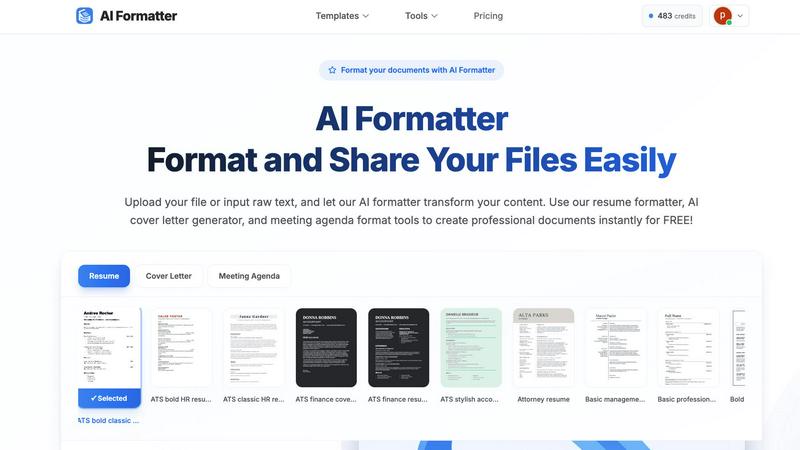
AI Formatter transforms your raw text into professional documents instantly using customizable templates.
Last updated: March 1, 2026

FilexHost
Effortlessly host and share any file with instant links, secure storage, and built-in viewers for a seamless experience.
Last updated: February 26, 2026
Visual Comparison
AI Formatter
FilexHost

Feature Comparison
AI Formatter
AI-Powered Formatting Engine
The central feature of AI Formatter is its intelligent formatting engine. This technology analyzes the raw text or content from uploaded documents, understands its structure and context, and automatically applies appropriate styling, layout, and organization. It intelligently distinguishes between headings, body text, lists, and other elements, transforming a basic text file into a professionally structured document that adheres to standard formatting conventions, all without manual intervention.
Extensive Template Library
AI Formatter provides access to a vast library of over 100 professionally designed templates. This library covers essential document types such as resumes, cover letters, meeting agendas, and invoices. Each template is crafted to meet industry standards and is optimized for specific purposes, like ensuring resumes pass through Applicant Tracking Systems (ATS). This gives users a strong, visually appealing starting point tailored to their exact needs.
Real-Time Online Editor
After the AI formats the content into a selected template, users have full control through the integrated real-time online editor. This tool allows for complete customization, enabling users to adjust fonts, colors, spacing, and layout elements. You can tweak the AI-generated format, add or remove sections, and fine-tune the document until it meets your personal or organizational branding requirements, all within your web browser.
Multi-Format Export and Sharing
Once a document is finalized, AI Formatter offers flexible output options. Users can download their formatted documents in multiple common file formats, including Microsoft Word (.docx), PDF, and plain text (.txt). This ensures compatibility with any application or submission system. Additionally, the platform includes secure sharing capabilities, allowing users to generate shareable links for their documents, streamlining collaboration and distribution.
FilexHost
Instant Subdomains
FilexHost provides users with instant subdomains for each file uploaded, which simplifies the sharing process. There is zero setup required, allowing users to focus on their work rather than technical configurations.
Free SSL Encryption
Every link generated through FilexHost comes with free SSL encryption, ensuring that files are shared securely. This built-in security feature enhances trust and protects sensitive data during transmission.
Smart View Modes
FilexHost includes smart view modes that allow recipients to choose how they want to access the files. Users can opt for direct rendering or a download page, providing flexibility based on their needs.
Powerful Built-In Viewers
The platform features powerful built-in viewers for various file types, including documents, images, and media. This ensures that users can preview files in-browser without needing additional software or plugins, enhancing the overall experience.
Use Cases
AI Formatter
Job Application Preparation
Job seekers can use AI Formatter to quickly convert their work history and skills into a polished, ATS-optimized resume and a matching cover letter. By uploading an old resume or pasting raw text, the tool formats the content into a professional template designed to pass automated screenings and catch a recruiter's eye, significantly improving application quality and saving hours of manual formatting work.
Business Meeting Management
Professionals and team leaders can streamline their meeting preparation. By inputting rough notes or bullet points, AI Formatter's meeting agenda tool structures the information into a clear, formal agenda with sections for topics, objectives, time allocations, and action items. This creates a professional document that sets clear expectations and improves meeting efficiency.
Academic Paper Formatting
Students and researchers can utilize AI Formatter to ensure their essays, reports, and research papers meet strict formatting guidelines. Instead of manually adjusting margins, headings, citations, and references, they can input their content and let the AI apply a consistent and correct academic format, allowing them to concentrate on their research and writing.
Small Business Administration
Small business owners and freelancers can generate professional invoices and receipts effortlessly. By inputting client details, services rendered, amounts due, and payment terms, the AI invoice generator creates a clean, branded invoice document. This presents a professional image to clients and helps maintain organized financial records without needing complex accounting software.
FilexHost
Professional File Sharing
Professionals can utilize FilexHost to share client reports, presentations, and other important documents quickly and securely. The platform's ease of use allows for efficient collaboration without the need for lengthy email exchanges.
Developer Hosting
Developers can host landing pages, mock APIs, or entire websites with ease. FilexHost's simple drag-and-drop interface allows them to upload and share projects without dealing with complex server configurations.
Creator Distribution
Content creators, such as artists and musicians, can distribute their digital products through FilexHost. The ability to share high-quality media files without size limitations makes it an excellent choice for creative professionals.
Educational Resource Sharing
Educators can use FilexHost to share learning materials, presentations, and interactive resources with students. The platform's fast access and secure sharing options facilitate seamless communication in educational settings.
Overview
About AI Formatter
AI Formatter is a cloud-based software tool designed to simplify and accelerate the process of creating professional documents. At its core, it is an intelligent formatting assistant that uses artificial intelligence to transform unformatted text or uploaded files into polished, ready-to-use documents. The fundamental value of AI Formatter lies in its ability to save significant time and effort, automating a task that is often tedious and complex. It is built for a wide range of users, including job seekers needing ATS-friendly resumes, professionals preparing business reports or meeting agendas, academics formatting papers, and small businesses creating invoices. By providing a straightforward platform where users can upload content, select a professional template, and receive a perfectly formatted document in seconds, AI Formatter removes the technical barriers of document design. This allows individuals and organizations to focus on their content's substance rather than its style, ensuring their documents always make a strong, positive impression.
About FilexHost
FilexHost is a powerful file hosting and sharing platform designed to streamline the process of managing and distributing digital files. With its intuitive "Drop & Share" workflow, users can effortlessly upload any file type—from documents to media files—and receive an instant, secure URL for sharing. This makes it an ideal solution for professionals, developers, and creators who need to share large files or static sites without the hassle of configuring servers or requiring logins for recipients. FilexHost prioritizes user experience by ensuring that files are presented optimally, whether they are PDFs, spreadsheets, or multimedia, all while maintaining high-speed access through a global CDN. The platform supports a variety of file types and offers features such as password protection and customizable expiry settings, making it versatile for various use cases.
Frequently Asked Questions
AI Formatter FAQ
What file formats can I upload to AI Formatter?
AI Formatter supports a variety of common document formats for upload. You can directly upload files in PDF, Microsoft Word (.doc and .docx), and plain text (.txt) formats. The platform is designed to extract and process the text content from these files to be reformatted according to your chosen template.
How does AI Formatter help with ATS (Applicant Tracking Systems)?
AI Formatter templates are specifically designed to be ATS-optimized. This means they use clean, simple layouts, standard fonts, and proper heading structures that automated resume screening software can easily read and parse. By formatting your resume with one of these templates, you significantly increase the chances that your resume's content will be correctly interpreted and ranked by an ATS.
Is my document content secure and private?
Yes, AI Formatter is a cloud-based SaaS tool developed with security in mind. The platform processes your documents securely. You maintain ownership of your content, and it is not shared with third parties. The secure sharing feature also allows you to control access when you generate shareable links for your formatted documents.
Can I customize the document after the AI formats it?
Absolutely. The AI provides a perfectly formatted first draft based on your content and selected template. You then have full access to a real-time online editor where you can make any adjustments you need. This includes changing text, fonts, colors, spacing, and layout, giving you complete control over the final appearance of your document.
FilexHost FAQ
What is FilexHost?
FilexHost is a file hosting and sharing platform that allows users to upload and share files of any type quickly and securely. It simplifies the process with its intuitive interface and features like instant subdomains and smart view modes.
Is it really free?
Yes, FilexHost offers a free plan that allows users to host up to 1,000 files with a maximum size of 25MB each. The free plan is ad-supported and comes with a 7-day expiry for shared files.
What file types are supported?
FilexHost supports a wide range of file types, including documents (PDF, RTF, TXT), media (MP4, MP3), images (JPG, PNG), and archives (ZIP). This makes it versatile for various hosting needs.
How do I update my site?
To update your hosted site, simply upload the new version of your file or website ZIP. FilexHost will generate a new link automatically, ensuring that your audience always has access to the latest version.
Alternatives
AI Formatter Alternatives
AI Formatter is a productivity tool that uses artificial intelligence to automatically format raw text and documents. It falls into the category of document creation and formatting software, helping users quickly produce professional resumes, cover letters, and business documents from basic inputs. Users often explore alternatives to find a solution that better fits their specific needs. Common reasons include budget constraints, the desire for different features like more template variety or integration with other platforms, or a preference for a different user interface. Some may seek tools with a stronger focus on collaborative editing or offline functionality. When evaluating other options, consider the core capabilities that matter most to your workflow. Key factors include the quality and breadth of templates, the level of customization available, the supported file formats for import and export, and the overall ease of use. Security features for handling sensitive documents and the transparency of pricing models are also important practical considerations.
FilexHost Alternatives
FilexHost is a user-friendly file hosting and sharing platform designed to simplify the process of sharing various file types, including documents, media, and more. It falls under the productivity and management category, catering to professionals and individuals who need seamless file delivery. Users often seek alternatives to FilexHost for various reasons, such as pricing, specific feature sets, or compatibility with other platforms. When selecting an alternative, it's essential to consider factors like ease of use, file type support, security features, and the overall viewing experience for recipients.