
Yume Comic
Yume Comic is a simple tool that turns your written ideas into consistent comic pages, panels, and characters using AI.
Visit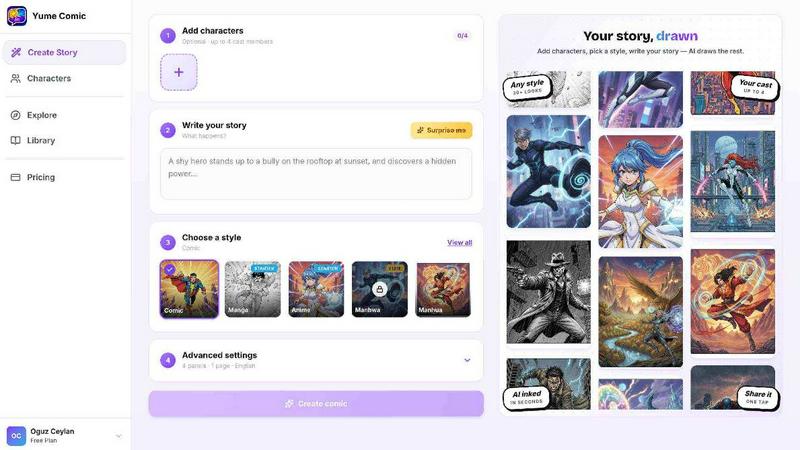
About Yume Comic
Yume Comic is a free, browser-based AI comic creation tool designed for anyone who wants to create comic-style images, scenes, and visual stories without needing any drawing skills. At its core, this product takes a simple text description of your idea, character, or story concept and transforms it into a full comic page with multiple panels, dialogue bubbles, and cinematic angles. The tool is built for storytellers, creators, social media users, manga fans, and anyone exploring visual storytelling with AI. You do not need to own expensive tablets, learn complicated software, or spend years mastering anatomy and perspective. Yume Comic works entirely in your browser on your phone or laptop. The main value proposition is simple: you describe the action, and the AI builds the visuals. Your characters stay consistent from panel to panel, so your hero looks the same throughout your entire story. You can switch between dozens of artistic styles, including classic shonen manga, moody noir, vibrant vertical manhwa, and bright webtoon styles with a single click. This tool removes the technical barriers that have traditionally kept people from bringing their comic ideas to life. Instead of staring at a blank canvas, you can focus on your plot, dialogue, and creativity. Yume Comic supports multiple languages, including English, Japanese, Korean, Chinese, Spanish, Portuguese, German, French, Italian, and many more. The goal is to let your imagination be the only limit, producing professional-looking pages that you will be proud to share with friends and followers.
Features of Yume Comic
Text to Panel Generation
You start by typing a few lines about your character and what happens next in the story. The AI comic maker reads your prompt and builds a multi-panel page layout with dialogue bubbles and cinematic angles in seconds. You do not need to worry about sketching, perspective, or composition. Simply drop in your idea, hit the button, and watch your first draft come to life instantly. This feature turns your one-line idea into a full layout without any manual work.
Consistent Character Appearance
One of the hardest parts of making a series is ensuring your main character looks like the same person from panel to panel. Yume Comic handles this heavy lifting for you. Once you define your protagonist, they stay consistent throughout your entire webtoon or manga. This means you can focus on the plot and the dialogue while the tool makes sure your hero's hair, outfit, and face stay perfectly on model every single time. No more redrawing or guessing.
Multiple Artistic Style Options
Why stick to one look when you can try them all? This free comic maker lets you switch between classic shonen manga, moody noir, vibrant vertical manhwa, or bright webtoon styles with one click. You can experiment with different aesthetics until you find the perfect vibe for your world. It is like having a whole studio of artists ready to work on your script. You can see how your hero looks in a gritty action scene or a soft romance setting instantly.
Browser Based and Device Agnostic
Forget about expensive tablets or complicated software that takes years to learn. Yume Comic works right in your browser, so you can start creating on your phone or laptop. There is nothing to download or install. This makes it accessible to anyone with an internet connection. You can create from your couch, during a commute, or anywhere you have a moment of inspiration. The tool is designed to be as simple and immediate as typing a text message.
Use Cases of Yume Comic
Creating a Full Manga Page from a Story Idea
You have a story idea but no drawing ability. You can turn your one-line concept into a full manga page in minutes. Just describe the scene, the characters, and the action. The AI generates a multi-panel layout with consistent characters and dialogue bubbles. This is perfect for writers who want to see their stories visualized quickly without hiring an artist or learning to draw. You can iterate on your ideas rapidly.
Experimenting with Different Comic Styles for Social Media
Social media creators need eye-catching visuals that stand out. You can use Yume Comic to generate comic strips or single panels in different styles to find what resonates with your audience. Try a classic black-and-white shonen look one day and a vibrant vertical webtoon the next. The one-click style switching lets you test different vibes for your characters instantly. This helps you build a unique visual brand for your online content.
Prototyping a Webtoon or Manga Series
Before committing to a long-form project, you need to see if your characters and story work visually. Yume Comic lets you prototype entire scenes and chapters quickly. You can define your protagonist once and generate multiple pages with consistent character design. This allows you to test pacing, dialogue, and visual storytelling flow. You can share these prototypes with friends or followers for feedback before investing time in a full series.
Teaching Visual Storytelling Concepts
Educators and workshop leaders can use Yume Comic to demonstrate visual storytelling principles without needing advanced art skills. You can show students how changing a camera angle, adding a dialogue bubble, or switching from a manga to a manhwa style affects the mood of a scene. The tool makes abstract concepts like panel composition and character consistency tangible. Students can experiment freely and see immediate results, making learning more engaging and hands-on.
Frequently Asked Questions
Do I need any drawing skills to use Yume Comic?
No, you do not need any drawing skills at all. Yume Comic is built specifically for people who want to create comic visuals without learning to draw. You simply type a description of your idea, character, or story concept, and the AI transforms it into a multi-panel comic page. The tool handles all the sketching, perspective, anatomy, and composition for you. Your only job is to provide the imagination and the prompt.
Can my characters look the same across multiple pages?
Yes, character consistency is a core feature of Yume Comic. Once you define your protagonist, the AI ensures they stay looking like themselves across the entire story. Their hair, outfit, and face remain on model from panel to panel and from page to page. This solves one of the biggest challenges in creating a comic series. You can focus on writing the plot and dialogue while the tool maintains visual consistency.
What styles of comics can I create with Yume Comic?
You can create several popular comic styles including classic shonen manga, moody manhwa, bright webtoon styles, and traditional comic strips. The tool lets you switch between these styles with a single click. This means you can experiment with different aesthetics until you find the perfect look for your story. Whether you want high-energy action panels, smooth scroll romance, epic fantasy adventure, or soft emotional scenes, there is a style for you.
Is Yume Comic free to use?
Yes, Yume Comic is a free tool. You can access it directly in your browser on your phone or laptop without paying anything. There is no software to download and no subscription required to start creating. The tool is designed to be accessible to anyone with an internet connection who wants to explore visual storytelling. You can create full manga pages, experiment with styles, and see your stories come to life at no cost.
Similar to Yume Comic

Create release-ready album covers from a prompt or photo. Generate, refine, and export art for singles, EPs, mixtapes, and playlists.

Generate and edit production-ready images with GPT Image 2 using prompts, reference images, clear text rendering, and a developer-friendly API.

Explore Flux LoRA workflows in a browser-based AI Studio, with a roadmap for models, generation, and guided training.


One AI enhancer for photos, images, videos, and creative effects.

Create text-perfect logos, posters, ads, packaging, and ecommerce visuals with Ideogram 4 workflows, references, and API tools.

AI image and video studio. Generate from a prompt, animate stills, swap faces, restyle clips and edit — one credit pool, no subscription.
