
KPI Studio
KPI Studio turns your raw numbers into polished animated video charts in under a minute, no design skills required.
Visit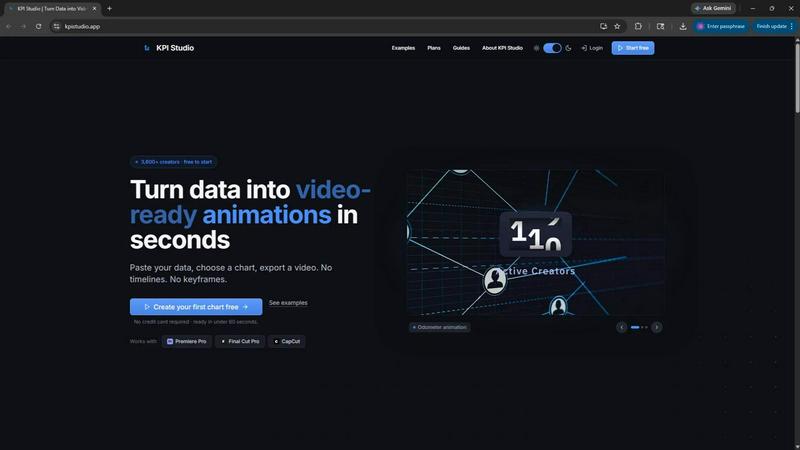
About KPI Studio
KPI Studio is a specialized software tool built for data-driven video creators who need to include animated charts and metrics in their content but lack the time or skills for motion design. The product solves a fundamental problem in the video production workflow. Traditionally, creators have had to choose between taking screenshots that look unprofessional, using rigid templates from tools like Canva, spending hours in After Effects learning complex animation techniques, or hiring expensive freelancers with slow turnaround times. Even newer AI video tools are unpredictable and not designed for precise data visualization. KPI Studio removes this entire process by letting users paste their data, choose a chart style, and export a fully animated, video-ready visual in under 60 seconds. There are no timelines to manage, no keyframes to set, and no complex setup procedures. The tool is built specifically for creators who operate on a strict publish schedule and need their chart ready the same day. Exports include transparent background options so charts drop directly into editing software like Premiere Pro, Final Cut Pro, and CapCut without any additional editing work. For advanced users, JSON export allows deeper customization and integration into custom production pipelines. Over 3,600 creators currently use KPI Studio, making it a trusted tool in the video creation community.
Features of KPI Studio
Three Step Workflow
The entire process of creating an animated chart is broken down into three simple steps that anyone can follow. First, you paste your raw data directly into the tool. Second, you customize the chart appearance by choosing from different chart types and visual styles. Third, you export the result as a video file. This streamlined workflow eliminates the need for any prior animation knowledge or design experience. The whole process takes less than 60 seconds from start to finish. If your data changes later, you simply paste the new numbers and re-export. There is no rework required on timelines or keyframes.
Multiple Export Formats
KPI Studio supports a wide range of export formats to fit into any video production workflow. You can export as MP4 for standard video use, MOV with transparency for overlay graphics, GIF for simple animations, and PNG sequences for frame by frame control. The transparent background options are particularly valuable because they allow charts to be placed directly over existing video footage without any additional masking or compositing work. All exports are compatible with major video editing software including Premiere Pro, Final Cut Pro, CapCut, and many others.
Wide Aspect Ratio Support
The tool provides multiple aspect ratio options to match different content platforms and formats. You can choose from 16:9 widescreen for YouTube and traditional video, 9:16 for mobile stories and TikTok content, 1:1 square for social media posts, and 4:3 standard for presentations and educational content. This flexibility ensures that your animated charts look correct regardless of where you plan to publish your video content. You do not need to manually crop or resize your exports after creation.
Real Time Preview
Before exporting, you can see a real time preview of your animated chart exactly as it will appear in the final video. This preview functionality allows you to verify that your data is correct, the animation looks smooth, and the colors match your branding. You can make adjustments to the chart type, colors, and animation style while seeing the results instantly. This eliminates the guesswork and back and forth that often happens when creating graphics for video content.
Use Cases of KPI Studio
YouTube Data Presentations
YouTube creators who produce data heavy content like channel growth reports, industry analysis, or financial reviews can use KPI Studio to create professional animated charts in seconds. Instead of spending hours learning motion graphics or outsourcing to freelancers, creators can paste their subscriber counts, revenue numbers, or audience growth metrics and get a polished animation ready for their next video. The transparent background exports allow charts to be placed directly over b roll footage or talking head shots without any additional editing work.
Social Media Short Form Content
Content creators making short form videos for platforms like TikTok, Instagram Reels, and YouTube Shorts need eye catching visuals that grab attention quickly. Animated charts and count up numbers are proven to increase viewer engagement and retention compared to static graphics. KPI Studio allows these creators to produce professional looking data animations in the 9:16 vertical format that matches mobile platform requirements. The 60 second creation time means creators can make last minute changes before posting without missing their upload schedule.
Business and Financial Reporting
Professionals who need to present business metrics, financial data, or key performance indicators in video format can use KPI Studio to create clear and compelling data visualizations. Whether it is a quarterly earnings report, a sales team update, or a client presentation, the tool provides a fast way to turn spreadsheet numbers into animated charts. The exports work seamlessly with presentation software like PowerPoint and Google Slides, making it easy to include animated data in both recorded and live presentations.
E Learning and Educational Content
Educators and course creators who teach subjects involving data analysis, statistics, or business metrics can use KPI Studio to create animated examples that help students understand trends and comparisons. The self drawing line charts and growing bar charts are particularly effective for showing how data changes over time. Instead of static screenshots that require verbal explanation, animated charts provide a visual narrative that makes complex data easier to understand and remember.
Frequently Asked Questions
Do I need any design or animation experience to use KPI Studio?
No, you do not need any design or animation experience whatsoever. KPI Studio is built specifically for people who are not motion designers. The entire workflow consists of pasting your data, choosing a chart style, and exporting a video. There are no timelines, keyframes, or complex settings to learn. If you can copy and paste numbers, you can create professional animated charts in under 60 seconds.
What video editing software is compatible with KPI Studio exports?
KPI Studio exports work with all major video editing software including Premiere Pro, Final Cut Pro, and CapCut. The transparent background MOV files are particularly useful because they allow charts to be placed directly over existing footage without any additional masking or compositing work. The exports also work with other editors and presentation tools like PowerPoint and Google Slides.
Can I change the data after I export a chart?
Yes, you can easily change your data and re-export a chart at any time. Simply open your project, paste the new numbers, and click export again. There is no need to rebuild the chart from scratch or adjust any animation settings. This is a major advantage over traditional motion design workflows where changing a number often requires redoing keyframes and animations.
What types of charts can I create with KPI Studio?
KPI Studio supports multiple chart types including count up numbers that animate milestone metrics, growing bar charts that reveal comparisons between categories, and drawing line charts that show trends over time. These chart types cover the most common data visualization needs for video content, from subscriber counts and revenue totals to audience growth and performance comparisons across different time periods.
Pricing of KPI Studio
KPI Studio offers three pricing tiers to match different usage levels. The Free plan costs $0 per month and includes unlimited PNG exports, 3 free animated exports, access to all chart types, and real time preview. This plan is ideal for trying the tool on your next video with no credit card required. The Creator Pack is a one time purchase for $11.99 that includes everything in the Free plan plus 10 video exports in GIF, MP4, WebM, and MOV formats, no watermark on exports, 1080p video resolution, and no expiry on credits. This plan is perfect for client projects, YouTube videos, and deadline driven edits. The Pro plan is $19.99 per month and includes everything in the Free plan plus unlimited video exports in all formats, no watermark, 4K video resolution, and the ability to cancel anytime. This plan is built for creators who publish every week and need unlimited access to animated chart exports.
Similar to KPI Studio

One AI enhancer for photos, images, videos, and creative effects.

Create Wan AI videos from text, images, references, or clips with Wan 2.7 workflows, task tracking, cost estimates, and API access.

Motiofy is an AI creative workspace that helps creators and teams turn ideas into polished visual stories.


Create complete faceless videos with AI -- scripts, voices, visuals, music and captions in one workflow.

GEO SEO content engineering for AI search visibility.


Curated directory of tools for influencers engaged with the creator economy