
Easymotion - AI Motion Graphic Generator
Turn hours of motion graphics work into minutes by describing your vision to AI, then instantly customize and export professional videos.
Visit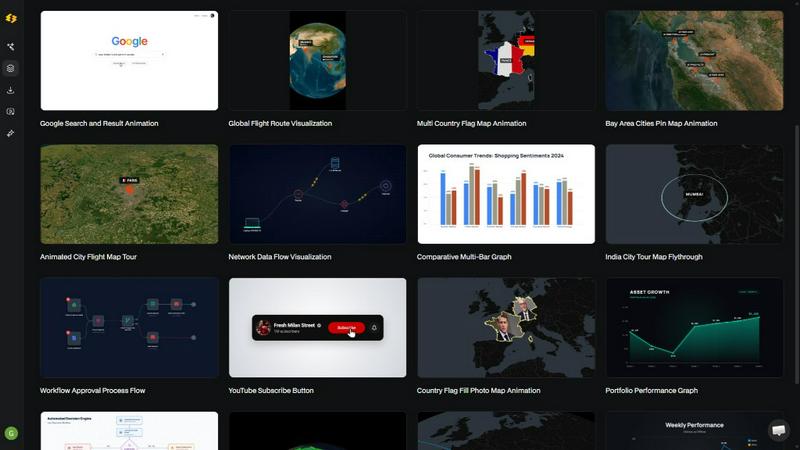
About Easymotion - AI Motion Graphic Generator
Easymotion is a browser-based AI motion graphics generator and map animation platform built for content creators, video editors, marketers, founders, and data storytellers. At its core, this tool removes the need for complex timeline editing software like Adobe After Effects. Instead, users can turn ideas, static visuals, files, and spreadsheets into polished animated videos simply by chatting with artificial intelligence. The platform supports a wide range of motion graphics formats including SaaS product promos, flowcharts, animated charts, UI explainers, quizzes, and other visual storytelling formats. It also functions as a dedicated map animation maker for flight routes, location pins, flag fill highlights, and geographic storytelling visuals. Users have multiple starting points: they can begin with a text prompt, upload an image for animation, convert a spreadsheet into data-driven visuals, or select from a premium template library. After generating an animation, users can refine every detail by chatting with the AI to adjust colors, pacing, labels, layout, and visual style. The final output supports multiple aspect ratios including 16:9 for YouTube, 9:16 for TikTok and Instagram Reels, 1:1 for square social posts, and 4:5 for feed-friendly vertical formats. Export options include MP4 and MOV files, with support for transparent backgrounds that drop directly into editing software. Easymotion is designed for anyone who needs a faster, more intuitive way to create professional motion graphics and reusable video assets without learning complex software.
Features of Easymotion - AI Motion Graphic Generator
Static Design into Animation
Upload any static image and let the AI bring it to life with stunning motion. This feature analyzes the content of your image and automatically generates smooth animations, adding movement to elements that were previously frozen. Whether you have a logo, a product screenshot, or an infographic, the AI handles the keyframes and animation curves so you get a professional result without manual effort.
Map Animations Made Easy
Create map animations effortlessly and faster than ever before. This feature allows you to generate flight route visualizations, location pin drops, country flag fill highlights, and geographic storytelling sequences. You can describe the map you want in plain English, and the AI will build the animation complete with accurate geography and smooth transitions between locations.
Boring Sheets into Visuals
Upload a CSV or XLSX file and let the AI create beautiful animated data visualizations. This feature automatically reads your spreadsheet data and generates animated bar charts, line graphs, pie charts, and other data-driven motion graphics. It transforms raw numbers into engaging visual stories that stop the scroll on social media or hold attention in presentations.
Perfect for Any Platform
Create videos in 16:9, 9:16, 4:5, or 1:1 aspect ratios so your content is ready to post everywhere. This feature ensures that whether you are creating for YouTube, TikTok, Instagram Reels, LinkedIn, or any other platform, your animation fits perfectly without cropping or manual resizing. The AI adjusts the layout and composition automatically for each format.
Use Cases of Easymotion - AI Motion Graphic Generator
YouTubers and Creators Growing Their Channels
Most creators spend hours in After Effects to produce a single video animation. Easymotion lets you create professional motion graphics in under five minutes per video. You can build animated intros, map travel routes for vlogs, create data visualizations for educational content, and produce social media promos without technical skills. This speed allows creators to post more frequently and grow their channels faster.
Video Editors Working Three Times Faster
Motion graphics tasks can eat an entire day of editing time. Templates from other sources never quite fit the project. With Easymotion, editors can create exactly what they need in minutes and move on to other work. The transparent background export feature is especially valuable because it allows editors to drop animated elements directly into their existing editing software without additional compositing work.
Marketing Teams Shipping Same-Day Campaigns
Marketing teams no longer need to wait on designers or go through multiple rounds of back-and-forth emails. With Easymotion, marketers can create and iterate on videos themselves, keeping them on brand and on schedule. This capability enables teams to respond to trends quickly, produce campaign assets in hours instead of days, and maintain a consistent video content calendar without bottlenecks.
Founders and Startups Building Social Presence
Freelance video creators are expensive and editing software has a steep learning curve. Founders can use Easymotion to create videos themselves in minutes and actually build their social media presence. Startups are using the platform to produce product demos, explainer videos, animated charts for pitch decks, and social content that drives engagement without hiring additional help.
Frequently Asked Questions
What is Easymotion?
Easymotion is an AI-powered motion graphics generator that lets you create professional videos simply by chatting. You can instantly generate map animations, animate static images, turn spreadsheets into data visualizations, and create social media videos without needing complex software like After Effects. It works entirely in your browser with no downloads required.
How does AI motion graphics generation work?
It works in three simple steps. First, describe the animation you want in plain English. Second, refine the result using chat commands to adjust colors, timing, map styles, or assets. Finally, export your completed video as an MP4 or with a transparent background. The AI handles all the keyframes and animation curves so you get professional results without technical knowledge.
What types of videos can I create?
You can create a wide variety of motion graphics including SaaS product promos, flowcharts, animated charts, UI explainers, quizzes, map animations for flight routes and location pins, social media videos, and data visualizations. The platform supports multiple starting points including text prompts, image uploads, spreadsheet imports, and template library selections.
What export formats and aspect ratios are supported?
Easymotion supports export as MP4 or MOV files, including videos with transparent backgrounds for editing workflows. The platform supports 16:9 for YouTube and landscape content, 9:16 for TikTok and Instagram Reels, 1:1 for square social posts, and 4:5 for feed-friendly vertical formats. This ensures your content is ready for any platform without additional editing.
Similar to Easymotion - AI Motion Graphic Generator

Create and edit AI images through conversation, using text or reference images and refining results in chat.

Clone any webpage pixel-perfect, export HTML/CSS/ZIP or React/Vue components.

All-in-one AI workspace to generate images, videos, and audio with multiple leading AI models.

Every key you press lights up on an on-screen keyboard, and each shortcut is named. For screen recordings, demos and learning shortcuts.

An adaptive AI tutor that turns topics or your materials into courses, lessons, and answers tailored to how you learn.

Generate iOS and Android app icons from any image and export all platform sizes for free.


Free, open-source 2D CAD in Rust for precise drafting, layers, dimensions, plotting, and AI-agent automation.