
aiiStudio
aiiStudio is a curated prompt library and generator that helps you create flawless GPT Image 2 visuals without trial and error.
Visit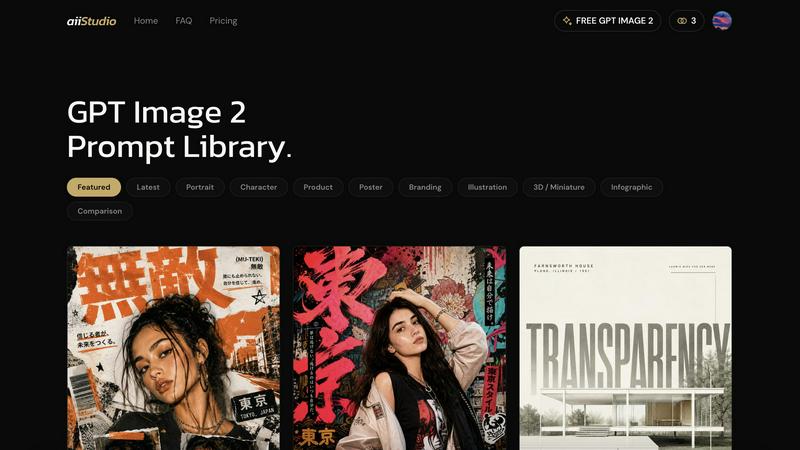
About aiiStudio
aiiStudio is a practical, all-in-one platform built around OpenAI's GPT Image 2 model. At its core, it combines a carefully curated library of high-quality image prompts with a built-in image generator, so you can browse, tweak, and create stunning visuals without leaving one place. The prompt library is hand-picked from real creators and organized by category: Portrait, Character, Product, Poster, Branding, Illustration, 3D / Miniature, Infographic, and Comparison. Each entry was chosen because it consistently produces clean composition, sharp text, and faithful subject identity. You simply click any image to open the prompt, copy it with one tap, then paste it into the generator or your own ChatGPT session. For best results, you swap in your own subject, location, or product while keeping the structural cues like lighting, camera, mood, and style language intact. If you want to edit an existing photo, you upload it as a reference and describe the change in plain English. The model preserves identity and composition far better than older diffusion editors. This platform is designed for designers, marketers, indie founders, and anyone who wants to skip the trial-and-error of crafting prompts from scratch. Every new account gets free credits on signup with no credit card required, and you can generate your first images in under 60 seconds. The goal is straightforward: give you a reliable, repeatable way to produce professional-quality images without needing deep technical knowledge or endless experimentation.
Features of aiiStudio
Curated Prompt Library
The prompt library is the heart of aiiStudio. It is not just a random collection of text. Every entry is hand-picked from real creators on X who consistently produce clean composition, sharp text, and faithful subject identity. You can browse by category such as e-commerce, ads, portraits, posters, characters, UI mockups, and before-and-after comparisons. You can also sort by what is currently most popular. Each prompt is a proven starting point. You click any image to open the full prompt, copy it with one tap, and then paste it into the generator. This saves you from the trial-and-error of writing prompts from scratch. You get a reliable foundation that you can then customize.
Built-in GPT Image 2 Generator
This is the tool that turns your prompts into actual images. The generator is built directly into aiiStudio, so you do not need to switch between different applications or websites. You paste your prompt, choose your aspect ratio (like 3:4), set your resolution (like 1K), and select your quality level. The generator uses GPT Image 2, which is OpenAI's latest image generation model. It produces highly photorealistic visuals with strong prompt adherence and accurate in-image text rendering. The generator also supports reference images. You can upload an existing photo and describe the change you want in plain English, and the model will edit it while preserving the original identity and composition.
One-Click Prompt Copy and Paste
This feature is about simplicity and speed. When you find a prompt you like in the library, you do not need to manually type it out or remember it. You click on the image to open the prompt details, and then you copy the entire prompt with a single tap. The copied prompt is then ready to paste directly into the built-in generator or into your own ChatGPT session. This workflow removes friction and makes the process of moving from inspiration to creation nearly instant. It is designed for people who want to work fast and focus on the creative result, not the technical steps.
Reference Image Editing
This feature lets you take an existing photo and modify it using natural language. You upload a reference image to the generator, and then you describe the change you want in plain English. For example, you could say "change the background to a sunny beach" or "make the product red." GPT Image 2 understands your instruction and applies the edit while keeping the subject's identity, composition, and lighting intact. This is much better than older diffusion editors which often distort or lose the original subject. This feature is useful for product photography, portrait retouching, and any situation where you need to adapt an existing image without starting over.
Use Cases of aiiStudio
Creating Product Images for E-Commerce
If you sell products online, you need clear, attractive images that show your items in the best light. With aiiStudio, you can start with a proven product prompt from the library, then swap in your own product name and details. You can specify the background, lighting, and angle. The generator will produce a photorealistic image that looks professional. You can also take an existing product photo and edit the background or add props using the reference image feature. This saves you the cost and time of a professional photoshoot. You can generate multiple variations quickly to test which one performs best in your store.
Designing Marketing Posters and Ads
Marketers need visuals that grab attention and communicate a message clearly. The poster and branding categories in the prompt library are built for this purpose. You can find prompts that produce clean layouts with sharp, accurate text rendering. You copy the prompt, paste it into the generator, and then customize the text and imagery to match your campaign. The model's ability to render text correctly inside the image is a key advantage. You can create social media graphics, flyers, and ad banners in minutes. This is especially useful for small teams or solo founders who do not have a dedicated graphic designer.
Generating Consistent Character Art
For game developers, storytellers, or content creators, keeping a character's appearance consistent across different scenes is a common challenge. With aiiStudio, you can use the character category prompts to establish a base look. You then use the reference image feature to upload that character and describe new poses, outfits, or backgrounds. The model preserves the character's identity, so you can build a library of consistent images. This is much faster than drawing each frame manually or struggling with other AI tools that change the character's face or body shape from one generation to the next.
Producing Before-and-After Comparisons
This use case is valuable for fitness coaches, beauty professionals, home renovation contractors, or anyone who needs to show a transformation. The comparison category in the prompt library gives you templates for side-by-side images. You can generate the "before" image and the "after" image using the same prompt structure, changing only the key details. The model's strong prompt adherence ensures that the two images are consistent in style and framing, making the comparison clear and believable. You can also edit an existing "before" photo by uploading it and describing the desired change to create the "after" version.
Frequently Asked Questions
What is GPT Image 2?
GPT Image 2 is OpenAI's latest image generation model. It is the successor to the GPT-4o image system that ships inside ChatGPT. This model produces highly photorealistic visuals with strong prompt adherence, meaning it follows your instructions closely. It also renders text accurately inside images, which is a common weakness in other AI image generators. It can edit uploaded reference images while preserving the subject's identity and composition. All of this is driven by the same multimodal reasoning that powers ChatGPT itself. aiiStudio provides a dedicated interface for using this model.
Can I try GPT Image 2 for free?
Yes. Every new account on aiiStudio gets free credits on signup. No credit card is required. You can use these credits to generate images using the built-in GPT Image 2 generator. The full prompt library is also free to browse. This means you can explore the platform, find prompts that interest you, and generate your first images in under 60 seconds without any initial investment. This is designed to let you test the quality and workflow before deciding if you want to upgrade to a paid plan.
What are the best prompts for ChatGPT image generation?
The best prompts are the ones that are specific and structured. Instead of saying "a dog," a better prompt would include details about the breed, the lighting, the camera angle, the mood, and the style. For example: "A golden retriever puppy sitting on a wooden deck in the warm afternoon sun, shot with a 50mm lens at f/2.8, soft focus background, photorealistic style." The prompts in the aiiStudio library are curated because they contain these structural cues. You can use them as templates. For best results, you swap in your own subject, location, or product while keeping the lighting, camera, mood, and style language intact.
Can I edit existing images with GPT Image 2?
Yes. You can upload an existing photo as a reference image to the GPT Image 2 generator. Then, you describe the change you want in plain English. For example, you could say "make the sky cloudy" or "turn the shirt blue." The model will apply the edit while preserving the original subject's identity and the overall composition. This works far better than older diffusion-based editors, which often distort the subject or change its appearance. This feature is useful for retouching, changing backgrounds, or adapting a photo for a new use case.
Similar to aiiStudio

Generate and edit production-ready images with GPT Image 2 using prompts, reference images, clear text rendering, and a developer-friendly API.

Explore Flux LoRA workflows in a browser-based AI Studio, with a roadmap for models, generation, and guided training.

One AI enhancer for photos, images, videos, and creative effects.

Create text-perfect logos, posters, ads, packaging, and ecommerce visuals with Ideogram 4 workflows, references, and API tools.

AI image and video studio. Generate from a prompt, animate stills, swap faces, restyle clips and edit — one credit pool, no subscription.

An AI video and AI image platform for creating visual content in the browser and scaling production with stable APIs.

Create polished AI images and videos from prompts or references for social posts, ads, flyers, album covers, and campaigns.

The Growth Toolkit for App Store & Google Play. Create the store assets that make your app feel ready to ship.