
Hush Touch | Voice-to-Text for MacOS vs URL to Any
Side-by-side comparison to help you choose the right product.

Hush Touch | Voice-to-Text for MacOS
Hush Touch transforms your voice into text on MacOS, learning your vocabulary and ensuring privacy with offline.
Last updated: February 26, 2026

URL to Any
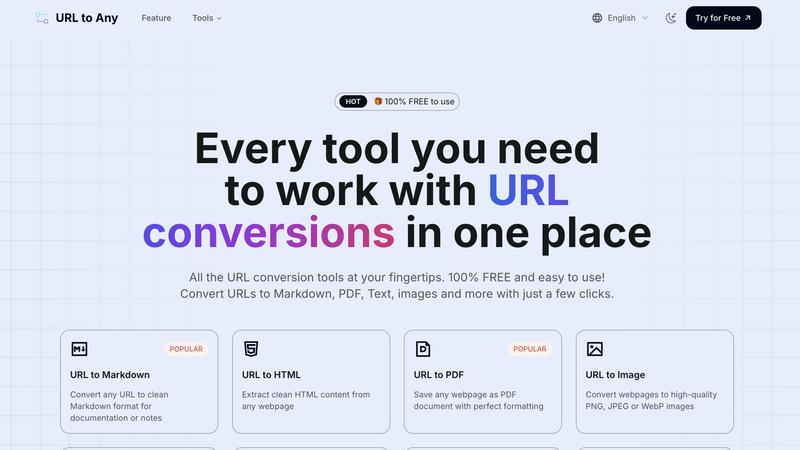
URL to Any is a free toolkit that converts any webpage into formats like PDF, Markdown, and images.
Last updated: March 2, 2026
Visual Comparison
Hush Touch | Voice-to-Text for MacOS

URL to Any
Feature Comparison
Hush Touch | Voice-to-Text for MacOS
Dual-Engine Recognition
Hush Touch utilizes two powerful Apple dictation engines to deliver superior transcription accuracy. The DictationTranscriber manages the natural flow and punctuation of your speech, while the SFSpeechRecognizer enhances custom vocabulary recognition. By merging the strengths of both engines and incorporating an Apple Intelligence final pass, Hush Touch ensures that your dictation is precise and contextually relevant.
Custom Vocabulary
With the ability to learn and adapt, Hush Touch allows you to input up to 500 custom terms, which helps it recognize specific jargon, brand names, and technical phrases that are unique to your profession. This feature includes an auto-learning capability that updates your vocabulary based on corrections you make during dictation, ensuring that the app evolves with your needs over time.
Smart Text Processing
The app's smart text processing capabilities help streamline your dictation by automatically removing filler words and correcting common speech errors in real time. It also formats voice snippets for repeated phrases and organizes text into numbered lists, making it easier to produce structured and polished documents directly from your spoken words.
Context Modes & Hands-Free Operation
Hush Touch offers multiple context modes tailored for different writing scenarios, including General, Email, Code, and Notes modes. You can initiate dictation hands-free by saying "Hey Siri, start touch," which allows the app to auto-insert text after a brief pause. Custom command phrases enable you to send messages or stop dictation effortlessly, enhancing your overall dictation experience.
URL to Any
Multi-Format Conversion Engine
The platform's central feature is its ability to convert a single URL into over ten different formats. This includes practical document types like PDF and Markdown, visual outputs like PNG or WebP images, machine-readable formats like JSON and XML, and even audio via MP3 conversion. This versatility ensures that regardless of your project requirements—whether for archiving, content creation, development, or sharing—there is a suitable output format available directly within the same tool.
Intuitive, No-Login Interface
URL to Any is designed with a fundamental commitment to ease of use. The interface is clean and task-oriented, guiding users through a simple three-step process: paste, select, convert. Crucially, it requires no user registration or login, removing a significant barrier to entry. This design philosophy ensures that anyone can start using the tool immediately without committing personal information or remembering passwords, focusing purely on the utility of the conversion task.
Secure Cloud Processing
All conversion processes are handled securely in the cloud. This means users do not need to download or install any software, and the tool is accessible from any device with a web browser. The service emphasizes privacy by stating that your data and the content of converted URLs are not stored on their servers after processing. This cloud-based approach also enables the "lightning fast" conversions, as the processing leverages optimized server-side engines.
Advanced Extraction Tools
Beyond basic format conversion, URL to Any includes specialized tools for web development and SEO analysis. Features like the Meta Tags Extractor and Heading Extractor allow users to analyze a website's SEO structure, Open Graph, and Twitter Card data. The URL Extractor tool can crawl a site and provide a complete list of all URLs in TXT or CSV format. These utilities provide deeper insights and data gathering capabilities from webpages, extending the tool's usefulness beyond simple format translation.
Use Cases
Hush Touch | Voice-to-Text for MacOS
Drafting Emails and Messages
Hush Touch is perfect for busy professionals who need to send emails or messages quickly. By dictating your thoughts, you can compose written communications in real time without getting bogged down by typing, allowing for more efficient usage of your time.
Creating Notes and Documents
Students and researchers can benefit from Hush Touch when taking notes or drafting documents. The app's accuracy and smart text processing features enable users to focus on their ideas and content rather than the mechanics of writing, resulting in clearer and more organized notes.
Writing Code and Technical Content
Developers and technical writers will appreciate Hush Touch's ability to recognize programming terminology and technical jargon. By dictating code and related documentation, they can work faster and reduce the likelihood of errors that often occur during manual typing.
Generating Content for Blogs and Articles
Content creators can leverage Hush Touch to brainstorm and draft blog posts or articles effortlessly. The app allows for a natural flow of ideas, enabling writers to capture their thoughts quickly and efficiently while maintaining their unique voice and tone.
URL to Any
Academic Research and Study
Students and researchers can use URL to Any to efficiently save online journals, articles, and reference materials. Converting a lengthy article to a well-formatted PDF or extracting just the pure text allows for offline reading, highlighting, and annotation without the distractions of website ads or layouts. This creates a clean, portable library of research materials directly from web sources.
Content Creation and Blogging
Writers, bloggers, and digital marketers can streamline their workflow by converting source material from the web into Markdown format. This is ideal for drafting posts, as Markdown cleanly captures headings, lists, and links from the original page, making it easy to quote, reference, or repurpose content while maintaining proper formatting within their own content management systems.
Web Development and Data Projects
Developers can utilize the tool to extract structured data from websites. Converting a webpage to JSON or XML format provides a machine-readable data snapshot that can be used for prototyping, testing APIs, or analyzing site structure. The URL Extractor is also valuable for tasks like building sitemaps or auditing all links on a given domain.
Professional Reporting and Presentations
Professionals needing to reference web content in reports or meetings can quickly generate high-quality screenshots (images) of webpages or save dynamic content as static PDF documents to ensure consistent formatting. Furthermore, generating a QR code for a relevant URL with the built-in tool makes it easy to share links directly within presentation slides or printed materials.
Overview
About Hush Touch | Voice-to-Text for MacOS
Hush Touch is a cutting-edge voice-to-text application designed specifically for macOS users who value speed, ease of use, and privacy in their dictation tools. This innovative app transforms spoken language into written text seamlessly and efficiently, making it an essential tool for anyone who regularly drafts emails, messages, notes, or documents. Hush Touch operates entirely on-device, ensuring that your voice data remains private and secure without relying on cloud services. By leveraging two advanced Apple transcription engines combined with an Apple Intelligence final pass, Hush Touch provides accurate and clean transcriptions that enhance your writing workflow. With a lightweight footprint of just 5.5 MB, it launches quickly and integrates effortlessly into daily tasks, allowing users to dictate naturally and hands-free. For just $20, you can enjoy a lifetime license without any ongoing subscription fees, making it a budget-friendly choice for professional and personal use alike.
About URL to Any
URL to Any is a comprehensive, web-based toolkit designed to solve a fundamental digital task: converting the content of any webpage into a different, more usable format. At its core, it transforms a simple web address (URL) into a wide array of outputs like Markdown documents, PDF files, images, plain text, and structured data formats such as JSON and XML. This process is built for simplicity and speed, requiring no software installation, account registration, or technical expertise. Users simply paste a URL, select their desired format, and receive a converted result within seconds.
This tool is built for a wide audience. Students can save online articles as clean PDFs for offline study. Content creators and bloggers can convert web research into Markdown for easy integration into their own work. Developers can extract structured data (JSON/XML) from websites for projects. Professionals can generate QR codes for presentations or capture webpage screenshots for reports. The primary value proposition is consolidation and accessibility. Instead of searching for and learning multiple specialized tools, URL to Any provides a single, free platform that handles numerous conversion needs with a consistent, straightforward interface. It emphasizes utility, privacy by not storing processed data, and efficiency, making it an essential asset for anyone who regularly works with or archives information from the web.
Frequently Asked Questions
Hush Touch | Voice-to-Text for MacOS FAQ
How does Hush Touch ensure privacy with my voice data?
Hush Touch processes all voice data entirely on your Mac, with no reliance on cloud services. This means your voice recordings and transcriptions remain private and secure, ensuring that your data is not collected or shared.
Can I customize the vocabulary in Hush Touch?
Yes, Hush Touch allows you to customize your vocabulary with up to 500 terms. It also learns from corrections you make during dictation, helping it to adapt to your specific language needs over time.
Is there a trial version of Hush Touch available?
Yes, Hush Touch offers a 7-day free trial without requiring a credit card. This allows you to test the app's features and functionality before making a purchase decision.
What is the pricing structure for Hush Touch?
Hush Touch is available for a one-time purchase price of $20, providing you with a lifetime license. There are no subscription fees, making it a cost-effective solution for voice-to-text needs.
URL to Any FAQ
Is URL to Any really free to use?
Yes, URL to Any is 100% free to use. The platform states clearly that every conversion tool is available without any cost, registration, or hidden fees. You can convert URLs to Markdown, PDF, images, and all other listed formats as many times as you need without encountering paywalls or subscription plans.
What happens to the data from the URLs I convert?
According to the provided information, your data is processed securely and is never stored on their servers. The conversion happens in real-time through their cloud processing engine. Once the conversion is complete and you have downloaded or copied your result, the data from your session is not retained, prioritizing user privacy.
What formats can I convert a URL into?
URL to Any supports a wide range of output formats. The most popular include Markdown, PDF, HTML, and high-quality images (PNG, JPEG, WebP). It also supports text extraction, JSON, XML, MP3 audio, and QR code generation. Additionally, it offers utility tools for encoding/decoding text and extracting meta tags or headings from URLs.
Do I need to install any software or browser extension?
No software installation is required to use the main website tools; everything runs in your web browser. However, the service does offer an optional browser extension for even quicker access. Using the core conversion features is completely web-based and does not depend on having the extension installed.
Alternatives
Hush Touch | Voice-to-Text for MacOS Alternatives
Hush Touch | Voice-to-Text for MacOS is an innovative application designed to convert spoken words into written text directly on macOS devices. As part of the AI Assistants category, it allows users to dictate emails, notes, and documents easily and privately without relying on cloud services. Users often seek alternatives for various reasons, including pricing concerns, the need for additional features, or compatibility with different platforms. When choosing an alternative, consider factors such as the app's transcription accuracy, offline capabilities, ease of use, and privacy measures. It's essential to look for solutions that align with your specific dictation needs and workflow preferences to ensure a seamless experience.
URL to Any Alternatives
URL to Any is a web-based tool in the AI Assistants category that converts online content into various formats like PDF, Markdown, and images. It is known for its straightforward, no-registration approach, allowing users to quickly transform a webpage link into a usable file. People often look for other tools for several common reasons. They might need specific features not offered, such as advanced editing or integration with other software. Others may require a tool that works on a different platform, like a mobile app or a desktop program, or they might be evaluating options against future pricing changes. When choosing a different conversion tool, focus on your core needs. Consider the specific formats you require, the importance of processing speed, and whether you need additional functions like batch conversions or data security measures. The goal is to find a solution that matches your workflow without unnecessary complexity.