
LessonPlanGenerator vs The Ultimate Piano
Side-by-side comparison to help you choose the right product.

LessonPlanGenerator
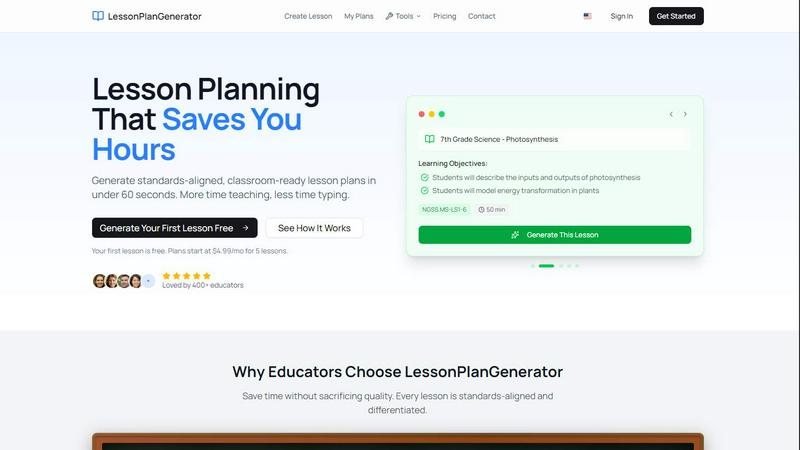
LessonPlanGenerator creates tailored, standards-aligned lesson plans in under 60 seconds, saving teachers valuable time.
Last updated: February 26, 2026

The Ultimate Piano
Learn piano online with realistic sound, interactive lessons, and instant feedback.
Last updated: March 4, 2026
Visual Comparison
LessonPlanGenerator
The Ultimate Piano

Feature Comparison
LessonPlanGenerator
60-Second Lesson Generation
With LessonPlanGenerator, educators can create complete lesson plans in under a minute. By simply entering the topic, grade, and subject, teachers receive a structured plan ready for classroom use, transforming planning from a daunting task into a quick and efficient process.
Standards Alignment
The platform ensures that every lesson is aligned with national standards such as CCSS (Common Core State Standards) and NGSS (Next Generation Science Standards). Built-in visual alignment checks allow educators to identify and address any gaps in standards compliance, thus satisfying administrative reviews effortlessly.
Automatic Differentiation
LessonPlanGenerator automatically incorporates differentiation strategies into each lesson plan. This feature provides essential supports for English Language Learners (ELL), accommodations for students with Individualized Education Programs (IEPs), and extensions for gifted learners, ensuring that every student’s needs are met.
Seamless Export Options
Educators can easily export their generated lesson plans to Google Docs or download them as PDFs with a single click. This functionality makes it simple to share lesson plans with colleagues, store them for future use, or present them during administrative observations, saving educators considerable time and effort.
The Ultimate Piano
Browser-Based Piano with Realistic Sound
Play a high-quality, responsive piano directly in your web browser. There is nothing to install. You can use your mouse, computer keyboard, or connect a physical MIDI keyboard for a more authentic playing experience. The tool uses beautiful, realistic piano samples to ensure every note you play sounds authentic and inspiring, providing a solid foundation for effective practice.
Interactive Learning Modes for Scales and Chords
Move beyond random practice with structured, interactive learning modes. Select from 14 different scale types or any chord, and The Ultimate Piano will instantly visualize it across the keyboard, lighting up the correct keys. The Scale Trainer provides detailed performance analysis, helping you practice correctly and build muscle memory for essential musical patterns from the ground up.
Real-Time Chord Detection and Music Theory Display
Understand the harmony of your playing as it happens. As you play notes on the keyboard, The Ultimate Piano analyzes them in real time and displays the name of the chord you are creating. Simultaneously, you can see the notes you play displayed on a traditional sheet music staff. This immediate feedback bridges the gap between playing by ear and understanding written music theory.
Integrated Audio, YouTube, and MIDI Practice Tools
Practice in a musical context by playing along with your own material. Load any MP3 audio file or paste a YouTube URL to practice along with tutorials or songs. You can slow down playback, set loop points, and save markers. Additionally, you can load MIDI files to watch falling notes on the keyboard, perfect for learning complex pieces section by section at your own pace.
Use Cases
LessonPlanGenerator
Streamlining Lesson Preparation
A busy 5th-grade teacher in Texas can use LessonPlanGenerator to quickly generate a week’s worth of lesson plans in just a few minutes. This efficiency allows the teacher to balance work and family life better, freeing up evenings for personal time instead of lesson preparation.
Enhancing Homeschooling Experience
Homeschool families can leverage LessonPlanGenerator to create customized lesson plans that fit their unique pacing and educational needs. By accommodating multiple grade levels within one subscription, families can efficiently manage their children’s diverse learning requirements without being tied to a rigid curriculum.
Supporting New Teachers
First-year teachers often feel overwhelmed by lesson planning. With LessonPlanGenerator, they can produce professional-quality lesson plans that impress mentors and administrators alike, building their confidence and competence in classroom management and instructional planning.
Improving Administrative Compliance
School districts can benefit from the robust standards alignment feature of LessonPlanGenerator, ensuring that all educators are creating lesson plans that meet required guidelines. This capability helps streamline the review and approval process, ultimately enhancing the quality of education provided to students.
The Ultimate Piano
Beginner Pianist Building Foundational Skills
A new student can use the platform to learn the layout of the keyboard, understand basic note names, and start playing simple melodies. The interactive scale and chord trainers provide guided practice for essential techniques, while the Kids Mode with animal icons makes initial learning engaging and fun for younger users, establishing a strong and enjoyable foundation.
Music Student Studying Theory and Ear Training
A student enrolled in music classes can use the chord explorer and real-time detection to visualize and understand harmonic progressions from their lessons. The ear training module allows them to systematically practice identifying intervals and chords by ear, strengthening the crucial connection between what they hear and what they understand theoretically.
Hobbyist Musician Learning Songs by Ear
An enthusiast wanting to learn their favorite songs can load the audio file or a YouTube video of the song into the platform. By slowing down the playback and using the loop function, they can work on difficult passages note-by-note. The real-time chord detection helps them figure out the song's harmony, enabling them to play along accurately and build their repertoire.
Teacher Providing Interactive Visual Lessons
A piano teacher can use The Ultimate Piano during online or in-person lessons to demonstrate concepts visually. They can instantly show scales, chords, and their relationships on the keyboard for a student. The falling notes from a MIDI file can help a student follow along with a piece, making abstract instructions concrete and accelerating the learning process.
Overview
About LessonPlanGenerator
LessonPlanGenerator is an innovative AI-powered Software as a Service (SaaS) designed specifically for educators who seek to create high-quality, standards-aligned lesson plans with minimal effort. This platform is tailored for K–12 teachers, instructional coaches, substitute teachers, and homeschool educators, allowing them to generate structured lesson plans in under 60 seconds. By employing a curriculum-first workflow, educators can select their grade level, subject, state standards, time constraints, and classroom context, resulting in lesson plans that are not only ready for immediate classroom use but also compliant with administrative requirements. In addition to lesson plans, the platform can produce assessments, rubrics, worksheets, and various supporting materials, all aligned to the same educational standards. This comprehensive approach helps educators save valuable planning time while ensuring that every lesson meets necessary guidelines, enabling them to focus more on teaching and interacting with their students.
About The Ultimate Piano
The Ultimate Piano is a foundational, browser-based piano practice platform designed to make learning and improving at the piano accessible to everyone. It operates entirely within your web browser, eliminating the need for complex software downloads or installations. This tool is built for pianists and music learners at all stages, from absolute beginners taking their first steps to experienced musicians looking to refine their skills and theory knowledge. Its core value proposition is providing a complete, interactive practice studio that you can access instantly from any device with an internet connection. By connecting a MIDI keyboard or simply using your computer keyboard, you gain access to a suite of educational tools that visualize music theory in real-time. The Ultimate Piano focuses on the essential elements of musical growth: understanding what you play with chord detection, building technique with scale trainers, developing critical listening skills with ear training, and applying your skills in context by playing along with your own music or tutorials. It transforms abstract concepts into visual, interactive lessons, offering a back-to-basics, effective path to mastering the piano.
Frequently Asked Questions
LessonPlanGenerator FAQ
Is there a free option?
Yes, LessonPlanGenerator offers a free trial for your first lesson, allowing educators to experience the platform without any financial commitment or credit card requirement.
How does pricing work?
The pricing structure is designed to be simple and transparent. After the free lesson, plans start at $4.99 per month for five lessons, with more extensive options available for those who require additional lesson plans each month.
What subjects and grades do you support?
LessonPlanGenerator supports a wide range of subjects and grade levels, catering to K–12 educators. Whether you teach math, science, language arts, or social studies, the platform is equipped to assist with your lesson planning needs.
Which standards are supported?
The platform incorporates various educational standards, including Common Core State Standards (CCSS), Next Generation Science Standards (NGSS), and state-specific standards, ensuring that all generated lesson plans are relevant and compliant with current educational requirements.
The Ultimate Piano FAQ
Do I need to install anything to use Ultimate Piano?
No, The Ultimate Piano requires no installation whatsoever. It is a fully web-based application that runs directly in your internet browser (like Chrome, Safari, or Firefox). You can start practicing immediately by visiting the website, making it incredibly accessible and convenient for instant practice sessions anywhere.
Can I connect my MIDI keyboard to Ultimate Piano?
Yes, you can connect a USB MIDI keyboard directly to your computer. The Ultimate Piano will automatically detect it, allowing you to play the virtual piano with your physical keyboard for a realistic and responsive practice experience. The platform also supports connecting a sustain pedal via MIDI for more expressive playing.
What chords and scales can I learn with Ultimate Piano?
The platform offers a comprehensive chord explorer and a scale trainer featuring 14 different scale types, including major, minor, pentatonic, blues, and modal scales. You can select any root note and see the scale or chord visualized across the keyboard, hear it played, and use the trainer to practice it with performance feedback.
Can I practice along with my own songs or YouTube videos?
Absolutely. The Ultimate Piano includes a built-in audio player for MP3 files and a dedicated YouTube player. You can upload your own audio files or paste any YouTube video link directly into the tool. You can then slow down the playback, set A-B loop points to repeat sections, and practice along at a comfortable tempo.
Alternatives
LessonPlanGenerator Alternatives
LessonPlanGenerator is an AI-powered software as a service (SaaS) designed specifically for educators. It enables teachers to quickly create high-quality, standards-aligned lesson plans, assessments, and rubrics tailored to their specific needs. This innovative platform is especially beneficial for K-12 teachers, instructional coaches, and homeschool educators who aim to streamline their lesson planning process. Users commonly seek alternatives to LessonPlanGenerator for various reasons, including pricing, feature sets, and specific platform requirements. When choosing an alternative, it is essential to consider factors such as ease of use, alignment with educational standards, the range of customizable features, and the overall support offered by the platform. Ensuring that the alternative meets the unique needs of teachers can significantly enhance the lesson planning experience.
The Ultimate Piano Alternatives
The Ultimate Piano is a browser-based tool in the Audio & Music and Education & Learning categories. It allows pianists to practice online with interactive features like chord detection, scale training, and MIDI support, all without needing to install software. Users often explore alternatives for various practical reasons. These can include budget considerations, as some may seek a completely free option or a different pricing model. Others might need specific features not available here, prefer a downloadable application over a web tool, or require compatibility with a different operating system or device. When evaluating other options, focus on your core learning goals. Consider the essential tools you need, such as MIDI keyboard support, the quality of sound samples, and the depth of music theory instruction. Also, assess the user interface for clarity and whether the platform's teaching approach aligns with a fundamental, back-to-basics learning style.