Dokie AI vs SimpleDraw
Side-by-side comparison to help you choose the right product.

Dokie AI
Dokie AI uses Claude Opus to create professional presentations from your text in minutes.
Last updated: March 19, 2026

SimpleDraw
SimpleDraw is a free online tool for creating accurate scale drawings and floor plans.
Last updated: March 1, 2026
Visual Comparison
Dokie AI

SimpleDraw
Feature Comparison
Dokie AI
AI Generate PPT
This is the foundational feature for creating presentations from scratch. You simply describe your topic, idea, or outline in plain text. Dokie AI's engine then analyzes this input to generate a complete slide deck. It automatically determines the optimal content structure, creates professional layouts, suggests and formats compelling text, and incorporates relevant visual design elements and charts. This feature handles the entire creative and design workflow, turning a basic concept into a ready-to-present slide deck.
AI Beautify PPT
This feature is designed to enhance and upgrade existing presentations. You can upload your current PowerPoint file, and Dokie AI will intelligently redesign it. It analyzes the content to fix awkward layouts, apply consistent and professional styling, improve visual hierarchy, and refresh the overall aesthetic. The AI works to preserve your original content and intent while elevating the design to a more polished and engaging standard, saving you from tedious manual redesign work.
Multi-Format Conversion
Dokie AI provides a suite of tools to convert various content formats directly into presentation slides. This includes converting PDF documents, Word files, HTML web pages, and even YouTube videos into structured PowerPoint presentations. This functionality is crucial for repurposing existing materials into a presentation format quickly, ensuring that valuable content from different sources can be seamlessly integrated into a slide deck without manual copying and pasting.
Speaker Notes Generation
To support effective presentation delivery, Dokie AI can automatically generate detailed speaker notes and talking points for each slide in your deck. This feature analyzes the slide content and creates comprehensive notes that explain key points, suggest transitions, and offer additional context. This helps presenters deliver their message more confidently and ensures they have a helpful guide to complement the visual slides during their talk.
SimpleDraw
Dedicated Floor Plan Mode
This specialized mode provides the essential tools for architectural drawing. With a single click, you can draw walls to scale and add standard doors and windows. A library of common interior fixtures for kitchens, bathrooms, and living spaces allows you to furnish your plan. As you work, measurements update in real-time, providing constant feedback to ensure your floor plan is dimensionally accurate and truly useful for planning.
Smart Alignment & Guidance System
This feature acts as a digital tutor, helping you place lines and points with precision. As you move your mouse, the system intelligently snaps to likely points of alignment, like connecting walls or right angles, with clear visual cues. For ultimate control, you can zoom in for finer detail or use keyboard shortcuts to lock lines to perfect horizontal or vertical axes, teaching you the principles of clean, aligned drawings.
Non-Destructive Editing & Full Control
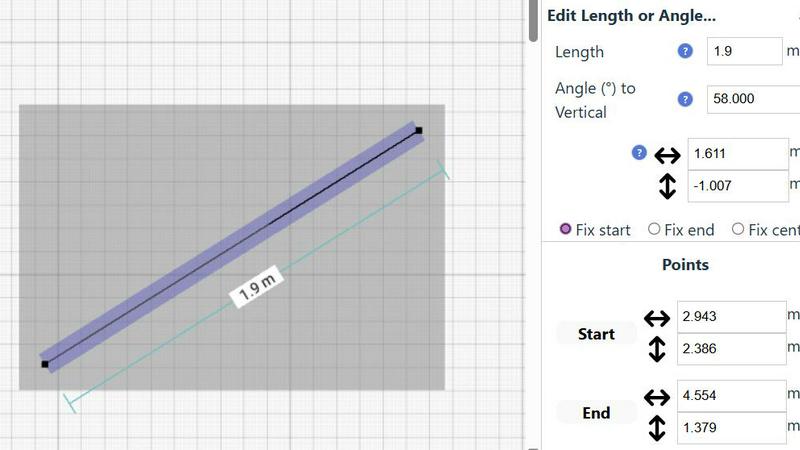
Every element in your drawing remains fully editable at any time. You can move, resize, or adjust walls, furniture, and measurements without starting over. The undo/redo functions and keyboard shortcuts encourage experimentation. For exact specifications, you can bypass the mouse and input precise lengths, angles, and coordinates directly via keyboard, giving you complete authority over the final drawing.
Comprehensive Measurement System
A good plan is defined by its measurements. SimpleDraw offers a robust system that displays contextual dimensions dynamically as you draw. You have fine control over which measurements are shown and can switch between metric units and standard US feet and inches. This ensures your scale drawing communicates the exact information needed for purchasing materials or verifying fits.
Use Cases
Dokie AI
Business Reporting and Proposals
Business professionals can use Dokie AI to rapidly create quarterly reports, project updates, sales proposals, and strategic plans. By inputting data points and objectives, the tool generates clear, visually authoritative decks that communicate complex business information effectively to stakeholders, managers, and clients, ensuring a professional image with minimal time investment.
Educational and Training Material Development
Educators, trainers, and instructional designers can leverage Dokie AI to build lesson plans, lecture slides, workshop materials, and online course content. Describing a lesson topic allows the AI to structure the educational content logically with engaging visuals and clear summaries, enhancing student comprehension and saving instructors significant preparation time.
Marketing and Sales Pitch Creation
Marketing teams and sales representatives can create compelling pitch decks, product launch presentations, and campaign overviews. Dokie AI helps transform feature lists and value propositions into persuasive, visually-driven stories that capture audience attention and clearly communicate brand messaging to potential customers and partners.
Startup and Investor Deck Preparation
Startup founders often need to create impactful investor pitch decks under tight deadlines. Dokie AI assists by turning a business idea, model, and metrics into a professionally designed narrative. It ensures the deck has a strong visual flow, highlights key opportunities, and presents data effectively, which is crucial for making a positive impression during funding rounds.
SimpleDraw
Home Renovation Planning
Before knocking down a wall or ordering new cabinets, create a precise scale drawing of your existing space. Experiment with different layouts for kitchens and bathrooms, moving fixtures and units to scale to visually confirm everything will fit and function as intended, preventing costly measurement mistakes.
Furniture & Room Layout Design
Test how new furniture will fit in a room. Draw your empty room to scale, then add scaled representations of sofas, beds, desks, and storage units. This allows you to optimize traffic flow and space utilization before making any purchases, ensuring a harmonious and functional arrangement.
Creating Property Floor Plans
Landlords, real estate agents, or homeowners selling their property can create clear, accurate floor plans for listings. A well-drawn plan helps potential tenants or buyers understand the flow and size of the space, providing essential information that photos alone cannot convey.
Workshop or Garden Planning
Plan functional spaces outside the home. Design a workshop layout to position tools, benches, and machinery efficiently. Map out a garden plot, planning raised beds, pathways, and structures to scale, ensuring optimal use of your available land and sunlight.
Overview
About Dokie AI
Dokie AI is a fundamental shift in how presentations are created. It is an AI-powered presentation maker designed to help individuals and teams produce professional, polished slide decks without requiring any prior design skills or spending hours on manual formatting. At its core, Dokie AI uses true artificial intelligence, powered by the advanced Claude Opus 4.6 model, to understand your content and automatically handle the complex tasks of structuring information, selecting appropriate layouts, applying typography, and designing cohesive visuals. This back-to-basics approach removes the technical barriers, allowing you to focus solely on your core message and ideas. It is built for a wide range of users including business professionals preparing reports, educators creating lesson materials, marketers developing campaign pitches, and startup founders crafting investor decks. The main value proposition of Dokie AI is simple: it transforms a simple text description or an existing document into a complete, visually compelling presentation in minutes, democratizing access to high-quality design and structured storytelling.
About SimpleDraw
SimpleDraw is a foundational online tool built for one core purpose: creating precise scale drawings and floor plans. It strips away the complexity of professional computer-aided design (CAD) software, offering a back-to-basics, educational approach to technical drawing. This tool is designed for DIY enthusiasts, home renovators, landlords, and anyone who needs to visualize a space accurately without years of technical training. Its primary value proposition is unparalleled accessibility. SimpleDraw runs entirely in your web browser, requires no software installation, and is completely free to use without any mandatory registration. This means you can start translating your ideas into measured drawings immediately, whether you're sketching a room layout, planning a kitchen renovation, or mapping out an entire apartment. By focusing on intuitive tools, smart guidance, and accurate measurements, SimpleDraw empowers users to build a solid foundation for their projects, ensuring plans are correct before any physical work begins.
Frequently Asked Questions
Dokie AI FAQ
What makes Dokie AI different from template-based tools like PowerPoint or Canva?
Dokie AI uses true generative AI, specifically Claude Opus 4.6, to create presentations dynamically from your text input. Unlike static templates where you manually fill in boxes, Dokie AI automatically generates the entire structure, layout, design, and coherent content flow tailored to your specific topic. It is an intelligent design partner, not just a library of pre-made slides.
What file formats can I use with Dokie AI?
You can start from a simple text prompt to generate a new presentation. For enhancement and conversion, Dokie AI supports uploading existing PowerPoint (PPT) files, PDF documents, Microsoft Word documents, and even HTML files. It also offers a unique tool to convert YouTube videos into presentation slides by extracting key content.
Does Dokie AI replace the need for me to know my content?
No, Dokie AI is a tool to execute and design your ideas, not to replace your expertise. You must provide the core topic, key points, and data. The AI's role is to structure that information effectively and apply professional design principles. You retain full control to edit and refine the AI-generated content to ensure accuracy and alignment with your message.
How does the "Beautify" feature work with my existing slides?
When you upload a presentation, Dokie AI analyzes all elements on each slide-text, images, charts. It then redesigns the deck by improving layout balance, applying a consistent color palette and typography, enhancing visual hierarchy for better readability, and suggesting more professional graphical treatments, all while keeping your original core content intact.
SimpleDraw FAQ
Is SimpleDraw really free to use with no hidden costs?
Yes. SimpleDraw is completely free to use. There is no requirement to sign up for an account, provide payment details, or download any software. You can access all its core drawing and floor plan creation features directly from your web browser without any cost barriers, making it accessible to everyone.
Do I need any prior CAD or design experience to use it?
No, prior experience is not necessary. SimpleDraw is built with a foundational, educational approach. Features like the Smart Alignment System guide you, and the intuitive interface avoids complex jargon. It is designed to teach the basics of scale drawing through use, making it suitable for absolute beginners.
Can I use SimpleDraw on any device or computer?
SimpleDraw works in any modern web browser, such as Chrome, Firefox, or Safari. This means you can use it on Windows and Mac computers, as well as on tablets. For the best precision, we recommend using a device with a larger screen and a mouse, but you can start sketching ideas from almost anywhere.
How do I save or export my drawings from SimpleDraw?
Your drawings are automatically saved in your web browser's local storage as you work. To export, use your browser's print function to save your drawing as a PDF document, which is a universal and high-quality format for sharing, printing, or archiving your scale plans for future reference.
Alternatives
Dokie AI Alternatives
Dokie AI is a specialized tool in the category of AI-powered design software, specifically built to generate and enhance presentation slides. It uses advanced artificial intelligence to automate the creation of professional slide decks from simple text descriptions, handling everything from content structure to visual design. Users often explore alternatives for several practical reasons. These can include budget constraints, as different tools offer varied pricing models. Others may seek specific features not available in one platform, require different levels of creative control, or need compatibility with certain operating systems or existing software ecosystems. When evaluating an alternative, it's wise to consider your core needs. Key factors include the tool's primary function, the quality and intelligence of its automation, the flexibility it offers for customization, and the overall value relative to its cost. Understanding these fundamentals helps in selecting a solution that aligns with your workflow and presentation goals.
SimpleDraw Alternatives
SimpleDraw is a free online tool in the design software category, specifically created for making accurate scale drawings and floor plans. It provides a foundational way for individuals to visualize spaces and projects directly from a web browser, without the need for complex installations. People explore other options for various reasons. Some may require advanced features beyond basic drawing, while others might need software that works on a specific operating system or integrates with other tools. Budget is also a key factor, as some users seek entirely free solutions while others are willing to pay for premium capabilities. When evaluating different tools, consider your core needs. Focus on the essential tasks you need to accomplish, the learning curve you're comfortable with, and whether the tool's platform and cost structure align with your project and long-term goals. The right choice effectively balances functionality with simplicity for your specific situation.