
Shrinkpad vs Vailo AI
Side-by-side comparison to help you choose the right product.

Shrinkpad
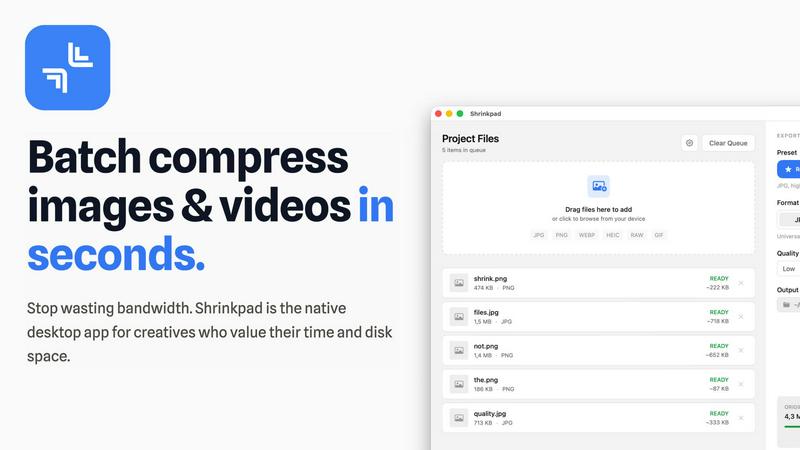
Effortlessly batch compress images and videos on Mac, optimizing your assets and saving valuable time and space.
Last updated: February 28, 2026

Vailo AI
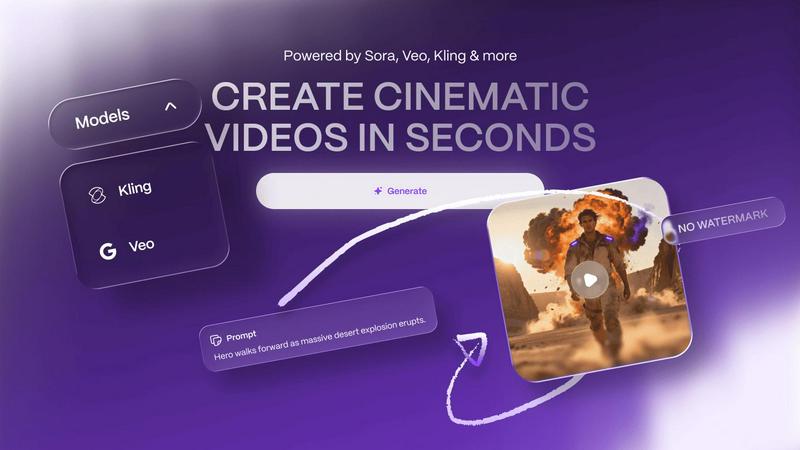
Vailo AI effortlessly turns your text and images into stunning videos, enhancing your creative projects in seconds.
Last updated: February 28, 2026
Visual Comparison
Shrinkpad
Vailo AI
Feature Comparison
Shrinkpad
Smart Compression Technology
Shrinkpad utilizes advanced algorithms that automatically analyze the visual complexity of each file. This ensures that the perfect compression ratio is applied without introducing artifacts, allowing users to maintain high-quality visuals while reducing file sizes significantly.
Unlimited Batching
With Shrinkpad, users can process thousands of images and videos simultaneously without crashing. Unlike web-based tools, this desktop application can handle massive queues, making it ideal for professionals who need to optimize large volumes of media efficiently.
One-Drop Folder Mode
Gone are the days of dragging files individually. Users can simply drop an entire folder into Shrinkpad, and the application will automatically detect all supported images and videos inside, ready for batch compression at the click of a button.
Privacy-Focused Processing
Shrinkpad places a strong emphasis on user privacy by ensuring that all processing is conducted locally on the user's machine. This means that sensitive assets never leave the device, providing peace of mind and security against potential data breaches associated with cloud services.
Vailo AI
Text-to-Video (T2V)
The Text-to-Video (T2V) feature allows users to generate video shots directly from written prompts. This functionality simplifies the video creation process, enabling users to convert their ideas into visual content rapidly. Whether it's for advertisements or storytelling, T2V ensures that your written concepts come to life in a dynamic and engaging manner.
Image-to-Video (I2V)
With the Image-to-Video (I2V) feature, users can animate portraits and products effectively. This capability transforms still images into captivating video sequences, adding motion and depth. It's particularly useful for marketers and product designers who want to showcase their offerings in a more interactive format.
Advanced Editing Tools
Vailo AI provides advanced editing tools that enhance the video production process. Users can refine and customize their videos with ease, adjusting elements like timing, transitions, and effects. These tools cater to both beginners and seasoned professionals, making it simple to achieve polished results without extensive editing knowledge.
Motion Control
The Motion Control feature allows users to manipulate and adjust animated elements within their videos. This provides greater creative freedom, enabling the incorporation of unique motion dynamics that capture the viewer's attention. By controlling motion, creators can craft compelling narratives and enhance the overall visual experience.
Use Cases
Shrinkpad
For Photographers
Photographers often deal with large image files that can slow down their workflow. Shrinkpad allows them to batch compress images quickly, ensuring high quality while saving disk space and enhancing load times for portfolios and galleries.
For Web Developers
Web developers need to optimize images and videos for faster loading times on websites. By using Shrinkpad, they can compress media assets efficiently, improving performance metrics such as loading speed and user experience without sacrificing visual fidelity.
For Graphic Designers
Graphic designers frequently export multiple assets from design software. Shrinkpad enables them to export and compress entire projects in bulk, saving time on manual processing and ensuring that all files are optimized for delivery.
For Content Creators
Content creators often juggle various media types for their projects. Shrinkpad's ability to handle mixed media batches allows them to compress images and videos together, streamlining their workflow and helping them meet tight deadlines.
Vailo AI
Creating UGC Ads
Vailo AI is ideal for marketers looking to create user-generated content (UGC) ads quickly. With its intuitive interface and powerful features, users can generate engaging promotional videos that resonate with their target audience, driving brand awareness and engagement effortlessly.
Product Showcases
Businesses can leverage Vailo AI to create stunning product showcases that captivate potential customers. By animating images and adding dynamic elements, companies can present their offerings in a visually appealing manner that highlights features and benefits effectively.
Storyboarding
Filmmakers and content creators can utilize Vailo AI for storyboarding purposes. The platform's ability to generate video shots from text descriptions allows creators to visualize their narratives before the actual filming process, ensuring a well-structured and coherent flow.
Social Media Content Creation
Vailo AI is a powerful tool for generating short-form videos suitable for social media platforms. Users can create eye-catching clips that attract followers and stimulate engagement, all without the need for complex equipment or extensive editing skills.
Overview
About Shrinkpad
Shrinkpad is a robust batch compression tool tailored for macOS users who require efficient optimization of images and videos without compromising on quality. This application streamlines the process of compressing multiple files or entire folders, allowing users to simply drag and drop their media assets, select preferred settings, and achieve significant reductions in file size within seconds. Designed with privacy in mind, all processing occurs locally on the user's device, eliminating the need for internet connectivity or reliance on cloud services. Shrinkpad supports over 50 file formats, including widely-used types like JPG, PNG, HEIC, MP4, and MOV, making it an essential tool for photographers, graphic designers, and content creators alike. By reducing file sizes by up to 90%, Shrinkpad not only conserves valuable disk space but also enhances the speed of website loading times and application performance. Its intuitive interface, combined with powerful features for customizing compression settings, empowers users to optimize their media management workflow effectively.
About Vailo AI
Vailo AI is a cutting-edge generative AI studio that empowers users to effortlessly transform text and images into breathtaking cinematic videos in just seconds, completely free of charge and without watermarks. This versatile platform is designed for a wide range of users, including creators, filmmakers, marketers, designers, and brands, enabling them to produce high-quality video content without the complexities typically associated with video production. Vailo AI allows users to create user-generated content (UGC) ads, product showcases, storyboards, and short-form videos for social media, eliminating the need for expensive equipment or extensive editing skills. Its first version, V1, introduced innovative features such as Text-to-Video (T2V) and Image-to-Video (I2V), while the upgraded V2 enhances the user experience with a professional interface, advanced editing tools, and multi-model engine capabilities. Ultimately, Vailo AI makes video creation accessible, efficient, and enjoyable for anyone looking to elevate their creative projects.
Frequently Asked Questions
Shrinkpad FAQ
Can I use Shrinkpad for free?
Yes, Shrinkpad offers a free starter version that includes essential tools for casual use, allowing users to experiment with the software before deciding to upgrade.
What file formats does Shrinkpad support?
Shrinkpad supports a wide range of file formats, including popular image formats like JPG, PNG, WEBP, and AVIF, as well as video formats such as MP4 and MOV, making it versatile for different media types.
Does Shrinkpad support video compression?
Absolutely. Shrinkpad is designed to handle both image and video files, allowing users to compress videos alongside images for a comprehensive media optimization solution.
How many files can I process at once?
Shrinkpad allows for unlimited batch processing, meaning users can compress thousands of files simultaneously without worrying about application crashes or performance issues. This feature is especially beneficial for users with large media libraries.
Vailo AI FAQ
Is Vailo AI completely free to use?
Yes, Vailo AI offers a free plan that provides users with 40 credits to start creating videos and images. This allows new users to explore the platform's capabilities without any initial investment.
What types of content can I create with Vailo AI?
With Vailo AI, users can create a variety of content, including user-generated content ads, product showcases, storyboards, and short-form social media videos, all designed to elevate creativity and engagement.
Do I need any technical skills to use Vailo AI?
No technical skills are required to use Vailo AI. The platform is designed to be user-friendly, allowing anyone to create high-quality videos and images simply by describing what they want to create.
What are the benefits of upgrading to a paid plan?
Upgrading to a paid plan gives users access to more credits, faster processing times, and premium features, enhancing their ability to generate high-quality content and meet higher production demands.
Alternatives
Shrinkpad Alternatives
Shrinkpad is a specialized batch compression tool designed for macOS users, focusing on optimizing images and videos. It allows users to compress large volumes of media files quickly while maintaining high visual quality. As the demand for efficient media management grows, many users often seek alternatives to Shrinkpad for various reasons, such as pricing, additional features, or compatibility with different operating systems. When exploring alternatives, it is essential to consider factors like ease of use, processing speed, and the range of supported file formats. Additionally, privacy and security features are crucial, especially for users dealing with sensitive content. Evaluating these aspects can help users find a suitable replacement that meets their specific needs.
Vailo AI Alternatives
Vailo AI is a generative AI studio that specializes in transforming text and images into high-quality videos quickly and efficiently. As part of the AI Assistants and Generative Art categories, it empowers creators, marketers, and brands to produce engaging video content without the complexities of traditional video production. Users often seek alternatives to Vailo AI for various reasons, including pricing structures, feature sets, and specific platform requirements that may not align with their project needs. When choosing an alternative, it's crucial to consider factors such as ease of use, the quality of output, available features, and the overall user experience. Additionally, understanding the target audience and the types of content that can be created with the platform will help in finding the best fit for individual creative goals and professional needs.