
Nano AI vs Shrinkpad
Side-by-side comparison to help you choose the right product.

Nano AI
Nano AI is an all-in-one creative platform for fast AI image generation and editing.
Last updated: February 28, 2026

Shrinkpad
Effortlessly batch compress images and videos on Mac, optimizing your assets and saving valuable time and space.
Last updated: February 28, 2026
Visual Comparison
Nano AI

Shrinkpad
Feature Comparison
Nano AI
Flash-Speed AI Generation
Powered by the proprietary Nano Banana AI model, Nano AI delivers high-quality text-to-image and image-to-image generations in under ten seconds. This "flash-speed" inference keeps you in the creative flow, allowing for rapid experimentation and iteration without frustrating wait times. You can describe a scene or upload an image and see near-instant results, making it ideal for brainstorming and tight deadlines.
All-in-One Creative Workspace
Nano AI consolidates the entire creative pipeline into one platform. It combines AI image generation with a suite of practical editing tools like background removal, an image resizer, and an image converter. Soon-to-arrive Prompt Labs, Galleries, and Editors will further centralize every experiment, review, and export, ensuring you can explore, iterate, and share assets without losing momentum or switching apps.
Deep Style Tuning & Magic Edit
Move beyond generic presets with granular style control. Describe a specific vibe—like "Renaissance lighting on cyberpunk geometry"—and the Nano Banana model faithfully follows it for style generation or transfer. The Magic Edit tool allows for intuitive inpainting and outpainting using natural language; simply highlight an area and type what you want to change, add, or expand.
Upcoming 4K Neural Upscaling
This soon-to-launch feature is designed to turn draft generations into production-ready assets. It goes beyond simple sharpening by intelligently adding believable detail and texture density—such as pores to skin or grain to wood—allowing you to upscale small images to 4K resolution suitable for high-quality prints and large formats without losing fidelity.
Shrinkpad
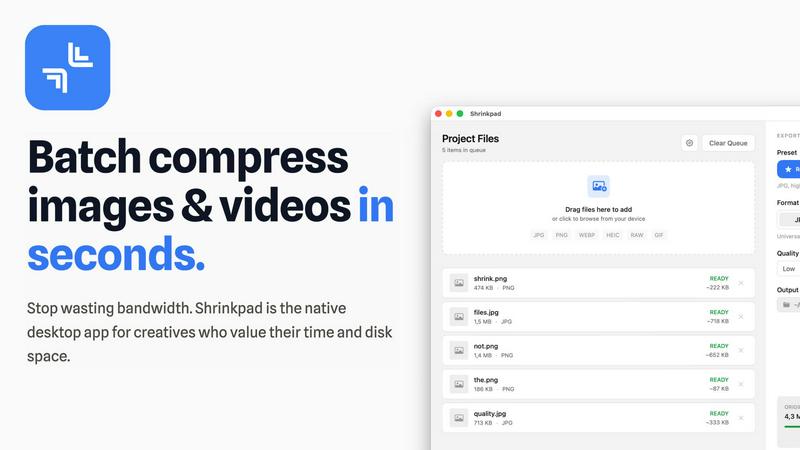
Smart Compression Technology
Shrinkpad utilizes advanced algorithms that automatically analyze the visual complexity of each file. This ensures that the perfect compression ratio is applied without introducing artifacts, allowing users to maintain high-quality visuals while reducing file sizes significantly.
Unlimited Batching
With Shrinkpad, users can process thousands of images and videos simultaneously without crashing. Unlike web-based tools, this desktop application can handle massive queues, making it ideal for professionals who need to optimize large volumes of media efficiently.
One-Drop Folder Mode
Gone are the days of dragging files individually. Users can simply drop an entire folder into Shrinkpad, and the application will automatically detect all supported images and videos inside, ready for batch compression at the click of a button.
Privacy-Focused Processing
Shrinkpad places a strong emphasis on user privacy by ensuring that all processing is conducted locally on the user's machine. This means that sensitive assets never leave the device, providing peace of mind and security against potential data breaches associated with cloud services.
Use Cases
Nano AI
Rapid Social Media Content Creation
Marketers and social media managers can use Nano AI to quickly generate and edit visual assets for campaigns. The flash-speed generation allows for creating multiple on-brand image variations in minutes, while built-in tools like background removal and style tuning enable quick polishing and adaptation for different platforms, all within a single workflow.
Concept Art and Mockup Design
Designers and product teams can leverage the platform to rapidly visualize concepts and build mockups. Starting with a text prompt, they can generate base imagery, then use image-to-image and the Magic Edit tool to refine details, change elements, and iterate on compositions without needing separate specialized software, accelerating the early design phase.
Personalized Art and Entertainment
Individual creators and hobbyists can explore artistic styles and create personalized artwork. Using effects like "Photo to Watercolor Painting" or "Manga Generator," users can transform their photos. The deep style tuning feature allows for easy experimentation with unique aesthetic mashups, making advanced creative techniques accessible without professional training.
Efficient E-commerce Asset Production
Online retailers can streamline the creation of product visuals. The platform can generate lifestyle or context images from product photos, remove or replace backgrounds instantly, and upscale product shots for high-resolution catalogs. This integrated approach significantly reduces the time and cost associated with producing large volumes of commercial imagery.
Shrinkpad
For Photographers
Photographers often deal with large image files that can slow down their workflow. Shrinkpad allows them to batch compress images quickly, ensuring high quality while saving disk space and enhancing load times for portfolios and galleries.
For Web Developers
Web developers need to optimize images and videos for faster loading times on websites. By using Shrinkpad, they can compress media assets efficiently, improving performance metrics such as loading speed and user experience without sacrificing visual fidelity.
For Graphic Designers
Graphic designers frequently export multiple assets from design software. Shrinkpad enables them to export and compress entire projects in bulk, saving time on manual processing and ensuring that all files are optimized for delivery.
For Content Creators
Content creators often juggle various media types for their projects. Shrinkpad's ability to handle mixed media batches allows them to compress images and videos together, streamlining their workflow and helping them meet tight deadlines.
Overview
About Nano AI
Nano AI is a comprehensive, all-in-one creative platform designed to streamline the entire process of visual asset creation. It serves as a unified workspace that eliminates the need to switch between multiple, disparate applications. At its heart is the proprietary Nano Banana AI model, engineered for exceptionally fast "flash-speed" orchestration. This allows users to generate high-quality text-to-image and image-to-image results in under ten seconds. The platform is built for a wide audience, from individual creators and marketers to professional design teams who need to produce visuals quickly and efficiently. Its core value proposition lies in combining powerful AI generation with practical editing and utility tools—such as background removal, inpainting/outpainting, and granular style control—all within a single, intuitive interface. This integration enables rapid iteration, allowing users to draft, refine, and export production-ready assets faster than traditional methods. With features like shared galleries, upcoming 4K neural upscaling, and API access, Nano AI provides a scalable solution for turning creative inspiration into tangible, commercially viable visual content, all without leaving one simple space.
About Shrinkpad
Shrinkpad is a robust batch compression tool tailored for macOS users who require efficient optimization of images and videos without compromising on quality. This application streamlines the process of compressing multiple files or entire folders, allowing users to simply drag and drop their media assets, select preferred settings, and achieve significant reductions in file size within seconds. Designed with privacy in mind, all processing occurs locally on the user's device, eliminating the need for internet connectivity or reliance on cloud services. Shrinkpad supports over 50 file formats, including widely-used types like JPG, PNG, HEIC, MP4, and MOV, making it an essential tool for photographers, graphic designers, and content creators alike. By reducing file sizes by up to 90%, Shrinkpad not only conserves valuable disk space but also enhances the speed of website loading times and application performance. Its intuitive interface, combined with powerful features for customizing compression settings, empowers users to optimize their media management workflow effectively.
Frequently Asked Questions
Nano AI FAQ
What is the Nano Banana AI model?
The Nano Banana AI model is Nano AI's proprietary, core AI engine specifically engineered for speed and fidelity. It is responsible for the platform's "flash-speed" inference, generating images in under ten seconds. It is also designed to understand layered instructions and stylistic cues from natural language prompts, reducing the need for complex prompt engineering.
What kinds of tools are included in the Nano AI workspace?
The Nano AI workspace integrates AI generation with practical utility tools. This includes core AI features like Text-to-Image and Image-to-Image, alongside tools for Image to Prompt conversion, resizing, and format conversion. It also includes creative effects like style filters and essential editing functions such as background removal and the Magic Edit tool for inpainting.
Can I use Nano AI for commercial projects?
Yes, Nano AI is designed to help users create commercially viable visual content. The platform's features, including high-quality generation, editing tools, and the upcoming 4K upscaling, are built to support the production of assets for marketing, advertising, e-commerce, and other professional use cases where ready-to-ship visuals are required.
Is there a way to organize and share my creations?
Yes, Nano AI includes features for organization and collaboration. Users have a "My Creations" gallery to manage their work. The platform also supports shared galleries, making it easy to send work to team members or clients for review directly within the workspace, facilitating a smoother collaborative workflow without external file sharing.
Shrinkpad FAQ
Can I use Shrinkpad for free?
Yes, Shrinkpad offers a free starter version that includes essential tools for casual use, allowing users to experiment with the software before deciding to upgrade.
What file formats does Shrinkpad support?
Shrinkpad supports a wide range of file formats, including popular image formats like JPG, PNG, WEBP, and AVIF, as well as video formats such as MP4 and MOV, making it versatile for different media types.
Does Shrinkpad support video compression?
Absolutely. Shrinkpad is designed to handle both image and video files, allowing users to compress videos alongside images for a comprehensive media optimization solution.
How many files can I process at once?
Shrinkpad allows for unlimited batch processing, meaning users can compress thousands of files simultaneously without worrying about application crashes or performance issues. This feature is especially beneficial for users with large media libraries.
Alternatives
Nano AI Alternatives
Nano AI is an all-in-one creative platform in the image generation and editing category. It combines ultra-fast AI image creation with practical editing tools in a single workspace, aiming to streamline the entire visual content creation process from concept to final asset. Users often explore alternatives for various practical reasons. These can include budget constraints, the need for different specific features not offered, or a requirement to integrate with other platforms in their existing workflow. The search for the right tool is a normal part of finding the best fit for one's unique creative process and project demands. When evaluating other options, consider a few core aspects. Focus on the balance between generation speed and output quality, the depth of editing and utility tools available, and the overall usability of the interface. The goal is to find a solution that effectively supports your specific creative workflow without unnecessary complexity.
Shrinkpad Alternatives
Shrinkpad is a specialized batch compression tool designed for macOS users, focusing on optimizing images and videos. It allows users to compress large volumes of media files quickly while maintaining high visual quality. As the demand for efficient media management grows, many users often seek alternatives to Shrinkpad for various reasons, such as pricing, additional features, or compatibility with different operating systems. When exploring alternatives, it is essential to consider factors like ease of use, processing speed, and the range of supported file formats. Additionally, privacy and security features are crucial, especially for users dealing with sensitive content. Evaluating these aspects can help users find a suitable replacement that meets their specific needs.