Kling 5 vs Seedream 5.0 AI
Side-by-side comparison to help you choose the right product.

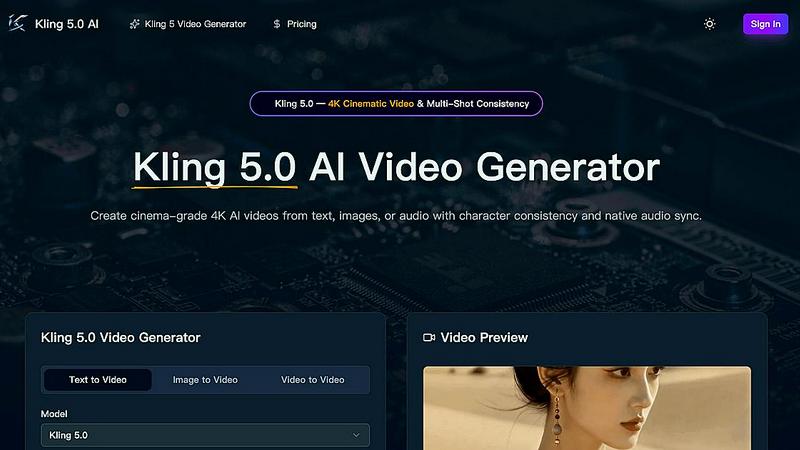
Kling 5.0 is an AI video generator that creates professional 4K cinematic videos from text, images, or audio with consistent characters.
Last updated: April 13, 2026

Seedream 5.0 AI
Seedream 5.0 AI generates stunning 2K images and cinematic videos from text prompts with unmatched creativity and.
Last updated: February 26, 2026
Visual Comparison
Kling 5
Seedream 5.0 AI

Feature Comparison
Kling 5
4K Cinematic Video Generation
Kling 5 generates videos in stunning 4K resolution, providing broadcast-ready quality suitable for professional use. The AI model is trained to produce clips with a cinematic look and feel, incorporating realistic lighting, textures, and atmospheric effects. This ensures the output has a high production value, making it ideal for projects that require a polished and professional appearance without a traditional film crew.
Multi-Shot Character Consistency
This feature addresses a common challenge in AI video generation: maintaining a character's appearance across different scenes. Kling 5's Omni Subject Library allows users to lock a character's facial features, proportions, and style. This ensures the character remains visually identical when shown from different angles or in sequential shots, which is essential for creating coherent narratives, episodic content, or consistent brand campaigns.
Native Audio Generation and Lip-Sync
Kling 5 can generate synchronized audio directly alongside the video. This includes dialogue, ambient sound, and Foley effects. Furthermore, it offers advanced lip-sync technology that matches mouth movements to the generated audio at the phoneme level. This synchronization is available in multiple languages, including English, Chinese, Japanese, Korean, and Spanish, adding a crucial layer of realism to character-driven videos.
Advanced Physics and Motion Simulation
The platform features a sophisticated physics engine that simulates natural movement. This applies to elements like flowing water, flickering fire, cloth dynamics, and human anatomy. By accurately replicating how these elements interact with light and move in the real world, Kling 5 creates videos that feel dynamic and authentic, enhancing the overall believability of the generated scenes.
Seedream 5.0 AI
Text-to-Image Generation at 2K Resolution
Seedream 5.0 AI excels in generating images from text prompts at an impressive 2K resolution. Users can describe any visual concept, and the AI will create portraits, landscapes, or product shots with remarkable detail and clarity.
Image-to-Image Editing with Natural Language
This feature allows users to upload an existing image and request edits using natural language. Whether it is style transfer, object removal, or background modification, Seedream 5.0 AI can make precise changes based on user descriptions.
Multi-Subject Composition with Individual Control
Users can create complex scenes featuring three or more distinct subjects, with each subject's individual attributes preserved. This feature enhances the storytelling aspect of image creation by allowing different elements to interact naturally within a composition.
Native Style Control Across Visual Aesthetics
Seedream 5.0 AI provides users with versatile style control, enabling them to choose from various aesthetics such as photorealism, anime, cyberpunk, watercolor, and oil painting. This can be done through text input or by using reference images, offering unprecedented creative flexibility.
Use Cases
Kling 5
Social Media Content Creation
Creators can rapidly produce eye-catching, platform-optimized videos for YouTube, TikTok, and Instagram. By describing a concept or uploading an image, users can generate trendy clips, educational content, or promotional videos in various aspect ratios (like 9:16 for Stories) without needing filming or complex editing software, significantly speeding up their content pipeline.
Prototyping for Film and Animation
Filmmakers and animators can use Kling 5 to visualize storyboards, script concepts, or character designs quickly. The ability to generate consistent characters across shots and simulate complex scenes with realistic physics allows for efficient pre-visualization and prototyping, helping teams make creative decisions before committing to full-scale production.
Marketing and Advertising
Marketing teams can create professional product demos, explainer videos, and brand campaign assets in-house. The cinematic quality and character consistency features enable the production of a series of cohesive ads or social media posts that maintain a uniform look for characters or products, strengthening brand identity and messaging.
Educational and Training Materials
Educators and corporate trainers can transform lesson plans or training modules into engaging video content. Complex concepts can be illustrated through animated scenes generated from descriptive text, making information more accessible and memorable for students or employees without the need for live-action filming.
Seedream 5.0 AI
Character Design for Games and Animation
Game developers and animators can leverage Seedream 5.0 AI to create unique character designs quickly. By inputting descriptions of desired traits and styles, users can generate a variety of character images suited for their projects.
Marketing and Promotional Materials
Businesses can use Seedream 5.0 AI to generate eye-catching visuals for marketing campaigns. From product photography to promotional social media graphics, the tool helps brands create professional-quality images that attract attention.
Concept Art for Film and Media
Filmmakers and media creators can utilize Seedream 5.0 AI to produce concept art that encapsulates their vision. This includes landscapes, character sketches, and scene compositions that aid in visual storytelling and production planning.
Custom Artwork for Personal Projects
Artists and hobbyists can explore their creativity by using Seedream 5.0 AI to generate custom artwork. Whether for personal enjoyment or as gifts, users can create unique pieces that reflect their individual style and preferences.
Overview
About Kling 5
Kling 5 is an advanced artificial intelligence video generation platform. It is designed to create high-quality, cinematic video content directly from text descriptions, images, or audio inputs. The core purpose of this tool is to make professional-grade video production accessible to individuals and teams without requiring extensive technical skills or expensive equipment. It serves a wide audience, including content creators, marketers, filmmakers, educators, and businesses looking to produce engaging visual material. The main value proposition of Kling 5 lies in its ability to transform simple ideas into polished 4K videos with realistic motion, consistent characters, and synchronized audio in a matter of minutes. By handling complex tasks like physics simulation and multi-shot consistency, it removes traditional barriers to video creation, allowing users to focus purely on their creative vision and storytelling.
About Seedream 5.0 AI
Seedream 5.0 AI is an innovative fifth-generation diffusion transformer model that transforms the landscape of image generation. This powerful tool is tailored for creators, designers, and production teams who seek to produce high-quality images quickly and efficiently. With Seedream 5.0 AI, users can generate professional-grade visuals in mere seconds, unlocking new creative avenues across various applications. The platform capitalizes on advanced AI technology to interpret text prompts, converting them into stunning, high-resolution images. The current promotional offer of a 50% discount makes it an appealing choice for anyone looking to elevate their visual content. Seedream 5.0 AI stands out for its ability to generate intricate details, photorealistic textures, and exact interpretations of complex prompts, making it an essential tool for anyone in need of top-tier visual content.
Frequently Asked Questions
Kling 5 FAQ
What types of input does Kling 5 accept?
Kling 5 accepts three primary types of input to generate video. You can start with a text prompt describing the scene you want to create. Alternatively, you can upload an image or piece of concept art, and the AI will animate it. Finally, you can also use audio as a starting point, and the model will generate a video synchronized to that audio.
How long can the videos generated by Kling 5 be?
Based on the provided interface context, users can set a duration for their video, with an example showing a 5-second option. The descriptive text mentions the model generates videos "up to 15 seconds" in length. This duration is suitable for creating short, impactful clips for platforms like social media or for use as segments in larger projects.
What is the Omni Subject Library for?
The Omni Subject Library is the technology within Kling 5 that enables multi-shot character consistency. When you create or define a character, the library "locks" their specific visual attributes. This means you can generate multiple different videos featuring that same character, and their appearance will remain stable and identical across all shots and scenes.
In which languages does the lip-sync feature work?
Kling 5's lip-sync capability is designed to work with multiple languages. Specifically, it provides phoneme-level synchronization for audio generated in English, Chinese, Japanese, Korean, and Spanish. This allows for the creation of realistic talking characters in videos intended for diverse, global audiences.
Seedream 5.0 AI FAQ
What is Seedream 5.0 AI?
Seedream 5.0 AI is a cutting-edge image generation tool that uses advanced AI technology to create high-resolution images from text prompts, designed for creators and designers.
How does the image-to-image editing work?
Users can upload an image and describe the desired edits in plain language. The AI interprets these instructions to make precise modifications, such as changing styles or removing elements.
Can I generate videos with Seedream 5.0 AI?
Yes, Seedream 5.0 AI includes Seedance 2.0, which allows users to produce cinematic videos from text or images, complete with synchronized audio and multiple duration options.
What kind of styles can I choose from?
Seedream 5.0 AI offers a wide range of styles, including photorealism, anime, cyberpunk, and more. Users can switch between these styles easily through text input or reference images.
Alternatives
Kling 5 Alternatives
Kling 5 is an AI video generator, a tool that uses artificial intelligence to create videos from simple text descriptions. It belongs to the rapidly growing category of AI-powered creative software, designed to make professional video production accessible to everyone. People often look for alternatives to tools like Kling 5 for various practical reasons. These can include budget constraints, as pricing models differ widely. Others may need specific features Kling 5 lacks, require integration with other platforms, or simply want to explore different user interfaces and AI capabilities to find the best fit for their unique workflow. When evaluating an alternative, focus on the core elements that matter for your projects. Consider the quality and style of the video output, the ease of use, the available customization options, and the overall value relative to the cost. Understanding your primary goal—whether it's speed, creative control, or a specific visual style—will guide you to the right tool.
Seedream 5.0 AI Alternatives
Seedream 5.0 AI is an advanced image generation tool that falls into the category of artificial intelligence-powered creative software. It specializes in producing photorealistic 2K visuals from simple text prompts, making it a valuable asset for various creative professionals. Users often seek alternatives for a variety of reasons, such as pricing concerns, specific feature requirements, or platform compatibility needs. Finding the right alternative involves considering factors like image quality, ease of use, support for diverse file formats, and the ability to handle complex prompts effectively to ensure the generated images align with user expectations. When selecting an alternative, it is crucial to evaluate the overall performance, including the speed of image generation and the fidelity of the visuals produced. Additionally, users should assess customer support options, user reviews, and the flexibility of the tool to adapt to unique project demands. By prioritizing these elements, users can find a suitable option that meets their creative needs without compromising on quality or functionality.