SeeDance Ai vs Tool.Video
Side-by-side comparison to help you choose the right product.

Seedance AI transforms text, images, audio, and video into polished, cinematic videos with synchronized sound, all in one seamless process.
Last updated: April 13, 2026

Tool.Video
Tool.Video is an all-in-one AI toolkit for effortlessly creating videos, images, and music tailored to your needs.
Last updated: March 1, 2026
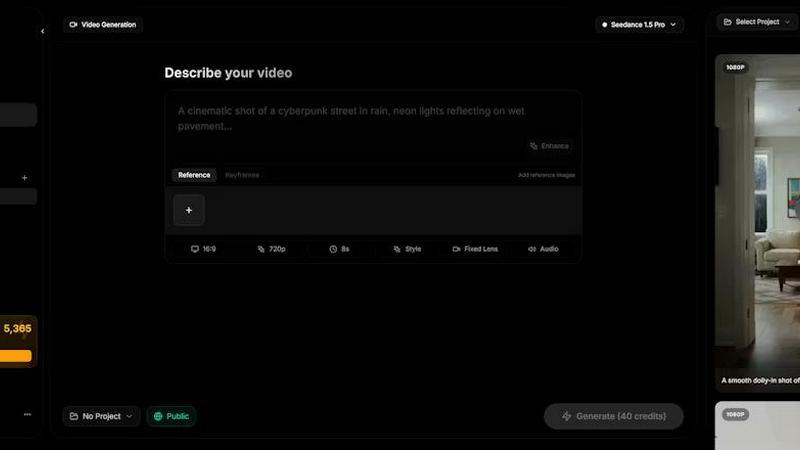
Visual Comparison
SeeDance Ai
Tool.Video

Feature Comparison
SeeDance Ai
Multimodal Input System
SeeDance Ai allows users to combine multiple types of media inputs, including text, images, audio, and video references. This multimodal approach enables creators to provide a richer context for their prompts, leading to more accurate and tailored video outputs.
Simultaneous Audio and Video Generation
Unlike many video tools that treat audio as an afterthought, SeeDance Ai generates sound and visuals concurrently. This integration ensures that every sound effect, dialogue, and background music is perfectly synchronized with the visuals, resulting in a seamless viewer experience.
Consistent Character Representation
One of the significant challenges in AI video creation is character drift, where a character's appearance changes between shots. SeeDance Ai addresses this issue by employing a cross-attention reference system that maintains character consistency across various scenes, ensuring a cohesive narrative.
Advanced Camera and Motion Control
Users can upload reference videos to replicate specific camera movements and human motions. This feature allows for precise control over tracking shots, zooms, and other dynamic movements, enabling creators to achieve professional cinematography without extensive technical knowledge.
Tool.Video
AI Video Generation with Sora 2
Sora 2 is an advanced text-to-video AI model that allows users to create stunning videos from simple text prompts. This feature enables realistic motion and captivating visuals, catering to a wide range of video styles, from cinematic scenes to engaging vlogs.
High-Quality Image Creation with Nano Banana Pro
The Nano Banana Pro feature provides users with high-quality image generation capabilities. It supports both text-to-image and image-to-image modes, allowing users to create unique visuals quickly, whether they are starting from scratch or enhancing existing images.
Professional Music Composition with Suno 5
Suno 5 is a professional AI music generation tool that allows users to compose original songs, complete with lyrics, melodies, and arrangements across various genres. This feature is perfect for creators looking to add a polished soundtrack to their video projects.
Video Utilities for Enhanced Editing
Tool.Video offers a suite of essential video utilities including a thumbnail generator, watermark adder, and video trimmer. These tools are designed to streamline the video editing process, ensuring that users can enhance their videos with ease, all while maintaining high-quality output.
Use Cases
SeeDance Ai
Marketing Campaigns
SeeDance Ai is ideal for marketers looking to generate engaging promotional videos. By using text prompts and reference media, they can create compelling content that resonates with their target audience, enhancing brand visibility and engagement.
Social Media Content Creation
Content creators can utilize SeeDance Ai to produce eye-catching videos for platforms like Instagram, TikTok, and YouTube. The tool's ability to generate short, impactful clips makes it perfect for capturing audience attention in the fast-paced social media environment.
Educational Videos
Educators and trainers can create informative videos that combine visuals, audio, and text to enhance learning experiences. SeeDance Ai allows for the integration of various media types, making lessons more engaging and accessible to learners.
Storytelling and Creative Projects
Writers and filmmakers can leverage SeeDance Ai to visualize their narratives. By transforming scripts into cinematic videos, they can explore storytelling in new ways, whether for personal projects, pitches, or collaborative efforts.
Tool.Video
Content Creation for Social Media
Creators can utilize Tool.Video to produce engaging video content tailored for social media platforms. By leveraging the AI video generation and thumbnail creation features, users can create eye-catching posts that attract more followers and boost engagement.
Marketing and Advertising Campaigns
Marketers can harness Tool.Video's capabilities to create compelling advertisements and promotional videos quickly. With the AI TVC generator, they can produce professional-quality commercials in minutes, maximizing their marketing efforts with minimal time investment.
Educational and Training Videos
Educators and trainers can use Tool.Video to develop informative and visually appealing educational content. The ability to generate videos from text prompts allows for the creation of diverse instructional materials that enhance learning experiences.
Artistic Projects and Creative Expression
Artists and content creators can explore their creativity using Tool.Video. With the integration of advanced AI tools, they can generate unique visuals, music compositions, and videos that showcase their artistic vision, enabling limitless creative possibilities.
Overview
About SeeDance Ai
SeeDance Ai is an innovative multimodal AI video generation platform designed to transform text prompts, images, audio, and video references into high-quality, cinematic videos. This tool is particularly beneficial for content creators, marketers, and storytellers who seek to produce professional-grade videos without the need for extensive studio resources. The platform stands out for its ability to generate synchronized sound and smooth motion in a single pass, eliminating the common pitfalls of traditional video editing processes. With SeeDance Ai, users can harness the power of advanced AI technology, ensuring their videos maintain high fidelity and visual consistency. The platform provides various models, including Seedance 2.0, Seedance 1.5 Pro, and others, each offering unique capabilities to enhance the creative workflow. Ultimately, SeeDance Ai empowers users to bring their visions to life with ease and precision, making it an essential tool in the realm of digital content creation.
About Tool.Video
Tool.Video is an innovative all-in-one AI video generation platform designed to empower creators, marketers, and developers with cutting-edge AI tools. It integrates powerful models such as Sora 2 for video creation, Nano Banana Pro for image generation, and Suno 5 for music composition. The platform simplifies the AI content creation process by offering a unified interface that allows users to generate videos, images, and music seamlessly. With Tool.Video, creators can easily transform text prompts into realistic videos, produce high-quality visuals, and create professional-grade music, all within a single dashboard. The main value proposition lies in its ability to streamline the creative workflow, making it accessible to users of all skill levels. By consolidating multiple AI tools into one platform, Tool.Video enables users to focus on their creative ideas without the distractions of managing different services, making it an essential tool for modern content creators who seek efficiency and quality.
Frequently Asked Questions
SeeDance Ai FAQ
What types of media can I use with SeeDance Ai?
You can use text prompts, images, audio clips, and video references. This multimodal capability allows for a richer and more detailed creation process.
How does SeeDance Ai ensure audio and video synchronization?
SeeDance Ai generates audio and visuals simultaneously within the same model pass. This means that sound effects and dialogue are perfectly timed with the corresponding visuals, enhancing the overall quality of the video.
Can I maintain character consistency across multiple shots?
Yes, SeeDance Ai employs a cross-attention reference system that locks in facial geometry and style, ensuring characters remain consistent throughout different scenes.
Is prior video editing experience required to use SeeDance Ai?
No prior experience is necessary. SeeDance Ai is designed to be user-friendly, allowing anyone to create professional-quality videos regardless of their technical background.
Tool.Video FAQ
What kind of videos can I create with Tool.Video?
You can create a wide array of videos using Tool.Video, ranging from promotional content, educational materials, to cinematic scenes and vlogs. The platform's versatile AI tools cater to various styles and purposes.
Is Tool.Video suitable for beginners?
Yes, Tool.Video is designed to be user-friendly and accessible for users of all skill levels. The unified interface simplifies the creative process, allowing beginners to quickly learn and utilize the powerful AI tools available.
Can I customize the generated content?
Absolutely! Tool.Video offers customization options for all types of generated content, including video styles, music genres, and image aesthetics. This flexibility allows you to tailor your creations to meet your specific needs and preferences.
Is there a limit to the number of videos I can create?
Tool.Video offers a credit system that may limit the number of videos you can generate based on your plan. Users can purchase additional credits or explore promotional offers to maximize their creative output.
Alternatives
SeeDance Ai Alternatives
SeeDance Ai is a cutting-edge AI video generation platform that enables users to create cinematic, multi-shot videos by transforming text, images, audio, and video references. As part of the video production category, it excels in creating high-quality output for various applications, including marketing clips, social media content, dance videos, and storytelling. Users often seek alternatives to SeeDance Ai for several reasons, including cost considerations, specific feature requirements, or compatibility with different platforms. When evaluating an alternative, it is essential to consider factors such as ease of use, the quality of output, unique features like motion-transfer systems, and the overall support offered by the platform. This will ensure that users find a solution that meets their creative and technical needs effectively.
Tool.Video Alternatives
Tool.Video is a comprehensive AI video toolkit designed for creators, marketers, and developers, providing an all-in-one platform for generating videos, images, and music. Users often seek alternatives to Tool.Video for various reasons, including pricing, specific feature sets, or compatibility with their existing workflows. When exploring alternatives, it is essential to consider factors such as ease of use, the range of creative tools offered, and the overall value for money to ensure that the chosen platform meets specific project needs.