QuoteCraft AI vs Tinyart.io
Side-by-side comparison to help you choose the right product.

QuoteCraft AI
QuoteCraft AI instantly creates clear, winning proposals for freelancers, ensuring competitive pricing and smooth.
Last updated: March 4, 2026

Tinyart.io
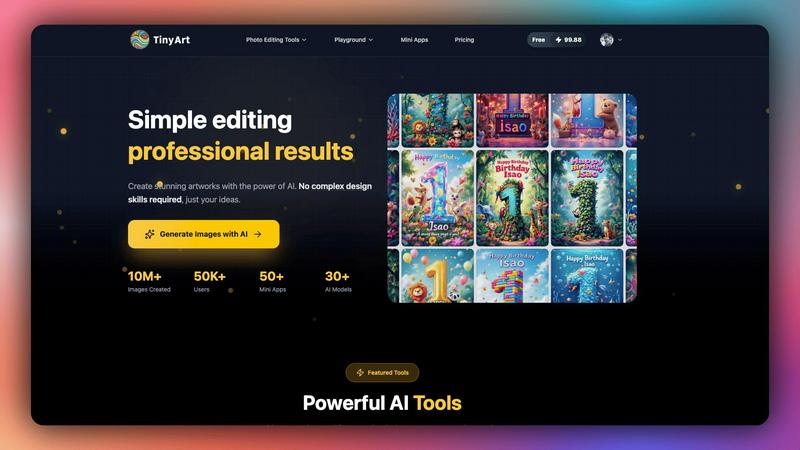
Tinyart.io uses AI to create professional images and edit photos without needing design skills.
Last updated: March 2, 2026
Visual Comparison
QuoteCraft AI

Tinyart.io
Feature Comparison
QuoteCraft AI
Voice-to-Proposal
This cutting-edge feature allows users to describe their project verbally, which is then transcribed into a professional proposal almost instantly. It is particularly useful for freelancers who are on the go, enabling them to capture ideas right after client meetings.
Interactive Proposals
With this feature, clients can customize their proposals by toggling line items on or off, allowing for real-time updates to pricing. This flexibility reduces the likelihood of proposal rejections and enhances client satisfaction by catering to their specific needs.
E-Signatures
QuoteCraft AI ensures that all proposals are legally binding through digital signatures. Clients can sign proposals directly within the platform, with each signature recorded with an IP address and a timestamp to provide legal protection.
Client Memory
This feature enables the AI to remember each client's history and goals, making proposals feel personal and tailored. By referencing past interactions, freelancers can create proposals that resonate more deeply with clients, improving engagement and acceptance rates.
Tinyart.io
AI Image Generator
This core feature allows you to generate original images from simple text descriptions. Instead of searching for stock photos, you describe the scene, style, or object you need, and the AI creates a unique visual. It supports over 30 different AI models, giving you flexibility in artistic style and output quality to match your specific vision, from photorealistic images to digital artwork.
Intelligent Background Remover
The background remover tool automatically and cleanly isolates the main subject of any photo. You can process up to 30 files simultaneously, saving significant time compared to manual editing. This is essential for creating clean product shots, profile pictures, or any graphic where you need the subject placed on a new background without tedious manual selection.
Smart Mini Apps
Tinyart.io offers a suite of specialized, single-purpose tools called Mini Apps designed for specific tasks. These include creating professional ID photos with automatic background correction, restoring old and damaged photographs using AI, and face-swapping capabilities. These apps simplify complex edits into a few clicks, addressing niche needs without requiring separate software.
All-in-One Photo Editing Suite
Beyond AI generation, the platform provides a comprehensive set of manual and AI-assisted editing tools. This includes upscaling images to enhance resolution, removing unwanted watermarks or objects with the "Clean Up" tool, and general photo customization. This suite ensures you can refine, tweak, and perfect your images entirely within the Tinyart.io ecosystem.
Use Cases
QuoteCraft AI
Web Design Projects
Freelance web designers can use QuoteCraft AI to quickly generate comprehensive proposals that outline project scope, deliverables, and pricing, helping them secure more contracts with clarity and professionalism.
Marketing Campaigns
Marketing agencies can leverage QuoteCraft AI to streamline proposal creation for various campaigns. The tool’s interactive features allow agencies to tailor proposals based on client feedback, ensuring that each proposal reflects the client's unique goals.
Creative Studios
For creative studios, QuoteCraft AI simplifies the proposal process by generating proposals that detail creative services and pricing structures. This efficiency allows studio teams to focus on creative work rather than paperwork.
Consulting Services
Consultants can benefit from QuoteCraft AI by producing detailed proposals that define project scopes and deliverables. The Context Engine learns from previous proposals, ensuring that each document maintains a consistent voice and meets client expectations.
Tinyart.io
E-commerce Product Photography
Online sellers can use Tinyart.io to create professional-looking product catalogs without a photoshoot studio. They can generate product images from descriptions, remove backgrounds from existing photos automatically, and upscale image quality. This drastically cuts costs and time while maintaining a high-quality, consistent visual storefront.
Social Media Content Creation
Marketers and content creators can quickly produce engaging visuals for posts, stories, and ads. The smart templates and one-click resizing ensure images are perfectly formatted for each platform (like Instagram, Facebook, or Twitter). The AI generator helps create unique featured images, while editing tools allow for quick branding and adjustments.
Professional Profile and ID Photos
Individuals and professionals can use the dedicated ID Photo Mini App to create compliant passport or license photos from any portrait. The app automatically adjusts the background, size, and composition. Similarly, the general tools can be used to enhance LinkedIn profile pictures by improving lighting or removing distractions.
Personal Creative Projects and Restoration
Hobbyists and individuals can restore cherished old family photos using the Photo Restoration Mini App, bringing faded or damaged pictures back to life. The platform also serves as a digital art playground where users can experiment with AI models to generate artwork, edit personal photos, or create custom graphics for invitations and personal blogs.
Overview
About QuoteCraft AI
QuoteCraft AI is a groundbreaking tool specifically designed to empower freelancers in crafting professional proposals with remarkable efficiency. By leveraging advanced artificial intelligence, this platform significantly reduces the time needed to create proposals, helping users focus on their core activities rather than getting bogged down in administrative tasks. Freelancers, including web designers, marketing agencies, creative studios, and consulting firms, can utilize QuoteCraft AI to tackle two critical challenges: defining a clear project scope and establishing effective pricing strategies. With features like voice-to-proposal capabilities and a Context Engine that learns from user feedback, QuoteCraft AI enhances the proposal process. This innovative solution generates comprehensive proposals within seconds, covering all essential components such as scope, pricing, timelines, and deliverables. Currently, QuoteCraft AI is available for free during its beta phase, offering early adopters an excellent opportunity to experience its benefits without any financial commitment.
About Tinyart.io
Tinyart.io is an AI-powered platform built to make professional visual creation accessible to everyone. It operates on a fundamental principle: powerful design tools should not require complex skills to use. The platform moves beyond simple AI image generation to offer a full suite of creation and editing tools. This allows users, from developers and marketers to everyday creators, to start with a raw idea and transform it into a polished, high-quality image ready for marketing, social media, or personal projects in minutes. A core differentiator is its developer-first design editor, which includes intelligent features like smart templates, automatic brand color detection, and one-click resizing for various platforms. By focusing on an intuitive workflow that eliminates the steep learning curve of traditional software, Tinyart.io empowers non-designers to produce stunning visuals efficiently. It combines the generative power of AI with practical editing utilities, serving as a comprehensive, all-in-one solution for modern visual content needs.
Frequently Asked Questions
QuoteCraft AI FAQ
How does the AI generate proposals?
The AI uses advanced algorithms to analyze the project details provided by the user. It then composes a comprehensive proposal that includes all relevant elements like scope, pricing, and timelines.
Will my proposals look generic?
No, QuoteCraft AI is designed to learn from your past proposals. Its Context Engine ensures that each generated proposal reflects your unique writing style and preferences, making it feel personal and tailored.
Can I edit proposals after generation?
Yes, users can edit and customize the proposals generated by QuoteCraft AI before sending them to clients. This flexibility allows freelancers to make adjustments based on specific client needs or preferences.
Is my data secure?
Absolutely. QuoteCraft AI prioritizes data security and employs encryption and secure storage methods to protect user information and proposals, ensuring that all data remains confidential and safe.
Tinyart.io FAQ
Who is Tinyart.io designed for?
Tinyart.io is designed for anyone who needs to create or edit visuals but may lack advanced design skills or expensive software. This includes developers, marketers, small business owners, social media managers, content creators, e-commerce sellers, and hobbyists. Its intuitive interface makes professional-grade visual tools accessible to non-designers.
Do I need design experience to use Tinyart.io?
No, you do not need prior design experience. The platform is built specifically to eliminate the complexity of traditional design tools. Features like smart templates, one-click actions, and AI-powered tools guide you through the process. You start with your basic idea, and the platform helps you execute it with professional results.
What makes Tinyart.io different from other AI image generators?
While it includes a powerful AI image generator, Tinyart.io is more than just a text-to-image tool. It is a complete creation and editing platform. Its key differentiators are the developer-first editor with smart templates, the extensive suite of practical editing tools (like background removal and upscaling), and the collection of specialized Mini Apps for specific tasks.
Is there a free plan to try Tinyart.io?
Yes, you can start using Tinyart.io for free. The platform offers a free tier that allows users to explore its core features and begin creating without a credit card. This lets you experience the AI-powered workflow and understand the tool's value before considering any paid plans for higher usage limits or advanced features.
Alternatives
QuoteCraft AI Alternatives
QuoteCraft AI is a cutting-edge tool tailored for freelancers seeking to create professional proposals quickly and efficiently. Falling under the categories of Business & Finance and Productivity & Management, it leverages advanced artificial intelligence to streamline the proposal process, making it easier for users to define project scope, pricing strategies, and timelines. Users often seek alternatives to QuoteCraft AI for various reasons, including pricing options, feature sets, and compatibility with different platforms. When looking for an alternative, it's essential to consider factors such as usability, the comprehensiveness of features, customer support, and how well the tool integrates with existing workflows. A good alternative should enhance efficiency and provide the necessary tools to create compelling proposals.
Tinyart.io Alternatives
Tinyart.io is an AI-powered design platform in the productivity and management category. It helps users, especially developers and non-designers, create professional marketing images quickly by focusing on editing and smart templates rather than just image generation. Users often explore alternatives for various practical reasons. These can include budget constraints, the need for different or more advanced features, or a requirement to work on a specific operating system or device. Some may seek tools with a stronger focus on pure AI art generation or more traditional, manual design control. When evaluating other options, consider your primary goal. Look at the core functionality, such as whether you need robust editing, simple background removal, or high-quality image generation. Also, assess the ease of use, pricing structure, and how well the tool integrates into your existing workflow to ensure it truly meets your needs.