Prompt Builder vs Pullsy
Side-by-side comparison to help you choose the right product.

Prompt Builder
Prompt Builder helps you quickly generate, refine, and save optimized AI prompts for any model, streamlining your creative process.
Last updated: April 13, 2026

Pullsy organizes your inbox, drafts replies in your voice, and keeps your day on track effortlessly.
Last updated: February 26, 2026
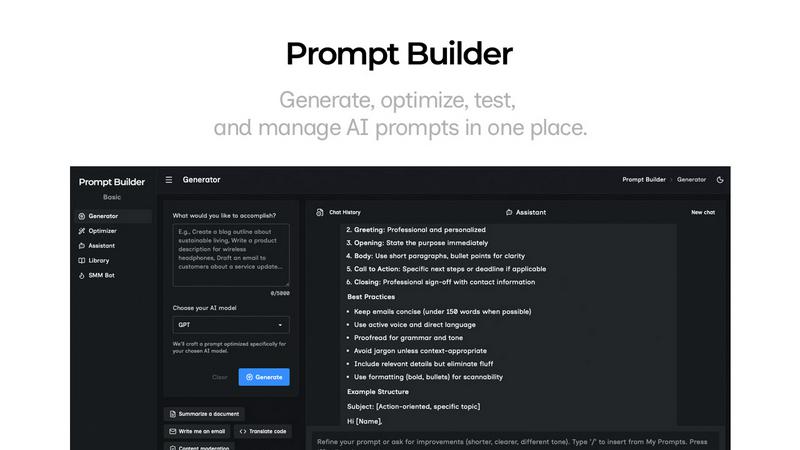
Visual Comparison
Prompt Builder
Pullsy

Feature Comparison
Prompt Builder
Prompt Generator
The Prompt Generator feature allows users to input their ideas and select a target AI model, producing a professional-grade prompt in seconds. This tool ensures that the generated prompts are specifically optimized for the selected model, enhancing effectiveness and relevance.
Chat Refinement
With the Chat Refinement feature, users can interactively refine their prompts in a built-in chat workspace. This functionality enables quick iterations and adjustments, allowing for real-time improvements and ensuring that the final output meets the desired specifications.
Prompt Library
The Prompt Library is a comprehensive repository where users can save, organize, and reuse their best prompts. This feature supports easy searching with filters by category and model, making it simple to access past work and build a robust collection of effective prompts tailored for various projects.
Prompt Optimizer
The Prompt Optimizer takes existing prompts and enhances them by providing structured improvements. This feature focuses on clarity, constraints, output format, and examples, ensuring that users can easily transform their original prompts into clearer and more effective versions.
Pullsy
Intelligent Email Organization
Pullsy automatically identifies and highlights the most important messages in your inbox, filtering out the noise so you can focus on what truly matters. This feature ensures that you never miss critical communications while maintaining a clear and organized inbox.
Context-Aware Reply Drafting
With Pullsy, drafting replies becomes effortless. The AI drafts context-aware responses based on the content and intent of incoming emails. You can choose the tone—Professional, Friendly, or Quick—allowing for personalized communication that aligns with your style.
Smart Task Management
Pullsy helps you manage your tasks efficiently. It detects questions that need answers, scheduling requests, and reminders about broken commitments. This means you can confirm tasks, propose meeting times, or attach documents with just one click, simplifying your workflow.
Comprehensive Email Summarization
The “Ask Pullsy” feature allows you to summarize lengthy email threads or review PDFs quickly, extracting key insights without sifting through unnecessary information. This saves time and enhances your ability to make informed decisions swiftly.
Use Cases
Prompt Builder
Content Creation
Content creators can utilize Prompt Builder to generate tailored writing prompts for blog posts, articles, or social media updates. With optimized prompts for different AI models, they can streamline their writing process and produce high-quality content faster.
Marketing Campaigns
Marketers can leverage the tool to create compelling marketing messages and social media posts. By using the SMM Bot, they can generate platform-specific content and refine it until it aligns perfectly with their brand voice and audience expectations.
Software Development
Developers can benefit from Prompt Builder by crafting prompts for AI-assisted coding or debugging. The ability to refine and save prompts specific to their development environment allows for more efficient and effective coding practices.
Education and Training
Educators can use Prompt Builder to create instructional materials and quizzes tailored to various learning models. This can enhance their teaching methods by ensuring that prompts are clear, targeted, and relevant to the curriculum.
Pullsy
Streamlined Communication for Teams
Pullsy is perfect for teams that need to maintain clear and concise communication. By drafting context-aware replies, team members can collaborate more effectively without getting lost in lengthy email exchanges.
Efficient Time Management for Entrepreneurs
Entrepreneurs can leverage Pullsy to manage their busy schedules. The tool helps prioritize emails and tasks, ensuring that essential communications are addressed promptly while allowing for better time allocation throughout the day.
Enhanced Customer Support
Customer support teams can utilize Pullsy to handle incoming inquiries more efficiently. The AI's ability to draft context-aware replies allows representatives to respond to clients quickly, improving customer satisfaction and reducing response times.
Improved Project Management
Project managers can benefit from Pullsy’s task management features. The tool helps track important emails related to project updates, deadlines, and team responsibilities, ensuring that nothing falls through the cracks.
Overview
About Prompt Builder
Prompt Builder is an innovative workspace designed for prompt engineering, enabling users to write, test, and save prompts efficiently. It simplifies the process of crafting high-quality prompts tailored to various AI models, including GPT, Claude, Gemini, Llama, and more. Users can begin with a draft, refine it through an intuitive chat interface, and easily save or pin different versions for future use. This tool is ideal for anyone working with AI, from content creators to developers, allowing them to optimize their interactions with AI models and achieve better results without the hassle of repetitive revisions. With the added benefit of a community-driven library of reusable prompts and templates, Prompt Builder transforms an idea into a polished prompt in mere seconds, making it a valuable resource for maximizing productivity and creativity in AI-driven tasks.
About Pullsy
Pullsy is an innovative AI-powered inbox assistant designed specifically for busy professionals, entrepreneurs, and small teams who want to take control of their email management. By seamlessly integrating with popular email services like Gmail and Outlook, Pullsy significantly enhances productivity by intelligently organizing incoming emails. It labels messages based on urgency, drafts context-aware replies in your unique tone, and allows users to summarize lengthy email threads quickly. With its “Ask Pullsy” feature, users can easily extract key insights from documents and emails, making it an indispensable tool for anyone looking to streamline their workflow. Instead of being bogged down by endless email threads and administrative tasks, users can navigate their inboxes up to three times faster, enabling them to focus on what truly matters. The simple setup and clean interface, combined with a free 14-day trial, make Pullsy an attractive option for those who seek to transform their email experience from a daily burden into an efficient, AI-driven process.
Frequently Asked Questions
Prompt Builder FAQ
What AI models does Prompt Builder support?
Prompt Builder works with a wide range of AI models, including but not limited to GPT, Claude, Gemini, Llama, Mistral, DeepSeek, Grok, and Perplexity. This flexibility allows users to tailor their prompts to the specific capabilities of different models.
How does the Chat Refinement feature work?
The Chat Refinement feature enables users to refine their prompts in real-time through an interactive chat interface. Users can make adjustments based on feedback and iterate quickly, ensuring that the final prompt is well-structured and effective.
Can I save my prompts for future use?
Yes, Prompt Builder includes a dedicated Prompt Library where users can save, organize, and reuse their prompts. This library also allows for easy searching and filtering, making it simple to find previously crafted prompts.
Is there a limit on the number of assistant requests?
Yes, Prompt Builder offers a free plan that includes 25 assistant requests per month without requiring a credit card. This allows users to explore the tool's features and see its value before committing to a paid plan.
Pullsy FAQ
What is Pullsy and how does it work?
Pullsy is an AI-powered inbox management tool that integrates with Gmail and Outlook. It organizes messages, highlights important information, and suggests replies, enabling users to clear their inboxes more efficiently and with less mental effort.
Is Pullsy safe to use?
Yes, Pullsy prioritizes user data security. It is Google OAuth Verified and SOC Type 2 compliant, ensuring that your information remains protected while you use the tool for managing your emails.
Do I need a credit card to start the free trial?
No, you do not need to provide a credit card to start your free 14-day trial with Pullsy. You can explore all features without any commitment.
Can Pullsy draft replies for me?
Absolutely. Pullsy drafts replies based on the context of your incoming emails. You can review the suggested responses and send them with just one click, making email communication more efficient.
Alternatives
Prompt Builder Alternatives
Prompt Builder is a versatile tool designed for prompt engineering, allowing users to generate, optimize, test, and manage AI prompts efficiently. As part of the AI Assistants category, it caters to a broad audience seeking to streamline their prompt creation process across various AI models. Users often seek alternatives due to factors such as pricing, specific feature sets, or the need for compatibility with different platforms. When searching for an alternative, it is important to consider the ease of use, the range of supported models, and the additional features offered, such as optimization tools or community resources. These factors can significantly impact the overall effectiveness and convenience of the prompt-building experience.
Pullsy Alternatives
Pullsy is an AI-powered inbox assistant designed specifically for busy professionals, entrepreneurs, and small teams. It falls under the category of email tools, providing solutions to streamline email management. Users often seek alternatives to Pullsy for various reasons, including the desire for different pricing structures, additional features, or compatibility with specific platforms. When exploring alternatives, it is essential to consider factors such as ease of integration with existing email services, the range of features offered, and the overall user experience to ensure that the solution meets individual or team needs effectively. Finding the right email tool can significantly enhance productivity and reduce the stress associated with managing an overflowing inbox. Users should look for solutions that offer intuitive interfaces, robust AI capabilities, and responsive customer support. Additionally, a free trial or demo can be beneficial to assess whether the alternative aligns with their workflow requirements before making a commitment.