PseudoRun vs Speechable
Side-by-side comparison to help you choose the right product.

PseudoRun
Master IGCSE pseudocode with a free, ad-free editor for real-time practice and debugging.
Last updated: March 1, 2026

Transform documents into engaging audio, podcasts, or lectures for active learning and deeper understanding on the go.
Last updated: February 28, 2026
Visual Comparison
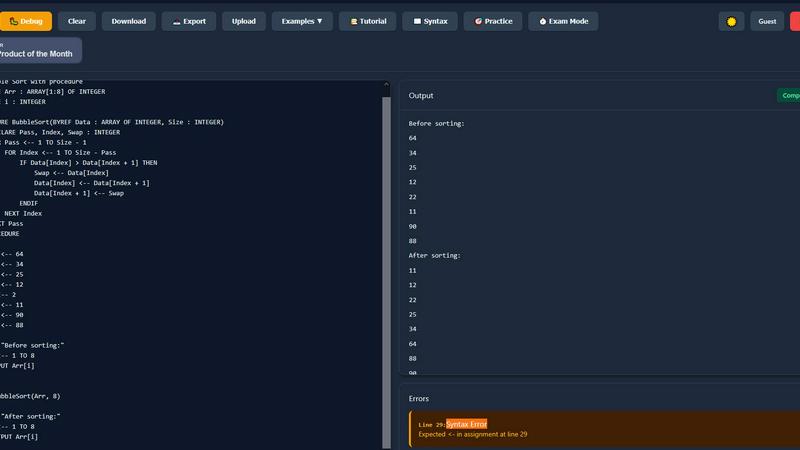
PseudoRun
Speechable
Feature Comparison
PseudoRun
IGCSE Exam-Focused Editor
The editor is built from the ground up to adhere strictly to the Cambridge IGCSE Computer Science pseudocode specifications. This ensures that every command, syntax rule, and structure you practice is exactly what will be expected in your exams. You learn the correct conventions from the start, eliminating confusion and building exam-ready confidence through consistent, specification-perfect practice.
Real-Time Syntax Validation
As you type your pseudocode, PseudoRun provides instant feedback by checking for syntax errors and logical mistakes. This immediate validation acts like a guiding tutor, helping you correct errors on the fly and understand the proper structure of IGCSE pseudocode. It transforms learning from a passive to an active process, reinforcing correct habits as you write.
Step-by-Step Debugger with Variable Tracking
Master complex algorithms by executing your code line-by-line. This powerful debugger allows you to observe the flow of execution and watch how variable values change at each step. This deep, visual understanding is crucial for grasping loops, conditionals, and procedures, turning abstract concepts into clear, traceable logic.
Comprehensive IGCSE Practice Library
Access over 50 curated examples and exercises that cover the entire IGCSE syllabus, including key topics like arrays, file handling, and procedures. This library provides structured practice from basic to advanced levels, allowing you to apply concepts in exam-style scenarios and solidify your understanding through hands-on problem-solving.
Speechable
Podcast Mode
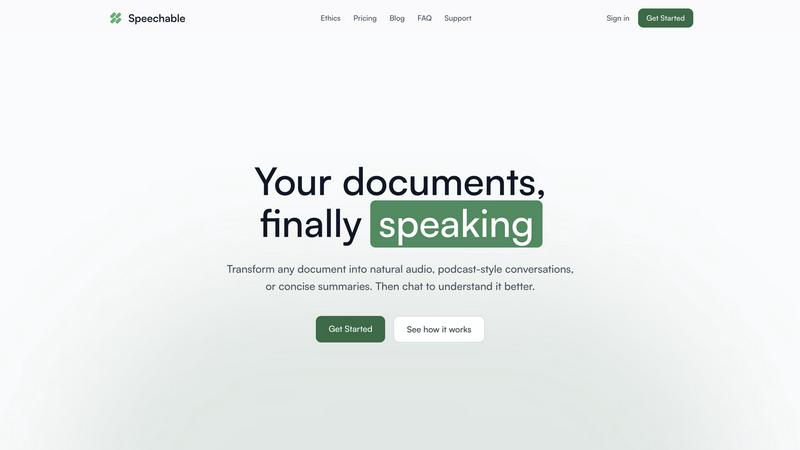
Podcast mode transforms your document into a dynamic two-voice conversation, allowing you to choose the duration of playback—5, 10, or 15 minutes—and select your preferred language. This feature makes learning feel more like a dialogue rather than a monologue, enhancing understanding and retention.
Lecture Mode
Lecture mode presents complex ideas in a clear and straightforward manner, mimicking the style of TED talks. This feature is particularly useful for users who seek to grasp intricate subjects quickly and effectively, making it easier to absorb important information.
Eco Mode
Eco mode operates locally within your browser, which means it does not rely on cloud services. This results in up to 20 times less energy consumption compared to traditional cloud-based text-to-speech solutions. Additionally, it offers unlimited playback without any credits required, making it a sustainable choice for users.
Interactive Chat
The interactive chat feature allows users to engage with their documents by asking questions, either by typing or speaking. This functionality facilitates active learning, enabling users to clarify doubts or explore specific topics in depth, transforming passive listening into an engaging dialogue.
Use Cases
PseudoRun
Independent Exam Preparation for Students
IGCSE students can use PseudoRun for self-directed study and revision. The platform allows them to practice past paper questions, work through syllabus topics at their own pace, and utilize the exam timer to simulate real test conditions. This builds both competence and time-management skills crucial for exam success.
Classroom Teaching and Demonstrations
Educators can leverage PseudoRun as an interactive teaching tool during lessons. It is perfect for live-coding demonstrations, where teachers can write pseudocode on the fly, use the step-by-step debugger to explain algorithm flow, and instantly validate student suggestions, making abstract concepts tangible for the entire class.
Homework and Assignment Completion
Students can complete their Computer Science homework and programming assignments directly within PseudoRun. The real-time validation helps them catch errors before submission, while the cloud storage allows them to save their work and access it from any device, whether at school or at home.
Algorithm Design and Logic Practice
Beyond specific IGCSE questions, learners can use the platform to design and test their own algorithms. This encourages experimentation and deepens logical thinking skills. Beginners can practice fundamental constructs like loops and conditionals without the overhead of learning a full programming language's syntax.
Speechable
On-the-Go Learning
Speechable is perfect for busy individuals who want to maximize productivity during commutes, workouts, or walks. By converting documents into audio formats, users can listen to essential content anytime and anywhere, making the most of their time.
Enhanced Study Sessions
Students can leverage Speechable to convert textbooks and lecture notes into audio summaries. This auditory approach can significantly aid comprehension and retention, especially for those who struggle with traditional reading methods.
Accessibility for Diverse Learners
Speechable is designed with accessibility in mind. Students with ADHD or dyslexia can benefit from its features, allowing them to interact with text in a more manageable and engaging manner, thus promoting equal learning opportunities.
Content Creation and Research
Researchers and content creators can use Speechable to turn lengthy articles or reports into concise audio formats. This not only saves time but also allows for easier dissemination of information, making it a valuable tool for professionals in various fields.
Overview
About PseudoRun
PseudoRun is the premier free online platform dedicated to mastering pseudocode for the Cambridge IGCSE Computer Science curriculum. It is an interactive editor and simulator designed to bridge the gap between theoretical learning and practical application. The tool provides a distraction-free, user-friendly environment where students can write, execute, and debug pseudocode in real-time, perfectly aligned with IGCSE specifications and exam patterns. By removing the complexity of traditional programming languages, PseudoRun allows learners to focus purely on understanding fundamental algorithmic logic, control structures, and problem-solving techniques. It is specifically built for IGCSE students, educators, and beginners who need a reliable, accessible, and effective tool for exam preparation and concept mastery. With its commitment to being completely free, devoid of advertisements, and focused on student privacy, PseudoRun empowers users to practice confidently, receive instant feedback, and build the skills necessary to excel in their Computer Science examinations.
About Speechable
Speechable is an innovative tool designed to transform text-based documents into engaging audio experiences. Whether you're dealing with PDFs, web articles, ebooks, or even photos of handwritten notes, Speechable cleanly extracts the main content while eliminating distractions like footnotes, citations, and ads. This makes your documents not only accessible but also enjoyable to listen to. The primary value proposition of Speechable lies in its ability to provide users with a more immersive and interactive learning experience. By utilizing natural-sounding AI voices, users can choose from various playback modes, including podcast-style conversations and TED-style lectures. Designed for everyone—from students to educators, and individuals with learning differences—Speechable aims to make learning accessible, engaging, and efficient. This tool supports users in enhancing their comprehension while maximizing productivity, making it an essential resource for anyone who consumes large amounts of written content.
Frequently Asked Questions
PseudoRun FAQ
Is PseudoRun really free to use?
Yes, PseudoRun is completely free. The platform operates on a promise of zero advertisements and no hidden paywalls. All features, including the editor, debugger, cloud storage, and practice problems, are available at no cost to ensure every student has access to top-quality IGCSE preparation tools.
How does PseudoRun help with IGCSE exams?
PseudoRun is 100% aligned with the Cambridge IGCSE pseudocode specification. By practicing with it, you are learning the exact syntax and logic required for the exam. Features like the exam-mode timer and a vast library of IGCSE-style problems provide targeted practice that builds the specific skills and speed needed to perform well.
Do I need to create an account to start using it?
No, you can start using PseudoRun immediately without any login or registration. You can try the editor and all core features right away. Creating a free account is optional and is used primarily to save your pseudocode programs to the cloud for access across different devices.
Can I save and access my pseudocode programs later?
Absolutely. With a free account, you have access to unlimited cloud storage. This means you can save all your practice programs, homework, and projects on PseudoRun's servers and retrieve them from any computer or tablet with an internet connection, making your study materials always accessible.
Speechable FAQ
What file formats does Speechable support?
Speechable supports a variety of file formats, including PDFs, Word documents (.docx), ePubs, and web URLs, as well as photos of text. Users can easily drop their files or paste links, and Speechable will handle the conversion seamlessly.
How many voices are available?
Speechable boasts a selection of 52 natural-sounding AI voices across eight different languages. Users have the option to preview each voice and adjust playback speeds to suit their listening preferences, ensuring a personalized experience.
What is Eco mode?
Eco mode is a unique feature that allows Speechable to run text-to-speech processing locally on your device rather than in the cloud. This significantly reduces energy usage—up to 20 times less than traditional options—and provides unlimited playback without requiring credits.
Can I chat with my documents?
Yes, Speechable includes a chat feature that enables users to ask questions or request clarifications about their documents. This interaction mimics a conversation with the content, allowing for deeper understanding and exploration of the material.
Alternatives
PseudoRun Alternatives
PseudoRun is a free online platform in the education and learning category, specifically designed for mastering IGCSE pseudocode. It provides a real-time, interactive environment for writing and debugging algorithms, making it a foundational tool for students and educators following the Cambridge curriculum. Users may explore alternatives for various reasons. Some might seek different pricing models, such as one-time purchases or offline software. Others may require features beyond IGCSE focus, like support for other programming languages or more advanced project management tools. Platform compatibility, such as mobile app availability or integration with other educational software, is another common consideration. When evaluating other options, it is crucial to consider alignment with your specific learning goals. For IGCSE students, strict adherence to the official pseudocode specification is paramount. Other key factors include the quality of real-time feedback, the presence of a step-by-step debugging tool, and the overall user experience that supports a clear, back-to-basics approach to learning algorithmic thinking.
Speechable Alternatives
Speechable is an innovative tool that transforms any document into audio formats such as podcasts and TED-style lectures. It falls within the Education & Learning and Speech & Voice categories, catering to users seeking to better absorb and understand written content through auditory means. Many users search for alternatives to Speechable due to varying needs, such as pricing concerns, specific feature requirements, or compatibility with different platforms. When selecting an alternative, it is crucial to consider factors like the range of features offered, ease of use, accessibility options, and whether the solution aligns with your learning preferences. Additionally, evaluating pricing structure and sustainability can help ensure that the chosen tool meets both your budget and environmental considerations.