LLMWise vs Pro Cursor Rules
Side-by-side comparison to help you choose the right product.

LLMWise offers a single API to access top AI models like GPT and Claude, optimizing costs with pay-per-use pricing.
Last updated: February 26, 2026

Pro Cursor Rules
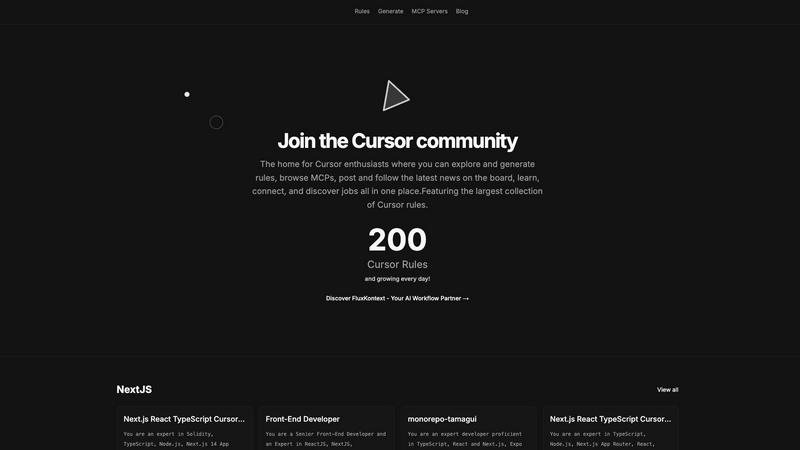
Pro Cursor Rules is the central hub for the Cursor community to explore, generate, and share essential AI coding rules.
Last updated: February 28, 2026
Visual Comparison
LLMWise

Pro Cursor Rules
Feature Comparison
LLMWise
Smart Routing
With LLMWise's smart routing feature, users can send a prompt and automatically receive the optimal model for their needs. This means that technical queries can be directed to GPT, creative writing prompts can go to Claude, and translation tasks can be handled by Gemini. This intelligent model selection minimizes the need for manual intervention, saving time and ensuring that tasks are handled by the most capable AI.
Compare & Blend
The compare and blend feature allows users to run prompts across different models simultaneously. This capability not only enables side-by-side comparisons of outputs but also allows for the blending of responses into a single, more robust answer. The judge mode lets models evaluate one another, providing insights into which responses are most accurate or relevant, enhancing the decision-making process.
Always Resilient
LLMWise is designed with resilience in mind. The circuit-breaker failover system automatically reroutes requests to backup models if a primary provider goes down. This ensures that applications remain operational and reliable, even during outages, preventing disruptions in user experience and maintaining service continuity.
Test & Optimize
The test and optimize feature offers comprehensive benchmarking suites, batch testing capabilities, and optimization policies tailored for speed, cost, or reliability. Automated regression checks help maintain quality over time, ensuring that users can continuously monitor and improve the performance of their AI applications without excessive manual input.
Pro Cursor Rules
The Largest Collection of Cursor Rules
This is the cornerstone feature of the platform. It provides a vast, searchable, and categorized library of pre-built Cursor rules contributed by the community. Users can browse rules by technology, such as Next.js, React, TypeScript, or Tailwind CSS, and instantly find expert-crafted prompts for specific roles like Senior Front-End Developer or for particular project setups like monorepos with Tamagui. This repository serves as an essential educational resource and a powerful starting point for any customization need.
Rule Generation Tool
Beyond browsing, the platform empowers users to create their own rules. The generation tools facilitate the process of building structured, effective prompts tailored to individual or team requirements. This feature guides users in defining clear roles, constraints, coding styles, and technology stacks for the AI, transforming vague ideas into precise, actionable Cursor rules that yield consistent and high-quality results during development sessions.
MCP Servers Directory
Pro Cursor Rules integrates access to MCP (Model Context Protocol) servers, a key component for extending Cursor's capabilities. This directory helps users discover and implement servers that connect the AI to external data sources, tools, and APIs. By providing this resource, the platform ensures users can not only instruct their AI but also expand its knowledge and functionality, covering a more complete spectrum of advanced Cursor customization and setup.
Community Hub & News Board
The platform is designed as a living community, not just a static database. It includes features for users to share their own rules, follow contributors, discuss best practices, and stay updated with the latest news and announcements through the community board. This social layer emphasizes connection and collective growth, allowing users to learn from peers, showcase their expertise, and keep pace with the evolving landscape of AI-assisted development.
Use Cases
LLMWise
Software Development
Developers can utilize LLMWise to quickly test various AI models for coding assistance. By comparing outputs from different models like GPT and Claude, they can determine which AI provides the best support for specific programming tasks, significantly reducing debugging time and enhancing productivity.
Content Creation
Content creators can leverage LLMWise for diverse writing tasks. Whether crafting articles, marketing copy, or social media posts, they can route prompts to the most effective models, compare creative outputs, and blend them into cohesive content that resonates with their audience, elevating quality while saving time.
Translation Services
For businesses requiring accurate translations, LLMWise facilitates access to the best translation models. Users can input text and compare translations from different models, ensuring that they select the most precise and contextually relevant translations for their needs, thereby improving communication with global audiences.
AI Research
Researchers can benefit from LLMWise by exploring and experimenting with various LLMs without the constraints of individual subscriptions. They can conduct side-by-side comparisons of model outputs, analyze their strengths and weaknesses, and ultimately choose the most suitable model for their research objectives.
Pro Cursor Rules
Accelerating Project Onboarding
A developer starting a new project with a specific stack, such as Next.js 14, TypeScript, and Supabase, can visit Pro Cursor Rules. Instead of spending hours crafting the perfect AI instructions, they can instantly find and apply a community-vetted rule tailored to that exact technology combination. This immediately aligns the Cursor AI with project best practices, coding conventions, and relevant libraries, dramatically reducing setup time and accelerating initial development.
Learning Best Practices Through Examples
A programmer new to a framework or concept, like React Three Fiber or OnchainKit, can use the platform as a learning tool. By exploring the rules built by experts for these technologies, they can deconstruct the prompts to understand what context, priorities, and patterns seasoned developers consider important. This provides practical, actionable insight into professional workflows and architectural decisions within that domain.
Standardizing Team Development
A development team lead can utilize Pro Cursor Rules to create and distribute a standardized rule for the entire team. By generating a consistent rule that enforces the company's coding style, preferred libraries (e.g., Zustand for state, Zod for validation), and review standards, they ensure uniform AI assistance across all developers. This promotes code consistency, reduces stylistic debates, and streamlines collaboration and code review processes.
Extending AI Capabilities with MCPs
A developer working on a niche or data-intensive project needs their AI assistant to access specialized information. They can use the MCP Servers directory on Pro Cursor Rules to find a server that connects Cursor to internal documentation, a specific database schema, or a unique API. This use case transforms the AI from a general-purpose coder into a domain-specific expert with relevant, real-time context for more accurate and informed assistance.
Overview
About LLMWise
LLMWise is an innovative API solution designed to simplify the management of multiple AI language models. It provides seamless access to a variety of leading models, including those from OpenAI, Anthropic, Google, Meta, xAI, and DeepSeek, all through one unified interface. This platform is tailored for developers who want to leverage the best AI models for their specific tasks without the hassle of managing multiple subscriptions or API keys. By incorporating intelligent routing capabilities, LLMWise ensures that each prompt is directed to the most suitable model based on its unique strengths. The main value proposition of LLMWise lies in its ability to optimize AI model selection, streamline requests, and deliver superior outputs, enabling developers to enhance application performance and efficiency, all while reducing costs associated with multiple subscriptions.
About Pro Cursor Rules
Pro Cursor Rules is the foundational platform and central hub for the Cursor AI code editor community. At its core, it addresses a fundamental need for developers: effectively customizing and controlling the powerful AI assistant within Cursor. The platform is built for anyone who uses Cursor, from novices seeking to improve their workflow to experienced developers crafting complex, context-aware AI instructions. Its primary value proposition is simplifying the discovery, creation, and sharing of "Cursor rules"—the custom instructions and system prompts that define how the AI behaves for specific tasks, frameworks, or personal coding styles. By providing the largest organized collection of these rules, Pro Cursor Rules eliminates the guesswork and manual effort of building effective AI prompts from scratch. It fosters a community-centric environment where users can learn from shared expertise, connect with like-minded developers, and continuously enhance their tool. The platform extends beyond just rules, integrating resources like MCP (Model Context Protocol) servers and a community blog, making it a comprehensive, one-stop destination for mastering Cursor customization and unlocking greater productivity in software development.
Frequently Asked Questions
LLMWise FAQ
How does LLMWise determine the optimal model for a prompt?
LLMWise employs intelligent routing algorithms that analyze the nature of each prompt and direct it to the model best suited for the task. This ensures that users receive the most relevant and high-quality output available.
Can I use my existing API keys with LLMWise?
Yes, LLMWise allows users to bring their own API keys. This feature enables developers to maintain cost control while benefiting from LLMWise's routing and optimization capabilities without losing access to their preferred providers.
What happens if a model I rely on is temporarily unavailable?
LLMWise features a circuit-breaker failover system that automatically reroutes requests to backup models if the primary model is down. This ensures that your applications remain functional and accessible, minimizing potential downtime and disruption.
Is there a free trial available for LLMWise?
Yes, LLMWise offers a free trial with 20 credits that never expire. Users can explore the platform and test various models without any upfront costs, allowing them to assess the service before committing to any paid usage.
Pro Cursor Rules FAQ
What exactly is a Cursor rule?
A Cursor rule is a set of custom instructions or a system prompt that configures how the Cursor AI editor's assistant behaves. It defines the AI's role (e.g., "Senior Front-End Developer"), its expertise areas (e.g., React, TypeScript), coding style preferences, and specific constraints to follow. Think of it as a detailed job description and style guide you give to your AI pair programmer to ensure it provides relevant, consistent, and high-quality suggestions tailored to your project's needs.
Is Pro Cursor Rules free to use?
Based on the available information from the website context, the core functionality of Pro Cursor Rules—browsing the extensive library of community rules, accessing the MCP server directory, and reading the community blog—appears to be freely accessible. Users can explore and utilize these vast resources without an indicated cost. Some advanced community features may require signing in.
How do I add my own rule to the collection?
The platform encourages community contribution. After signing in, you can use the "Generate" tools to formally create your rule. The process involves defining the rule's title, description, relevant technologies (tags), and the full prompt text. Once submitted, your rule becomes part of the public collection, allowing other developers to discover, use, and learn from your expertise, thereby contributing back to the community's shared knowledge base.
What are MCP Servers and why are they important?
MCP (Model Context Protocol) Servers are external services that provide additional context, data, or tools to the Cursor AI. While a rule tells the AI how to think and code, an MCP Server gives it what to think about—specific data. For example, a server could provide real-time API documentation, internal company schemas, or live database information. The directory on Pro Cursor Rules helps you find these servers, which is crucial for making the AI aware of your unique project context beyond public knowledge.
Alternatives
LLMWise Alternatives
LLMWise is an innovative API solution that falls under the category of AI assistants. It consolidates access to various major language models, allowing users to leverage advanced AI capabilities without the hassle of managing multiple providers. With its smart routing feature, LLMWise optimally selects the best model for each specific task, making it a versatile tool for developers and businesses alike. Users often seek alternatives to LLMWise for various reasons, including pricing structures, desired features, and specific platform requirements. When looking for an alternative, it is crucial to consider the flexibility of the pricing model, the range of supported AI models, the ease of integration, and the overall user experience. A good alternative should streamline operations and enhance the ability to harness AI effectively.
Pro Cursor Rules Alternatives
Pro Cursor Rules is a dedicated platform in the AI assistant category, specifically for users of the Cursor code editor. It functions as a central hub where individuals can explore a large collection of rules, generate their own custom rules, and connect with a community of other enthusiasts. Its core purpose is to simplify and enhance the process of customizing Cursor. Users often explore alternatives for several fundamental reasons. These can include seeking different pricing models, such as free tiers or one-time purchases. Others may look for platforms with a specific feature focus, like more advanced rule management or integration with other developer tools. Platform compatibility, like needing a desktop application versus a web service, is another common consideration. When evaluating an alternative, focus on the essentials that match your needs. Consider the core functionality: does it allow you to effectively discover, create, and manage Cursor rules? Assess the strength and activity of its user community for support and shared knowledge. Finally, examine the overall value, weighing the features provided against the cost and your specific workflow requirements.