OGimagen vs RemoveTexts
Side-by-side comparison to help you choose the right product.

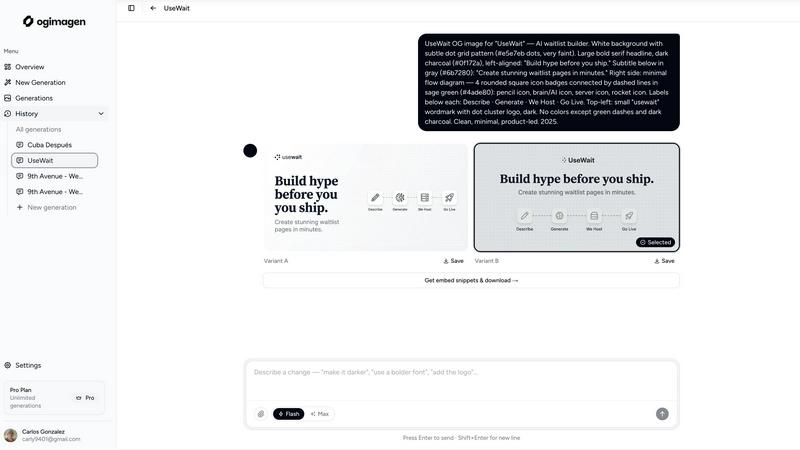
OGImagen is an AI tool that instantly creates and delivers optimized Open Graph images and meta tags for all major social platforms.
Last updated: March 11, 2026

RemoveTexts
RemoveTexts is an AI tool that effortlessly erases text from images in seconds, no design skills required.
Last updated: March 11, 2026
Visual Comparison
OGimagen
RemoveTexts

Feature Comparison
OGimagen
AI-Powered Image Generation
At its core, OGimagen uses artificial intelligence to transform your text content into visually appealing social card images. You simply enter your desired title and description, and the AI generates two unique design variants. This process eliminates the need for graphic design expertise or manual template editing, providing professional results based on fundamental design principles. The AI ensures each image is balanced, readable, and aesthetically suitable for public sharing.
Multi-Platform Format Optimization
OGimagen understands that each social platform has slightly different technical requirements for optimal image display. Instead of creating one image and hoping it works everywhere, the tool automatically generates and exports three perfectly optimized versions from a single generation: one for OG/General use (1200x630px), one for Twitter Cards (1200x600px), and one for LinkedIn (1200x627px). This foundational feature guarantees your previews will look pixel-perfect whether shared on Facebook, X, Slack, Discord, WhatsApp, or LinkedIn.
Framework-Specific Meta Tag Snippets
Creating the image is only half the battle; you must also correctly embed the code on your website. OGimagen provides ready-to-paste meta tag snippets tailored for your specific web framework. Free users receive standard HTML. Pro users unlock snippets for modern frameworks like Next.js (App and Pages Router), Astro, SvelteKit, and Remix. This feature educates users on proper implementation and ensures technical correctness, saving time and preventing common embedding errors.
MCP (Model Context Protocol) Integration
For developers seeking ultimate workflow efficiency, OGimagen Pro offers integration with the Model Context Protocol. This allows you to generate images, list previous generations, and copy embed snippets directly from within your code editor or AI coding assistant like Claude Code, Cursor, or Windsurf. It brings the foundational task of OG image creation into the development environment, removing the need to switch contexts to a web browser and streamlining the entire shipping process.
RemoveTexts
Paint to Remove
This feature gives users the ability to brush over specific areas of text they wish to erase. It offers precise control, allowing for targeted removal without affecting the rest of the image. Whether it's small captions or larger chunks of text, users can easily manage what stays and what goes.
Auto Remove All
With this feature, the AI automatically detects and removes all text elements in an image with a single click. It simplifies the editing process for users who want a quick clean-up without any manual effort, making it an efficient choice for bulk editing tasks.
Edit & Replace Text
Users can not only remove text but also edit and replace it while matching the original style. This feature is particularly useful for updating or correcting information in images, ensuring that any changes blend seamlessly with the existing design.
Remove Objects
This powerful feature allows users to erase unwanted objects, logos, and visual elements from images. It enhances the overall aesthetic by cleaning up distractions that may detract from the main subject, giving users more control over their visual content.
Use Cases
OGimagen
Blog and Content Marketing
Every time a new blog post is published, it needs a compelling social preview image to attract readers when shared. OGimagen allows content marketers and bloggers to quickly generate a unique, on-brand image for each article. By consistently using professional OG images, they can significantly increase the click-through rate from social media feeds to their website, which is a basic goal of any content strategy.
SaaS Product Launches and Updates
When a software company announces a new feature or product launch, sharing links on social media and community platforms is crucial. A generic or missing preview image looks unprofessional. Using OGimagen, the team can instantly create a polished social card that highlights the launch name and key benefit, ensuring the shared link conveys credibility and excitement, which are fundamental for driving interest and sign-ups.
Developer Workflow Integration
Developers building websites or applications need to implement OG images as a standard part of their process. With OGimagen's MCP integration, a developer can stay in their editor, generate an image via a command, and immediately insert the correct framework-specific meta tags into their codebase. This use case turns a disruptive, manual task into a fast, integrated step within the foundational development workflow.
E-commerce and Product Sharing
Online stores often share links to specific product pages on social platforms. A preview image showing the product name, a short description, and a brand color is far more effective than a blank square. Store owners can use OGimagen to create attractive cards for featured products or sales events, making shared links visually appealing and more likely to be clicked by potential customers browsing their feeds.
RemoveTexts
Cleaning Screenshots
RemoveTexts is perfect for cleaning up screenshots by removing unwanted text or overlays. This is especially useful for presentations, reports, or social media posts where clarity and professionalism are crucial.
E-commerce Product Photos
Online sellers can use RemoveTexts to eliminate watermarks or text from product images, ensuring that potential customers see a clean and appealing representation of their products, which can lead to increased sales.
Legal Document Redaction
Legal professionals can rely on RemoveTexts to efficiently redact sensitive information, such as names or dates, from images of documents. This ensures compliance with privacy regulations while maintaining the integrity of the original document.
Creating Memes and Graphics
Content creators can remove subtitles, captions, or branding from images to repurpose them for memes or marketing materials. This flexibility allows for creative freedom and the ability to produce unique content quickly.
Overview
About OGimagen
OGimagen is a foundational tool designed to solve a specific, essential problem for anyone who publishes content on the web: creating professional Open Graph images. These are the preview images that appear when a link is shared on social platforms like Facebook, LinkedIn, and X (Twitter). Without a proper OG image, a shared link looks plain, unprofessional, and often fails to attract clicks. OGimagen simplifies this critical task by using artificial intelligence to generate beautiful, production-ready social card images in seconds. It is built for developers, content creators, marketers, and business owners who need to ensure their shared links look polished and engaging without requiring design skills or complex software. The core value proposition is straightforward: you provide a title, description, and basic branding preferences, and OGimagen's AI handles the design, delivering perfectly formatted images for every major platform along with the correct meta tag code to embed on your site. This back-to-basics approach removes friction from a mandatory web development task, directly helping to improve click-through rates and brand presentation with minimal effort.
About RemoveTexts
RemoveTexts is an innovative AI-powered online tool designed for effortless removal of unwanted text from images. Ideal for individuals and professionals alike, this tool caters to a diverse audience including graphic designers, marketers, e-commerce sellers, and anyone needing clean visuals without the hassle of complex software like Photoshop. RemoveTexts streamlines the editing process by allowing users to upload images and remove text in seconds, ensuring that no design skills are required. The primary value proposition of RemoveTexts lies in its ability to maintain the original quality of the image while seamlessly reconstructing the background where text was removed. This is achieved through advanced deep learning technologies, offering professional-grade results that are both quick and efficient.
Frequently Asked Questions
OGimagen FAQ
What exactly is an OG image?
An OG image, or Open Graph image, is the preview picture that automatically appears when you paste a website link into social media platforms, messaging apps, or other supported services. It is defined by specific meta tags in the webpage's HTML code. This image is fundamental because it provides a visual context for the link, greatly influencing whether someone decides to click on it. A good OG image acts as a miniature billboard for your content.
What's the difference between Starter, Growth, and Pro plans?
The plans are structured to serve different foundational needs. The Starter and Growth plans are one-time purchases for a set number of generations, ideal for projects with a finite need. The Pro plan is a monthly subscription for ongoing use, offering more generations per month and key workflow features. The primary functional difference is that Pro includes permanent CDN hosting for your images and MCP integration for developer workflows, while the one-time plans include hosting for a limited period (45 or 90 days).
What happens when CDN hosting expires on a one-time plan?
When the CDN (Content Delivery Network) hosting period expires on a Starter (45-day) or Growth (90-day) plan, the generated images will no longer be served from the OGimagen CDN. This means the image URLs in your meta tags will return an error, and your social previews will break. To maintain your links, you must download the image files before hosting expires and re-upload them to your own permanent web server or storage, updating the image URLs in your meta tags accordingly.
Which frameworks are supported for meta tag snippets?
OGimagen provides code snippets for the most common web frameworks to ensure correct implementation. All users get a plain HTML snippet, which is the fundamental building block. Pro users unlock framework-specific snippets for Next.js (using both the App Router and Pages Router syntax), Astro, SvelteKit, and Remix. These snippets show you the exact code structure and placement required for each framework, serving as an educational guide for proper setup.
RemoveTexts FAQ
How does RemoveTexts work?
RemoveTexts utilizes advanced AI-driven technology to analyze surrounding pixels in your image. It intelligently reconstructs the background after removing text, ensuring seamless and professional results.
What file formats does RemoveTexts support?
RemoveTexts supports JPG, PNG, and WebP image formats, allowing users to upload a wide variety of images for text removal. The maximum file size supported is 10 MB.
Is there a limit to how much text I can remove?
There is no specific limit to the amount of text that can be removed; users can choose to remove specific text elements or opt for the Auto Remove All feature for comprehensive text elimination in one go.
Do I need any design skills to use RemoveTexts?
No design skills are required to use RemoveTexts. The tool is designed to be user-friendly, enabling anyone to easily upload images and remove text in just a few clicks.
Alternatives
OGimagen Alternatives
OGimagen is an AI-powered tool in the developer tools category, specifically designed to generate Open Graph images. These are the preview images that appear when a website link is shared on social media platforms. The tool automates the creation of professional, production-ready social cards compatible with any web framework. Users often explore alternatives to a tool like OGimagen for several practical reasons. These can include budget constraints, as pricing models vary widely. Others may seek different feature sets, such as more granular design control, specific template libraries, or integration with their existing tech stack and hosting platform. The need for a self-hosted solution versus a cloud service is another common driver. When evaluating an alternative, focus on a few core criteria. Consider the balance between automation and creative control. Assess the quality and flexibility of the output images. Examine how easily the tool integrates into your current workflow and publishing pipeline. Finally, always weigh the cost against the value and time it saves for your specific use case.
RemoveTexts Alternatives
RemoveTexts is an AI-powered image editing tool designed specifically for removing text from images quickly and efficiently. It falls into the category of image and photo editing software, providing a user-friendly solution for tasks like erasing watermarks, subtitles, or any unwanted text. Users often seek alternatives to RemoveTexts for various reasons, including pricing concerns, specific feature requirements, or compatibility with different platforms. When choosing an alternative, it's important to consider factors such as ease of use, the range of features offered, output quality, and the ability to support multiple languages. These elements will help ensure that the selected tool meets the user's needs effectively and efficiently.