Magic Hour vs Nano Photo
Side-by-side comparison to help you choose the right product.

Magic Hour
Magic Hour is a free AI studio for creating professional videos and images in seconds.
Last updated: March 4, 2026

NanoPhoto.AI provides simple, efficient AI tools to edit your photos and create stunning videos.
Last updated: March 1, 2026
Visual Comparison
Magic Hour

Nano Photo
Feature Comparison
Magic Hour
Unified AI Studio
Magic Hour brings together more than 100 specialized AI tools for video, image, and audio creation into one seamless interface. This consolidation means users no longer need to switch between different platforms for different tasks. You can generate a video from text, edit an image with AI, upscale its quality, and sync lip movements all within the same project. This unified approach streamlines the creative process, saving significant time and reducing the learning curve associated with mastering multiple, disparate software products.
Text-to-Video and Video-to-Video
These core features allow for versatile content transformation. With Text-to-Video, you can type a descriptive script or prompt, and the AI generates a corresponding video scene, ideal for quickly bringing ideas to life. The Video-to-Video tool lets you apply new artistic styles, filters, or complete visual themes to existing footage. This is perfect for rebranding content, creating different thematic versions of a clip, or achieving a specific cinematic look without needing to reshoot any footage.
AI Face Swap and Lip Sync
Magic Hour includes powerful tools for personalizing and modifying human subjects in media. The AI Face Swap feature allows you to seamlessly replace a face in any photo or video, useful for creative projects, dubbing, or personalized marketing. The Lip Sync tool can accurately match new audio or dialogue to the mouth movements of a person in a video or photo, creating convincing talking head videos or enabling multilingual content adaptation without complex editing.
AI Image Generation and Editing
This suite of tools empowers users to create and refine images entirely through AI. You can generate original images from text descriptions, edit existing photos using text commands (like "change the background to a beach"), and enhance image resolution with the AI Upscaler. Additionally, specialized tools like the AI Headshot Generator help create professional profile pictures, providing a comprehensive solution for all image-based needs without requiring advanced graphic design skills.
Nano Photo
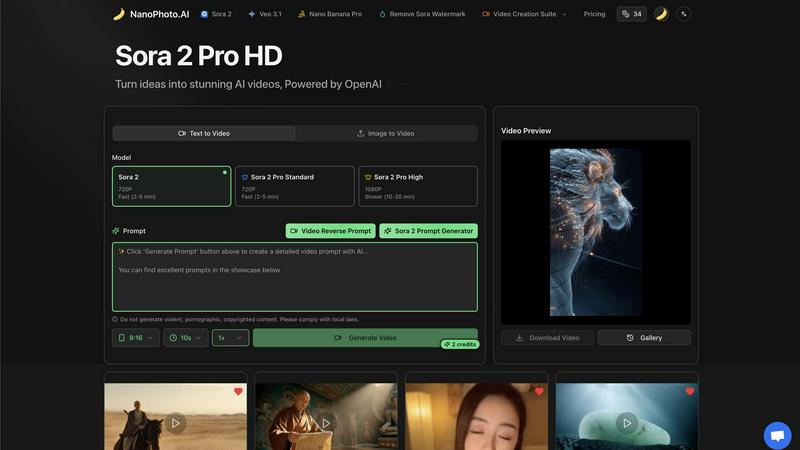
Text to Video Generation
This feature allows users to create videos directly from written text prompts. By simply describing a scene, action, or concept, the AI interprets the text and generates a corresponding video. This process eliminates the need for filming, complex animation software, or video editing skills, making it an accessible starting point for bringing any idea to life visually. It is powered by advanced models to ensure the output matches the user's creative intent.
Image to Video Generation
With this capability, users can upload a static image and instruct the AI to animate it or create a video sequence based on it. This transforms photographs, digital art, or any still graphic into dynamic video content. It is particularly useful for adding motion to logos, creating animated storyboards from concept art, or making product images more engaging for marketing campaigns without starting from scratch.
AI Prompt Generators
To assist users in crafting effective instructions for the AI, Nano Photo includes specialized prompt generators. These tools help formulate detailed and descriptive text prompts that yield better results from the text-to-video and image-to-video features. By guiding users on what details to include, these generators educate on best practices for AI communication, improving output quality and user confidence.
Video Creation Suite & Editing Tools
Beyond generation, the platform offers a suite of tools for refining and finalizing content. This includes options to remove watermarks from generated videos, adjust video dimensions like the 9:16 format for social media, and control generation parameters such as duration. This suite provides foundational post-generation control, allowing users to tailor content to specific platform requirements or branding needs.
Use Cases
Magic Hour
Social Media Content Creation
Creators and marketers can rapidly produce a high volume of engaging, platform-specific content. Using text prompts, they can generate unique video clips for Instagram Reels or TikTok. Templates ensure content is perfectly sized, while tools like the AI Meme Generator or Talking Photo add viral elements. This enables consistent posting schedules and trend participation without the burden of lengthy production times or high costs.
Marketing and Advertising Campaigns
Teams can develop and personalize ad creatives at scale. They can use the AI UGC (User-Generated Content) generator to create authentic-looking testimonial videos, apply brand styles to stock footage with Video-to-Video, and personalize ads for different demographics using Face Swap. The ability to quickly iterate on concepts allows for efficient A/B testing and faster campaign deployment.
Corporate Training and Communication
Organizations can create professional internal training videos, onboarding materials, and company announcements. A script can be turned into a video with Text-to-Video, and presenters can be lip-synced to translated audio for global teams. The platform's ease of use allows non-video specialists in HR or learning departments to produce clear, engaging visual communications that maintain a consistent corporate identity.
Personalized Customer Experiences
Developers and product teams can use the Magic Hour API to integrate AI video and image generation directly into their applications. This enables features like letting users create personalized avatars with the Headshot Generator, virtual try-ons for e-commerce using Face Swap, or generating custom video messages for customers. This drives user engagement by offering unique, interactive content powered by AI.
Nano Photo
Social Media Content Creation
Creators and marketers can use Nano Photo to rapidly produce eye-catching videos and images for platforms like Instagram, TikTok, and YouTube. The ability to generate trending, platform-specific formats (like vertical 9:16 videos) from simple text ideas allows for consistent and high-volume content output, which is essential for maintaining an engaging online presence.
Marketing and Advertisement Production
Small businesses and marketing teams can develop professional advertising materials without a large production budget. The platform enables the creation of product demo videos, promotional clips, and branded imagery directly from product descriptions or logos, significantly reducing the time and cost associated with traditional video production.
Educational and Explainer Videos
Educators, trainers, and presenters can transform lesson plans or complex concepts into simple, visual explainer videos. By inputting explanatory text, they can generate supporting visuals that enhance comprehension and retention, making information more accessible to students or audiences.
Personal Creative Projects
Hobbyists, artists, and individuals can explore digital storytelling and art creation. Whether animating a personal photograph, visualizing a story idea, or experimenting with AI-generated art, the platform provides a safe and intuitive space for personal expression and learning about AI-powered creativity.
Overview
About Magic Hour
Magic Hour is a comprehensive, browser-based AI studio designed to simplify and accelerate professional video and image creation. At its core, it consolidates over one hundred distinct AI tools into a single, unified platform. This eliminates the need for creators to juggle multiple expensive software subscriptions or complex, standalone applications. The primary goal is to make high-quality visual content creation accessible to everyone, regardless of their technical skill or budget. Users can start with simple inputs like a text prompt, an existing image, or a video clip and transform them into polished, engaging media in seconds. Magic Hour serves a wide audience, from individual content creators and social media marketers to larger teams and agencies that require scalable, consistent output. Its fundamental value proposition is providing a centralized, intuitive workspace where the entire creative workflow—from initial generation to final editing and enhancement—can be managed efficiently. By operating directly in a web browser, it removes barriers related to device compatibility and software installation, empowering users to create stunning visuals for social media, advertising, training, and more with unprecedented ease and speed.
About Nano Photo
Nano Photo is an AI-powered creative platform designed to simplify the generation of videos and images. At its core, the platform serves as a comprehensive tool that transforms text descriptions or existing images into engaging visual content. It is built for a wide range of users, including content creators, marketers, small business owners, and even individuals working on personal projects. The primary value proposition of Nano Photo is its ability to democratize high-quality visual creation by removing the need for extensive technical expertise or expensive software. By integrating advanced AI models like Sora 2 and Veo 3.1, the platform provides a user-friendly, all-in-one suite where ideas can be quickly turned into professional-looking videos and photos. This foundational approach allows anyone to enhance their visual storytelling, create advertisements, produce social media content, and unlock their creative potential efficiently and effectively.
Frequently Asked Questions
Magic Hour FAQ
Is Magic Hour really free to use?
Yes, Magic Hour offers a free tier that provides access to its core suite of over 100 AI tools. This allows users to start creating videos and images immediately without entering credit card information. The free plan is designed to let individuals and creators explore the platform's capabilities. For higher-volume usage, advanced features, or commercial API access, Magic Hour offers paid plans with expanded limits and capabilities.
What kind of files can I create with Magic Hour?
Magic Hour supports the creation of a wide range of media files. For video, you can generate and export standard MP4 files, including high-quality 4K resolution content. For images, you can create and edit common formats like JPG and PNG. The platform also includes audio tools for generating and manipulating sound files. The outputs are designed to be share-ready for social media platforms, websites, and professional presentations.
Do I need any technical or editing skills to use it?
No, Magic Hour is specifically designed to be accessible to users with no prior video editing or technical AI experience. The interface is built to be intuitive, guiding you through the process with prompts and templates. Most creation tasks begin with simple text instructions or drag-and-drop actions. The platform handles the complex AI processing in the background, allowing you to focus on your creative idea rather than software mechanics.
Can I use Magic Hour for commercial projects?
Yes, content created with Magic Hour can be used for commercial purposes, including in marketing materials, social media ads, and client projects. It is important for users to review the platform's Terms of Service for specific licensing details related to generated content. For large-scale commercial use, such as integrating the technology via API into a public-facing application, exploring the dedicated team or enterprise plans is recommended to ensure appropriate licensing and usage limits.
Nano Photo FAQ
What AI models does Nano Photo use?
Nano Photo integrates state-of-the-art AI models, including OpenAI's Sora 2 for high-definition video generation and Veo 3.1. These models are accessed through the platform's interface, providing users with powerful generation capabilities without needing to understand the underlying technical complexities.
Do I need video editing experience to use this platform?
No, prior video editing experience is not required. Nano Photo is designed with a user-friendly interface that guides you through the creation process. The core features, like text-to-video, are built to generate content from simple prompts, making advanced visual creation accessible to beginners.
What is the difference between the Sora 2 Pro plans?
The Sora 2 Pro plans differ primarily in output resolution and generation speed. The Standard plan generates 720P videos quickly (2-5 minutes), while the High plan produces higher-quality 1080P videos but takes longer (10-20 minutes). This allows users to choose between speed and fidelity based on their project needs.
Can I use the videos I create for commercial purposes?
Yes, videos created using Nano Photo are intended for your use, including commercial applications like advertisements and social media marketing. It is always recommended to review the platform's Terms of Service for the most current and detailed information regarding licensing, usage rights, and any specific restrictions.
Alternatives
Magic Hour Alternatives
Magic Hour is a free, browser-based AI studio for creating professional videos and images. It falls into the categories of content creation, video production, and image generation. This type of tool consolidates many AI capabilities into one platform, allowing users to generate and edit media quickly from simple prompts. Users often explore other options for various reasons. Some may require specific advanced features not available in one tool, while others might have budget constraints or need software that integrates with their existing workflow. Platform preference, such as needing a desktop application versus a web app, also influences the search. When evaluating different platforms, consider your primary needs. Key factors include the core AI capabilities like text-to-video or image upscaling, the overall cost and pricing structure, and the learning curve. Also, assess the output quality, the ability to maintain a consistent style, and what final formats are supported for your projects.
Nano Photo Alternatives
Nano Photo is an AI-powered creative platform in the video generation and editing category. It helps users create visual content from text or images, focusing on tools like AI video generation and ad production to simplify complex tasks. People often look for alternatives for practical reasons. This could be due to budget constraints, a need for different specific features, or a requirement to work on a different platform like a mobile device. The goal is to find a tool that aligns with their unique project demands and workflow. When evaluating other options, consider the core AI capabilities, ease of use, and output quality. It's also wise to assess the cost structure, the types of projects the tool is best suited for, and how well it integrates into your existing creative process. The right choice effectively balances power with simplicity.