Nano AI vs Remove Handwriting
Side-by-side comparison to help you choose the right product.

Nano AI is an all-in-one creative platform for fast AI image generation and editing.
Last updated: February 28, 2026

Remove Handwriting
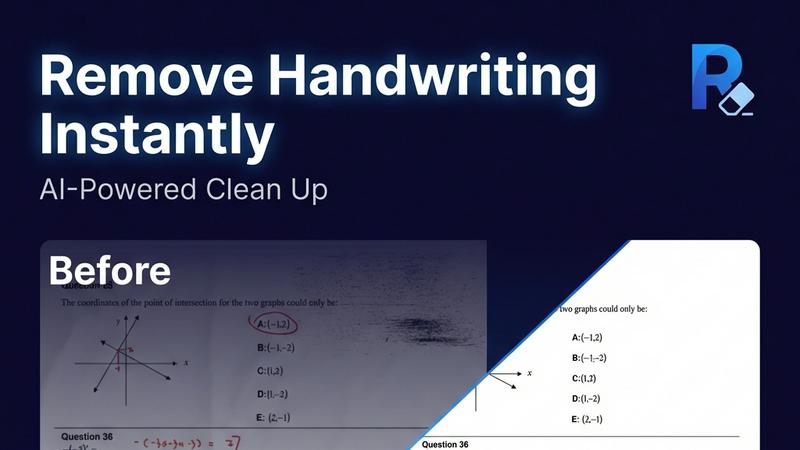
Effortlessly remove handwritten text from images and PDFs while preserving original content with our AI-powered handwriting removal tool.
Last updated: March 26, 2026
Visual Comparison
Nano AI

Remove Handwriting
Feature Comparison
Nano AI
Flash-Speed AI Generation
Powered by the proprietary Nano Banana AI model, Nano AI delivers high-quality text-to-image and image-to-image generations in under ten seconds. This "flash-speed" inference keeps you in the creative flow, allowing for rapid experimentation and iteration without frustrating wait times. You can describe a scene or upload an image and see near-instant results, making it ideal for brainstorming and tight deadlines.
All-in-One Creative Workspace
Nano AI consolidates the entire creative pipeline into one platform. It combines AI image generation with a suite of practical editing tools like background removal, an image resizer, and an image converter. Soon-to-arrive Prompt Labs, Galleries, and Editors will further centralize every experiment, review, and export, ensuring you can explore, iterate, and share assets without losing momentum or switching apps.
Deep Style Tuning & Magic Edit
Move beyond generic presets with granular style control. Describe a specific vibe—like "Renaissance lighting on cyberpunk geometry"—and the Nano Banana model faithfully follows it for style generation or transfer. The Magic Edit tool allows for intuitive inpainting and outpainting using natural language; simply highlight an area and type what you want to change, add, or expand.
Upcoming 4K Neural Upscaling
This soon-to-launch feature is designed to turn draft generations into production-ready assets. It goes beyond simple sharpening by intelligently adding believable detail and texture density—such as pores to skin or grain to wood—allowing you to upscale small images to 4K resolution suitable for high-quality prints and large formats without losing fidelity.
Remove Handwriting
AI-Powered Handwriting Removal
This feature utilizes advanced artificial intelligence to intelligently detect and erase handwritten text, notes, and annotations from images and PDFs. It ensures that printed text and other important elements remain intact, providing a clean and professional final document.
Multi-Format Support
Remove Handwriting supports various file formats, including JPG, PNG, JPEG, and PDF. This versatility allows users to work with different types of documents seamlessly, whether they are single images or multi-page PDFs, making it suitable for diverse applications.
Batch Processing Capability
For users dealing with large volumes of documents, the batch processing feature allows for multiple files to be processed simultaneously. This saves time and enhances productivity, especially for businesses and educational institutions that require efficient document management.
Manual Processing Options
In addition to automated features, Remove Handwriting also offers manual processing for challenging cleanup tasks. Users can manually adjust settings to address complex issues such as damaged pages or intricate markings, ensuring a high-quality output even in difficult scenarios.
Use Cases
Nano AI
Rapid Social Media Content Creation
Marketers and social media managers can use Nano AI to quickly generate and edit visual assets for campaigns. The flash-speed generation allows for creating multiple on-brand image variations in minutes, while built-in tools like background removal and style tuning enable quick polishing and adaptation for different platforms, all within a single workflow.
Concept Art and Mockup Design
Designers and product teams can leverage the platform to rapidly visualize concepts and build mockups. Starting with a text prompt, they can generate base imagery, then use image-to-image and the Magic Edit tool to refine details, change elements, and iterate on compositions without needing separate specialized software, accelerating the early design phase.
Personalized Art and Entertainment
Individual creators and hobbyists can explore artistic styles and create personalized artwork. Using effects like "Photo to Watercolor Painting" or "Manga Generator," users can transform their photos. The deep style tuning feature allows for easy experimentation with unique aesthetic mashups, making advanced creative techniques accessible without professional training.
Efficient E-commerce Asset Production
Online retailers can streamline the creation of product visuals. The platform can generate lifestyle or context images from product photos, remove or replace backgrounds instantly, and upscale product shots for high-resolution catalogs. This integrated approach significantly reduces the time and cost associated with producing large volumes of commercial imagery.
Remove Handwriting
Document Cleanup for Students
Students can use Remove Handwriting to erase handwritten answers, notes, or grading marks from their exam papers or worksheets, allowing them to create clean, shareable copies for study purposes or submission.
Archival Restoration
Archivists can benefit from this tool by restoring old documents that may have handwritten annotations, stains, or folds. By cleaning up these documents, they can preserve historical materials for future generations.
Business Documentation
Businesses can utilize Remove Handwriting to prepare contracts, reports, and marketing materials by removing handwritten notes and revisions. This creates a polished and professional appearance for important documents.
Enhancing Scanned Images
Individuals or organizations with low-quality scanned documents can employ Remove Handwriting to enhance clarity and remove unwanted marks. This ensures that all text is legible and visually appealing, improving overall document quality.
Overview
About Nano AI
Nano AI is a comprehensive, all-in-one creative platform designed to streamline the entire process of visual asset creation. It serves as a unified workspace that eliminates the need to switch between multiple, disparate applications. At its heart is the proprietary Nano Banana AI model, engineered for exceptionally fast "flash-speed" orchestration. This allows users to generate high-quality text-to-image and image-to-image results in under ten seconds. The platform is built for a wide audience, from individual creators and marketers to professional design teams who need to produce visuals quickly and efficiently. Its core value proposition lies in combining powerful AI generation with practical editing and utility tools—such as background removal, inpainting/outpainting, and granular style control—all within a single, intuitive interface. This integration enables rapid iteration, allowing users to draft, refine, and export production-ready assets faster than traditional methods. With features like shared galleries, upcoming 4K neural upscaling, and API access, Nano AI provides a scalable solution for turning creative inspiration into tangible, commercially viable visual content, all without leaving one simple space.
About Remove Handwriting
Remove Handwriting is an innovative AI-powered tool designed to facilitate the removal of handwritten text from images, PDFs, and scanned documents. It caters to a wide range of users, including students, educators, businesses, and archivists who need to clean up documents for improved readability and presentation. This tool offers a seamless solution for erasing handwritten notes, annotations, and markings while preserving the integrity of printed content, tables, and diagrams. Whether you are dealing with exam papers, contracts, or archival materials, Remove Handwriting enables you to restore documents to a pristine state, enhancing their usability. With its user-friendly interface and availability on both web and mobile platforms, this tool allows users to perform document cleanup tasks quickly and efficiently. Best of all, you can try it for free with no credit card required, making it accessible for anyone looking to streamline their document management process.
Frequently Asked Questions
Nano AI FAQ
What is the Nano Banana AI model?
The Nano Banana AI model is Nano AI's proprietary, core AI engine specifically engineered for speed and fidelity. It is responsible for the platform's "flash-speed" inference, generating images in under ten seconds. It is also designed to understand layered instructions and stylistic cues from natural language prompts, reducing the need for complex prompt engineering.
What kinds of tools are included in the Nano AI workspace?
The Nano AI workspace integrates AI generation with practical utility tools. This includes core AI features like Text-to-Image and Image-to-Image, alongside tools for Image to Prompt conversion, resizing, and format conversion. It also includes creative effects like style filters and essential editing functions such as background removal and the Magic Edit tool for inpainting.
Can I use Nano AI for commercial projects?
Yes, Nano AI is designed to help users create commercially viable visual content. The platform's features, including high-quality generation, editing tools, and the upcoming 4K upscaling, are built to support the production of assets for marketing, advertising, e-commerce, and other professional use cases where ready-to-ship visuals are required.
Is there a way to organize and share my creations?
Yes, Nano AI includes features for organization and collaboration. Users have a "My Creations" gallery to manage their work. The platform also supports shared galleries, making it easy to send work to team members or clients for review directly within the workspace, facilitating a smoother collaborative workflow without external file sharing.
Remove Handwriting FAQ
How does Remove Handwriting work?
Remove Handwriting uses advanced AI algorithms to analyze documents, automatically detecting and removing handwritten text while preserving the original printed content and layout.
What file formats are supported?
The tool supports multiple file formats, including JPG, PNG, JPEG, and PDF, allowing users to work with a variety of document types for their specific needs.
Is there a limit on the number of documents I can process?
The application supports batch processing, enabling users to upload and process multiple documents at once, thus streamlining workflows for users with larger quantities of files.
Can I use Remove Handwriting on mobile devices?
Yes, Remove Handwriting is available on both iOS and Android platforms, making it convenient for users to clean up documents on the go, whether they are using a smartphone or tablet.
Alternatives
Nano AI Alternatives
Nano AI is an all-in-one creative platform in the image generation and editing category. It combines ultra-fast AI image creation with practical editing tools in a single workspace, aiming to streamline the entire visual content creation process from concept to final asset. Users often explore alternatives for various practical reasons. These can include budget constraints, the need for different specific features not offered, or a requirement to integrate with other platforms in their existing workflow. The search for the right tool is a normal part of finding the best fit for one's unique creative process and project demands. When evaluating other options, consider a few core aspects. Focus on the balance between generation speed and output quality, the depth of editing and utility tools available, and the overall usability of the interface. The goal is to find a solution that effectively supports your specific creative workflow without unnecessary complexity.
Remove Handwriting Alternatives
Remove Handwriting is an AI-powered tool designed to erase handwritten text, notes, and annotations from images, PDFs, and scanned documents. This tool falls under the category of image and photo editing, specifically tailored for users needing to clean up documents while maintaining the integrity of printed text, tables, and diagrams. Users often seek alternatives to Remove Handwriting for various reasons, including pricing concerns, specific feature requirements, or compatibility with different platforms and devices. When choosing an alternative, it is essential to consider factors such as ease of use, supported file formats, batch processing capabilities, and whether the tool can effectively preserve the remaining content while removing unwanted handwriting.