Kling 5 vs Melograph
Side-by-side comparison to help you choose the right product.

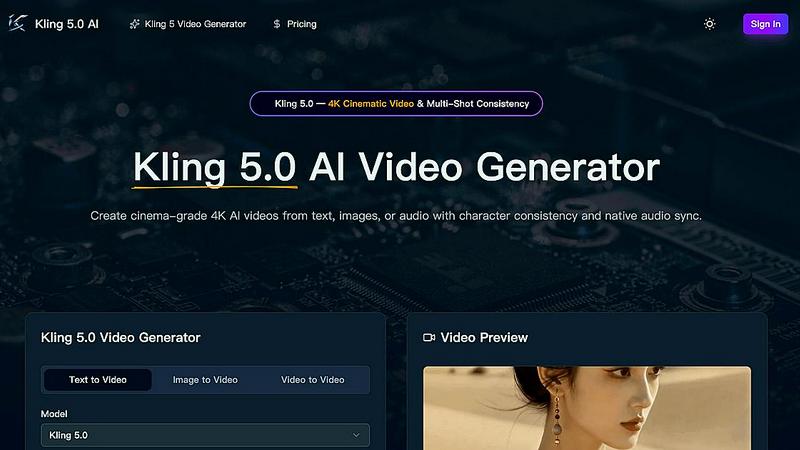
Kling 5.0 is an AI video generator that creates professional 4K cinematic videos from text, images, or audio with consistent characters.
Last updated: April 13, 2026

Melograph
Melograph instantly creates professional music videos from your audio using simple, customizable templates.
Last updated: February 28, 2026
Visual Comparison
Kling 5
Melograph

Feature Comparison
Kling 5
4K Cinematic Video Generation
Kling 5 generates videos in stunning 4K resolution, providing broadcast-ready quality suitable for professional use. The AI model is trained to produce clips with a cinematic look and feel, incorporating realistic lighting, textures, and atmospheric effects. This ensures the output has a high production value, making it ideal for projects that require a polished and professional appearance without a traditional film crew.
Multi-Shot Character Consistency
This feature addresses a common challenge in AI video generation: maintaining a character's appearance across different scenes. Kling 5's Omni Subject Library allows users to lock a character's facial features, proportions, and style. This ensures the character remains visually identical when shown from different angles or in sequential shots, which is essential for creating coherent narratives, episodic content, or consistent brand campaigns.
Native Audio Generation and Lip-Sync
Kling 5 can generate synchronized audio directly alongside the video. This includes dialogue, ambient sound, and Foley effects. Furthermore, it offers advanced lip-sync technology that matches mouth movements to the generated audio at the phoneme level. This synchronization is available in multiple languages, including English, Chinese, Japanese, Korean, and Spanish, adding a crucial layer of realism to character-driven videos.
Advanced Physics and Motion Simulation
The platform features a sophisticated physics engine that simulates natural movement. This applies to elements like flowing water, flickering fire, cloth dynamics, and human anatomy. By accurately replicating how these elements interact with light and move in the real world, Kling 5 creates videos that feel dynamic and authentic, enhancing the overall believability of the generated scenes.
Melograph
Premium Template Library
Melograph offers a curated collection of high-quality video templates. These templates are designed to cater to different musical styles and visual aesthetics, such as minimal, cinematic, retro, and futuristic. Each template provides a cohesive visual framework, ensuring the final output looks polished and intentional. Users simply pick a template that matches the vibe of their track, providing a strong creative foundation without starting from scratch.
Audio-Reactive Visuals
The tool automatically generates visuals that react to the audio waveform of the uploaded track. This means the motion, waves, and graphical elements in the video pulse and move in sync with the music's beats and frequencies. This dynamic connection between sound and image is created instantly upon upload, ensuring the visualizer feels uniquely tied to that specific piece of music without any manual animation work from the user.
Simple Customization Interface
Customization is designed to be quick and intuitive. After choosing a template and uploading audio, users can input their artist name and song title. On selected templates, they can also upload a logo or album cover. The system handles the placement and animation, ensuring text remains readable even on small mobile screens. This process avoids complex editing suites, focusing only on the essential details needed for a complete visual.
Platform-Ready Exports
Melograph renders videos in high-quality 1080p MP4 format, suitable for all major platforms. The exports are optimized to look great on social media feeds like TikTok, Instagram Reels, and YouTube Shorts. The render happens locally in the user's web browser for speed, and the final video includes smooth motion and clean text, arriving as a ready-to-post file without any watermarks for paid users.
Use Cases
Kling 5
Social Media Content Creation
Creators can rapidly produce eye-catching, platform-optimized videos for YouTube, TikTok, and Instagram. By describing a concept or uploading an image, users can generate trendy clips, educational content, or promotional videos in various aspect ratios (like 9:16 for Stories) without needing filming or complex editing software, significantly speeding up their content pipeline.
Prototyping for Film and Animation
Filmmakers and animators can use Kling 5 to visualize storyboards, script concepts, or character designs quickly. The ability to generate consistent characters across shots and simulate complex scenes with realistic physics allows for efficient pre-visualization and prototyping, helping teams make creative decisions before committing to full-scale production.
Marketing and Advertising
Marketing teams can create professional product demos, explainer videos, and brand campaign assets in-house. The cinematic quality and character consistency features enable the production of a series of cohesive ads or social media posts that maintain a uniform look for characters or products, strengthening brand identity and messaging.
Educational and Training Materials
Educators and corporate trainers can transform lesson plans or training modules into engaging video content. Complex concepts can be illustrated through animated scenes generated from descriptive text, making information more accessible and memorable for students or employees without the need for live-action filming.
Melograph
Independent Artist Music Releases
Indie artists can use Melograph to create compelling video content for new single or album releases. By quickly generating a professional visualizer, they can promote their music on social media platforms and streaming services, giving their audio a visual identity that helps it stand out and engage listeners without needing a budget for a custom music video.
Social Media Content for Producers
Music producers and beatmakers can regularly create fresh visual content for their online presence. Each new beat or track snippet can be paired with a different visualizer template, providing consistent, eye-catching material for platforms like Instagram and TikTok to grow their audience and showcase their work dynamically.
Label and DJ Promotional Material
Record labels and DJs can streamline their promotional workflows. Labels can create uniform visualizers for various artists on their roster, maintaining a level of professional quality. DJs can produce visuals for their mixes, live sets, or podcast episodes, adding an engaging layer to their audio content when shared online or used during performances.
Content Creation for Musicians
Musicians and creators who need to post regularly can use Melograph to overcome creative block. It provides a reliable tool to generate visually appealing content that directly features their music. This is ideal for sharing behind-the-scenes clips, previews, or simply giving followers a visual experience of a track, all while saving the hours typically spent on video editing.
Overview
About Kling 5
Kling 5 is an advanced artificial intelligence video generation platform. It is designed to create high-quality, cinematic video content directly from text descriptions, images, or audio inputs. The core purpose of this tool is to make professional-grade video production accessible to individuals and teams without requiring extensive technical skills or expensive equipment. It serves a wide audience, including content creators, marketers, filmmakers, educators, and businesses looking to produce engaging visual material. The main value proposition of Kling 5 lies in its ability to transform simple ideas into polished 4K videos with realistic motion, consistent characters, and synchronized audio in a matter of minutes. By handling complex tasks like physics simulation and multi-shot consistency, it removes traditional barriers to video creation, allowing users to focus purely on their creative vision and storytelling.
About Melograph
Melograph is a web-based tool designed to create music visualizations. Its primary function is to transform audio tracks into professional-looking, audio-reactive videos. This product is built specifically for musicians, producers, DJs, labels, and content creators. The core value proposition is simplicity and speed. Traditional video editing software is powerful but often complex and time-consuming to learn. Melograph removes that barrier. It provides a straightforward alternative where users do not need any editing skills, timelines, or plugins. Instead, they can select from a library of pre-designed templates, upload their music, add basic text, and export a finished video. The process focuses on what is essential: matching a visual style to the sound and generating a clean, platform-ready video file. This allows artists to concentrate on their music while still producing high-quality visual content for social media, releases, and promotions. By streamlining the creation process, Melograph saves significant time and effort, making professional visuals accessible to everyone, regardless of their technical background in video production.
Frequently Asked Questions
Kling 5 FAQ
What types of input does Kling 5 accept?
Kling 5 accepts three primary types of input to generate video. You can start with a text prompt describing the scene you want to create. Alternatively, you can upload an image or piece of concept art, and the AI will animate it. Finally, you can also use audio as a starting point, and the model will generate a video synchronized to that audio.
How long can the videos generated by Kling 5 be?
Based on the provided interface context, users can set a duration for their video, with an example showing a 5-second option. The descriptive text mentions the model generates videos "up to 15 seconds" in length. This duration is suitable for creating short, impactful clips for platforms like social media or for use as segments in larger projects.
What is the Omni Subject Library for?
The Omni Subject Library is the technology within Kling 5 that enables multi-shot character consistency. When you create or define a character, the library "locks" their specific visual attributes. This means you can generate multiple different videos featuring that same character, and their appearance will remain stable and identical across all shots and scenes.
In which languages does the lip-sync feature work?
Kling 5's lip-sync capability is designed to work with multiple languages. Specifically, it provides phoneme-level synchronization for audio generated in English, Chinese, Japanese, Korean, and Spanish. This allows for the creation of realistic talking characters in videos intended for diverse, global audiences.
Melograph FAQ
Do I need video editing experience to use Melograph?
No, you do not need any prior video editing experience. Melograph is specifically designed for users without editing skills. The process involves only basic steps: selecting a pre-made template, uploading your audio file, and typing in your song details. The tool handles all the complex animation and rendering automatically.
Will the exported videos work for TikTok, Reels, and Shorts?
Yes, videos exported from Melograph are created to be platform-friendly. They are rendered in high-quality 1080p MP4 format, which is the standard for social media platforms. The visuals and text are designed to be effective and readable on mobile screens, making them perfectly suited for TikTok, Instagram Reels, YouTube Shorts, and similar vertical video formats.
Is Melograph a web-based application?
Yes, Melograph is entirely web-based. It runs in your internet browser, so there is no software to download or install. You can access it from any computer with a modern web browser. All rendering is also processed locally on your device, which helps keep the export process fast and efficient.
What do I get after making a payment?
After purchasing a paid plan, you unlock access to the full library of premium templates. Your exports will no longer have a watermark, and you are granted a commercial license to use the videos. You receive export credits according to your plan (e.g., 25 per month), which are used to download your final high-quality MP4 video files.
Alternatives
Kling 5 Alternatives
Kling 5 is an AI video generator, a tool that uses artificial intelligence to create videos from simple text descriptions. It belongs to the rapidly growing category of AI-powered creative software, designed to make professional video production accessible to everyone. People often look for alternatives to tools like Kling 5 for various practical reasons. These can include budget constraints, as pricing models differ widely. Others may need specific features Kling 5 lacks, require integration with other platforms, or simply want to explore different user interfaces and AI capabilities to find the best fit for their unique workflow. When evaluating an alternative, focus on the core elements that matter for your projects. Consider the quality and style of the video output, the ease of use, the available customization options, and the overall value relative to the cost. Understanding your primary goal—whether it's speed, creative control, or a specific visual style—will guide you to the right tool.
Melograph Alternatives
Melograph is a web-based tool in the music visualizer category. It allows musicians and creators to automatically generate audio-reactive videos by simply uploading a track and selecting a template. This process bypasses the need for complex video editing software, making professional visuals accessible. Users often explore alternatives for several practical reasons. Budget is a primary concern, as pricing models vary. Some may need specific features Melograph lacks, like more granular control over animations or different export formats. Others might require software that works on their specific device, such as a desktop application instead of a web tool. When evaluating other options, consider your core needs. Focus on the ease of use versus the depth of customization offered. Check the supported video formats and resolutions to ensure they meet platform requirements like YouTube or Instagram. Finally, compare the value directly against the cost, including any subscription fees or one-time purchases.