Looktara vs Seedream 5.0 AI
Side-by-side comparison to help you choose the right product.

Looktara
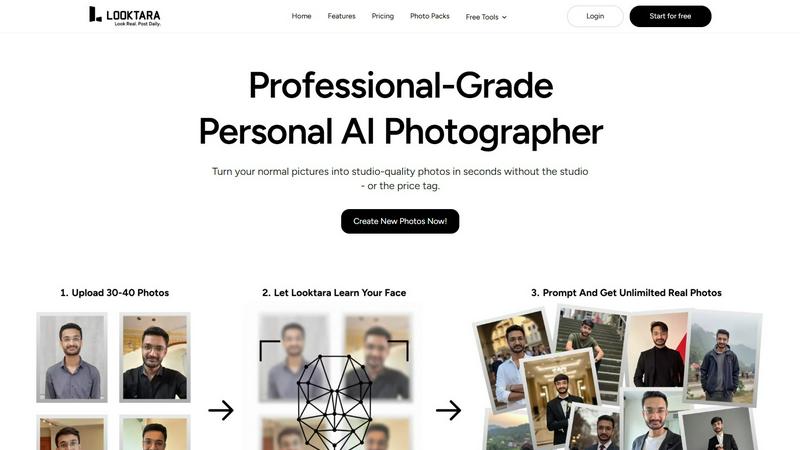
Looktara delivers personalized, high-quality photos in 10 minutes, tailored to your style and brand for any platform.
Last updated: February 28, 2026

Seedream 5.0 AI
Seedream 5.0 AI generates stunning 2K images and cinematic videos from text prompts with unmatched creativity and.
Last updated: February 26, 2026
Visual Comparison
Looktara
Seedream 5.0 AI

Feature Comparison
Looktara
Personalized AI Model
Looktara allows users to upload around 30 personal photos to create a custom AI model. This model is encrypted and tailored exclusively for each user, ensuring that the generated images are unique and reflective of the individual's personality.
Rapid Photo Generation
Once the model is trained, Looktara can produce high-quality, studio-grade images in about 5 seconds. This rapid generation process means users can quickly obtain the visuals they need without waiting for long periods.
Authentic and Realistic Images
Unlike many other AI image generators that often produce overly filtered or artificial-looking photos, Looktara focuses on creating authentic images. It captures natural expressions and body language, providing users with visuals that feel genuine and relatable.
Versatile Style Options
Looktara offers a variety of styling options tailored to different platforms and professional needs. Whether it's LinkedIn, Instagram, Twitter, or Tinder, users can receive images styled appropriately for each platform, ensuring they present the right vibe.
Seedream 5.0 AI
Text-to-Image Generation at 2K Resolution
Seedream 5.0 AI excels in generating images from text prompts at an impressive 2K resolution. Users can describe any visual concept, and the AI will create portraits, landscapes, or product shots with remarkable detail and clarity.
Image-to-Image Editing with Natural Language
This feature allows users to upload an existing image and request edits using natural language. Whether it is style transfer, object removal, or background modification, Seedream 5.0 AI can make precise changes based on user descriptions.
Multi-Subject Composition with Individual Control
Users can create complex scenes featuring three or more distinct subjects, with each subject's individual attributes preserved. This feature enhances the storytelling aspect of image creation by allowing different elements to interact naturally within a composition.
Native Style Control Across Visual Aesthetics
Seedream 5.0 AI provides users with versatile style control, enabling them to choose from various aesthetics such as photorealism, anime, cyberpunk, watercolor, and oil painting. This can be done through text input or by using reference images, offering unprecedented creative flexibility.
Use Cases
Looktara
Professional Networking
Looktara is perfect for professionals who need high-quality images for platforms like LinkedIn. Users can generate polished photos that enhance their professional image and help them stand out to potential employers or clients.
Social Media Engagement
Content creators and influencers can leverage Looktara to produce engaging and authentic images for their social media profiles. High-quality visuals can help capture audience attention and increase interaction on posts.
Personal Branding
Individuals looking to enhance their personal brand can use Looktara to create images that reflect their unique identity. This is essential for building a memorable presence online and connecting with audiences on a deeper level.
Online Dating Profiles
Users seeking to improve their online dating profiles can benefit from Looktara's ability to generate warm and inviting images. Authentic photos can significantly increase the chances of making a positive impression on potential matches.
Seedream 5.0 AI
Character Design for Games and Animation
Game developers and animators can leverage Seedream 5.0 AI to create unique character designs quickly. By inputting descriptions of desired traits and styles, users can generate a variety of character images suited for their projects.
Marketing and Promotional Materials
Businesses can use Seedream 5.0 AI to generate eye-catching visuals for marketing campaigns. From product photography to promotional social media graphics, the tool helps brands create professional-quality images that attract attention.
Concept Art for Film and Media
Filmmakers and media creators can utilize Seedream 5.0 AI to produce concept art that encapsulates their vision. This includes landscapes, character sketches, and scene compositions that aid in visual storytelling and production planning.
Custom Artwork for Personal Projects
Artists and hobbyists can explore their creativity by using Seedream 5.0 AI to generate custom artwork. Whether for personal enjoyment or as gifts, users can create unique pieces that reflect their individual style and preferences.
Overview
About Looktara
Looktara is an innovative personal AI photographer meticulously crafted for individuals who seek high-quality, personalized images that authentically represent their unique personality. Users can upload around 30 photos to train a private, encrypted model tailored specifically for them. In a remarkably short span of about 10 minutes, this model is primed to generate studio-grade solo photos in just 5 seconds. The primary value proposition of Looktara lies in its ability to create genuine images that encapsulate the essence of the user, avoiding the artificiality often associated with conventional AI-generated photos. Whether you require a polished professional appearance for LinkedIn or a warm, inviting image for social media, Looktara skillfully delivers the right tone and style for any occasion. It is ideal for professionals, content creators, and anyone eager to elevate their personal brand with striking visuals that resonate with their audience, ensuring they stand out in an increasingly competitive digital landscape.
About Seedream 5.0 AI
Seedream 5.0 AI is an innovative fifth-generation diffusion transformer model that transforms the landscape of image generation. This powerful tool is tailored for creators, designers, and production teams who seek to produce high-quality images quickly and efficiently. With Seedream 5.0 AI, users can generate professional-grade visuals in mere seconds, unlocking new creative avenues across various applications. The platform capitalizes on advanced AI technology to interpret text prompts, converting them into stunning, high-resolution images. The current promotional offer of a 50% discount makes it an appealing choice for anyone looking to elevate their visual content. Seedream 5.0 AI stands out for its ability to generate intricate details, photorealistic textures, and exact interpretations of complex prompts, making it an essential tool for anyone in need of top-tier visual content.
Frequently Asked Questions
Looktara FAQ
How does Looktara ensure the privacy of my uploaded photos?
Looktara employs robust encryption methods to ensure that all uploaded photos are kept private. Your personal AI model is exclusively yours, and no one else has access to your images or data.
What types of images can Looktara generate?
Looktara can generate a wide variety of images, including professional headshots, casual portraits, and styled photos suitable for social media. Users can customize the style to match their needs.
How long does it take to create my AI model?
The process of creating your personalized AI model takes about 10 minutes after you upload your photos. Once trained, the model can generate images in approximately 5 seconds.
Can I use Looktara for commercial purposes?
Yes, Looktara's images can be used for various commercial purposes, including marketing materials, social media content, and professional portfolios, allowing users to enhance their visual branding effectively.
Seedream 5.0 AI FAQ
What is Seedream 5.0 AI?
Seedream 5.0 AI is a cutting-edge image generation tool that uses advanced AI technology to create high-resolution images from text prompts, designed for creators and designers.
How does the image-to-image editing work?
Users can upload an image and describe the desired edits in plain language. The AI interprets these instructions to make precise modifications, such as changing styles or removing elements.
Can I generate videos with Seedream 5.0 AI?
Yes, Seedream 5.0 AI includes Seedance 2.0, which allows users to produce cinematic videos from text or images, complete with synchronized audio and multiple duration options.
What kind of styles can I choose from?
Seedream 5.0 AI offers a wide range of styles, including photorealism, anime, cyberpunk, and more. Users can switch between these styles easily through text input or reference images.
Alternatives
Looktara Alternatives
Looktara is an innovative AI-driven platform designed to create personalized, professional-quality photos tailored to individual styles and brands. As a generative art tool, it empowers users to obtain high-quality images quickly, making it especially appealing for professionals and content creators. However, users often seek alternatives due to various factors such as pricing, feature sets, and specific platform needs that may not align with Looktara’s offerings. When exploring alternatives, it's essential to consider aspects like the level of personalization available, the speed of photo generation, and the variety of contextual styling options. Additionally, evaluating the security of user data and the overall user experience can help in making an informed choice that best suits individual requirements.
Seedream 5.0 AI Alternatives
Seedream 5.0 AI is an advanced image generation tool that falls into the category of artificial intelligence-powered creative software. It specializes in producing photorealistic 2K visuals from simple text prompts, making it a valuable asset for various creative professionals. Users often seek alternatives for a variety of reasons, such as pricing concerns, specific feature requirements, or platform compatibility needs. Finding the right alternative involves considering factors like image quality, ease of use, support for diverse file formats, and the ability to handle complex prompts effectively to ensure the generated images align with user expectations. When selecting an alternative, it is crucial to evaluate the overall performance, including the speed of image generation and the fidelity of the visuals produced. Additionally, users should assess customer support options, user reviews, and the flexibility of the tool to adapt to unique project demands. By prioritizing these elements, users can find a suitable option that meets their creative needs without compromising on quality or functionality.