LayoffAlert vs SoloTools
Side-by-side comparison to help you choose the right product.

LayoffAlert
Stay informed about potential layoffs at your job with timely WARN Act alerts and essential resources for support.
Last updated: February 26, 2026

SoloTools
SoloTools uses AI to create polished client proposals in seconds, saving you hours of work.
Last updated: March 4, 2026
Visual Comparison
LayoffAlert
SoloTools

Feature Comparison
LayoffAlert
Comprehensive WARN Act Database
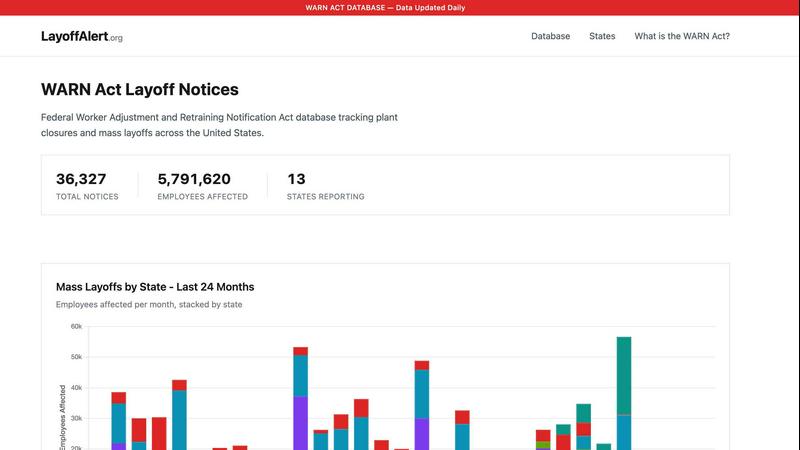
LayoffAlert features a comprehensive database that aggregates WARN Act notices from 49 states. This database is updated daily, ensuring that users have access to the most current information regarding layoffs and plant closures across the nation.
Customizable Email Alerts
Users can set up personalized email alerts to receive notifications whenever their tracked companies or regions file new WARN notices. This feature ensures that users are promptly informed about changes that could impact their employment status or industry trends.
Search Functionality
The platform includes a robust search functionality that allows users to filter WARN notices by company name, location, industry, or date. This makes it easy to find relevant information quickly, helping users stay informed about specific situations that matter to them.
Detailed Layoff Insights
LayoffAlert provides detailed insights into layoffs by state and by company, including the number of employees affected and the frequency of notices filed. This valuable information helps users understand the broader trends within specific industries or regions.
SoloTools
AI-Powered Proposal Generation
The core feature of SoloTools is its intelligent AI engine. It does far more than fill in templates. Based on the brief project details you provide, the AI writes a compelling, tailored proposal from the ground up. It crafts persuasive executive summaries, breaks down the scope of work into clear phases, structures professional pricing tables, and outlines project timelines and terms. This ensures every proposal is client-ready, coherent, and professionally formatted without any manual writing effort.
AI Section-Level Editing
After the AI generates your proposal, you retain full control with smart editing tools. For any section of the proposal, such as the executive summary or scope, you can instruct the AI to refine the text on the spot. You can use simple commands like "Make more persuasive," "Make shorter," "Make more detailed," or "Rewrite in formal tone." This allows for quick, intelligent customization without having to manually rewrite entire paragraphs, saving even more time while perfecting the message.
Client Tracking & E-Signatures
SoloTools manages the entire client interaction after the proposal is created. You can send proposals directly to clients via email with a personalized message. The platform then provides real-time analytics, notifying you the moment a client opens your proposal for the first time. Most importantly, it includes a built-in canvas for clients to provide legally-binding e-signatures directly on the document, streamlining the acceptance process and eliminating the need for separate signing software.
Proposal Analytics & Automation
This feature provides valuable insights into your business performance. You can view a clear conversion funnel showing how many proposals were sent, viewed, accepted, or declined. This helps you understand your win rate and identify where you might be losing deals. Furthermore, the tool offers automation like automatic follow-up reminder emails (set for 3, 5, or 7 days) and the ability to set proposal expiry dates to create urgency, helping you manage the follow-up process without manual effort.
Use Cases
LayoffAlert
Monitoring Employer Layoffs
Employees can use LayoffAlert to monitor their employer's WARN filings, allowing them to stay informed about potential layoffs and prepare accordingly. This proactive approach can help employees make informed decisions about their employment.
Tracking Industry Trends
Job seekers and analysts can leverage LayoffAlert to track mass layoffs within specific industries. Understanding which sectors are experiencing layoffs can help users identify job opportunities in more stable or growing industries.
Planning for Career Transitions
Individuals anticipating a career change can use LayoffAlert to find out about upcoming layoffs in their area or industry. This information can aid in career planning and networking efforts, helping users transition smoothly.
Researching Economic Impacts
Researchers and economic analysts can utilize the comprehensive data provided by LayoffAlert to study the impact of mass layoffs on local economies and labor markets. This data can be invaluable for reports or policy recommendations.
SoloTools
Freelance Web Designers & Developers
For freelancers building websites or applications, SoloTools is ideal for quickly proposing projects. By inputting the client's name, project type (e.g., "Website Redesign"), budget, and key requirements, the AI generates a detailed proposal complete with phases like Discovery, UI/UX Design, and Development, including timelines and pricing. This allows designers and developers to respond to client inquiries rapidly and professionally.
Independent Marketing & SEO Consultants
Marketing consultants can use SoloTools to propose campaigns, SEO audits, or content strategy projects. The AI can structure proposals that outline objectives, key performance indicators, service packages, and investment summaries. The ability to track when a client views the proposal is particularly useful in fast-paced marketing discussions, allowing for timely follow-up.
Business & Management Consultants
Independent consultants offering strategic advice can leverage SoloTools to formalize their engagement terms. The AI helps draft a clear scope of work, methodology, deliverables, and a professional fee structure. The e-signature feature ensures the consulting agreement is executed smoothly, providing a clear record for both parties.
Creative Professionals (Writers, Designers, Videographers)
Freelancers in creative fields often need to propose fixed-price projects for specific deliverables like a video series, a branding package, or a set of articles. SoloTools enables them to convert a project brief into a formal proposal with itemized costs for each deliverable, a clear timeline for revisions and final delivery, and standard copyright or usage terms, presenting their creative work as a serious business service.
Overview
About LayoffAlert
LayoffAlert is a vital tool designed to track mass layoffs and plant closures across the United States by aggregating official WARN (Worker Adjustment and Retraining Notification) Act notices filed with state governments. Companies with more than 100 employees are mandated to submit WARN notices at least 60 days prior to implementing mass layoffs, thereby giving workers essential advance notice. LayoffAlert meticulously collects and organizes over 6,000 WARN notices from 49 states, covering more than 561,000 employees affected nationwide. Users can search for disclosures by company name, location, industry, or date to stay informed about layoffs before they occur. Additionally, LayoffAlert offers customizable email alerts for new WARN notices, empowering users to monitor specific companies or regions. All data is sourced directly from government filings and is updated daily. Whether you are an employee concerned about your job, a job seeker keeping an eye on industry trends, or a researcher analyzing workforce impacts, LayoffAlert equips you with the earliest possible notifications to help you prepare. It also provides recommendations for finance or legal support if needed, making it a comprehensive resource in times of uncertainty.
About SoloTools
SoloTools is an AI-powered proposal generator designed specifically for freelancers and independent consultants. Its fundamental purpose is to solve a common and time-consuming problem: creating professional client proposals from scratch. Instead of facing a blank document for hours, users can input basic project details like the client name, project type, budget, and scope notes in about 30 seconds. The tool's core intelligence then takes over, generating a complete, polished proposal in approximately 12 seconds. This proposal includes all essential sections such as an executive summary, a detailed scope of work, itemized pricing, a clear project timeline, and standard terms and conditions. SoloTools is built for busy professionals who need to streamline their workflow, save significant time, and present a consistently high-quality front to clients. Beyond just creation, the platform facilitates the entire proposal lifecycle, allowing users to send proposals directly via email, track when clients view them, and collect legally-binding e-signatures, all from one centralized dashboard.
Frequently Asked Questions
LayoffAlert FAQ
What is the WARN Act?
The WARN Act is a federal law that requires employers with more than 100 employees to provide 60 days' notice before mass layoffs or plant closures. This law aims to protect workers by giving them time to prepare for job loss.
How often is the data updated on LayoffAlert?
LayoffAlert updates its database daily, ensuring that users have access to the most current WARN notices and layoff information across the United States.
Can I receive alerts for multiple companies?
Yes, users can sign up for alerts for multiple companies or regions. For more details, users can contact LayoffAlert for assistance in managing their alert preferences.
Is there any cost associated with using LayoffAlert?
LayoffAlert offers its core features free of charge. Users can access the WARN Act database and set up alerts without any subscription fees, making it accessible to everyone seeking information on mass layoffs.
SoloTools FAQ
How does the AI proposal generator work?
You provide basic project information including the client's name, the type of project, the budget, and a few notes on the scope. In about 30 seconds of input, SoloTools' AI analyzes this information and generates a complete, structured proposal. This includes an executive summary, detailed scope of work, a breakdown of pricing and timeline, and standard terms and conditions, all tailored to your specific project details.
Is there a free plan available?
Yes, SoloTools offers a free plan to get started. This plan allows you to create and send up to three proposals per month at no cost. It includes access to the AI generator, basic editing, and the ability to download PDFs. This plan requires no credit card to sign up, so you can test the tool's core functionality with no financial commitment.
Can I edit the proposals that the AI creates?
Absolutely. You have full editing control over every proposal. You can manually edit any text directly. More powerfully, you can use AI section-level editing commands to refine specific parts. For any section, you can ask the AI to make it more persuasive, shorter, more detailed, or rewrite it in a different tone, giving you smart assistance to perfect the document.
How do clients sign the proposals?
SoloTools includes a built-in e-signature feature. When you send a proposal to a client, they can review it directly in their browser. To accept, they are prompted to draw their signature using their mouse or finger on a digital canvas. Once drawn and confirmed, this acts as a legally-binding e-signature on the document, and you are immediately notified of the acceptance.
Alternatives
LayoffAlert Alternatives
LayoffAlert is a service that informs users about potential job layoffs by tracking mass layoffs and plant closures across the United States. It belongs to the HR and recruiting category, focusing on providing advance notifications through the aggregation of official WARN Act notices filed by companies. This resource is invaluable for employees who want to stay informed about their job security and for those who are looking for support in navigating potential job loss. Users often seek alternatives to LayoffAlert for various reasons, including pricing, feature sets, and platform compatibility. When choosing an alternative, it's essential to consider the comprehensiveness of the data, the frequency of updates, user interface ease, and the availability of additional resources like financial or legal support. A well-rounded alternative should not only notify users of layoffs but also assist them in preparing for potential transitions in their careers.
SoloTools Alternatives
SoloTools is an AI-powered proposal generator in the business and finance software category. It helps freelancers and independent consultants quickly create professional client proposals by automating the drafting process. This saves significant time compared to writing documents from scratch. Users often explore alternatives for various reasons. Some may need different pricing structures or a higher volume of proposals than a plan allows. Others might seek specific features like advanced integrations, more detailed analytics, or different customization options for their branding and document layout. When evaluating other tools, consider your core needs. Key factors include the total cost relative to your proposal volume, the depth of customization available, and how well the software integrates with your existing workflow. The goal is to find a solution that balances efficiency with the professional presentation your business requires.