
Hush Touch | Voice-to-Text for MacOS vs QuickData.ai
Side-by-side comparison to help you choose the right product.

Hush Touch | Voice-to-Text for MacOS
Hush Touch transforms your voice into text on MacOS, learning your vocabulary and ensuring privacy with offline.
Last updated: February 26, 2026

QuickData.ai
QuickData.ai automates multifamily rent roll and T12 data entry into Excel to accelerate underwriting.
Last updated: March 1, 2026
Visual Comparison
Hush Touch | Voice-to-Text for MacOS

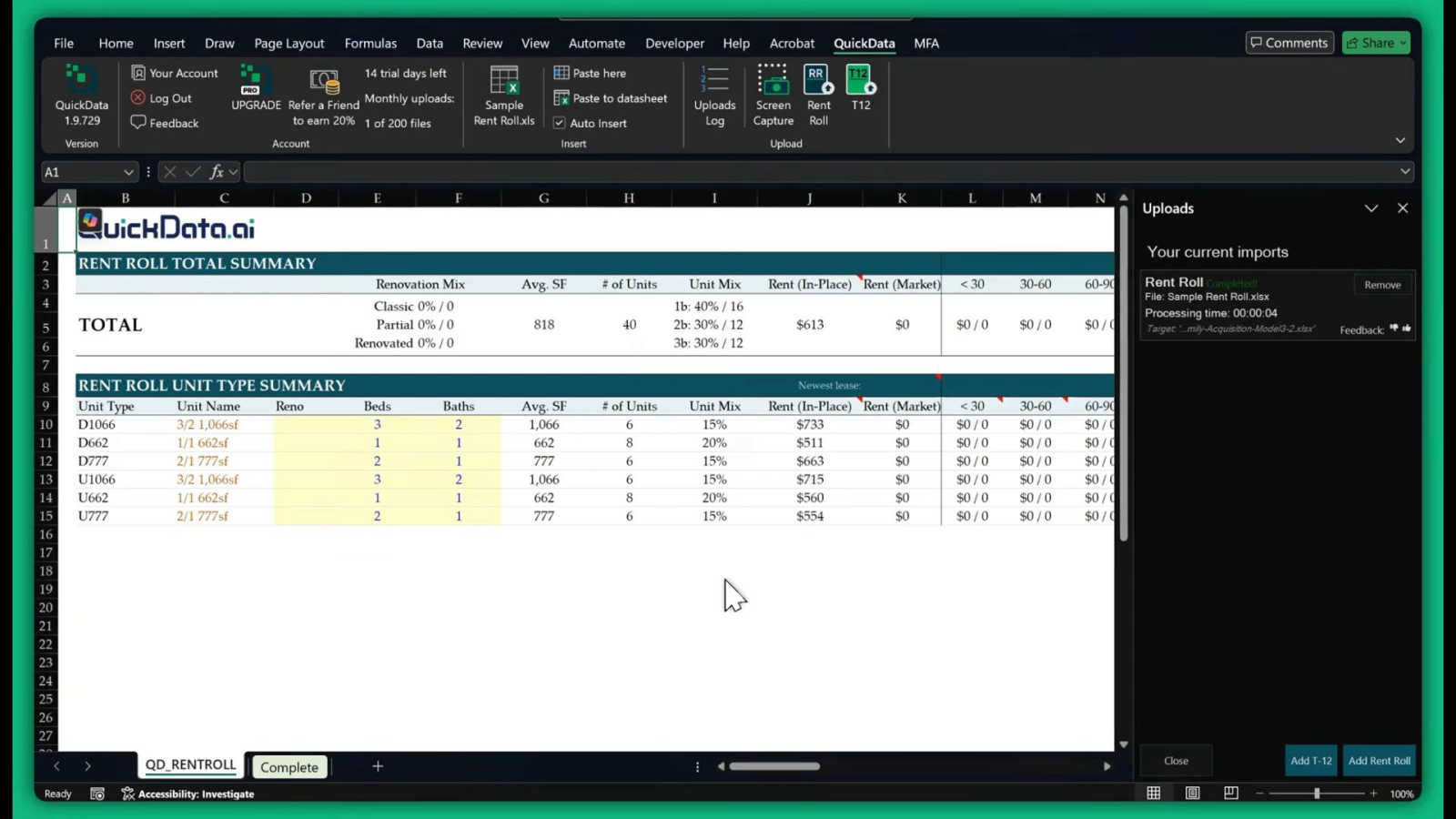
QuickData.ai
Feature Comparison
Hush Touch | Voice-to-Text for MacOS
Dual-Engine Recognition
Hush Touch utilizes two powerful Apple dictation engines to deliver superior transcription accuracy. The DictationTranscriber manages the natural flow and punctuation of your speech, while the SFSpeechRecognizer enhances custom vocabulary recognition. By merging the strengths of both engines and incorporating an Apple Intelligence final pass, Hush Touch ensures that your dictation is precise and contextually relevant.
Custom Vocabulary
With the ability to learn and adapt, Hush Touch allows you to input up to 500 custom terms, which helps it recognize specific jargon, brand names, and technical phrases that are unique to your profession. This feature includes an auto-learning capability that updates your vocabulary based on corrections you make during dictation, ensuring that the app evolves with your needs over time.
Smart Text Processing
The app's smart text processing capabilities help streamline your dictation by automatically removing filler words and correcting common speech errors in real time. It also formats voice snippets for repeated phrases and organizes text into numbered lists, making it easier to produce structured and polished documents directly from your spoken words.
Context Modes & Hands-Free Operation
Hush Touch offers multiple context modes tailored for different writing scenarios, including General, Email, Code, and Notes modes. You can initiate dictation hands-free by saying "Hey Siri, start touch," which allows the app to auto-insert text after a brief pause. Custom command phrases enable you to send messages or stop dictation effortlessly, enhancing your overall dictation experience.
QuickData.ai
AI-Powered Data Extraction
This is the foundational feature of QuickData.ai. The software employs artificial intelligence to automatically identify, read, and extract key financial data from uploaded documents. It is specifically trained to recognize the structure and data points within multifamily real estate documents such as rent rolls, T12 income statements, and offering memorandums. This eliminates the need for manual typing, ensuring data flows directly from the source document into your model without manual intervention.
Direct Excel Integration
QuickData.ai operates entirely within Microsoft Excel as an add-in. There is no need to export data to another platform or learn a new software system. The extracted data populates directly into your own, familiar Excel underwriting model. This seamless integration preserves your existing formulas, formatting, and workflow, allowing you to leverage powerful automation without disrupting the tools and processes you already know and trust.
Support for Core Multifamily Documents
The tool is precisely built for the documents central to multifamily analysis. It reliably processes Rent Rolls (to capture unit-by-unit rent, square footage, and occupancy), Trailing Twelve-Month (T12) statements (for historical income and expense verification), and Offering Memorandums (OMs). By focusing on these standard document types, QuickData.ai ensures high accuracy and relevance for the specific data points underwriters need most.
Rapid Setup and Free Onboarding
Getting started with QuickData.ai is designed to be straightforward. The setup process takes only minutes, not days. To help users succeed, the company offers a free, personalized 1:1 onboarding session. This ensures that every user, regardless of their technical expertise, can understand how to implement the tool into their underwriting process effectively and start saving time immediately.
Use Cases
Hush Touch | Voice-to-Text for MacOS
Drafting Emails and Messages
Hush Touch is perfect for busy professionals who need to send emails or messages quickly. By dictating your thoughts, you can compose written communications in real time without getting bogged down by typing, allowing for more efficient usage of your time.
Creating Notes and Documents
Students and researchers can benefit from Hush Touch when taking notes or drafting documents. The app's accuracy and smart text processing features enable users to focus on their ideas and content rather than the mechanics of writing, resulting in clearer and more organized notes.
Writing Code and Technical Content
Developers and technical writers will appreciate Hush Touch's ability to recognize programming terminology and technical jargon. By dictating code and related documentation, they can work faster and reduce the likelihood of errors that often occur during manual typing.
Generating Content for Blogs and Articles
Content creators can leverage Hush Touch to brainstorm and draft blog posts or articles effortlessly. The app allows for a natural flow of ideas, enabling writers to capture their thoughts quickly and efficiently while maintaining their unique voice and tone.
QuickData.ai
For Real Estate Acquisitions Analysts
Acquisitions analysts can underwrite potential deals dramatically faster. Instead of spending hours manually inputting data from a seller's provided rent roll and T12, they can upload the documents and have the data populate their model in minutes. This efficiency allows them to analyze more deals per week, identify the best opportunities quicker, and prepare compelling investment committee packages with accurate data.
For Commercial Real Estate Brokers
Brokers preparing offering materials or evaluating properties for clients can use QuickData.ai to rapidly build financial models. By automating the data entry from existing property records, brokers can create professional, accurate underwriting projections in a fraction of the usual time, enabling them to provide faster and more reliable valuations to both buyers and sellers.
For Real Estate Lenders and Underwriters
Lenders and underwriters assessing the risk of a multifamily loan must verify the property's financial performance. QuickData.ai accelerates their due diligence by instantly extracting historical income and expense data from T12s and rent rolls into their credit analysis models. This speeds up the underwriting decision process while reducing the risk of manual data entry errors that could affect the loan assessment.
For Accountants and Financial Controllers
Accountants working with real estate investment firms can streamline the process of auditing or consolidating property financials. QuickData.ai automates the transfer of data from monthly or annual statements into master financial models or reports, saving significant time on data reconciliation and ensuring consistency across financial records.
Overview
About Hush Touch | Voice-to-Text for MacOS
Hush Touch is a cutting-edge voice-to-text application designed specifically for macOS users who value speed, ease of use, and privacy in their dictation tools. This innovative app transforms spoken language into written text seamlessly and efficiently, making it an essential tool for anyone who regularly drafts emails, messages, notes, or documents. Hush Touch operates entirely on-device, ensuring that your voice data remains private and secure without relying on cloud services. By leveraging two advanced Apple transcription engines combined with an Apple Intelligence final pass, Hush Touch provides accurate and clean transcriptions that enhance your writing workflow. With a lightweight footprint of just 5.5 MB, it launches quickly and integrates effortlessly into daily tasks, allowing users to dictate naturally and hands-free. For just $20, you can enjoy a lifetime license without any ongoing subscription fees, making it a budget-friendly choice for professional and personal use alike.
About QuickData.ai
QuickData.ai is a specialized software tool built as an add-in for the PC version of Microsoft Excel. Its primary purpose is to serve multifamily real estate professionals, including acquisitions teams, brokers, lenders, and accountants. The core function of the tool is to address a fundamental and time-consuming challenge in real estate underwriting: manual data entry. When analyzing an apartment building deal, professionals must extract critical financial figures from source documents like rent rolls, trailing twelve-month (T12) statements, and offering memorandums (OMs) and manually input them into their Excel underwriting models. This process is not only slow but also prone to human error, which can lead to costly miscalculations.
QuickData.ai uses artificial intelligence to automate this entire process. It intelligently reads and extracts the necessary data from these common documents and populates it directly into the user's existing Excel spreadsheet. The main value proposition is a dramatic increase in both efficiency and accuracy. By eliminating hours of tedious typing and copy-pasting, professionals can reduce the time spent on data entry from hours to minutes. This allows them to evaluate more investment opportunities, minimize errors, and make faster, more confident decisions based on reliable data. The tool is designed to integrate seamlessly into current workflows without requiring a complex setup or migration to a new software platform, making advanced AI accessible for fundamental analysis tasks.
Frequently Asked Questions
Hush Touch | Voice-to-Text for MacOS FAQ
How does Hush Touch ensure privacy with my voice data?
Hush Touch processes all voice data entirely on your Mac, with no reliance on cloud services. This means your voice recordings and transcriptions remain private and secure, ensuring that your data is not collected or shared.
Can I customize the vocabulary in Hush Touch?
Yes, Hush Touch allows you to customize your vocabulary with up to 500 terms. It also learns from corrections you make during dictation, helping it to adapt to your specific language needs over time.
Is there a trial version of Hush Touch available?
Yes, Hush Touch offers a 7-day free trial without requiring a credit card. This allows you to test the app's features and functionality before making a purchase decision.
What is the pricing structure for Hush Touch?
Hush Touch is available for a one-time purchase price of $20, providing you with a lifetime license. There are no subscription fees, making it a cost-effective solution for voice-to-text needs.
QuickData.ai FAQ
What types of documents can QuickData.ai process?
QuickData.ai is specifically designed to process the most common documents in multifamily real estate underwriting. This includes Rent Rolls (PDF or Excel), Trailing Twelve-Month (T12) financial statements, and Offering Memorandums (OMs). The AI is trained to recognize the standard formats and data points within these documents to ensure accurate extraction.
Do I need to change my Excel underwriting model to use QuickData.ai?
No, you do not. A key benefit of QuickData.ai is that it works with your existing Excel model. The add-in populates the extracted data directly into the cells of your current spreadsheet. Your formulas, formatting, and layout remain intact. The tool adapts to your model, not the other way around.
Is there a free trial available?
Yes, QuickData.ai offers a full-featured 14-day free trial. This allows you to test the software with your own documents and within your actual Excel workflow to experience the time savings and accuracy improvements firsthand before making a commitment.
How does the AI ensure data extraction accuracy?
The AI is built and trained specifically on multifamily real estate documents, allowing it to understand context and locate key data points like rental income, expense categories, and unit details with high precision. The software also provides users with the opportunity to review and validate the extracted data within Excel, ensuring a final check and maintaining user control over the analysis.
Alternatives
Hush Touch | Voice-to-Text for MacOS Alternatives
Hush Touch | Voice-to-Text for MacOS is an innovative application designed to convert spoken words into written text directly on macOS devices. As part of the AI Assistants category, it allows users to dictate emails, notes, and documents easily and privately without relying on cloud services. Users often seek alternatives for various reasons, including pricing concerns, the need for additional features, or compatibility with different platforms. When choosing an alternative, consider factors such as the app's transcription accuracy, offline capabilities, ease of use, and privacy measures. It's essential to look for solutions that align with your specific dictation needs and workflow preferences to ensure a seamless experience.
QuickData.ai Alternatives
QuickData.ai is an AI-powered Excel add-in in the business and finance category. It automates data entry for multifamily real estate underwriting by extracting figures from rent rolls and T12 statements directly into a user's spreadsheet model. This saves professionals significant time and reduces errors during deal analysis. Users may look for alternatives for various practical reasons. These can include budget constraints, a need for different features, or because they use a platform other than the PC version of Excel. Some may seek a more comprehensive underwriting software suite instead of a focused data extraction tool. When evaluating alternatives, consider the core task you need to solve. Key factors include the accuracy of data extraction, compatibility with your existing Excel workflow, the specific document types you process, and the overall value for the investment. The right tool should fit seamlessly into your current process while reliably automating the most tedious parts of your analysis.