HuntingPad vs JobHustler
Side-by-side comparison to help you choose the right product.

HuntingPad simplifies your job search by capturing postings, matching resumes, and providing AI insights for easy.
Last updated: March 1, 2026

JobHustler
JobHustler instantly tailors resumes and cover letters for any job application without the need for signup.
Last updated: March 4, 2026
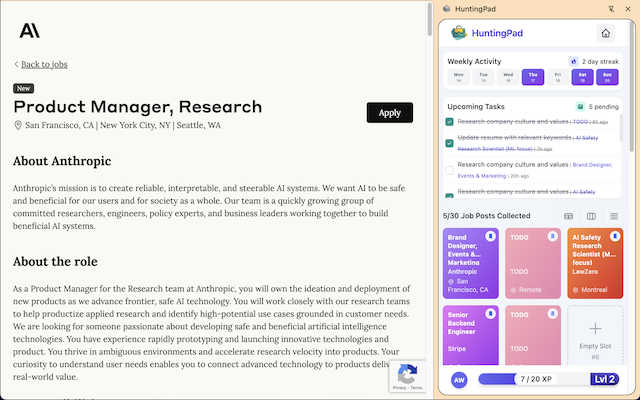
Visual Comparison
HuntingPad
JobHustler

Feature Comparison
HuntingPad
One-Click Job Capture
HuntingPad enables you to save job postings from any website with a single click. This feature eliminates the hassle of copying and pasting information, allowing you to focus on exploring potential opportunities without interruption.
Smart Reminders
Stay on top of your job applications with HuntingPad's intelligent reminders. This feature ensures you never miss a deadline or follow-up, helping you maintain a proactive approach throughout your job search.
AI-Powered Resume Matching
HuntingPad leverages artificial intelligence to match job postings with your resume. This intelligent feature suggests customization options tailored to each role, increasing your chances of standing out among other candidates.
Local Data Storage
HuntingPad is committed to user privacy, storing all your data locally on your device. This ensures that your sensitive information remains secure and accessible only to you, giving you peace of mind during your job search.
JobHustler
AI-Powered Tailoring
JobHustler leverages advanced artificial intelligence to tailor resumes and cover letters specifically for each job application. Users simply input a job description, and the AI generates customized content that aligns with the employer's expectations.
ATS-Friendly Formatting
Understanding that many companies use Applicant Tracking Systems to filter resumes, JobHustler optimizes document formatting to ensure compatibility. This feature enhances the chances of getting past initial screenings and increases the likelihood of landing an interview.
Role-Specific Bullet Points
The tool generates specific bullet points that highlight relevant skills and experiences based on the job description. This ensures that users can effectively convey their qualifications in a concise and impactful manner.
Multiple Document Types and Tones
JobHustler offers flexibility with different types of documents and tones. Users can generate both resumes and cover letters, choosing from various tones to match the job's requirements. This versatility supports users in crafting documents that resonate with different employers and industries.
Use Cases
HuntingPad
Streamlined Job Tracking
For busy professionals juggling multiple applications, HuntingPad simplifies the tracking process. With its one-click capture feature, you can quickly save job postings and keep everything organized in one place, reducing the clutter of spreadsheets and bookmarks.
Efficient Resume Customization
When applying for multiple roles, HuntingPad's AI-powered resume matching helps you tailor your resume for each position. This feature saves time and effort, allowing you to focus on crafting impactful cover letters and preparing for interviews.
Enhanced Follow-Up Management
HuntingPad's smart reminders keep you informed about application deadlines and necessary follow-ups. This ensures that you stay engaged with recruiters and hiring managers, increasing your chances of securing interviews.
Simplified Application Process
With HuntingPad, you can say goodbye to repetitive form filling. The extension's autofill feature handles the basics, allowing you to submit applications faster and with less mental strain, thus enabling you to apply for more positions in less time.
JobHustler
Recent Graduates
Recent graduates entering the job market can benefit from JobHustler by quickly creating resumes and cover letters that highlight their educational achievements and internships. This tool helps them make a strong first impression without extensive experience.
Career Changers
Individuals looking to switch careers can utilize JobHustler to effectively communicate transferable skills and relevant experiences. The AI-driven customization ensures that their application materials speak to the new industry they are targeting.
Job Seekers with Limited Time
For job seekers who are pressed for time, JobHustler provides a fast solution to generate professional resumes and cover letters. The quick turnaround allows them to apply for multiple positions without spending hours on document creation.
Professionals Upgrading Their Applications
Experienced professionals aiming to refresh their application materials can use JobHustler to optimize their resumes and cover letters. The tool helps refine language and format, ensuring their documents are polished and up to date.
Overview
About HuntingPad
HuntingPad is an innovative Chrome extension designed to streamline the job hunting experience for professionals across various fields. This powerful tool directly integrates into your browser, making it easy to capture job postings from popular platforms like LinkedIn, Indeed, and Glassdoor with just one click. Gone are the days of tedious manual data entry and the constant need to switch between apps. HuntingPad allows you to track your applications effortlessly while providing AI-powered resume matching to keep you organized and prepared. By prioritizing user privacy, all data is stored locally on your device, ensuring your information remains secure. With HuntingPad, you can focus on what truly matters—landing your next job—while enjoying a seamless integration into your existing workflow that enhances productivity and efficiency.
About JobHustler
JobHustler is an innovative AI-powered tool designed to streamline the process of creating professional resumes and cover letters. Tailored specifically for job seekers, it addresses the need for relevant and effective application materials that meet employers' expectations. By allowing users to simply paste a job description, JobHustler generates customized resumes and cover letters in just minutes. The tool not only produces documents that are aligned with the specific requirements of each job but also ensures they are formatted to be compatible with Applicant Tracking Systems (ATS). This makes it a valuable resource for anyone looking to enhance their job application process, from recent graduates to seasoned professionals. The main value proposition lies in its ability to save time while delivering high-quality, role-specific content, making job applications clearer, faster, and more impactful. With no account setup required and free usage options available, JobHustler is accessible and user-friendly, catering to various job-seeking needs.
Frequently Asked Questions
HuntingPad FAQ
How does HuntingPad capture job postings?
HuntingPad captures job postings through a simple one-click process when you find a job listing on platforms like LinkedIn or Indeed. This saves you from having to manually input details into a separate tracking system.
Is my data safe with HuntingPad?
Yes, HuntingPad prioritizes user privacy by storing all your data locally on your device. This means your information is not shared with third parties and is kept secure from external breaches.
Can I use HuntingPad with multiple job boards?
Absolutely! HuntingPad is designed to work seamlessly with various job platforms, including LinkedIn, Indeed, Glassdoor, and more. This flexibility allows you to capture job postings from your preferred sites effortlessly.
Do I need to pay to use HuntingPad?
HuntingPad is available as a free Chrome extension, allowing you to start organizing your job search without any upfront costs or credit card requirements. This makes it accessible for all ambitious job seekers.
JobHustler FAQ
How does JobHustler work?
JobHustler allows users to paste a job description, after which its AI generates tailored resumes and cover letters. The tool ensures that the documents are ATS-friendly and aligned with the employer's needs.
Is there a limit on how many resumes or cover letters I can generate?
With the single purchase plan, users can generate one resume and one cover letter. However, there are options for unlimited access available for those who need to create more documents.
Do I need to create an account to use JobHustler?
No, JobHustler does not require any account setup. Users can start generating their documents immediately after accessing the tool, making it user-friendly and convenient.
Can I customize the generated documents?
Yes, the documents generated by JobHustler can be further customized by users after creation. They can adjust language, add personal touches, or modify bullet points as needed to better fit their individual style.
Alternatives
HuntingPad Alternatives
HuntingPad is a pioneering Chrome extension designed to streamline the job search process for professionals across various fields. It falls under the productivity and management category, making it easier for users to capture job postings, track applications, and match resumes with the help of advanced AI technology. Many users seek alternatives to HuntingPad due to factors like pricing, specific feature sets, or compatibility with different platforms. When exploring alternatives, it is essential to consider the ease of use, privacy policies, and the extent to which features align with your individual job search needs. Finding an option that enhances your workflow while ensuring data security should be a top priority.
JobHustler Alternatives
JobHustler is an AI-powered resume and cover letter generator designed to help job seekers create professional, ATS-friendly documents quickly and efficiently. This tool falls under the productivity and management category, catering to individuals who want to enhance their job application materials without the hassle of lengthy setups or complicated processes. Users often seek alternatives to JobHustler for various reasons, including pricing, specific feature sets, or platform compatibility. When exploring alternatives, it is essential to consider factors such as ease of use, the quality of generated documents, level of customization, and the availability of support. By focusing on these aspects, users can find a solution that best fits their job application needs and preferences.