HeyVid vs Tinyart.io
Side-by-side comparison to help you choose the right product.

HeyVid is your all-in-one AI tool for effortlessly generating high-quality videos and images from text and images in minutes.
Last updated: April 4, 2026

Tinyart.io
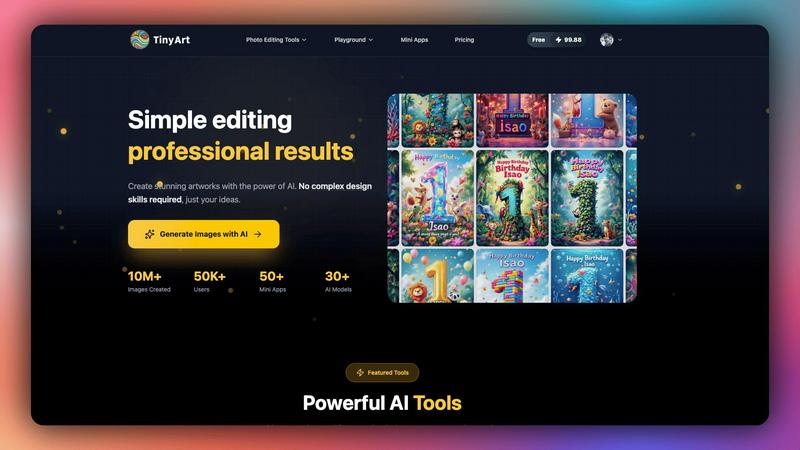
Tinyart.io uses AI to create professional images and edit photos without needing design skills.
Last updated: March 2, 2026
Visual Comparison
HeyVid

Tinyart.io
Feature Comparison
HeyVid
Text to Video
This feature allows users to convert written content into engaging videos. Simply input your text, and HeyVid transforms it into a dynamic visual presentation, complete with animations and voiceovers, making it ideal for content creators and marketers who want to enhance their messaging.
Image to Video
With the Image to Video feature, users can animate their still images effortlessly. This tool takes static images and brings them to life through various transitions and effects, which is perfect for social media campaigns or promotional materials.
AI Image Refiner & Stylizer
The AI Image Refiner & Stylizer feature enables users to enhance and stylize their images easily. By applying advanced algorithms, HeyVid can refine images, improving quality and adding artistic touches that make visuals more appealing for any project.
AI Music Generation
HeyVid also includes an AI Music Generation tool, allowing users to create custom soundtracks for their videos. This feature ensures that every piece of content is complemented by unique music, enhancing the overall viewing experience and helping to convey the desired mood.
Tinyart.io
AI Image Generator
This core feature allows you to generate original images from simple text descriptions. Instead of searching for stock photos, you describe the scene, style, or object you need, and the AI creates a unique visual. It supports over 30 different AI models, giving you flexibility in artistic style and output quality to match your specific vision, from photorealistic images to digital artwork.
Intelligent Background Remover
The background remover tool automatically and cleanly isolates the main subject of any photo. You can process up to 30 files simultaneously, saving significant time compared to manual editing. This is essential for creating clean product shots, profile pictures, or any graphic where you need the subject placed on a new background without tedious manual selection.
Smart Mini Apps
Tinyart.io offers a suite of specialized, single-purpose tools called Mini Apps designed for specific tasks. These include creating professional ID photos with automatic background correction, restoring old and damaged photographs using AI, and face-swapping capabilities. These apps simplify complex edits into a few clicks, addressing niche needs without requiring separate software.
All-in-One Photo Editing Suite
Beyond AI generation, the platform provides a comprehensive set of manual and AI-assisted editing tools. This includes upscaling images to enhance resolution, removing unwanted watermarks or objects with the "Clean Up" tool, and general photo customization. This suite ensures you can refine, tweak, and perfect your images entirely within the Tinyart.io ecosystem.
Use Cases
HeyVid
Marketing Campaigns
HeyVid can be used to create compelling marketing videos that capture the attention of potential customers. By utilizing the platform's various video generation tools, businesses can produce promotional content that stands out on social media and other channels.
Educational Content
Educators can leverage HeyVid to develop engaging tutorials and presentations. The platform's ease of use allows teachers to convert lesson plans into video format, making learning more interactive and accessible for students.
Product Launches
Businesses preparing for product launches can utilize HeyVid to create stunning visual announcements. The combination of video, images, and custom music ensures that the launch content is professional and captivating, helping to generate buzz and anticipation.
Social Media Content Creation
Content creators can maximize their social media presence by using HeyVid to produce short-form videos and eye-catching thumbnails. The platform's quick generation capabilities make it easy to keep content fresh and relevant across various social media platforms.
Tinyart.io
E-commerce Product Photography
Online sellers can use Tinyart.io to create professional-looking product catalogs without a photoshoot studio. They can generate product images from descriptions, remove backgrounds from existing photos automatically, and upscale image quality. This drastically cuts costs and time while maintaining a high-quality, consistent visual storefront.
Social Media Content Creation
Marketers and content creators can quickly produce engaging visuals for posts, stories, and ads. The smart templates and one-click resizing ensure images are perfectly formatted for each platform (like Instagram, Facebook, or Twitter). The AI generator helps create unique featured images, while editing tools allow for quick branding and adjustments.
Professional Profile and ID Photos
Individuals and professionals can use the dedicated ID Photo Mini App to create compliant passport or license photos from any portrait. The app automatically adjusts the background, size, and composition. Similarly, the general tools can be used to enhance LinkedIn profile pictures by improving lighting or removing distractions.
Personal Creative Projects and Restoration
Hobbyists and individuals can restore cherished old family photos using the Photo Restoration Mini App, bringing faded or damaged pictures back to life. The platform also serves as a digital art playground where users can experiment with AI models to generate artwork, edit personal photos, or create custom graphics for invitations and personal blogs.
Overview
About HeyVid
HeyVid is an innovative AI-powered platform designed to simplify the process of video and image creation. It allows users to generate high-quality multimedia content quickly and effortlessly, catering to a wide range of needs from social media posts to educational materials. With an intuitive interface, HeyVid is suitable for everyone from beginners to seasoned professionals. The platform supports various functionalities like text-to-video, image-to-video, and image refinement, making it a versatile tool for marketers, content creators, educators, and businesses. The main value proposition lies in its ability to turn creative ideas into visually appealing content in just a few clicks, all while maintaining a professional standard that helps users stand out in a crowded digital space.
About Tinyart.io
Tinyart.io is an AI-powered platform built to make professional visual creation accessible to everyone. It operates on a fundamental principle: powerful design tools should not require complex skills to use. The platform moves beyond simple AI image generation to offer a full suite of creation and editing tools. This allows users, from developers and marketers to everyday creators, to start with a raw idea and transform it into a polished, high-quality image ready for marketing, social media, or personal projects in minutes. A core differentiator is its developer-first design editor, which includes intelligent features like smart templates, automatic brand color detection, and one-click resizing for various platforms. By focusing on an intuitive workflow that eliminates the steep learning curve of traditional software, Tinyart.io empowers non-designers to produce stunning visuals efficiently. It combines the generative power of AI with practical editing utilities, serving as a comprehensive, all-in-one solution for modern visual content needs.
Frequently Asked Questions
HeyVid FAQ
What types of content can I create with HeyVid?
HeyVid allows you to create a variety of content including videos from text, images into videos, and refined images. You can also generate music to accompany your videos, making it a comprehensive tool for multimedia content creation.
Is HeyVid suitable for beginners?
Absolutely! HeyVid is designed with an intuitive interface that makes it easy for users of all skill levels to create professional-quality content. The platform provides step-by-step guidance, ensuring that even beginners can navigate and utilize its features effectively.
Can I customize the videos and images I create?
Yes, HeyVid offers extensive customization options. You can adjust elements such as aspect ratio, resolution, and add watermarks. This allows users to tailor their content to match their brand identity or personal style.
Is there a free version of HeyVid available?
While specific details about a free version were not provided, HeyVid offers various pricing plans, including promotional discounts. It is advisable to check their website for current deals and whether a trial or free version is available.
Tinyart.io FAQ
Who is Tinyart.io designed for?
Tinyart.io is designed for anyone who needs to create or edit visuals but may lack advanced design skills or expensive software. This includes developers, marketers, small business owners, social media managers, content creators, e-commerce sellers, and hobbyists. Its intuitive interface makes professional-grade visual tools accessible to non-designers.
Do I need design experience to use Tinyart.io?
No, you do not need prior design experience. The platform is built specifically to eliminate the complexity of traditional design tools. Features like smart templates, one-click actions, and AI-powered tools guide you through the process. You start with your basic idea, and the platform helps you execute it with professional results.
What makes Tinyart.io different from other AI image generators?
While it includes a powerful AI image generator, Tinyart.io is more than just a text-to-image tool. It is a complete creation and editing platform. Its key differentiators are the developer-first editor with smart templates, the extensive suite of practical editing tools (like background removal and upscaling), and the collection of specialized Mini Apps for specific tasks.
Is there a free plan to try Tinyart.io?
Yes, you can start using Tinyart.io for free. The platform offers a free tier that allows users to explore its core features and begin creating without a credit card. This lets you experience the AI-powered workflow and understand the tool's value before considering any paid plans for higher usage limits or advanced features.
Alternatives
HeyVid Alternatives
HeyVid is an all-in-one AI video and image generator designed to help users create high-quality visual content quickly and effortlessly. It falls within the productivity and management category, catering to individuals and businesses looking to enhance their visual storytelling capabilities. Despite its robust features, users often seek alternatives for various reasons, including pricing structures, specific functionalities, or compatibility with their preferred platforms. When searching for alternatives to HeyVid, it is essential to consider factors such as ease of use, the quality of generated content, and the range of features offered. Additionally, assessing customer support, pricing plans, and the availability of trial versions can help ensure that the chosen solution meets your unique needs and expectations.
Tinyart.io Alternatives
Tinyart.io is an AI-powered design platform in the productivity and management category. It helps users, especially developers and non-designers, create professional marketing images quickly by focusing on editing and smart templates rather than just image generation. Users often explore alternatives for various practical reasons. These can include budget constraints, the need for different or more advanced features, or a requirement to work on a specific operating system or device. Some may seek tools with a stronger focus on pure AI art generation or more traditional, manual design control. When evaluating other options, consider your primary goal. Look at the core functionality, such as whether you need robust editing, simple background removal, or high-quality image generation. Also, assess the ease of use, pricing structure, and how well the tool integrates into your existing workflow to ensure it truly meets your needs.