Geekflare Connect vs Prompt Builder
Side-by-side comparison to help you choose the right product.

Geekflare Connect
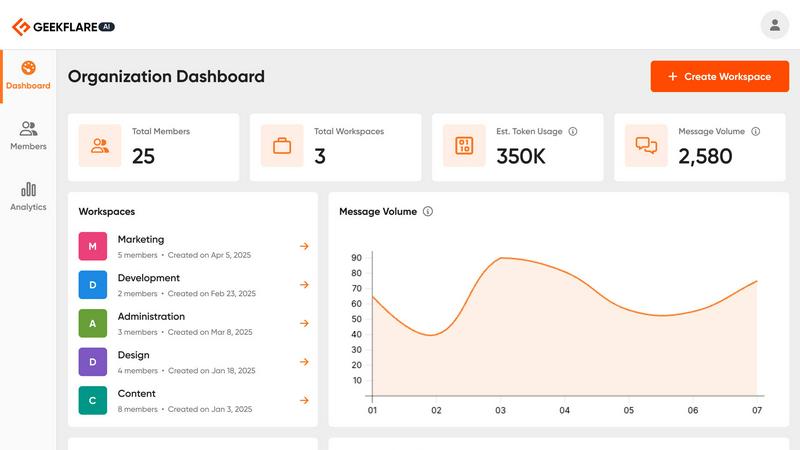
Geekflare Connect unifies your team's AI tools into one platform to cut costs and boost collaboration.
Last updated: March 1, 2026

Prompt Builder
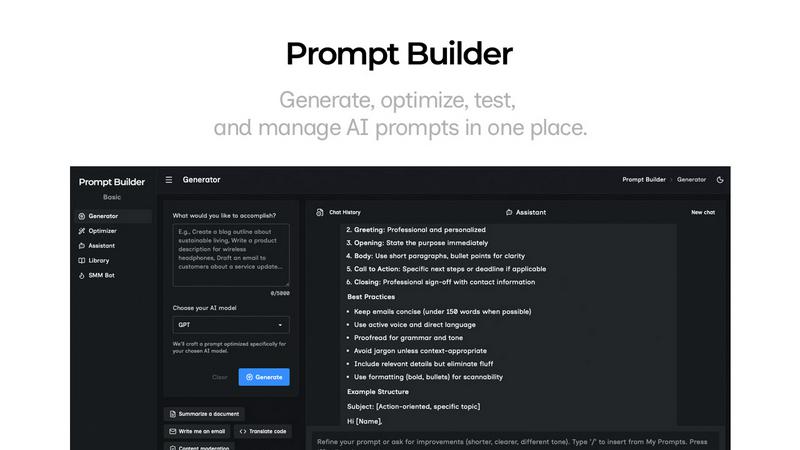
Prompt Builder helps you quickly generate, refine, and save optimized AI prompts for any model, streamlining your creative process.
Last updated: April 13, 2026
Visual Comparison
Geekflare Connect
Prompt Builder
Feature Comparison
Geekflare Connect
Multi-Model Comparison
This fundamental feature allows you to instantly compare responses from leading AI models like GPT-4o, Claude 3.5 Sonnet, and Gemini 1.5 Pro side-by-side within a single interface. Instead of manually copying prompts between different tabs and applications, you can submit one query and view the outputs from multiple providers simultaneously. This enables you to objectively evaluate the quality, tone, and completeness of each model's response for your specific task, ensuring you always select the best possible output without guesswork or extra steps.
Collaborative Workspaces
Geekflare Connect moves beyond individual AI chats to provide structured, team-oriented workspaces. You can organize conversations and projects into dedicated spaces, add team members with appropriate permissions, and securely share chat histories. This foundational approach ensures that prompts, successful outputs, and institutional knowledge are not trapped in individual accounts but are centralized and accessible. It keeps everyone aligned, reduces duplicate work, and allows for seamless handoffs and collaborative brainstorming on AI-driven projects.
Live Web Access
To ground AI responses in real-time, factual information, Geekflare Connect integrates live web search capabilities. Powered by providers like Exa and Firecrawl, this feature allows the AI models to search the current internet and incorporate up-to-date data, news, and research into their answers. This solves the core limitation of static AI knowledge cutoffs, supercharging your research, market analysis, content creation, and competitive intelligence tasks with accurate, timely information pulled directly from the web.
Your Private AI Brain
This feature addresses the need for contextual, secure AI interactions using your own data. You can securely upload private documents—such as PDFs, Word files, and text documents—to create a personalized knowledge base. The AI models can then reference this uploaded content to provide answers that are specific to your company's processes, products, or research. It acts as a private, internal AI assistant that understands your unique context without the risk of exposing sensitive data to public models.
Prompt Builder
Prompt Generator
The Prompt Generator feature allows users to input their ideas and select a target AI model, producing a professional-grade prompt in seconds. This tool ensures that the generated prompts are specifically optimized for the selected model, enhancing effectiveness and relevance.
Chat Refinement
With the Chat Refinement feature, users can interactively refine their prompts in a built-in chat workspace. This functionality enables quick iterations and adjustments, allowing for real-time improvements and ensuring that the final output meets the desired specifications.
Prompt Library
The Prompt Library is a comprehensive repository where users can save, organize, and reuse their best prompts. This feature supports easy searching with filters by category and model, making it simple to access past work and build a robust collection of effective prompts tailored for various projects.
Prompt Optimizer
The Prompt Optimizer takes existing prompts and enhances them by providing structured improvements. This feature focuses on clarity, constraints, output format, and examples, ensuring that users can easily transform their original prompts into clearer and more effective versions.
Use Cases
Geekflare Connect
Content Creation and Strategy
Marketing teams, writers, and strategists can use the platform to generate and refine content. By using the multi-model comparison, they can prompt several AIs to create blog post drafts, social media copy, or email campaigns and instantly compare the results to select the most engaging version. The shared prompt library and workspaces allow the entire content team to build on successful templates and maintain a consistent brand voice across all materials, significantly speeding up the production cycle.
Technical Development and Code Review
Developers and engineering teams can leverage multiple AI models for coding assistance, debugging, and code explanation. They can ask different models to solve the same problem or review a code snippet, then use the side-by-side comparison to evaluate the efficiency and accuracy of each suggested solution. Collaborative workspaces allow team members to share complex technical prompts and solutions, building a valuable internal knowledge base for common development challenges.
Business Intelligence and Research
Analysts and product managers can conduct comprehensive market and competitive research efficiently. Using the live web access feature, they can task AIs with gathering the latest information on market trends, competitor announcements, or customer sentiment. Uploading internal reports to the private AI brain allows for deep analysis of company-specific data. Comparing insights from different models ensures a well-rounded, fact-based understanding to support strategic decisions.
Customer Support Optimization
Support teams can use Geekflare Connect to build and refine a library of response templates for common customer inquiries. By testing prompts with multiple AI models, they can identify the clearest, most helpful, and most empathetic responses. These optimized responses can be stored and shared in team workspaces, ensuring all support agents provide high-quality, consistent information. This reduces resolution time and improves the overall customer experience.
Prompt Builder
Content Creation
Content creators can utilize Prompt Builder to generate tailored writing prompts for blog posts, articles, or social media updates. With optimized prompts for different AI models, they can streamline their writing process and produce high-quality content faster.
Marketing Campaigns
Marketers can leverage the tool to create compelling marketing messages and social media posts. By using the SMM Bot, they can generate platform-specific content and refine it until it aligns perfectly with their brand voice and audience expectations.
Software Development
Developers can benefit from Prompt Builder by crafting prompts for AI-assisted coding or debugging. The ability to refine and save prompts specific to their development environment allows for more efficient and effective coding practices.
Education and Training
Educators can use Prompt Builder to create instructional materials and quizzes tailored to various learning models. This can enhance their teaching methods by ensuring that prompts are clear, targeted, and relevant to the curriculum.
Overview
About Geekflare Connect
Geekflare Connect is a foundational platform designed to bring order and efficiency to how modern businesses use artificial intelligence. At its core, it solves the critical problem of AI tool fragmentation. Today, teams often juggle multiple individual subscriptions from providers like OpenAI, Google, and Anthropic. This scattered approach leads to redundant spending, operational silos, and a complete lack of centralized oversight. Geekflare Connect addresses this by being a BYOK (Bring Your Own Key) AI platform. It allows organizations to consolidate their use of multiple, best-in-class AI models into a single, unified workspace.
This platform is built for teams across all functions—from marketing, sales, and development to customer support and strategy—who need to leverage AI for diverse tasks. Its primary value proposition is twofold: significant cost reduction and enhanced team collaboration. By allowing companies to use their existing API keys, Geekflare Connect provides a centralized dashboard to monitor all AI usage, prevent budget waste, and optimize spending, with reported savings of up to 65%. Simultaneously, it creates a collaborative environment where team members can work together in shared projects, compare AI outputs side-by-side, and maintain a centralized history of all AI-powered work. In essence, Geekflare Connect transforms AI from a collection of disparate, expensive tools into a manageable, collaborative, and cost-effective utility for the entire organization.
About Prompt Builder
Prompt Builder is an innovative workspace designed for prompt engineering, enabling users to write, test, and save prompts efficiently. It simplifies the process of crafting high-quality prompts tailored to various AI models, including GPT, Claude, Gemini, Llama, and more. Users can begin with a draft, refine it through an intuitive chat interface, and easily save or pin different versions for future use. This tool is ideal for anyone working with AI, from content creators to developers, allowing them to optimize their interactions with AI models and achieve better results without the hassle of repetitive revisions. With the added benefit of a community-driven library of reusable prompts and templates, Prompt Builder transforms an idea into a polished prompt in mere seconds, making it a valuable resource for maximizing productivity and creativity in AI-driven tasks.
Frequently Asked Questions
Geekflare Connect FAQ
What does BYOK (Bring Your Own Key) mean?
BYOK means you use your own existing API keys from AI providers like OpenAI, Anthropic, or Google AI Studio. You connect these keys to your Geekflare Connect workspace. The platform does not charge you for the AI model usage itself; you pay the providers directly based on their standard API pricing. Geekflare Connect provides the unified interface, collaboration tools, and analytics on top of your keys, helping you manage and optimize that usage.
How does Geekflare Connect help reduce AI costs by up to 65%?
The platform reduces costs primarily through consolidation and visibility. By bringing all AI usage into one dashboard, it eliminates wasteful duplicate subscriptions across a team. The usage and cost analytics feature gives you a real-time, consolidated view of token consumption and estimated spend across all connected models, allowing you to identify and curb inefficient usage patterns. Furthermore, the ability to compare models helps teams choose the most cost-effective model for each specific task, avoiding unnecessary use of expensive, premium models for simpler queries.
Is my data and conversation history private and secure?
Yes, data privacy and security are foundational to the platform. Your conversations and uploaded documents within your private workspace are not used to train public AI models. The platform operates on a BYOK model, meaning your API keys and the data sent through them are handled with strict security protocols. You maintain ownership and control over your data, and team collaboration features include permission controls to ensure information is shared only with intended members.
Can I use Geekflare Connect for free?
Yes, Geekflare Connect offers a free plan to get started. This plan allows you to connect your own API keys and access core features, including the multi-model chat interface and basic collaboration. This enables individuals and small teams to experience the benefits of a unified AI workspace without an initial subscription fee. You only incur costs based on your usage of the underlying AI models via your API keys. The platform may offer advanced features or higher usage limits through paid team plans.
Prompt Builder FAQ
What AI models does Prompt Builder support?
Prompt Builder works with a wide range of AI models, including but not limited to GPT, Claude, Gemini, Llama, Mistral, DeepSeek, Grok, and Perplexity. This flexibility allows users to tailor their prompts to the specific capabilities of different models.
How does the Chat Refinement feature work?
The Chat Refinement feature enables users to refine their prompts in real-time through an interactive chat interface. Users can make adjustments based on feedback and iterate quickly, ensuring that the final prompt is well-structured and effective.
Can I save my prompts for future use?
Yes, Prompt Builder includes a dedicated Prompt Library where users can save, organize, and reuse their prompts. This library also allows for easy searching and filtering, making it simple to find previously crafted prompts.
Is there a limit on the number of assistant requests?
Yes, Prompt Builder offers a free plan that includes 25 assistant requests per month without requiring a credit card. This allows users to explore the tool's features and see its value before committing to a paid plan.
Alternatives
Geekflare Connect Alternatives
Geekflare Connect is a productivity and management platform designed to help businesses consolidate their use of various AI models. It acts as a central hub, allowing teams to bring their own API keys from providers like OpenAI and Anthropic to manage costs and collaborate more effectively. Users often explore alternatives for several common reasons. These can include budget constraints, the need for different feature sets, or specific platform requirements like deeper integrations with existing company software. The search for the right tool is a normal part of finding the best operational fit. When evaluating other options, key considerations should include the platform's approach to cost management, its support for collaborative features among team members, and the range of AI models it can access. The goal is to find a solution that reduces tool fragmentation while fitting seamlessly into your company's workflow.
Prompt Builder Alternatives
Prompt Builder is a versatile tool designed for prompt engineering, allowing users to generate, optimize, test, and manage AI prompts efficiently. As part of the AI Assistants category, it caters to a broad audience seeking to streamline their prompt creation process across various AI models. Users often seek alternatives due to factors such as pricing, specific feature sets, or the need for compatibility with different platforms. When searching for an alternative, it is important to consider the ease of use, the range of supported models, and the additional features offered, such as optimization tools or community resources. These factors can significantly impact the overall effectiveness and convenience of the prompt-building experience.