Fieldtics vs Invoice Guru
Side-by-side comparison to help you choose the right product.

Fieldtics simplifies service business management with scheduling, customer tracking, invoicing, and seamless payments.
Last updated: February 26, 2026

Invoice Guru
Invoice Guru helps UK tradespeople create HMRC compliant invoices in under a minute.
Last updated: February 28, 2026
Visual Comparison
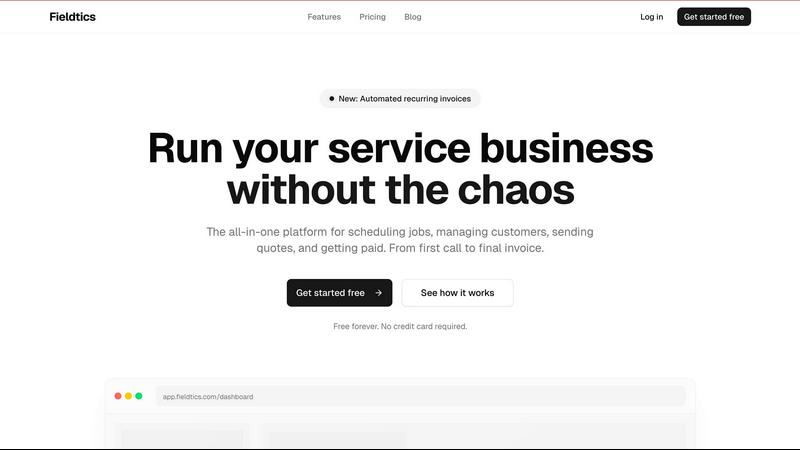
Fieldtics
Invoice Guru

Feature Comparison
Fieldtics
Smart Job Scheduling
Fieldtics provides an intuitive job scheduling feature that allows businesses to efficiently allocate tasks based on availability and expertise. This ensures that jobs are assigned to the right team members, optimizing resource use and enhancing productivity.
Customer Relationship Management (CRM)
The CRM feature helps businesses maintain and manage customer interactions effectively. By centralizing customer information, Fieldtics enables teams to track leads and relationships, enhancing communication and fostering stronger customer connections.
Invoicing and Payment Processing
Fieldtics simplifies the invoicing process, allowing businesses to create and send invoices effortlessly. With integrated payment processing, businesses can receive payments quickly, improving cash flow and reducing the administrative burden associated with billing.
Mobile and Web Applications
Fieldtics offers both mobile and web applications, ensuring that teams can access essential tools from any location. This flexibility allows service businesses to stay connected and informed, whether working in the office or on-site.
Invoice Guru
Mobile-First Invoice Creation
This core feature is built for speed and efficiency on the go. Users can generate a complete, professional invoice in less than 60 seconds directly from their mobile device. The process involves entering client details and job items quickly, with automatic inclusion of your logo, company information, VAT, and payment terms. This eliminates the need to return to the office or use a computer, enabling immediate invoicing as soon as a job is completed.
AI-Powered OCR Receipt Scanner
This feature automates expense tracking to save hours of manual data entry. By simply taking a photo of a paper receipt with the app's camera, the built-in Artificial Intelligence (OCR) technology reads all the key details such as date, vendor, amount, and tax. It then automatically creates a categorized expense entry within the system. This ensures accurate record-keeping for tax purposes and provides a clear view of business spending without manual input.
Automated Bank Integration & Payment Matching
Invoice Guru streamlines payment tracking by securely connecting to your business bank account. Once linked, the software automatically imports new transactions and intelligently matches them against your outstanding invoices. This reconciliation happens automatically, showing you instantly which clients have paid and clearly highlighting any overdue payments, giving you a real-time view of your cash flow.
Multi-Language, Multi-Currency & Tax Compliance
Designed for both local and international work, this feature supports business growth. It allows you to create invoices in over 12 languages and multiple currencies, catering to a diverse client base. Fundamentally, it ensures your invoices are 100% compliant with local tax regulations, including automatic submissions for UK MTD VAT and compatibility with Poland's KSeF system, providing peace of mind and legal security.
Use Cases
Fieldtics
Efficient Job Management
Service businesses can utilize Fieldtics to manage multiple jobs simultaneously. By scheduling tasks and tracking progress in real-time, teams can ensure that projects stay on track and deadlines are met without unnecessary delays.
Enhanced Customer Engagement
With the CRM capabilities of Fieldtics, businesses can manage customer relationships more effectively. By tracking interactions and preferences, teams can personalize communication, leading to improved customer satisfaction and retention.
Streamlined Invoicing Process
Fieldtics allows service businesses to automate their invoicing process. By generating and sending invoices automatically, businesses can reduce errors and ensure that payments are collected on time, enhancing overall financial health.
Real-Time Collaboration
Fieldtics fosters collaboration among team members by providing tools that keep everyone informed. With real-time updates and shared access to project details, teams can work together more effectively, minimizing miscommunication and enhancing productivity.
Invoice Guru
For On-Site Tradespeople
A plumber finishing a repair can immediately create and email a professional invoice to the homeowner from their van using their phone. They add parts used and labour, apply VAT, and send it before leaving the property. This speeds up payment, improves cash flow, and presents a highly professional image without any paperwork.
For Small Service Business Owners
The owner of a small decorating company can manage all client quotes and invoices from one mobile app. They can generate quotes during initial consultations, convert them to invoices once the job is approved, and track which invoices are viewed and paid. This centralizes their administrative work and provides clear oversight of all jobs and finances.
For Expense and Receipt Management
A self-employed electrician can use the OCR scanner to photograph all receipts for materials bought throughout the day (wire, fittings, fuel). The AI extracts the data, categorizes each expense, and stores them digitally. At tax time, all expenses are perfectly organized for their accountant, saving evenings spent sorting through paper receipts.
For Ensuring HMRC MTD Compliance
A UK-based tradesperson who is VAT-registered can use Invoice Guru to meet their Making Tax Digital obligations without needing separate software. They record all sales (invoices) and purchases (scanned receipts) digitally in the app, and can submit their VAT return directly to HMRC through the software, ensuring they remain compliant with the law.
Overview
About Fieldtics
Fieldtics is an all-in-one platform designed specifically for service businesses seeking to streamline their operations and enhance efficiency. It integrates critical tools for job scheduling, customer relationship management, invoicing, and payment processing into one user-friendly interface. This comprehensive solution is tailored for teams whether they are working from an office or out in the field, ensuring seamless communication and real-time updates across devices. Fieldtics enables businesses to customize their dashboards and branding, making it a perfect fit for any unique business identity. Moreover, its ability to integrate with existing tools automates workflows and centralizes data, providing a connected experience that helps manage leads, projects, time tracking, expenses, and recurring invoices. By offering clarity and control, Fieldtics empowers service businesses to grow and thrive without the chaos of daily operational hurdles.
About Invoice Guru
Invoice Guru is a specialized invoicing and tax compliance software designed from the ground up for tradespeople and small service businesses. It addresses a fundamental need for professionals like painters, plumbers, electricians, and decorators who are constantly on the move between job sites. Unlike traditional accounting software built for desktop use, Invoice Guru adopts a mobile-first philosophy, allowing users to manage their entire invoicing workflow directly from their smartphone or tablet. The core purpose of the application is to turn time-consuming administrative tasks into quick, simple actions that can be completed in seconds, not hours. Its primary value proposition lies in combining essential invoicing functions with powerful automation and regulatory compliance. Users can create and send professional invoices in under a minute, track payments in real-time, and manage expenses effortlessly with AI-powered receipt scanning. Crucially, Invoice Guru is built to keep businesses compliant with regulations such as the UK's Making Tax Digital (MTD) for VAT and Poland's KSeF, eliminating the need for separate tax software. By focusing on speed, simplicity, and automation, Invoice Guru helps business owners save time, get paid faster, and reduce the administrative burden that takes them away from their actual trade.
Frequently Asked Questions
Fieldtics FAQ
What types of businesses can benefit from Fieldtics?
Fieldtics is designed for service businesses, including cleaning services, landscaping companies, electrical contractors, and more. It is versatile enough to cater to various service-oriented industries.
Is Fieldtics easy to integrate with other tools?
Yes, Fieldtics seamlessly integrates with a variety of existing tools and applications. This allows businesses to sync data, automate workflows, and maintain a centralized system for all operational needs.
Can I customize the Fieldtics platform for my business?
Absolutely! Fieldtics offers customization options that let you adjust the dashboard, branding, and menus to align with your unique business identity, making it feel like a natural extension of your operations.
Is there a free trial available?
Yes, Fieldtics offers a free forever plan with no credit card required. This allows potential users to explore the platform and its features before committing to a paid plan.
Invoice Guru FAQ
Who is Invoice Guru designed for?
Invoice Guru is specifically designed for tradespeople, contractors, and small service-based businesses in the UK and Europe. This includes professions like plumbers, electricians, painters, decorators, handymen, cleaners, and landscapers who are often mobile and need to invoice quickly from job sites. It is ideal for sole traders and small businesses looking for a simple, fast, and compliant way to manage their invoicing.
How does the free plan work?
The Starter plan is free forever and allows users to create and download up to 10 invoices as PDFs. It includes basic functionality to try the core invoicing process. For unlimited invoices, client management, email sending, and access to more advanced features like expense tracking and multi-currency support, users would need to upgrade to the paid Basic or Pro plans.
Is Invoice Guru compliant with Making Tax Digital (MTD)?
Yes, Invoice Guru is fully compliant with the UK's Making Tax Digital for VAT regulations. The Pro plan includes the capability to submit VAT returns directly to HMRC through the software. It maintains your digital records and facilitates the required digital link, helping VAT-registered traders meet their legal obligations seamlessly within the same app they use for invoicing.
Can I use Invoice Guru on multiple devices?
As a mobile-first, cloud-based application, Invoice Guru is designed to work across your devices. You can access your account and data from your smartphone, tablet, or a web browser on your computer. Your information syncs automatically, allowing you to start an invoice on your phone at a job site and review reports later on your laptop at home.
Alternatives
Fieldtics Alternatives
Fieldtics is an all-in-one platform designed for service businesses, streamlining various operational tasks such as scheduling, customer management, invoicing, and payment processing. As a comprehensive solution, it aims to enhance efficiency by centralizing essential tools in a user-friendly manner. Users often seek alternatives to Fieldtics for several reasons, including pricing considerations, specific feature requirements, or the need for a platform that better aligns with their business model. When searching for an alternative, it's important to evaluate factors such as ease of use, integration capabilities, customer support, and customization options to ensure the chosen solution meets your unique operational needs.
Invoice Guru Alternatives
Invoice Guru is a mobile-first invoicing application designed for UK tradespeople and small service businesses. It falls into the business and finance software category, specifically targeting professionals who need to create and send compliant invoices quickly while on the job. Users often explore alternatives for various reasons. Common considerations include pricing structures, the need for specific features not offered, or a preference for a desktop platform over a mobile-first approach. Every business has unique operational needs and budget constraints. When evaluating other options, it’s wise to consider your primary work environment, essential features like payment tracking or receipt management, and compliance with local tax regulations. The goal is to find a tool that simplifies your administrative tasks without adding complexity.