Dubvid vs Melograph
Side-by-side comparison to help you choose the right product.

Dubvid
Dubvid dubs your audio and video into multiple languages with natural voices and optional lip-sync.
Last updated: February 27, 2026

Melograph
Melograph instantly creates professional music videos from your audio using simple, customizable templates.
Last updated: February 28, 2026
Visual Comparison
Dubvid
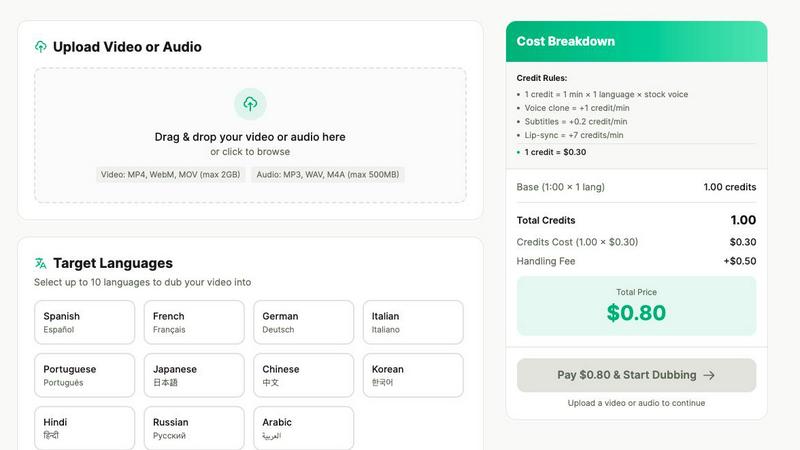
Melograph

Feature Comparison
Dubvid
Multi-Language Dubbing
Dubvid allows you to translate and dub your video or audio content into over ten different languages from a single upload. You simply select your desired target languages from a list, and the platform's AI handles the translation and voice generation automatically. This feature is designed to maximize your potential audience reach by making your content accessible to viewers worldwide without creating separate videos for each language group.
Natural AI Voice Selection
The platform uses advanced text-to-speech technology to generate the dubbed audio. You can choose from a library of stock AI voices that are designed to sound natural, with appropriate tone, pacing, and emotional inflection. This ensures the translated dialogue does not sound robotic or disconnected, maintaining engagement and clarity for the viewer in the new language.
Optional Lip-Sync Technology
For videos where the speaker is visible, such as tutorials or talking-head presentations, Dubvid offers an optional premium lip-sync feature. This technology adjusts the timing and movement of the dubbed audio to better match the speaker's mouth movements on screen. This adds a significant layer of realism to the dubbed content, making it more professional and immersive for the audience.
Simple Credit-Based System
Dubvid operates on a transparent, pay-as-you-go pricing model using credits. One credit covers dubbing one minute of content into one language using a standard stock voice. Additional features like voice cloning, subtitles, and lip-sync cost extra credits per minute. This system is foundational because it allows users to pay only for what they use, with no subscriptions or long-term commitments, making professional dubbing financially accessible.
Melograph
Premium Template Library
Melograph offers a curated collection of high-quality video templates. These templates are designed to cater to different musical styles and visual aesthetics, such as minimal, cinematic, retro, and futuristic. Each template provides a cohesive visual framework, ensuring the final output looks polished and intentional. Users simply pick a template that matches the vibe of their track, providing a strong creative foundation without starting from scratch.
Audio-Reactive Visuals
The tool automatically generates visuals that react to the audio waveform of the uploaded track. This means the motion, waves, and graphical elements in the video pulse and move in sync with the music's beats and frequencies. This dynamic connection between sound and image is created instantly upon upload, ensuring the visualizer feels uniquely tied to that specific piece of music without any manual animation work from the user.
Simple Customization Interface
Customization is designed to be quick and intuitive. After choosing a template and uploading audio, users can input their artist name and song title. On selected templates, they can also upload a logo or album cover. The system handles the placement and animation, ensuring text remains readable even on small mobile screens. This process avoids complex editing suites, focusing only on the essential details needed for a complete visual.
Platform-Ready Exports
Melograph renders videos in high-quality 1080p MP4 format, suitable for all major platforms. The exports are optimized to look great on social media feeds like TikTok, Instagram Reels, and YouTube Shorts. The render happens locally in the user's web browser for speed, and the final video includes smooth motion and clean text, arriving as a ready-to-post file without any watermarks for paid users.
Use Cases
Dubvid
Content Creator Expansion
Individual creators on platforms like YouTube, Instagram, and TikTok can use Dubvid to dub their short-form videos, Reels, or Shorts into multiple languages. This directly multiplies their potential viewership and subscriber base by making content consumable for non-native speakers, leading to greater channel growth and audience engagement without recreating content from scratch.
Educational Course Localization
Educators and course creators can rapidly translate their lesson videos, tutorials, and webinars for students across the globe. By dubbing instructional content, they break down language barriers in learning, allowing them to sell courses to an international market and provide equal learning opportunities to a diverse, worldwide student body.
Business Support & Onboarding
Companies can localize their help center videos, product demos, and employee onboarding materials for different regional offices and customer bases. Providing support content in a user's native language reduces confusion, decreases support ticket volume, and improves the overall customer and employee experience, fostering better understanding and efficiency.
Podcast & Interview Accessibility
Podcasters and interviewers can repurpose their audio or video podcast episodes for new audiences by dubbing them into other languages. This allows them to expand their show's reach, attract international sponsors, and share conversations and ideas across cultural lines without the cost and effort of re-recording with multilingual hosts.
Melograph
Independent Artist Music Releases
Indie artists can use Melograph to create compelling video content for new single or album releases. By quickly generating a professional visualizer, they can promote their music on social media platforms and streaming services, giving their audio a visual identity that helps it stand out and engage listeners without needing a budget for a custom music video.
Social Media Content for Producers
Music producers and beatmakers can regularly create fresh visual content for their online presence. Each new beat or track snippet can be paired with a different visualizer template, providing consistent, eye-catching material for platforms like Instagram and TikTok to grow their audience and showcase their work dynamically.
Label and DJ Promotional Material
Record labels and DJs can streamline their promotional workflows. Labels can create uniform visualizers for various artists on their roster, maintaining a level of professional quality. DJs can produce visuals for their mixes, live sets, or podcast episodes, adding an engaging layer to their audio content when shared online or used during performances.
Content Creation for Musicians
Musicians and creators who need to post regularly can use Melograph to overcome creative block. It provides a reliable tool to generate visually appealing content that directly features their music. This is ideal for sharing behind-the-scenes clips, previews, or simply giving followers a visual experience of a track, all while saving the hours typically spent on video editing.
Overview
About Dubvid
Dubvid is a fundamental tool for making video and audio content understandable to people who speak different languages. At its core, it is an AI-powered platform that takes your original video or audio file and translates the speech into a new language using a synthetic voice. This process is called dubbing. The primary goal of Dubvid is to remove the traditional, complex barriers of dubbing, which typically require hiring voice actors, booking studio time, and managing lengthy editing projects. Instead, Dubvid provides a straightforward, web-based solution where creators, educators, and businesses can upload their media, select a target language, and receive a dubbed version in minutes. Its main value proposition is accessibility and speed, enabling anyone to scale their message internationally without specialized skills or a large budget. By focusing on a simple, credit-based pricing model and offering features like optional lip-synchronization, Dubvid serves as a foundational bridge over language barriers for a global digital audience.
About Melograph
Melograph is a web-based tool designed to create music visualizations. Its primary function is to transform audio tracks into professional-looking, audio-reactive videos. This product is built specifically for musicians, producers, DJs, labels, and content creators. The core value proposition is simplicity and speed. Traditional video editing software is powerful but often complex and time-consuming to learn. Melograph removes that barrier. It provides a straightforward alternative where users do not need any editing skills, timelines, or plugins. Instead, they can select from a library of pre-designed templates, upload their music, add basic text, and export a finished video. The process focuses on what is essential: matching a visual style to the sound and generating a clean, platform-ready video file. This allows artists to concentrate on their music while still producing high-quality visual content for social media, releases, and promotions. By streamlining the creation process, Melograph saves significant time and effort, making professional visuals accessible to everyone, regardless of their technical background in video production.
Frequently Asked Questions
Dubvid FAQ
How does the free trial work?
The free trial offers 2 credits with no credit card required. This allows you to dub up to 60 seconds of your content (e.g., 1 minute into 1 language, or 30 seconds into 2 languages) to test the quality of the translation, voice output, and overall platform workflow before committing any funds.
What file formats and sizes does Dubvid support?
Dubvid supports common video and audio formats for upload, including MP4, MOV, WebM for video, and MP3 and WAV for audio. The maximum file size for upload is 500 megabytes, which accommodates a significant amount of high-quality content for processing.
What is the difference between stock voice and voice clone?
A stock voice is a pre-made, high-quality AI voice provided by Dubvid's system that you can select for your dubbing. Voice clone is a premium feature where you can create a synthetic replica of your own or a specific person's voice, which is then used for the dubbing to maintain brand consistency or personal connection.
How is the final cost for a project calculated?
The cost is calculated based on the total credits used. You start with a base of 1 credit per minute of audio dubbed per language. You then add credits for any premium features: +1 credit/min for voice clone, +0.2 credits/min for subtitles, and +7 credits/min for lip-sync. The total credits are multiplied by $0.30 per credit, and a fixed $0.50 handling fee is added per job.
Melograph FAQ
Do I need video editing experience to use Melograph?
No, you do not need any prior video editing experience. Melograph is specifically designed for users without editing skills. The process involves only basic steps: selecting a pre-made template, uploading your audio file, and typing in your song details. The tool handles all the complex animation and rendering automatically.
Will the exported videos work for TikTok, Reels, and Shorts?
Yes, videos exported from Melograph are created to be platform-friendly. They are rendered in high-quality 1080p MP4 format, which is the standard for social media platforms. The visuals and text are designed to be effective and readable on mobile screens, making them perfectly suited for TikTok, Instagram Reels, YouTube Shorts, and similar vertical video formats.
Is Melograph a web-based application?
Yes, Melograph is entirely web-based. It runs in your internet browser, so there is no software to download or install. You can access it from any computer with a modern web browser. All rendering is also processed locally on your device, which helps keep the export process fast and efficient.
What do I get after making a payment?
After purchasing a paid plan, you unlock access to the full library of premium templates. Your exports will no longer have a watermark, and you are granted a commercial license to use the videos. You receive export credits according to your plan (e.g., 25 per month), which are used to download your final high-quality MP4 video files.
Alternatives
Dubvid Alternatives
Dubvid is an AI-powered tool in the content creation category, specifically designed for video and audio dubbing. It translates and recreates voices in multiple languages, aiming to simplify the process of making content globally accessible without traditional studio resources. Users often explore alternatives for various practical reasons. These can include budget constraints, as pricing models differ, or a need for specific features like support for more languages or different audio editing tools. Others might seek software that integrates better with their existing workflow or platforms they use. When evaluating different dubbing solutions, consider a few core aspects. Look at the quality and naturalness of the AI voices, the range of languages offered, and the overall ease of use. Also, assess the cost relative to your project volume and check for important capabilities like lip-sync adjustment or data security practices.
Melograph Alternatives
Melograph is a web-based tool in the music visualizer category. It allows musicians and creators to automatically generate audio-reactive videos by simply uploading a track and selecting a template. This process bypasses the need for complex video editing software, making professional visuals accessible. Users often explore alternatives for several practical reasons. Budget is a primary concern, as pricing models vary. Some may need specific features Melograph lacks, like more granular control over animations or different export formats. Others might require software that works on their specific device, such as a desktop application instead of a web tool. When evaluating other options, consider your core needs. Focus on the ease of use versus the depth of customization offered. Check the supported video formats and resolutions to ensure they meet platform requirements like YouTube or Instagram. Finally, compare the value directly against the cost, including any subscription fees or one-time purchases.