Dokta vs Fieldtics
Side-by-side comparison to help you choose the right product.

Dokta automates document management for freelancers by reading bills and invoices to handle payments and reminders.
Last updated: April 4, 2026

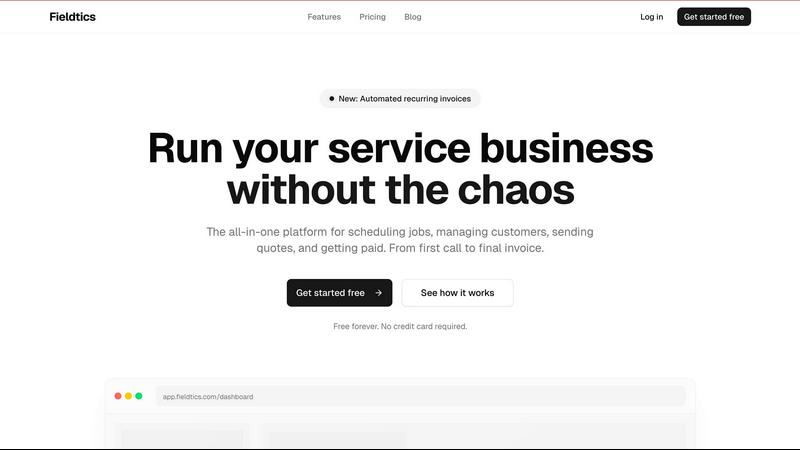
Fieldtics simplifies service business management with scheduling, customer tracking, invoicing, and seamless payments.
Last updated: February 26, 2026
Visual Comparison
Dokta

Fieldtics
Feature Comparison
Dokta
Instant AI-Powered Document Analysis
At the core of Dokta is its powerful analysis engine. When you upload a photo, scan, or PDF of any document, the platform uses OCR and AI to read, classify, and extract critical information in less than 60 seconds. It automatically identifies the document type, amounts, due dates, and client or supplier details, transforming unstructured paperwork into structured, actionable data without any manual typing required.
Automated Invoicing & Quote Management
Dokta provides a complete suite for your billing cycle. You can create professional invoices and quotes in just a few clicks. For freelancers on day-rate contracts, it supports automatic monthly invoicing. Furthermore, you can send quotes with an online acceptance link, allowing clients to approve digitally, and then convert an accepted quote into an invoice with a single click, streamlining the entire proposal-to-payment process.
Real-Time Cash Flow & Financial Overview
Gain immediate clarity on your business's financial health. Dokta consolidates data from all your documents to display key metrics like billed revenue, collected revenue, unpaid invoices, and VAT in an intuitive dashboard. A 12-month graphical view provides a clear, long-term perspective on your cash flow, helping you make informed decisions without needing complex spreadsheets.
Intelligent Client Management & Anomaly Detection
Dokta automatically builds and enriches your contact database. It can pull company details using SIRET numbers and provides payment scoring based on historical data. Crucially, it also acts as a safeguard by detecting potential anomalies in your documents, such as changed IBANs, duplicates, inconsistent VAT, or missing invoice numbering, helping to prevent errors and fraud.
Fieldtics
Smart Job Scheduling
Fieldtics provides an intuitive job scheduling feature that allows businesses to efficiently allocate tasks based on availability and expertise. This ensures that jobs are assigned to the right team members, optimizing resource use and enhancing productivity.
Customer Relationship Management (CRM)
The CRM feature helps businesses maintain and manage customer interactions effectively. By centralizing customer information, Fieldtics enables teams to track leads and relationships, enhancing communication and fostering stronger customer connections.
Invoicing and Payment Processing
Fieldtics simplifies the invoicing process, allowing businesses to create and send invoices effortlessly. With integrated payment processing, businesses can receive payments quickly, improving cash flow and reducing the administrative burden associated with billing.
Mobile and Web Applications
Fieldtics offers both mobile and web applications, ensuring that teams can access essential tools from any location. This flexibility allows service businesses to stay connected and informed, whether working in the office or on-site.
Use Cases
Dokta
Freelance IT Consultants & Developers
For freelancers working on time-based contracts, Dokta automates the entire invoicing workflow. It manages recurring day-rate contracts, generates monthly invoices automatically, and tracks payments. This allows the professional to focus entirely on their technical work while Dokta handles the administrative billing cycle reliably and on schedule.
Creative Freelancers & Project-Based Workers
Graphic designers, writers, and other project-based creatives benefit from Dokta's seamless quote-to-cash process. They can create a quote, send it for online client acceptance, and with one click, convert the approved quote into a formal invoice. This manages the entire project lifecycle from the first proposal to the final payment, ensuring nothing falls through the cracks.
Auto-Entrepreneurs & Micro-Entrepreneurs
This group needs simple, compliant tools without complexity. Dokta helps by generating compliant invoices, tracking income against the micro-enterprise revenue cap, and providing alerts for upcoming URSSAF social charge deadlines. It offers a straightforward way to manage finances and stay on top of regulatory requirements without stress.
Growing Small Businesses (SMBs)
As a business grows, so does its document chaos. Dokta serves as a centralized system for the entire team to manage invoices, contracts, and supplier documents. It provides a real-time view of company-wide cash flow, automates payment reminders to improve collection rates, and ensures all documents are organized, searchable, and anomaly-free.
Fieldtics
Efficient Job Management
Service businesses can utilize Fieldtics to manage multiple jobs simultaneously. By scheduling tasks and tracking progress in real-time, teams can ensure that projects stay on track and deadlines are met without unnecessary delays.
Enhanced Customer Engagement
With the CRM capabilities of Fieldtics, businesses can manage customer relationships more effectively. By tracking interactions and preferences, teams can personalize communication, leading to improved customer satisfaction and retention.
Streamlined Invoicing Process
Fieldtics allows service businesses to automate their invoicing process. By generating and sending invoices automatically, businesses can reduce errors and ensure that payments are collected on time, enhancing overall financial health.
Real-Time Collaboration
Fieldtics fosters collaboration among team members by providing tools that keep everyone informed. With real-time updates and shared access to project details, teams can work together more effectively, minimizing miscommunication and enhancing productivity.
Overview
About Dokta
Dokta is a foundational document management platform designed to bring order and automation to the essential paperwork of running a business. It serves as a central hub for freelancers, solo entrepreneurs, auto-entrepreneurs, and small to medium-sized businesses (SMBs) who need to manage their administrative tasks efficiently. The core principle of Dokta is simple: you provide the document, and its AI engine takes care of the rest. By simply dropping any document—such as an invoice, quote, or contract—into the platform, Dokta reads, classifies, and extracts key data in under 60 seconds. This eliminates manual data entry and forms the basis for managing the entire document lifecycle. From creating professional invoices and tracking payments to automating reminders for unpaid invoices and managing contract deadlines, Dokta handles the operational backbone of your business. It automatically builds a client database from your documents, provides a real-time view of your cash flow, and offers exports for your accountant. Ultimately, Dokta puts your documents at the heart of your business, managed intelligently by AI, so you can stop chasing payments and reclaim your time.
About Fieldtics
Fieldtics is an all-in-one platform designed specifically for service businesses seeking to streamline their operations and enhance efficiency. It integrates critical tools for job scheduling, customer relationship management, invoicing, and payment processing into one user-friendly interface. This comprehensive solution is tailored for teams whether they are working from an office or out in the field, ensuring seamless communication and real-time updates across devices. Fieldtics enables businesses to customize their dashboards and branding, making it a perfect fit for any unique business identity. Moreover, its ability to integrate with existing tools automates workflows and centralizes data, providing a connected experience that helps manage leads, projects, time tracking, expenses, and recurring invoices. By offering clarity and control, Fieldtics empowers service businesses to grow and thrive without the chaos of daily operational hurdles.
Frequently Asked Questions
Dokta FAQ
How does Dokta analyze my documents?
Dokta uses a combination of Optical Character Recognition (OCR) to read text from your documents and advanced Artificial Intelligence (specifically Claude by Anthropic) to understand the context. The AI classifies the document type and extracts key fields like dates, amounts, and contact information. This entire process is completed in under 60 seconds per document.
Is my data secure with Dokta?
Yes, data security and privacy are foundational to Dokta. The platform is fully compliant with the GDPR (General Data Protection Regulation). All data is hosted on secure servers within Europe (AWS Paris region). Furthermore, documents and data are protected using AES-256 encryption, ensuring your business information remains confidential and secure.
What happens if I exceed my monthly document limit?
Dokta offers different plans with monthly document allowances. If you are on a paid plan and occasionally exceed your limit, you can typically purchase additional document packs or upgrade your plan. The free Discovery tier allows for 15 documents per month, which is ideal for testing the platform's core functionality before committing.
Can I use Dokta for expenses and supplier invoices?
Absolutely. Dokta is designed to manage all document types relevant to your business. You can upload supplier invoices and receipts for expenses. The AI will extract the relevant data, allowing you to track outgoing payments, manage your expenses, and have a complete picture of both your accounts receivable and payable in one place.
Fieldtics FAQ
What types of businesses can benefit from Fieldtics?
Fieldtics is designed for service businesses, including cleaning services, landscaping companies, electrical contractors, and more. It is versatile enough to cater to various service-oriented industries.
Is Fieldtics easy to integrate with other tools?
Yes, Fieldtics seamlessly integrates with a variety of existing tools and applications. This allows businesses to sync data, automate workflows, and maintain a centralized system for all operational needs.
Can I customize the Fieldtics platform for my business?
Absolutely! Fieldtics offers customization options that let you adjust the dashboard, branding, and menus to align with your unique business identity, making it feel like a natural extension of your operations.
Is there a free trial available?
Yes, Fieldtics offers a free forever plan with no credit card required. This allows potential users to explore the platform and its features before committing to a paid plan.
Alternatives
Dokta Alternatives
Dokta is an AI-powered document management platform designed for small businesses, freelancers, and solo entrepreneurs. It automates the handling of invoices, quotes, and contracts, aiming to reduce administrative tasks by reading documents and extracting data automatically. Users often explore alternatives for various reasons. Needs differ; some require more advanced accounting features, others seek integration with specific software, and budget constraints can lead to a search for different pricing models. The ideal platform depends heavily on the specific workflow and scale of a business. When evaluating alternatives, consider core functionality like document processing accuracy, automation capabilities for reminders and tasks, and security compliance. Also assess the ease of use, quality of customer support, and how well the tool scales with your business growth. The goal is to find a system that seamlessly fits into your daily operations.
Fieldtics Alternatives
Fieldtics is an all-in-one platform designed for service businesses, streamlining various operational tasks such as scheduling, customer management, invoicing, and payment processing. As a comprehensive solution, it aims to enhance efficiency by centralizing essential tools in a user-friendly manner. Users often seek alternatives to Fieldtics for several reasons, including pricing considerations, specific feature requirements, or the need for a platform that better aligns with their business model. When searching for an alternative, it's important to evaluate factors such as ease of use, integration capabilities, customer support, and customization options to ensure the chosen solution meets your unique operational needs.