
DocuExtractor vs Zovo
Side-by-side comparison to help you choose the right product.

DocuExtractor
DocuExtractor automatically turns your receipts and invoices into clean, structured Excel or CSV files.
Last updated: February 28, 2026

Zovo offers 20 privacy-first Chrome extensions for developers and writers, unlocking tools with one simple subscription.
Last updated: February 26, 2026
Visual Comparison
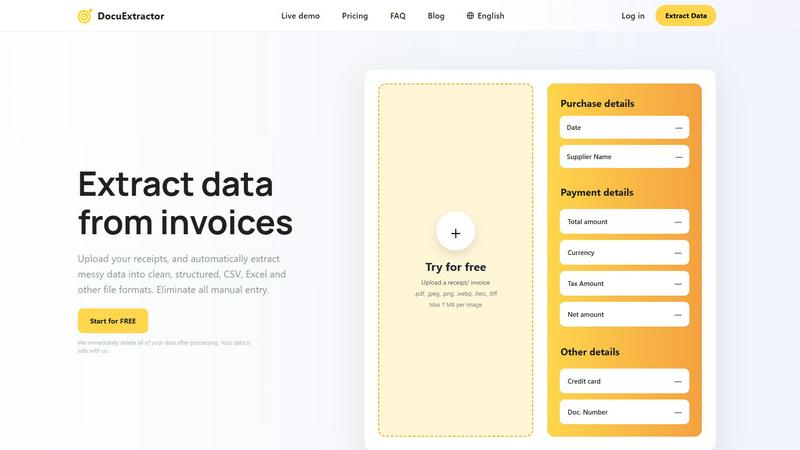
DocuExtractor
Zovo

Feature Comparison
DocuExtractor
Advanced AI-Powered Extraction
At its core, DocuExtractor employs a sophisticated blend of Optical Character Recognition (OCR), Deep Learning (DL), and Large Language Models (LLMs). This multi-layered AI approach allows the software to not just read text, but to understand the context and structure of financial documents. It can intelligently identify and extract key data fields such as dates, supplier names, total amounts, tax details, and document numbers from various layouts and formats with a reported 99.6% accuracy, ensuring the output is both precise and reliable.
Broad Format and Language Support
DocuExtractor is built to handle the diverse reality of business documentation. It supports a wide array of upload formats including PDF, JPG, PNG, WebP, HEIC, and TIFF files, making it compatible with scans, photos, and digital documents. Furthermore, it can process documents in over 45 languages with automatic language detection, which is crucial for businesses operating in global markets or dealing with international suppliers and clients.
Simple Three-Step Workflow
The platform is designed with a back-to-basics, user-friendly approach. The entire process is broken down into three straightforward steps: Upload, Extract, and Download. Users can drag and drop documents, either individually or in batches, select their desired output format (CSV or Excel), and receive their structured data instantly. This simplicity ensures a minimal learning curve, allowing teams to become productive in minutes without extensive training.
Enterprise-Grade Security and Scale
DocuExtractor is engineered for businesses with serious data security and volume needs. It operates on a principle of immediate data deletion post-processing, ensuring your financial information is not stored unnecessarily. The platform is enterprise-ready, capable of handling over 500,000 documents monthly with consistent performance. This combination of robust security, high-volume processing, and reliable uptime makes it a trustworthy solution for both small firms and large corporations.
Zovo
BeLikeNative
BeLikeNative is a flagship extension that helps users improve their writing by providing instant rewrites in 80 different languages. This tool is designed for anyone looking to communicate more effectively in a foreign language or enhance their overall writing skills. With just one keystroke, users can transform their text to sound more natural, making it an essential tool for students, professionals, and anyone who values clear communication.
Tab Suspender Pro
Tab Suspender Pro is designed to optimize memory usage by automatically suspending inactive tabs. This feature is particularly beneficial for users who frequently multitask or work with numerous tabs open. By intelligently detecting which tabs are not in use, it frees up valuable system resources, helping to speed up your browser and enhance your overall browsing experience.
Clipboard History Pro
Clipboard History Pro ensures that users never lose track of copied text again. This feature allows for the storage of up to 10,000 clips, enabling instant searches and smart pasting of previously copied items. Ideal for writers, researchers, and anyone who regularly copies and pastes information, this tool significantly improves efficiency and accuracy when handling text.
JSON Formatter Pro
JSON Formatter Pro simplifies the process of working with JSON data by providing a user-friendly interface for formatting, validating, and exploring JSON files. It includes features for beautifying and minifying code, as well as tree exploration for easier navigation. This tool is particularly useful for developers and data analysts who need to handle JSON data regularly, offering a streamlined way to visualize and manipulate complex data structures.
Use Cases
DocuExtractor
Automating Accounts Payable Processing
For accounts payable teams, processing a high volume of invoices and receipts is a daily chore. DocuExtractor automates this by extracting key details like vendor name, invoice number, date, and total amount. The resulting CSV or Excel file can be directly imported into accounting software (like QuickBooks or Xero), eliminating manual entry, reducing errors, and accelerating the payment cycle, which can save professionals several hours per week.
Streamlining Expense Reporting and Reconciliation
Employees and managers can use DocuExtractor to quickly process personal or corporate credit card receipts. Instead of manually typing details from a pile of receipts, users upload them in batches. The software extracts the merchant, date, and amount, creating a clean, auditable digital record. This streamlines expense report submission, simplifies reconciliation for accountants, and ensures compliance with company spending policies.
Bank Statement Analysis and Bookkeeping
Bookkeepers and accountants often need to categorize transactions from bank and credit card statements. Manually copying this data is time-consuming. DocuExtractor can convert PDF bank statements into structured Excel files, isolating transaction dates, descriptions, and amounts. This formatted data is much easier to review, categorize, and integrate into general ledgers, making monthly closings faster and more accurate.
Data Migration and Historical Document Digitization
When businesses switch accounting systems or need to analyze historical financial data, they face the daunting task of digitizing paper archives or old PDFs. DocuExtractor provides an efficient solution by batch-processing these historical documents—invoices, receipts, statements—and converting them into structured digital data. This creates a searchable, analyzable database from previously unstructured information, unlocking valuable insights from past records.
Zovo
Enhancing Language Skills
BeLikeNative can be used by language learners who want to practice writing in a new language. By providing instant rewrites, it helps users learn how to construct sentences and use vocabulary more effectively, making it a valuable tool for students and professionals alike.
Memory Management During Browsing
Tab Suspender Pro is perfect for users who often have multiple tabs open while working on projects. By suspending inactive tabs, it helps conserve memory and keeps the browser running smoothly, allowing for a more organized and efficient workflow.
Efficient Text Management
Clipboard History Pro is ideal for professionals and students who frequently copy and paste information. Whether compiling research notes or drafting documents, this tool ensures users can easily retrieve and manage their clipboard history, significantly enhancing productivity.
Simplifying Data Handling
JSON Formatter Pro is essential for developers who work with APIs or data interchange formats. It enables them to format and validate JSON data quickly, making it easier to debug and understand complex data structures, thus streamlining their development process.
Overview
About DocuExtractor
DocuExtractor is a fundamental software solution designed to solve a foundational problem in business operations: manual data entry. It is a cutting-edge document conversion tool that specializes in extracting and structuring data from financial documents. By utilizing advanced Optical Character Recognition (OCR) technology combined with deep learning and large language models (AI), it automatically transforms messy, unstructured information from documents like invoices, receipts, and bank statements into clean, organized data. This data is then output into universally usable formats such as CSV and Excel files. The primary value proposition of DocuExtractor is its ability to eliminate tedious, error-prone manual data input, thereby saving significant time and enhancing data reliability. It is built for accountants, bookkeepers, accounts payable specialists, and businesses of all sizes who seek to streamline their financial workflows. With a focus on accuracy, speed, and ease of use, DocuExtractor allows professionals to redirect their efforts from repetitive administrative tasks to more strategic, value-added activities, making it an essential tool for modern, efficient financial management.
About Zovo
Zovo is an innovative suite of 20 Chrome extensions designed to enhance the productivity and efficiency of users while browsing the internet. Created by a solo developer with over a decade of experience and a robust track record of $400K earned on Upwork, Zovo stands out for its commitment to user privacy and community engagement. The flagship extension, BeLikeNative, empowers more than 3,300 users to write like native speakers in 80 languages with just one keystroke. The entire suite includes various tools such as Tab Suspender Pro, JSON Formatter Pro, and Clipboard History Pro, among others. Zovo prioritizes user feedback, allowing members to vote on features and shape the roadmap, ensuring that each extension meets real-world needs. With no data harvesting, no investors, and a strong focus on user-driven development, Zovo represents a refreshing approach to browser extensions that put users first.
Frequently Asked Questions
DocuExtractor FAQ
What types of documents can DocuExtractor process?
DocuExtractor is specifically optimized for financial documents. This includes, but is not limited to, invoices, receipts, purchase orders, and bank or credit card statements. You can upload these documents in various formats such as PDF, JPG, PNG, WebP, HEIC, and TIFF. The software uses specialized algorithms for each document type to ensure the highest accuracy during data extraction.
How does DocuExtractor ensure the security of my data?
Data security is a foundational priority. DocuExtractor operates on a strict data privacy policy where all uploaded documents and the extracted data are immediately and permanently deleted from our servers once the processing is complete and you have downloaded your results. We do not store, share, or use your financial data for any other purpose, ensuring your sensitive information remains safe and confidential.
What is the accuracy rate of the data extraction?
DocuExtractor achieves a consistently high accuracy rate of 99.6% for standard, clear financial documents. This high precision is the result of combining advanced OCR technology with deep learning and large language model (AI) systems that are trained to understand the context and layout of financial data. For optimal results, ensure your uploaded documents are legible and of reasonable quality.
Can I process multiple documents at once?
Yes, batch processing is a core feature designed to save you time. DocuExtractor allows you to upload multiple documents simultaneously through a simple drag-and-drop interface. The system will process them in sequence, extracting data from each one. You can then download the consolidated, structured data from all documents in a single CSV or Excel file, ready for import into your accounting or analysis software.
Zovo FAQ
What kind of data does Zovo collect?
Zovo is committed to privacy and does not collect any user data. All data processed by the extensions remains on the user's device, ensuring complete confidentiality and security.
How often are new extensions released?
New extensions are typically released every month. Members receive early access to these tools, usually one to two weeks before they are available to the public.
Can I request features for Zovo extensions?
Yes, users are encouraged to submit feature requests directly. The developer reviews all requests, and the most requested features are prioritized in the development roadmap.
How can I contact support if I have issues?
Users can reach out directly to the developer via email or Discord for any questions or problems. There are no automated bots or ticket queues, ensuring a personal touch in customer support.
Alternatives
DocuExtractor Alternatives
DocuExtractor is a productivity and management tool designed to automate data extraction from financial documents like invoices and receipts. It uses OCR technology to convert unstructured document data into organized spreadsheets, eliminating manual entry. This category of software is essential for businesses aiming to improve efficiency and data accuracy in their financial workflows. Users often explore alternatives to find a solution that better fits their specific needs. Common reasons include budget constraints, as pricing models vary, or a need for different features like integration with specific accounting software. Some may require a tool that works on a particular operating system or offers a different user experience. When evaluating other options, consider the core functionality: accurate OCR, batch processing capabilities, and output format compatibility. It's also wise to assess the software's ease of use, security measures for handling sensitive documents, and the scalability of its pricing plans to match your business volume.
Zovo Alternatives
Zovo is a suite of 20 privacy-focused Chrome extensions designed specifically for developers and writers. With tools like JSON Formatter, Tab Suspender, and Clipboard History, Zovo enhances productivity while prioritizing user privacy and data security. Users often seek alternatives to Zovo for various reasons, including pricing, feature sets, or compatibility with different platforms. It is essential to consider factors such as usability, the range of features, and the commitment to user privacy when evaluating alternatives to ensure that you find a solution that meets your specific needs. When searching for an alternative, it's crucial to identify what functionalities are most important to you. A good alternative should offer a similar level of privacy, a variety of tools, and a user-friendly experience. Additionally, consider whether the alternative has a community-driven approach to feature development, as this can enhance the overall user experience and provide tools that genuinely meet your needs.