conceptviz vs Prompt Builder
Side-by-side comparison to help you choose the right product.

ConceptViz transforms complex science and math concepts into clear, accurate diagrams for effective teaching and.
Last updated: February 28, 2026

Prompt Builder
Prompt Builder helps you quickly generate, refine, and save optimized AI prompts for any model, streamlining your creative process.
Last updated: April 13, 2026
Visual Comparison
conceptviz
Prompt Builder
Feature Comparison
conceptviz
User-Friendly Interface
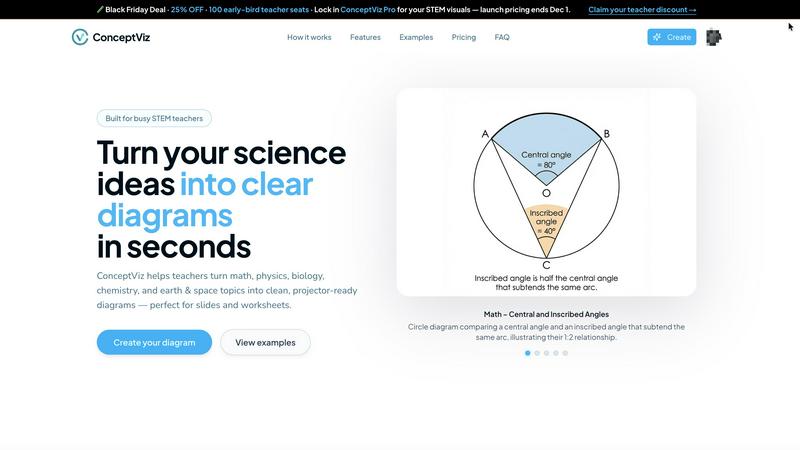
ConceptViz boasts an intuitive user interface that allows users to create diagrams with minimal effort. Users can simply sign in and select their subject and grade level, making the tool accessible for educators and students alike, regardless of their technical skills.
Quick Diagram Generation
With ConceptViz, users can describe the diagram they need in plain English, and the tool generates a clean, projector-ready visual in seconds. This feature eliminates the frustration of finding suitable images or spending time on complex drawing tools, making lesson preparation quick and efficient.
High-Quality Visuals
The diagrams produced by ConceptViz are designed for clarity and readability. Features include thick, legible lines and labels, simple backgrounds, and high contrast to ensure that visuals remain sharp and effective, whether viewed from the front or back of the classroom.
Subject and Grade-Level Presets
ConceptViz includes a variety of presets tailored to specific subjects and grade levels, from elementary to high school and university. This feature ensures that the visuals created are age-appropriate and aligned with educational standards, facilitating better understanding of the concepts being taught.
Prompt Builder
Prompt Generator
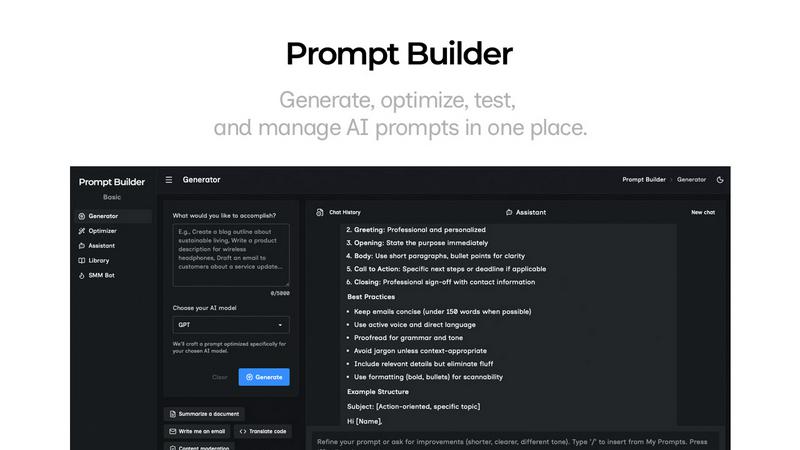
The Prompt Generator feature allows users to input their ideas and select a target AI model, producing a professional-grade prompt in seconds. This tool ensures that the generated prompts are specifically optimized for the selected model, enhancing effectiveness and relevance.
Chat Refinement
With the Chat Refinement feature, users can interactively refine their prompts in a built-in chat workspace. This functionality enables quick iterations and adjustments, allowing for real-time improvements and ensuring that the final output meets the desired specifications.
Prompt Library
The Prompt Library is a comprehensive repository where users can save, organize, and reuse their best prompts. This feature supports easy searching with filters by category and model, making it simple to access past work and build a robust collection of effective prompts tailored for various projects.
Prompt Optimizer
The Prompt Optimizer takes existing prompts and enhances them by providing structured improvements. This feature focuses on clarity, constraints, output format, and examples, ensuring that users can easily transform their original prompts into clearer and more effective versions.
Use Cases
conceptviz
Classroom Teaching
Teachers can utilize ConceptViz to create engaging and informative diagrams that enhance their lessons. For example, a physics teacher can quickly generate a diagram of energy transformation in a roller coaster, helping students visualize complex concepts.
Student Projects
Students can leverage ConceptViz for their projects, creating professional-quality diagrams that illustrate their understanding of scientific principles. A biology student can produce a labeled diagram of an animal cell, showcasing the various organelles and their functions.
Research Presentations
Researchers can use ConceptViz to create accurate visuals for presentations, ensuring that their findings are communicated clearly. A graduate student can generate complex diagrams illustrating experimental setups, making their research more accessible to audiences.
Homework Assignments
ConceptViz can also aid in homework assignments, allowing students to create diagrams for their tasks efficiently. For instance, a chemistry student can produce a diagram demonstrating an acid-base titration setup, reinforcing their learning through visual aids.
Prompt Builder
Content Creation
Content creators can utilize Prompt Builder to generate tailored writing prompts for blog posts, articles, or social media updates. With optimized prompts for different AI models, they can streamline their writing process and produce high-quality content faster.
Marketing Campaigns
Marketers can leverage the tool to create compelling marketing messages and social media posts. By using the SMM Bot, they can generate platform-specific content and refine it until it aligns perfectly with their brand voice and audience expectations.
Software Development
Developers can benefit from Prompt Builder by crafting prompts for AI-assisted coding or debugging. The ability to refine and save prompts specific to their development environment allows for more efficient and effective coding practices.
Education and Training
Educators can use Prompt Builder to create instructional materials and quizzes tailored to various learning models. This can enhance their teaching methods by ensuring that prompts are clear, targeted, and relevant to the curriculum.
Overview
About conceptviz
ConceptViz is a revolutionary tool specifically designed for the education sector, catering to teachers, students, and researchers who require clear and accurate visual representations of complex scientific and mathematical concepts. By allowing users to transform intricate ideas into classroom-ready diagrams, ConceptViz addresses a significant gap in the educational landscape. Its main value proposition lies in its simplicity and efficiency, enabling educators to generate high-quality visuals in seconds rather than the hours typically spent searching for images or grappling with complicated drawing software. This tool is built for real-world educational environments, ensuring that diagrams are not only visually appealing but also functional, with high contrast, legible labels, and clean layouts. Whether displayed on a projector, embedded in digital slides, or printed for worksheets, these visuals are designed to remain effective and sharp. ConceptViz offers subject and grade-level presets to guarantee that the diagrams are age-appropriate and conceptually accurate, serving users from K-12 through to graduate-level research. By streamlining the diagram creation process, ConceptViz allows educators to focus more on teaching and less on preparation.
About Prompt Builder
Prompt Builder is an innovative workspace designed for prompt engineering, enabling users to write, test, and save prompts efficiently. It simplifies the process of crafting high-quality prompts tailored to various AI models, including GPT, Claude, Gemini, Llama, and more. Users can begin with a draft, refine it through an intuitive chat interface, and easily save or pin different versions for future use. This tool is ideal for anyone working with AI, from content creators to developers, allowing them to optimize their interactions with AI models and achieve better results without the hassle of repetitive revisions. With the added benefit of a community-driven library of reusable prompts and templates, Prompt Builder transforms an idea into a polished prompt in mere seconds, making it a valuable resource for maximizing productivity and creativity in AI-driven tasks.
Frequently Asked Questions
conceptviz FAQ
What subjects does ConceptViz cover?
ConceptViz covers a wide range of subjects, including physics, biology, chemistry, earth and space science, and mathematics. It is tailored for various grade levels, from elementary through high school and university.
Is there a cost to use ConceptViz?
ConceptViz offers a limited-time lifetime deal for $229, providing access to all its features. This one-time payment option is designed to make the tool accessible for educators and students looking to enhance their teaching and learning experiences.
How do I create a diagram using ConceptViz?
Creating a diagram is straightforward: sign in with a free account, select your subject and grade level, describe the diagram you need in plain English, and then generate it. The tool will produce a clean, usable diagram ready for your slides or printouts.
Can I use ConceptViz for projects other than classroom teaching?
Absolutely! ConceptViz is versatile and can be used for various purposes beyond classroom teaching, including student projects, research presentations, and homework assignments, making it a valuable tool for anyone needing clear scientific visuals.
Prompt Builder FAQ
What AI models does Prompt Builder support?
Prompt Builder works with a wide range of AI models, including but not limited to GPT, Claude, Gemini, Llama, Mistral, DeepSeek, Grok, and Perplexity. This flexibility allows users to tailor their prompts to the specific capabilities of different models.
How does the Chat Refinement feature work?
The Chat Refinement feature enables users to refine their prompts in real-time through an interactive chat interface. Users can make adjustments based on feedback and iterate quickly, ensuring that the final prompt is well-structured and effective.
Can I save my prompts for future use?
Yes, Prompt Builder includes a dedicated Prompt Library where users can save, organize, and reuse their prompts. This library also allows for easy searching and filtering, making it simple to find previously crafted prompts.
Is there a limit on the number of assistant requests?
Yes, Prompt Builder offers a free plan that includes 25 assistant requests per month without requiring a credit card. This allows users to explore the tool's features and see its value before committing to a paid plan.
Alternatives
conceptviz Alternatives
ConceptViz is a specialized tool that falls within the category of design software, specifically dedicated to creating clear and accurate diagrams for science and math education. It empowers teachers and students by transforming complex concepts into easily understandable visual aids, which are essential for effective STEM learning. Users often seek alternatives to ConceptViz for various reasons, including pricing issues, specific feature requirements, or compatibility with different platforms and devices. When choosing an alternative, it's important to look for tools that prioritize ease of use, provide age-appropriate templates, and ensure high-quality output suitable for classroom settings. --- [{"question": "What is conceptviz?", "answer": "ConceptViz is a tool designed to create clear and accurate science and math diagrams for educators and students."}, {"question": "Who is conceptviz for?", "answer": "ConceptViz is intended for teachers, students, and researchers in the STEM fields looking for effective visual aids."}, {"question": "Is conceptviz free?", "answer": "The pricing structure for ConceptViz is not specified, but users should check the official website for details on costs."}, {"question": "What are the main features of conceptviz?", "answer": "ConceptViz features subject and grade presets, projector-ready clarity, and outputs that are suitable for slides and worksheets."}]
Prompt Builder Alternatives
Prompt Builder is a versatile tool designed for prompt engineering, allowing users to generate, optimize, test, and manage AI prompts efficiently. As part of the AI Assistants category, it caters to a broad audience seeking to streamline their prompt creation process across various AI models. Users often seek alternatives due to factors such as pricing, specific feature sets, or the need for compatibility with different platforms. When searching for an alternative, it is important to consider the ease of use, the range of supported models, and the additional features offered, such as optimization tools or community resources. These factors can significantly impact the overall effectiveness and convenience of the prompt-building experience.