CleanPaste.org vs Prompt Builder
Side-by-side comparison to help you choose the right product.

CleanPaste.org
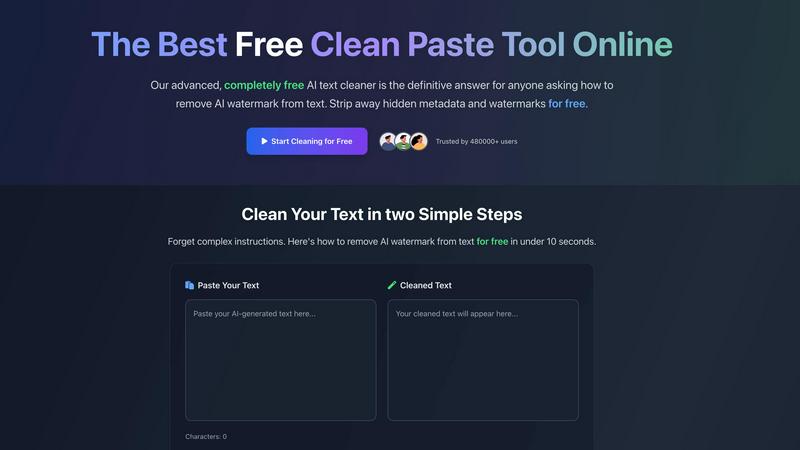
CleanPaste.org is a free tool that instantly removes invisible characters and AI watermarks from your text.
Last updated: March 2, 2026

Prompt Builder
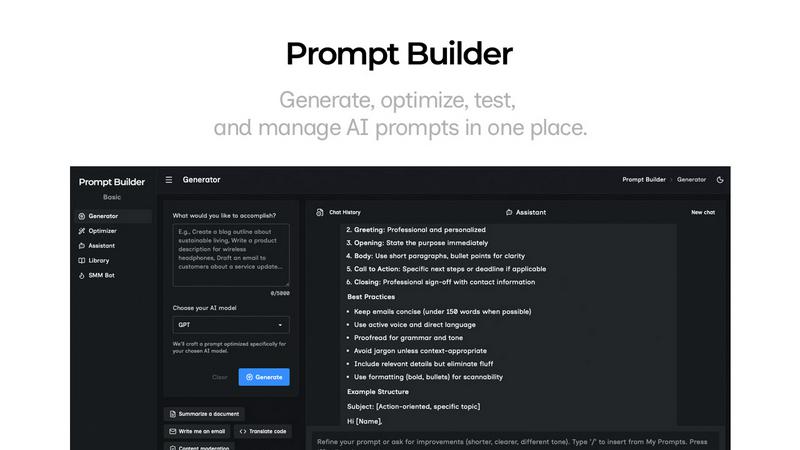
Prompt Builder helps you quickly generate, refine, and save optimized AI prompts for any model, streamlining your creative process.
Last updated: April 13, 2026
Visual Comparison
CleanPaste.org
Prompt Builder
Feature Comparison
CleanPaste.org
Instant One-Click Processing
The core functionality of CleanPaste.org is built for speed and simplicity. Users can paste their text and receive cleansed results instantly with a single click. There is no complex setup, no waiting for processing queues, and no need to navigate through multiple menus. This immediate, streamlined approach respects the user's time and integrates seamlessly into any writing or editing workflow, making the cleansing of text as simple as copying and pasting.
Comprehensive Invisible Character Removal
This feature employs advanced algorithms to perform a deep scan of submitted text. It is engineered to detect and strip out a wide array of hidden artifacts that are not visible in standard text editors. This includes zero-width spaces, non-printing formatting characters, and embedded metadata that can be carried over from various word processors, web pages, and AI platforms. The result is text that is visually clean and free from underlying technical clutter.
AI Watermark Removal Mode
A dedicated function addresses the modern challenge of AI-generated content. This mode specifically targets and removes the statistical patterns and subtle linguistic artifacts that act as AI watermarks. By stripping these identifiers, the tool helps ensure the text presents with a natural, human-like quality, significantly improving its chances of passing through AI content detection systems without being flagged.
100% Free with No Limitations
CleanPaste.org is committed to being an accessible public utility. Every feature, from basic invisible character cleaning to advanced AI watermark removal, is available to all users without any cost. The service operates with no mandatory user registration, no tiered premium plans, and no caps on the number of cleanses or the length of text submitted. This removes all barriers to access for individuals at any level.
Prompt Builder
Prompt Generator
The Prompt Generator feature allows users to input their ideas and select a target AI model, producing a professional-grade prompt in seconds. This tool ensures that the generated prompts are specifically optimized for the selected model, enhancing effectiveness and relevance.
Chat Refinement
With the Chat Refinement feature, users can interactively refine their prompts in a built-in chat workspace. This functionality enables quick iterations and adjustments, allowing for real-time improvements and ensuring that the final output meets the desired specifications.
Prompt Library
The Prompt Library is a comprehensive repository where users can save, organize, and reuse their best prompts. This feature supports easy searching with filters by category and model, making it simple to access past work and build a robust collection of effective prompts tailored for various projects.
Prompt Optimizer
The Prompt Optimizer takes existing prompts and enhances them by providing structured improvements. This feature focuses on clarity, constraints, output format, and examples, ensuring that users can easily transform their original prompts into clearer and more effective versions.
Use Cases
CleanPaste.org
For Students Submitting Academic Work
Students using AI tools for research assistance or draft generation can use CleanPaste.org as a final check before submission. The tool removes hidden characters and metadata that may inadvertently be copied from source materials or AI platforms, ensuring the submitted essay or paper is clean. More importantly, it helps humanize the text, reducing the risk of it being flagged by academic integrity software and allowing the student's own voice and analysis to stand clear.
For Content Creators and Bloggers
Professional writers and bloggers who utilize AI for ideation or drafting can integrate CleanPaste.org into their editing process. It cleans the text of invisible formatting artifacts that can disrupt publishing platforms and helps remove AI watermarks. This ensures the final article maintains the creator's intended brand voice and reads as authentically human, which is crucial for building trust and engagement with their audience.
For Business and Professional Communication
Professionals who draft reports, proposals, marketing copy, or emails with AI assistance can rely on CleanPaste.org to polish their output. The tool ensures that all business communications are free from hidden formatting that could cause display issues for recipients and that the language flows naturally. This preserves a professional image and ensures the message's clarity and authenticity are never compromised by technical artifacts.
For Non-Native English Speakers
Individuals who use AI tools to help draft or refine text in English can use CleanPaste.org to finalize their writing. While the AI provides a strong foundation, the tool helps by removing tell-tale robotic patterns or watermarks, resulting in content that sounds more natural and fluid. This empowers users to communicate more effectively and confidently in professional or academic settings.
Prompt Builder
Content Creation
Content creators can utilize Prompt Builder to generate tailored writing prompts for blog posts, articles, or social media updates. With optimized prompts for different AI models, they can streamline their writing process and produce high-quality content faster.
Marketing Campaigns
Marketers can leverage the tool to create compelling marketing messages and social media posts. By using the SMM Bot, they can generate platform-specific content and refine it until it aligns perfectly with their brand voice and audience expectations.
Software Development
Developers can benefit from Prompt Builder by crafting prompts for AI-assisted coding or debugging. The ability to refine and save prompts specific to their development environment allows for more efficient and effective coding practices.
Education and Training
Educators can use Prompt Builder to create instructional materials and quizzes tailored to various learning models. This can enhance their teaching methods by ensuring that prompts are clear, targeted, and relevant to the curriculum.
Overview
About CleanPaste.org
CleanPaste.org is a fundamental online utility designed to restore digital text to its purest, most authentic state. In today's digital workflow, text is often processed through multiple platforms and AI tools, accumulating hidden artifacts that compromise its integrity. These artifacts include invisible formatting characters, zero-width spaces, embedded metadata, and subtle statistical patterns known as AI watermarks. CleanPaste.org directly addresses this core problem by providing a straightforward, no-cost solution to cleanse text of these unseen elements. Its primary value is delivering clean, human-presenting text through an instantaneous, one-click process. The tool is completely free, requiring no registration, imposing no usage limits, and charging no fees. It serves a wide audience, from students and academics to professional content creators, marketers, and business communicators. For anyone who uses AI assistance in drafting essays, articles, reports, or communications, CleanPaste.org acts as an essential final step. It ensures the output is not only free of technical clutter but is also optimized to pass scrutiny from AI detection systems, thereby preserving the originality and perceived authenticity of the work. By focusing on this foundational need, CleanPaste.org empowers users to confidently present their content, knowing it reflects a natural, human-written quality.
About Prompt Builder
Prompt Builder is an innovative workspace designed for prompt engineering, enabling users to write, test, and save prompts efficiently. It simplifies the process of crafting high-quality prompts tailored to various AI models, including GPT, Claude, Gemini, Llama, and more. Users can begin with a draft, refine it through an intuitive chat interface, and easily save or pin different versions for future use. This tool is ideal for anyone working with AI, from content creators to developers, allowing them to optimize their interactions with AI models and achieve better results without the hassle of repetitive revisions. With the added benefit of a community-driven library of reusable prompts and templates, Prompt Builder transforms an idea into a polished prompt in mere seconds, making it a valuable resource for maximizing productivity and creativity in AI-driven tasks.
Frequently Asked Questions
CleanPaste.org FAQ
How does CleanPaste.org remove invisible characters?
CleanPaste.org uses specialized algorithms designed to scan text at a deep level. These algorithms are programmed to identify patterns and character codes that correspond to non-printing elements, such as zero-width spaces, formatting metadata, and other hidden artifacts. When you paste your text and initiate the clean process, the tool instantly analyzes the content, isolates these invisible components, and strips them out, returning only the visible, intended text to you.
Is CleanPaste.org truly free? What is the catch?
Yes, CleanPaste.org is completely free. There is no catch, no hidden fees, and no premium version. The tool is offered as a fundamental utility for everyone. We do not require user registration, we do not impose usage limits on the number of cleanses or text length, and we do not sell user data. The goal is simply to provide an effective solution for cleaning text without any barriers to access.
What types of hidden characters does the tool remove?
The tool is designed to remove a comprehensive range of invisible characters. This includes zero-width spaces often used in complex formatting, hidden metadata embedded by word processors and websites, non-printing formatting commands, and the specific statistical patterns known as AI watermarks that are sometimes left in AI-generated text. It provides a thorough cleansing to restore text to a basic, clean state.
Will using CleanPaste.org guarantee my content passes AI detection?
While CleanPaste.org is highly effective at removing AI watermarks and humanizing text, no tool can provide an absolute 100% guarantee against all AI detection systems, as these systems continuously evolve. However, by stripping the identifiable artifacts and patterns that detectors commonly look for, CleanPaste.org significantly improves the likelihood that your content will be perceived as human-written, making it a powerful and essential step in the process.
Prompt Builder FAQ
What AI models does Prompt Builder support?
Prompt Builder works with a wide range of AI models, including but not limited to GPT, Claude, Gemini, Llama, Mistral, DeepSeek, Grok, and Perplexity. This flexibility allows users to tailor their prompts to the specific capabilities of different models.
How does the Chat Refinement feature work?
The Chat Refinement feature enables users to refine their prompts in real-time through an interactive chat interface. Users can make adjustments based on feedback and iterate quickly, ensuring that the final prompt is well-structured and effective.
Can I save my prompts for future use?
Yes, Prompt Builder includes a dedicated Prompt Library where users can save, organize, and reuse their prompts. This library also allows for easy searching and filtering, making it simple to find previously crafted prompts.
Is there a limit on the number of assistant requests?
Yes, Prompt Builder offers a free plan that includes 25 assistant requests per month without requiring a credit card. This allows users to explore the tool's features and see its value before committing to a paid plan.
Alternatives
CleanPaste.org Alternatives
CleanPaste.org is a fundamental tool in the AI assistant category, designed to restore text to a pure, human-presentable state. It works by removing invisible formatting, metadata, and AI-generated watermarks, providing a clean foundation for any written work. Users often seek alternatives for various foundational reasons. These include the need for different feature sets, such as batch processing or integration with other platforms. Others may look for tools that operate offline or offer a different approach to privacy and data handling. When evaluating an alternative, focus on the core principles. A reliable tool should effectively strip invisible characters and AI signatures without altering your original message. Consider the simplicity of the process, the tool's commitment to data security, and whether its approach aligns with your need for authentic, uncluttered text.
Prompt Builder Alternatives
Prompt Builder is a versatile tool designed for prompt engineering, allowing users to generate, optimize, test, and manage AI prompts efficiently. As part of the AI Assistants category, it caters to a broad audience seeking to streamline their prompt creation process across various AI models. Users often seek alternatives due to factors such as pricing, specific feature sets, or the need for compatibility with different platforms. When searching for an alternative, it is important to consider the ease of use, the range of supported models, and the additional features offered, such as optimization tools or community resources. These factors can significantly impact the overall effectiveness and convenience of the prompt-building experience.