AI Formatter vs CleanPaste.org
Side-by-side comparison to help you choose the right product.
AI Formatter transforms your raw text into professional documents instantly using customizable templates.
Last updated: March 1, 2026

CleanPaste.org
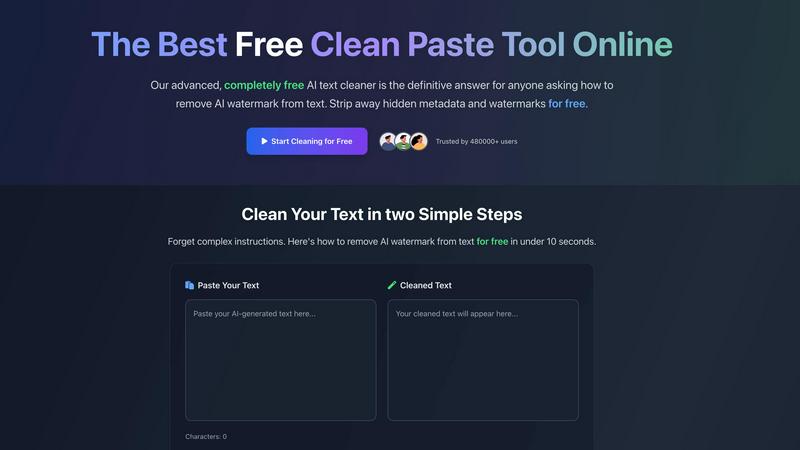
CleanPaste.org is a free tool that instantly removes invisible characters and AI watermarks from your text.
Last updated: March 2, 2026
Visual Comparison
AI Formatter
CleanPaste.org
Feature Comparison
AI Formatter
AI-Powered Formatting Engine
The central feature of AI Formatter is its intelligent formatting engine. This technology analyzes the raw text or content from uploaded documents, understands its structure and context, and automatically applies appropriate styling, layout, and organization. It intelligently distinguishes between headings, body text, lists, and other elements, transforming a basic text file into a professionally structured document that adheres to standard formatting conventions, all without manual intervention.
Extensive Template Library
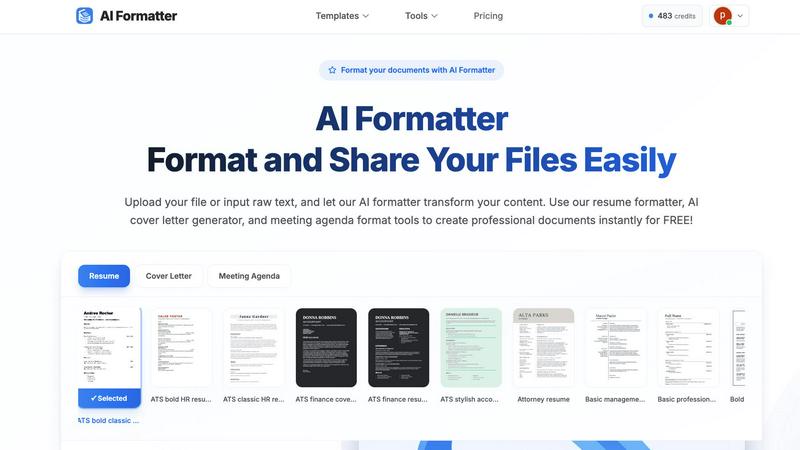
AI Formatter provides access to a vast library of over 100 professionally designed templates. This library covers essential document types such as resumes, cover letters, meeting agendas, and invoices. Each template is crafted to meet industry standards and is optimized for specific purposes, like ensuring resumes pass through Applicant Tracking Systems (ATS). This gives users a strong, visually appealing starting point tailored to their exact needs.
Real-Time Online Editor
After the AI formats the content into a selected template, users have full control through the integrated real-time online editor. This tool allows for complete customization, enabling users to adjust fonts, colors, spacing, and layout elements. You can tweak the AI-generated format, add or remove sections, and fine-tune the document until it meets your personal or organizational branding requirements, all within your web browser.
Multi-Format Export and Sharing
Once a document is finalized, AI Formatter offers flexible output options. Users can download their formatted documents in multiple common file formats, including Microsoft Word (.docx), PDF, and plain text (.txt). This ensures compatibility with any application or submission system. Additionally, the platform includes secure sharing capabilities, allowing users to generate shareable links for their documents, streamlining collaboration and distribution.
CleanPaste.org
Instant One-Click Processing
The core functionality of CleanPaste.org is built for speed and simplicity. Users can paste their text and receive cleansed results instantly with a single click. There is no complex setup, no waiting for processing queues, and no need to navigate through multiple menus. This immediate, streamlined approach respects the user's time and integrates seamlessly into any writing or editing workflow, making the cleansing of text as simple as copying and pasting.
Comprehensive Invisible Character Removal
This feature employs advanced algorithms to perform a deep scan of submitted text. It is engineered to detect and strip out a wide array of hidden artifacts that are not visible in standard text editors. This includes zero-width spaces, non-printing formatting characters, and embedded metadata that can be carried over from various word processors, web pages, and AI platforms. The result is text that is visually clean and free from underlying technical clutter.
AI Watermark Removal Mode
A dedicated function addresses the modern challenge of AI-generated content. This mode specifically targets and removes the statistical patterns and subtle linguistic artifacts that act as AI watermarks. By stripping these identifiers, the tool helps ensure the text presents with a natural, human-like quality, significantly improving its chances of passing through AI content detection systems without being flagged.
100% Free with No Limitations
CleanPaste.org is committed to being an accessible public utility. Every feature, from basic invisible character cleaning to advanced AI watermark removal, is available to all users without any cost. The service operates with no mandatory user registration, no tiered premium plans, and no caps on the number of cleanses or the length of text submitted. This removes all barriers to access for individuals at any level.
Use Cases
AI Formatter
Job Application Preparation
Job seekers can use AI Formatter to quickly convert their work history and skills into a polished, ATS-optimized resume and a matching cover letter. By uploading an old resume or pasting raw text, the tool formats the content into a professional template designed to pass automated screenings and catch a recruiter's eye, significantly improving application quality and saving hours of manual formatting work.
Business Meeting Management
Professionals and team leaders can streamline their meeting preparation. By inputting rough notes or bullet points, AI Formatter's meeting agenda tool structures the information into a clear, formal agenda with sections for topics, objectives, time allocations, and action items. This creates a professional document that sets clear expectations and improves meeting efficiency.
Academic Paper Formatting
Students and researchers can utilize AI Formatter to ensure their essays, reports, and research papers meet strict formatting guidelines. Instead of manually adjusting margins, headings, citations, and references, they can input their content and let the AI apply a consistent and correct academic format, allowing them to concentrate on their research and writing.
Small Business Administration
Small business owners and freelancers can generate professional invoices and receipts effortlessly. By inputting client details, services rendered, amounts due, and payment terms, the AI invoice generator creates a clean, branded invoice document. This presents a professional image to clients and helps maintain organized financial records without needing complex accounting software.
CleanPaste.org
For Students Submitting Academic Work
Students using AI tools for research assistance or draft generation can use CleanPaste.org as a final check before submission. The tool removes hidden characters and metadata that may inadvertently be copied from source materials or AI platforms, ensuring the submitted essay or paper is clean. More importantly, it helps humanize the text, reducing the risk of it being flagged by academic integrity software and allowing the student's own voice and analysis to stand clear.
For Content Creators and Bloggers
Professional writers and bloggers who utilize AI for ideation or drafting can integrate CleanPaste.org into their editing process. It cleans the text of invisible formatting artifacts that can disrupt publishing platforms and helps remove AI watermarks. This ensures the final article maintains the creator's intended brand voice and reads as authentically human, which is crucial for building trust and engagement with their audience.
For Business and Professional Communication
Professionals who draft reports, proposals, marketing copy, or emails with AI assistance can rely on CleanPaste.org to polish their output. The tool ensures that all business communications are free from hidden formatting that could cause display issues for recipients and that the language flows naturally. This preserves a professional image and ensures the message's clarity and authenticity are never compromised by technical artifacts.
For Non-Native English Speakers
Individuals who use AI tools to help draft or refine text in English can use CleanPaste.org to finalize their writing. While the AI provides a strong foundation, the tool helps by removing tell-tale robotic patterns or watermarks, resulting in content that sounds more natural and fluid. This empowers users to communicate more effectively and confidently in professional or academic settings.
Overview
About AI Formatter
AI Formatter is a cloud-based software tool designed to simplify and accelerate the process of creating professional documents. At its core, it is an intelligent formatting assistant that uses artificial intelligence to transform unformatted text or uploaded files into polished, ready-to-use documents. The fundamental value of AI Formatter lies in its ability to save significant time and effort, automating a task that is often tedious and complex. It is built for a wide range of users, including job seekers needing ATS-friendly resumes, professionals preparing business reports or meeting agendas, academics formatting papers, and small businesses creating invoices. By providing a straightforward platform where users can upload content, select a professional template, and receive a perfectly formatted document in seconds, AI Formatter removes the technical barriers of document design. This allows individuals and organizations to focus on their content's substance rather than its style, ensuring their documents always make a strong, positive impression.
About CleanPaste.org
CleanPaste.org is a fundamental online utility designed to restore digital text to its purest, most authentic state. In today's digital workflow, text is often processed through multiple platforms and AI tools, accumulating hidden artifacts that compromise its integrity. These artifacts include invisible formatting characters, zero-width spaces, embedded metadata, and subtle statistical patterns known as AI watermarks. CleanPaste.org directly addresses this core problem by providing a straightforward, no-cost solution to cleanse text of these unseen elements. Its primary value is delivering clean, human-presenting text through an instantaneous, one-click process. The tool is completely free, requiring no registration, imposing no usage limits, and charging no fees. It serves a wide audience, from students and academics to professional content creators, marketers, and business communicators. For anyone who uses AI assistance in drafting essays, articles, reports, or communications, CleanPaste.org acts as an essential final step. It ensures the output is not only free of technical clutter but is also optimized to pass scrutiny from AI detection systems, thereby preserving the originality and perceived authenticity of the work. By focusing on this foundational need, CleanPaste.org empowers users to confidently present their content, knowing it reflects a natural, human-written quality.
Frequently Asked Questions
AI Formatter FAQ
What file formats can I upload to AI Formatter?
AI Formatter supports a variety of common document formats for upload. You can directly upload files in PDF, Microsoft Word (.doc and .docx), and plain text (.txt) formats. The platform is designed to extract and process the text content from these files to be reformatted according to your chosen template.
How does AI Formatter help with ATS (Applicant Tracking Systems)?
AI Formatter templates are specifically designed to be ATS-optimized. This means they use clean, simple layouts, standard fonts, and proper heading structures that automated resume screening software can easily read and parse. By formatting your resume with one of these templates, you significantly increase the chances that your resume's content will be correctly interpreted and ranked by an ATS.
Is my document content secure and private?
Yes, AI Formatter is a cloud-based SaaS tool developed with security in mind. The platform processes your documents securely. You maintain ownership of your content, and it is not shared with third parties. The secure sharing feature also allows you to control access when you generate shareable links for your formatted documents.
Can I customize the document after the AI formats it?
Absolutely. The AI provides a perfectly formatted first draft based on your content and selected template. You then have full access to a real-time online editor where you can make any adjustments you need. This includes changing text, fonts, colors, spacing, and layout, giving you complete control over the final appearance of your document.
CleanPaste.org FAQ
How does CleanPaste.org remove invisible characters?
CleanPaste.org uses specialized algorithms designed to scan text at a deep level. These algorithms are programmed to identify patterns and character codes that correspond to non-printing elements, such as zero-width spaces, formatting metadata, and other hidden artifacts. When you paste your text and initiate the clean process, the tool instantly analyzes the content, isolates these invisible components, and strips them out, returning only the visible, intended text to you.
Is CleanPaste.org truly free? What is the catch?
Yes, CleanPaste.org is completely free. There is no catch, no hidden fees, and no premium version. The tool is offered as a fundamental utility for everyone. We do not require user registration, we do not impose usage limits on the number of cleanses or text length, and we do not sell user data. The goal is simply to provide an effective solution for cleaning text without any barriers to access.
What types of hidden characters does the tool remove?
The tool is designed to remove a comprehensive range of invisible characters. This includes zero-width spaces often used in complex formatting, hidden metadata embedded by word processors and websites, non-printing formatting commands, and the specific statistical patterns known as AI watermarks that are sometimes left in AI-generated text. It provides a thorough cleansing to restore text to a basic, clean state.
Will using CleanPaste.org guarantee my content passes AI detection?
While CleanPaste.org is highly effective at removing AI watermarks and humanizing text, no tool can provide an absolute 100% guarantee against all AI detection systems, as these systems continuously evolve. However, by stripping the identifiable artifacts and patterns that detectors commonly look for, CleanPaste.org significantly improves the likelihood that your content will be perceived as human-written, making it a powerful and essential step in the process.
Alternatives
AI Formatter Alternatives
AI Formatter is a productivity tool that uses artificial intelligence to automatically format raw text and documents. It falls into the category of document creation and formatting software, helping users quickly produce professional resumes, cover letters, and business documents from basic inputs. Users often explore alternatives to find a solution that better fits their specific needs. Common reasons include budget constraints, the desire for different features like more template variety or integration with other platforms, or a preference for a different user interface. Some may seek tools with a stronger focus on collaborative editing or offline functionality. When evaluating other options, consider the core capabilities that matter most to your workflow. Key factors include the quality and breadth of templates, the level of customization available, the supported file formats for import and export, and the overall ease of use. Security features for handling sensitive documents and the transparency of pricing models are also important practical considerations.
CleanPaste.org Alternatives
CleanPaste.org is a fundamental tool in the AI assistant category, designed to restore text to a pure, human-presentable state. It works by removing invisible formatting, metadata, and AI-generated watermarks, providing a clean foundation for any written work. Users often seek alternatives for various foundational reasons. These include the need for different feature sets, such as batch processing or integration with other platforms. Others may look for tools that operate offline or offer a different approach to privacy and data handling. When evaluating an alternative, focus on the core principles. A reliable tool should effectively strip invisible characters and AI signatures without altering your original message. Consider the simplicity of the process, the tool's commitment to data security, and whether its approach aligns with your need for authentic, uncluttered text.