Changeflow vs Refbox
Side-by-side comparison to help you choose the right product.

Changeflow
Changeflow delivers AI-driven insights on critical web page changes, ensuring you stay informed without manual effort.
Last updated: March 4, 2026

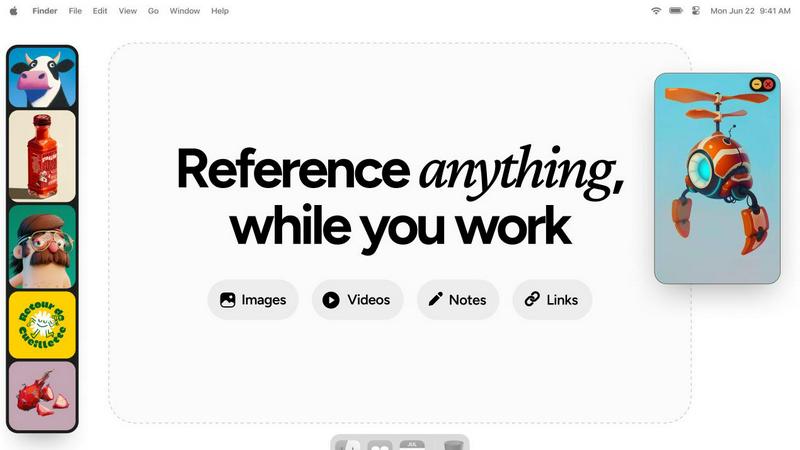
Refbox is a floating app that keeps your reference images and notes visible above any workspace.
Last updated: February 28, 2026
Visual Comparison
Changeflow

Refbox
Feature Comparison
Changeflow
AI-Powered Intelligence
Changeflow's AI technology is designed to filter out irrelevant changes and focus on what matters most to users. This means no more wasted time dealing with false positives or unnecessary notifications, allowing for efficient tracking of essential updates.
Natural Language Setup
Setting up Changeflow is effortless. Users can describe what they want to track using plain English, eliminating the need for complex RSS feeds or technical configuration. This user-friendly approach makes it accessible for everyone, regardless of technical expertise.
Customized Summaries
With Changeflow, users receive AI-generated summaries of web page changes. These summaries provide clear insights into what changed and why it matters to the user's specific business context, saving time and enhancing understanding.
Advanced Anti-Blocking Technology
Changeflow employs sophisticated anti-blocking technology, enabling it to navigate challenging websites with fewer interruptions compared to competitors. This reliability ensures consistent monitoring, even on sites that may typically restrict automated access.
Refbox
Always-on-Top Floating Frames
This is the foundational feature of Refbox. It allows you to pin any image, GIF, or video reference into a resizable frame that stays visible above all other application windows. This eliminates the need for disruptive window switching, keeping your reference material directly in your line of sight as you work in your primary creative software, preserving your focus and workflow continuity.
Centralized Reference Library (The Box)
All your media is gathered into a central, organized sidebar called the Box. You can import references by dragging files from your computer, pasting image links or screenshots from the web, or using the clipboard. This creates a single source of truth for your project's inspiration, moving you away from scattered folders and browser tabs to a streamlined, searchable collection.
Multiple Viewing Modes
Refbox provides flexible ways to interact with your references. View your entire collection in a dense Masonry grid within the Box, float individual items as separate windows, or use a full-screen gallery mode ideal for secondary monitors. You can also flip through items like a slideshow for quick comparison, ensuring you have the right visual context at any moment.
Integrated Notes and Tools
Beyond images, Refbox lets you create markdown-enabled notes with styling and checklists, turning it into a full reference hub. Practical tools are built-in, including a color picker to sample colors from any media, GIF frame-by-frame playback, pixel-perfect rendering for pixel art, and the ability to crop images or take website screenshots directly by pasting a URL.
Use Cases
Changeflow
Competitor Pricing Monitoring
Businesses can use Changeflow to keep a close eye on competitor pricing changes. By tracking specific product pages, organizations can receive timely updates, allowing them to adjust their pricing strategies accordingly and maintain a competitive edge.
Regulatory Compliance Tracking
Compliance teams at Fortune 500 companies benefit from Changeflow by monitoring critical regulatory updates. This includes tracking FDA guidance and SEC filings, ensuring that organizations stay compliant and informed about any changes that could impact their operations.
News Mentions and Market Movement Tracking
Changeflow allows businesses to follow news mentions and significant market movements effectively. This capability is crucial for making informed decisions and staying ahead of industry trends by receiving updates on relevant news articles and reports.
Legal Document Monitoring
Legal librarians, especially in Am Law 200 firms, utilize Changeflow to monitor court dockets and legal citations. This tool helps them stay informed about ongoing cases and changes in legal documents, enhancing their research capabilities and ensuring they have the latest information.
Refbox
Digital Illustration and Concept Art
Illustrators and concept artists can keep mood boards, anatomical references, color palettes, and style guides pinned around their canvas. This allows for constant visual comparison and inspiration without breaking concentration to search through files, enabling a more fluid and accurate creative process from sketch to final piece.
UI/UX and Graphic Design
Designers can float brand guidelines, logo variations, typography samples, and competitor website screenshots directly over their design tools like Figma or Adobe XD. This ensures every design decision is made with immediate reference to critical assets and specifications, boosting both speed and consistency in the design workflow.
3D Modeling and Animation
3D artists and animators can pin orthographic reference images, texture maps, character turnarounds, and motion study videos next to their 3D viewport. Having these crucial references always visible allows for more accurate modeling, sculpting, and animation, as artists can match proportions, poses, and movements without guesswork.
Motion Graphics and Video Editing
Editors and motion designers can keep storyboards, style frames, asset lists, and video clips accessible in floating windows above their timeline software. This facilitates quick visual checks and ensures the final product aligns perfectly with the planned creative direction, all while maintaining an efficient editing flow.
Overview
About Changeflow
Changeflow is an innovative web monitoring tool designed to keep businesses informed about significant changes across websites that matter to them. Unlike other monitoring services that simply notify users when changes occur, Changeflow utilizes advanced artificial intelligence to analyze web pages, comprehend context, and summarize only the most pertinent information. This means users receive actionable insights rather than vague alerts. Changeflow is ideal for a variety of professionals, including business teams tracking competitor pricing, legal librarians monitoring court dockets, and compliance teams keeping an eye on regulatory changes. With a straightforward setup process—users simply describe what they want to track in plain English—Changeflow handles complex scenarios like login walls and JavaScript with an impressive 99.9% success rate. Overall, Changeflow empowers users with timely intelligence, ensuring they never miss critical updates while saving them time and reducing manual effort.
About Refbox
Refbox is a fundamental desktop application designed to solve a persistent problem in creative workflows: the disruptive act of window switching. At its core, Refbox is a floating reference manager that allows artists, designers, animators, and other visual professionals to keep their inspiration and resources visible at all times. It functions by letting users pin images, GIFs, videos, and notes into always-on-top frames that float above any other application. This foundational approach eliminates the need to constantly alt-tab between a creative software and a folder, browser, or note-taking app, thereby preserving a state of deep focus and flow.
The tool is built for professionals across disciplines like 3D art, animation, UI/UX design, illustration, concept art, motion graphics, photography, and pixel art. Its main value proposition is organized visual access without distraction. Users can gather media from the web, their computer, or clipboard into a central sidebar and then choose how to view it: in a Masonry grid, as individual floating windows on the desktop, or in a full-screen gallery for secondary monitors. By integrating markdown-enabled notes and clickable bookmarks directly into the reference ecosystem, Refbox consolidates the entire inspirational toolkit into one always-accessible space. It is the essential companion for any creative who needs their references at their fingertips, not buried in tabs and folders.
Frequently Asked Questions
Changeflow FAQ
How does Changeflow determine what changes are relevant?
Changeflow uses advanced AI algorithms to analyze web pages, understanding the context and significance of changes. This allows it to filter out irrelevant updates, providing users with only the most pertinent information.
Can I track multiple web pages at once?
Yes, Changeflow enables users to monitor multiple web pages simultaneously. Users can easily add several URLs and receive updates on all of them in a consolidated feed, streamlining the tracking process.
What types of notifications can I receive?
Users can receive notifications in various formats, including email alerts, dashboard updates, or through integrations with other tools via Zapier. This flexibility ensures that users can stay informed through their preferred channels.
Is Changeflow suitable for small businesses?
Absolutely. Changeflow is designed for businesses of all sizes, from small startups to large enterprises. Its user-friendly setup and powerful features make it a valuable tool for any organization looking to monitor web changes effectively.
Refbox FAQ
What types of files does Refbox support?
Refbox supports a wide range of media essential for creative work. You can import standard image files (JPG, PNG, WebP, SVG), animated GIFs, and various video formats. It also supports text-based notes and can generate image screenshots directly from website URLs you paste into the application.
How does Refbox help maintain focus?
Refbox is built on the principle of reducing friction. By allowing references to float in always-on-top windows, it completely eliminates the disruptive cycle of minimizing your work to find a file or browser tab. Your inspiration stays visually accessible, which helps you maintain a state of deep focus, or flow, for much longer periods.
Can I use Refbox with multiple monitors?
Yes, Refbox is excellent for multi-monitor setups. You can use the full-screen gallery mode to turn a secondary monitor into a dedicated reference display. Alternatively, you can spread individual floating frames across multiple screens, organizing your workspace to keep your primary screen clear for your main creative application.
Is there a way to organize different projects?
Yes, Refbox uses a system called Collections. You can create different Collections for each project, client, or theme. Switching between these Collections is instant with a single click, allowing you to keep your references neatly separated and quickly access the exact set of visuals you need for your current task.
Alternatives
Changeflow Alternatives
Changeflow is an AI-driven tool that specializes in providing market and competitor insights by monitoring web pages for changes. It falls under the category of productivity and management solutions, helping businesses track vital information like competitor pricing, regulatory updates, and market movements effectively. Users often seek alternatives for various reasons, including pricing concerns, feature sets that better align with their needs, or compatibility with specific platforms. When choosing an alternative, it’s essential to assess features that cater to your unique requirements, ease of use, and the level of customer support available. Additionally, consider the tool's ability to handle complex web pages, as well as its integration capabilities with your existing workflows. A thorough evaluation will ensure you find a solution that meets your organization's specific tracking and monitoring needs.
Refbox Alternatives
Refbox is a fundamental desktop application in the productivity and management category. It serves as a floating reference manager, designed to keep images, notes, and videos visible above other software to prevent disruptive window switching and maintain creative focus. Users may look for alternatives for foundational reasons like budget, specific feature needs, or compatibility with their operating system. Some may require a simpler tool, while others seek more advanced organizational capabilities not present in their current solution. When evaluating an alternative, consider the core need: persistent visual access to reference material. Key factors include the ability to keep content always on top, support for various file types, and organizational methods that fit your workflow without adding complexity or distraction.